Acer Nitro V 16 AI (2025) 16"
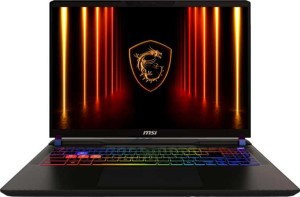
MSI Vector 16 HX AI A2XW (2025) 16" (Ultra 7 255HX / RTX 5070 Ti Laptop / 16GB RAM / 512GB)

Acer Nitro V 16 AI (2025) 16" MSI Vector 16 HX AI A2XW (2025) 16" (Ultra 7 255HX / RTX 5070 Ti Laptop / 16GB RAM / 512GB)

Common Features

  • Both products are gaming laptops.
  • Neither product uses a fanless design.
  • Both products have a backlit keyboard.
  • Neither product is weather-sealed or splashproof.
  • Neither product has a rugged build.
  • Both products have a 16″ screen size.
  • Both products use an LCD, LED-backlit, IPS display type.
  • Neither product has a touch screen.
  • Neither product has an anti-reflection coating.
  • Both products support up to 4 displays.
  • Both products use flash storage.
  • Both products have a CPU with 20 threads.
  • Both products use GDDR7 video memory.
  • Both products use NVMe SSD storage.
  • Both products support DirectX 12 Ultimate.
  • Both products support multithreading.
  • Both products use DDR5 memory.
  • Both products use PCIe version 4.
  • Neither product has USB 3.2 Gen 2 Type-C ports.
  • Neither product has USB 4 20Gbps ports.
  • Neither product has Thunderbolt 4 ports.
  • Neither product has Thunderbolt 3 ports.
  • Both products have an HDMI output.
  • Both products have a USB Type-C port.
  • Both products support Wi-Fi.
  • Both products have an external memory slot.
  • Both products have sleep-and-charge USB ports.
  • Neither product has a MagSafe power adapter.
  • Both products have stereo speakers.
  • Both products have a 3.5 mm audio jack socket.
  • Both products support ray tracing.
  • Both products support DLSS.
  • Neither product has Dolby Atmos.
  • Neither product includes a stylus.
  • Neither product has a fingerprint scanner.
  • Both products have 1 microphone.
  • Both products use Intel Resizable BAR.
  • Both products use the Blackwell GPU architecture.
  • Neither product has LHR.
  • Both products support 3D.
  • Both products support multi-display technology.
  • Both products support OpenCL version 3.
  • Both products support OpenGL version 4.6.
  • Both products support ECC memory.

Main Differences

  • Weight is 2440 g on Acer Nitro V 16 AI (2025) 16″ and 2700 g on MSI Vector 16 HX AI A2XW (2025) 16″ (Ultra 7 255HX / RTX 5070 Ti Laptop / 16GB RAM / 512GB).
  • Volume is 2384.64 cm³ on Acer Nitro V 16 AI (2025) 16″ and 2230.536 cm³ on MSI Vector 16 HX AI A2XW (2025) 16″ (Ultra 7 255HX / RTX 5070 Ti Laptop / 16GB RAM / 512GB).
  • Width is 360 mm on Acer Nitro V 16 AI (2025) 16″ and 357 mm on MSI Vector 16 HX AI A2XW (2025) 16″ (Ultra 7 255HX / RTX 5070 Ti Laptop / 16GB RAM / 512GB).
  • Height is 276 mm on Acer Nitro V 16 AI (2025) 16″ and 284 mm on MSI Vector 16 HX AI A2XW (2025) 16″ (Ultra 7 255HX / RTX 5070 Ti Laptop / 16GB RAM / 512GB).
  • Thickness is 24 mm on Acer Nitro V 16 AI (2025) 16″ and 22 mm on MSI Vector 16 HX AI A2XW (2025) 16″ (Ultra 7 255HX / RTX 5070 Ti Laptop / 16GB RAM / 512GB).
  • Resolution is 1920 x 1200 px on Acer Nitro V 16 AI (2025) 16″ and 2560 x 1600 px on MSI Vector 16 HX AI A2XW (2025) 16″ (Ultra 7 255HX / RTX 5070 Ti Laptop / 16GB RAM / 512GB).
  • Pixel density is 141 ppi on Acer Nitro V 16 AI (2025) 16″ and 188 ppi on MSI Vector 16 HX AI A2XW (2025) 16″ (Ultra 7 255HX / RTX 5070 Ti Laptop / 16GB RAM / 512GB).
  • Refresh rate is 180Hz on Acer Nitro V 16 AI (2025) 16″ and 240Hz on MSI Vector 16 HX AI A2XW (2025) 16″ (Ultra 7 255HX / RTX 5070 Ti Laptop / 16GB RAM / 512GB).
  • RAM is 32GB on Acer Nitro V 16 AI (2025) 16″ and 16GB on MSI Vector 16 HX AI A2XW (2025) 16″ (Ultra 7 255HX / RTX 5070 Ti Laptop / 16GB RAM / 512GB).
  • Internal storage is 1024GB on Acer Nitro V 16 AI (2025) 16″ and 512GB on MSI Vector 16 HX AI A2XW (2025) 16″ (Ultra 7 255HX / RTX 5070 Ti Laptop / 16GB RAM / 512GB).
  • CPU speed is 10 x 2 GHz on Acer Nitro V 16 AI (2025) 16″ and 8 x 2.4 & 12 x 1.8 GHz on MSI Vector 16 HX AI A2XW (2025) 16″ (Ultra 7 255HX / RTX 5070 Ti Laptop / 16GB RAM / 512GB).
  • VRAM is 8GB on Acer Nitro V 16 AI (2025) 16″ and 12GB on MSI Vector 16 HX AI A2XW (2025) 16″ (Ultra 7 255HX / RTX 5070 Ti Laptop / 16GB RAM / 512GB).
  • Floating-point performance is 23.22 TFLOPS on Acer Nitro V 16 AI (2025) 16″ and 17.04 TFLOPS on MSI Vector 16 HX AI A2XW (2025) 16″ (Ultra 7 255HX / RTX 5070 Ti Laptop / 16GB RAM / 512GB).
  • Texture rate is 362.9 GTexels/s on Acer Nitro V 16 AI (2025) 16″ and 266.2 GTexels/s on MSI Vector 16 HX AI A2XW (2025) 16″ (Ultra 7 255HX / RTX 5070 Ti Laptop / 16GB RAM / 512GB).
  • Pixel rate is 121 GPixel/s on Acer Nitro V 16 AI (2025) 16″ and 115.8 GPixel/s on MSI Vector 16 HX AI A2XW (2025) 16″ (Ultra 7 255HX / RTX 5070 Ti Laptop / 16GB RAM / 512GB).
  • GPU clock speed is 2235 MHz on Acer Nitro V 16 AI (2025) 16″ and 847 MHz on MSI Vector 16 HX AI A2XW (2025) 16″ (Ultra 7 255HX / RTX 5070 Ti Laptop / 16GB RAM / 512GB).
  • Maximum memory amount is 256GB on Acer Nitro V 16 AI (2025) 16″ and 96GB on MSI Vector 16 HX AI A2XW (2025) 16″ (Ultra 7 255HX / RTX 5070 Ti Laptop / 16GB RAM / 512GB).
  • Turbo clock speed is 5 GHz on Acer Nitro V 16 AI (2025) 16″ and 5.2 GHz on MSI Vector 16 HX AI A2XW (2025) 16″ (Ultra 7 255HX / RTX 5070 Ti Laptop / 16GB RAM / 512GB).
  • GPU turbo speed is 2520 MHz on Acer Nitro V 16 AI (2025) 16″ and 1447 MHz on MSI Vector 16 HX AI A2XW (2025) 16″ (Ultra 7 255HX / RTX 5070 Ti Laptop / 16GB RAM / 512GB).
  • PassMark (G3D) result is 19987 on Acer Nitro V 16 AI (2025) 16″ and 23749 on MSI Vector 16 HX AI A2XW (2025) 16″ (Ultra 7 255HX / RTX 5070 Ti Laptop / 16GB RAM / 512GB).
  • PassMark result is 29482 on Acer Nitro V 16 AI (2025) 16″ and 50739 on MSI Vector 16 HX AI A2XW (2025) 16″ (Ultra 7 255HX / RTX 5070 Ti Laptop / 16GB RAM / 512GB).
  • PassMark single-core result is 3841 on Acer Nitro V 16 AI (2025) 16″ and 4645 on MSI Vector 16 HX AI A2XW (2025) 16″ (Ultra 7 255HX / RTX 5070 Ti Laptop / 16GB RAM / 512GB).
  • USB 3.2 Gen 2 Type-A ports: Acer Nitro V 16 AI (2025) 16″ has none, while MSI Vector 16 HX AI A2XW (2025) 16″ (Ultra 7 255HX / RTX 5070 Ti Laptop / 16GB RAM / 512GB) has 2.
  • USB 4 40Gbps ports: Acer Nitro V 16 AI (2025) 16″ has none, while MSI Vector 16 HX AI A2XW (2025) 16″ (Ultra 7 255HX / RTX 5070 Ti Laptop / 16GB RAM / 512GB) has 2.
  • USB 3.2 Gen 1 Type-C ports: Acer Nitro V 16 AI (2025) 16″ has 1, while MSI Vector 16 HX AI A2XW (2025) 16″ (Ultra 7 255HX / RTX 5070 Ti Laptop / 16GB RAM / 512GB) has none.
  • USB 3.2 Gen 1 Type-A ports: Acer Nitro V 16 AI (2025) 16″ has 3, while MSI Vector 16 HX AI A2XW (2025) 16″ (Ultra 7 255HX / RTX 5070 Ti Laptop / 16GB RAM / 512GB) has none.
  • Wi-Fi version is Wi-Fi 6E on Acer Nitro V 16 AI (2025) 16″ and Wi-Fi 7 (802.11be) on MSI Vector 16 HX AI A2XW (2025) 16″ (Ultra 7 255HX / RTX 5070 Ti Laptop / 16GB RAM / 512GB).
  • Bluetooth version is 5.3 on Acer Nitro V 16 AI (2025) 16″ and 5.4 on MSI Vector 16 HX AI A2XW (2025) 16″ (Ultra 7 255HX / RTX 5070 Ti Laptop / 16GB RAM / 512GB).
  • An RJ45 ethernet port is present on Acer Nitro V 16 AI (2025) 16″ but not available on MSI Vector 16 HX AI A2XW (2025) 16″ (Ultra 7 255HX / RTX 5070 Ti Laptop / 16GB RAM / 512GB).
  • Battery size is 76 Wh on Acer Nitro V 16 AI (2025) 16″ and 90 Wh on MSI Vector 16 HX AI A2XW (2025) 16″ (Ultra 7 255HX / RTX 5070 Ti Laptop / 16GB RAM / 512GB).
  • 3D facial recognition is present on MSI Vector 16 HX AI A2XW (2025) 16″ (Ultra 7 255HX / RTX 5070 Ti Laptop / 16GB RAM / 512GB) but not available on Acer Nitro V 16 AI (2025) 16″.
  • Voice commands are supported on Acer Nitro V 16 AI (2025) 16″ but not available on MSI Vector 16 HX AI A2XW (2025) 16″ (Ultra 7 255HX / RTX 5070 Ti Laptop / 16GB RAM / 512GB).
  • Clock multiplier is 20 on Acer Nitro V 16 AI (2025) 16″ and 24 on MSI Vector 16 HX AI A2XW (2025) 16″ (Ultra 7 255HX / RTX 5070 Ti Laptop / 16GB RAM / 512GB).
  • Thermal Design Power (TDP) is 50W on Acer Nitro V 16 AI (2025) 16″ and 60W on MSI Vector 16 HX AI A2XW (2025) 16″ (Ultra 7 255HX / RTX 5070 Ti Laptop / 16GB RAM / 512GB).
  • Memory bus width is 128-bit on Acer Nitro V 16 AI (2025) 16″ and 192-bit on MSI Vector 16 HX AI A2XW (2025) 16″ (Ultra 7 255HX / RTX 5070 Ti Laptop / 16GB RAM / 512GB).
  • Maximum memory bandwidth is 405.8 GB/s on Acer Nitro V 16 AI (2025) 16″ and 608.6 GB/s on MSI Vector 16 HX AI A2XW (2025) 16″ (Ultra 7 255HX / RTX 5070 Ti Laptop / 16GB RAM / 512GB).
  • Render output units (ROPs) total 48 on Acer Nitro V 16 AI (2025) 16″ and 80 on MSI Vector 16 HX AI A2XW (2025) 16″ (Ultra 7 255HX / RTX 5070 Ti Laptop / 16GB RAM / 512GB).
  • Texture mapping units (TMUs) total 144 on Acer Nitro V 16 AI (2025) 16″ and 184 on MSI Vector 16 HX AI A2XW (2025) 16″ (Ultra 7 255HX / RTX 5070 Ti Laptop / 16GB RAM / 512GB).
  • Shading units total 4608 on Acer Nitro V 16 AI (2025) 16″ and 5888 on MSI Vector 16 HX AI A2XW (2025) 16″ (Ultra 7 255HX / RTX 5070 Ti Laptop / 16GB RAM / 512GB).
  • GPU memory speed is 2000 MHz on Acer Nitro V 16 AI (2025) 16″ and 1750 MHz on MSI Vector 16 HX AI A2XW (2025) 16″ (Ultra 7 255HX / RTX 5070 Ti Laptop / 16GB RAM / 512GB).
  • big.LITTLE technology is not used on Acer Nitro V 16 AI (2025) 16″ but is used on MSI Vector 16 HX AI A2XW (2025) 16″ (Ultra 7 255HX / RTX 5070 Ti Laptop / 16GB RAM / 512GB).
  • Maximum RAM speed is 7500 MHz on Acer Nitro V 16 AI (2025) 16″ and 6400 MHz on MSI Vector 16 HX AI A2XW (2025) 16″ (Ultra 7 255HX / RTX 5070 Ti Laptop / 16GB RAM / 512GB).
  • L3 cache is 24 MB on Acer Nitro V 16 AI (2025) 16″ and 36 MB on MSI Vector 16 HX AI A2XW (2025) 16″ (Ultra 7 255HX / RTX 5070 Ti Laptop / 16GB RAM / 512GB).
Specs Comparison
Acer Nitro V 16 AI (2025) 16"

Acer Nitro V 16 AI (2025) 16"

MSI Vector 16 HX AI A2XW (2025) 16" (Ultra 7 255HX / RTX 5070 Ti Laptop / 16GB RAM / 512GB)

MSI Vector 16 HX AI A2XW (2025) 16" (Ultra 7 255HX / RTX 5070 Ti Laptop / 16GB RAM / 512GB)

Design:
Type Gaming Gaming
weight 2440 g 2700 g
Uses a fanless design
Has a backlit keyboard
volume 2384.64 cm³ 2230.536 cm³
width 360 mm 357 mm
height 276 mm 284 mm
thickness 24 mm 22 mm
is weather-sealed (splashproof)
has a rugged build

Both the Acer Nitro V 16 AI and the MSI Vector 16 HX AI are gaming laptops that share the same broad category DNA: active cooling (neither uses a fanless design), a backlit keyboard for low-light gaming sessions, and no weather sealing or rugged certification — expected trade-offs in performance-focused machines at this tier.

Where the two diverge is in their physical form factor. The MSI Vector is notably thinner at 22 mm versus the Acer's 24 mm, and its overall volume is smaller (2230.5 cm³ vs 2384.6 cm³), meaning it presents a sleeker, more compact silhouette on a desk or in a bag. However, despite occupying less space, the MSI is actually heavier at 2700 g compared to the Acer's 2440 g — a 260 g difference that is clearly perceptible when carrying the machine daily. This suggests the MSI uses denser internal materials or a more substantial chassis construction to achieve that slimmer profile.

For users who prioritize portability and daily carry, the Acer Nitro V 16 AI holds a meaningful edge in weight, making it the more practical travel companion despite its slightly bulkier frame. The MSI Vector, on the other hand, wins on thinness and compactness, making it the better fit for those who value a sleeker aesthetic or tighter bag fit and can tolerate the extra heft. Neither laptop is rugged or splashproof, so both demand the same level of careful handling.

Display:
screen size 16" 16"
resolution 1920 x 1200 px 2560 x 1600 px
pixel density 141 ppi 188 ppi
Display type LCD, LED-backlit, IPS LCD, LED-backlit, IPS
has a touch screen
refresh rate 180Hz 240Hz
has anti-reflection coating
supported displays 4 4

On screen technology, the two laptops share a common foundation — both use a 16″ IPS LCD panel with no touchscreen and identical external display support up to 4 screens. The meaningful differences lie in resolution, pixel density, and refresh rate, and they tell a clear story about where each machine is positioned.

The MSI Vector steps up to a 2560 x 1600 px resolution at 188 ppi, versus the Acer Nitro V's 1920 x 1200 px at 141 ppi. That 47 ppi gap is genuinely noticeable at normal viewing distances — text appears crisper, fine textures in games and creative work resolve more clearly, and the overall image feels more refined. The MSI also pulls ahead on refresh rate with 240Hz compared to the Acer's 180Hz, which translates to marginally smoother motion in fast-paced games, though the practical difference between these two figures is less dramatic than the resolution gap.

It is worth noting that neither display features an anti-reflection coating, which puts both at equal footing — and equal disadvantage — in brightly lit environments. Overall, the MSI Vector holds a clear display advantage: its higher resolution and faster refresh rate make it the stronger choice for users who care about visual fidelity and competitive gaming responsiveness. The Acer Nitro V's panel is more modest, but also lighter on GPU workload at its native resolution — a trade-off that may appeal to users prioritizing frame rates over image sharpness.

Performance:
RAM 32GB 16GB
Uses flash storage
internal storage 1024GB 512GB
CPU speed 10 x 2 GHz 8 x 2.4 & 12 x 1.8 GHz
CPU threads 20 threads 20 threads
VRAM 8GB 12GB
floating-point performance 23.22 TFLOPS 17.04 TFLOPS
GDDR version GDDR7 GDDR7
texture rate 362.9 GTexels/s 266.2 GTexels/s
pixel rate 121 GPixel/s 115.8 GPixel/s
Is an NVMe SSD
DirectX version DirectX 12 Ultimate DirectX 12 Ultimate
GPU clock speed 2235 MHz 847 MHz
uses multithreading
maximum memory amount 256GB 96GB
DDR memory version 5 5
turbo clock speed 5GHz 5.2GHz
GPU turbo 2520 MHz 1447 MHz
PCI Express (PCIe) version 4 4
semiconductor size 4 nm 4 nm
has XeSS (XMX)
Supports 64-bit

The raw compute numbers here tell a story that cuts against intuition. Despite the MSI Vector featuring a higher-tier GPU with 12GB VRAM, the Acer Nitro V's GPU delivers substantially stronger measured performance: 23.22 TFLOPS of floating-point throughput versus 17.04 TFLOPS, a texture rate of 362.9 GTexels/s against 266.2, and a GPU turbo clock of 2520 MHz compared to just 1447 MHz on the MSI. In practical terms, this means the Acer's GPU executes more shader work per second — an advantage that directly translates to higher frame rates in GPU-bound scenarios.

The MSI's edge in VRAM (12GB vs 8GB) is not irrelevant — larger video memory buffers matter at high resolutions with demanding texture packs or in AI-accelerated workloads — but it does not offset the deficit in raw compute throughput for most gaming use cases. On the system memory side, the Acer ships with 32GB of DDR5 RAM versus the MSI's 16GB, and doubles the storage at 1024GB NVMe SSD versus 512GB. Both are meaningful advantages for multitasking, large game libraries, and memory-intensive creative applications. The Acer also supports a higher maximum memory ceiling of 256GB versus the MSI's 96GB, giving it significantly more long-term upgrade headroom.

The MSI holds a marginal lead in CPU turbo speed (5.2GHz vs 5GHz), but with the same thread count and comparable base architecture, the real-world CPU difference between the two is unlikely to be decisive. Overall, the Acer Nitro V 16 AI holds a commanding performance advantage in this group — more RAM, more storage, higher GPU throughput, and greater upgrade capacity — making it the stronger performer on paper despite carrying what appears to be a nominally lower GPU tier.

Benchmarks:
PassMark (G3D) result 19987 23749
PassMark result 29482 50739
PassMark result (single) 3841 4645

The benchmark results introduce an important counterpoint to the raw spec comparison. The MSI Vector scores 23,749 on PassMark G3D versus 19,987 for the Acer Nitro V — a roughly 19% lead in GPU benchmark performance. This is a standardized, real-world-weighted test, and that margin is meaningful: it suggests the MSI's GPU delivers more usable graphics output in practice than its lower TFLOPS figure implied, while the Acer's GPU may be thermally or power-limited in sustained workloads despite its higher theoretical throughput.

The CPU gap is even more pronounced. The MSI dominates the overall PassMark score at 50,739 versus the Acer's 29,482 — a 72% advantage — and also leads in single-core performance with 4,645 vs 3,841. Single-core scores are especially significant because most real-world tasks, from game engine logic to everyday application responsiveness, depend heavily on per-core speed rather than total thread count. A 21% single-core lead for the MSI translates to a noticeably snappier feel in day-to-day use.

Taken together, the benchmark data reverses some of the conclusions drawn from raw specs alone: the MSI Vector holds a clear advantage in measured real-world performance, particularly in CPU-heavy workloads. Users choosing between these two machines should weight the benchmark results heavily, as they reflect how the hardware actually behaves under realistic conditions rather than peak theoretical limits.

Connectivity:
USB 3.2 Gen 2 ports (USB-C) 0 0
USB 3.2 Gen 2 ports (USB-A) 0 2
USB 4 20Gbps ports 0 0
USB 4 40Gbps ports 0 2
Thunderbolt 4 ports 0 0
USB 3.2 Gen 1 ports (USB-C) 1 0
USB 3.2 Gen 1 ports (USB-A) 3 0
Thunderbolt 3 ports 0 0
has an HDMI output
Has USB Type-C
supports Wi-Fi
Wi-Fi version Wi-Fi 6E (802.11ax), Wi-Fi 6 (802.11ax), Wi-Fi 5 (802.11ac), Wi-Fi 4 (802.11n) Wi-Fi 7 (802.11be), Wi-Fi 6E (802.11ax), Wi-Fi 6 (802.11ax), Wi-Fi 5 (802.11ac), Wi-Fi 4 (802.11n)
has an external memory slot
Bluetooth version 5.3 5.4
RJ45 ports 1 0
HDMI ports 1 1
DisplayPort outputs 0 0
USB 2.0 ports 0 0
has AirPlay
mini DisplayPort outputs 0 0
has a VGA connector

Wired connectivity reveals a meaningful trade-off between the two machines. The Acer Nitro V includes a dedicated RJ45 ethernet port — something the MSI Vector completely omits — which is a notable consideration for gamers and power users who rely on a stable, low-latency wired network connection. The Acer also offers three USB-A ports, giving it more plug-and-play flexibility for mice, keyboards, and peripherals without a hub. The MSI counters with two USB4 40Gbps ports, a significantly faster standard that supports external GPU enclosures, ultra-fast storage, and high-bandwidth displays — capabilities the Acer's USB 3.2 Gen 1 ports simply cannot match in throughput.

Wireless connectivity tilts decisively toward the MSI. It supports Wi-Fi 7 (802.11be), the latest generation offering higher theoretical speeds, lower latency, and better performance in congested environments compared to the Acer's maximum of Wi-Fi 6E. The MSI also edges ahead on Bluetooth with version 5.4 vs 5.3 — a minor but forward-looking advantage in connection stability and energy efficiency for wireless peripherals.

The verdict here depends on use case. The Acer Nitro V has the practical edge for desk-bound setups thanks to its ethernet port and greater USB-A availability — essentials that many gamers will not want to sacrifice to a dongle. The MSI Vector wins on future-proofing, with its USB4 40Gbps ports and Wi-Fi 7 support positioning it better for high-bandwidth peripherals and next-generation wireless networks. Neither laptop is outright superior; the right choice comes down to whether wired reliability or high-speed expansion matters more to the user.

Battery:
battery size 76 Wh 90 Wh
Has sleep-and-charge USB ports
Has a MagSafe power adapter

Battery capacity is one of the thinner differentiators between these two machines. The MSI Vector carries a 90 Wh battery against the Acer Nitro V's 76 Wh — a 18% larger reservoir that, all else being equal, translates to meaningfully more time away from the wall during light workloads like browsing, streaming, or productivity tasks. For a gaming laptop, where unplugged gaming sessions are rarely sustainable regardless of battery size, that gap matters most in everyday non-gaming use.

Both laptops share sleep-and-charge USB ports, allowing users to top up phones or peripherals even when the laptop is powered off — a small but genuinely useful convenience feature for travel. Neither machine uses a MagSafe-style magnetic connector, so both rely on standard charging connections with no quick-disconnect safety mechanism.

On battery alone, the MSI Vector has a modest but clear advantage courtesy of its larger 90 Wh pack. It is worth noting, however, that the MSI also packs a more power-hungry high-resolution display and a stronger CPU, which will draw down that extra capacity faster under load. The Acer's smaller battery feeds a less demanding screen and platform, partially narrowing the real-world gap. Still, by the numbers provided, the MSI holds the edge in this category.

Features:
release date October 2025 February 2025
has stereo speakers
has a socket for a 3.5 mm audio jack
supports ray tracing
supports DLSS
has Dolby Atmos
Stylus included
Has a fingerprint scanner
number of microphones 1 1
Uses 3D facial recognition
has voice commands
has a front camera
Has S/PDIF Out port
has a gyroscope
has GPS
has an accelerometer
has a compass
Has an optical disc drive

For a features comparison, these two gaming laptops are strikingly similar in most respects — both deliver stereo speakers, a 3.5mm audio jack, a front camera, a single microphone, and critically for gamers, full support for ray tracing and DLSS. Neither includes Dolby Atmos, a fingerprint scanner, an optical drive, or any motion sensors, keeping the feature set lean and gaming-focused on both sides.

The only meaningful divergence lies in authentication and voice interaction. The MSI Vector adds 3D facial recognition, enabling secure Windows Hello login without any physical contact — a genuinely useful convenience for users who log in and out frequently or share a workspace. The Acer Nitro V skips facial recognition but includes voice command support, a feature the MSI lacks. In practice, voice commands on a gaming laptop occupy a fairly niche use case compared to biometric login, which most users will engage with daily.

Neither laptop pulls far ahead in this category, but the MSI Vector holds a slight edge through its 3D facial recognition — a more broadly applicable and frequently used feature than voice commands for the typical user. That said, for gamers who simply want capable audio, solid gaming API support, and a functional webcam for streaming or calls, both machines deliver equally well on the essentials.

Miscellaneous:
clock multiplier 20 24
AMD SAM / Intel Resizable BAR Intel Resizable BAR Intel Resizable BAR
GPU architecture Blackwell Blackwell
has LHR
Thermal Design Power (TDP) 50W 60W
Supports 3D
Supports multi-display technology
OpenCL version 3 3
OpenGL version 4.6 4.6
Supports ECC memory
memory bus width 128-bit 192-bit
effective memory speed 25400 MHz 25400 MHz
maximum memory bandwidth 405.8 GB/s 608.6 GB/s
render output units (ROPs) 48 80
texture mapping units (TMUs) 144 184
shading units 4608 5888
Has Double Precision Floating Point (DPFP)
GPU memory speed 2000 MHz 1750 MHz
Type Laptop, Desktop Laptop
Uses big.LITTLE technology
Has an unlocked multiplier
instruction sets MMX, F16C, FMA3, AES, AVX, AVX2, SSE 4.1, SSE 4.2 MMX, F16C, FMA3, AES, AVX, AVX2, SSE 4.1, SSE 4.2
Has integrated graphics
memory channels 2 2
RAM speed (max) 7500 MHz 6400 MHz
L3 cache 24 MB 36 MB
L2 cache 10 MB 36 MB
CPU temperature 100 °C 105 °C
Has NX bit

Digging into the deeper GPU silicon, this data helps reconcile the apparent contradiction between the Acer's higher TFLOPS in raw specs and the MSI's stronger benchmark results. The MSI Vector's GPU features a 192-bit memory bus versus the Acer Nitro V's 128-bit, yielding a maximum memory bandwidth of 608.6 GB/s compared to 405.8 GB/s — a 50% advantage. It also packs more shading units (5888 vs 4608), ROPs, and TMUs, and operates at a higher 60W TDP. A wider memory bus means the GPU can feed its compute units with data far more efficiently, which is why the MSI delivers stronger real-world benchmark numbers despite the Acer's higher clock speeds on paper.

On the CPU side, the MSI employs big.LITTLE technology — a hybrid core architecture that pairs high-performance and high-efficiency cores to balance throughput and power draw intelligently. The Acer does not use this approach. The MSI also carries substantially more cache, with 36MB of both L2 and L3 versus the Acer's 10MB L2 and 24MB L3 — larger caches reduce latency by keeping more frequently accessed data closer to the processor, benefiting both gaming and productivity workloads. The Acer does edge ahead in supported RAM speed at 7500 MHz versus the MSI's 6400 MHz, which can marginally benefit memory-sensitive tasks.

Across the miscellaneous architecture specs, the MSI Vector demonstrates a structural GPU and CPU advantage — wider memory bandwidth, more shading resources, a smarter CPU core design, and a larger cache hierarchy all point to a platform built for higher sustained throughput. These are precisely the under-the-hood characteristics that translate into the benchmark leads observed in the dedicated benchmarks group.

Comparison Summary & Verdict

This is a specification comparison between the Acer Nitro V 16 AI (2025) 16″ and the MSI Vector 16 HX AI A2XW (2025) 16″ (Ultra 7 255HX / RTX 5070 Ti Laptop / 16GB RAM / 512GB). Both laptops feature a 16″ display with LCD, LED-backlit, and IPS technology, and both have stereo speakers. The Acer Nitro V 16 AI (2025) 16″ offers 32GB of RAM, a 1920 x 1200 px resolution, and a turbo clock speed of 5GHz, while the MSI Vector 16 HX AI A2XW (2025) 16″ has 16GB of RAM, a higher 2560 x 1600 px resolution, and a turbo clock speed of 5.2GHz. The Acer Nitro V 16 AI (2025) 16″ has a larger battery at 76 Wh compared to the 90 Wh battery in the MSI Vector 16 HX AI A2XW (2025) 16″. Additionally, the Acer Nitro V 16 AI (2025) 16″ is lighter, weighing 2440 g, while the MSI Vector 16 HX AI A2XW (2025) 16″ weighs 2700 g.