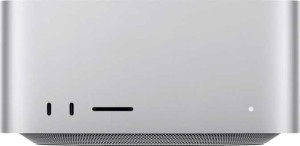
Apple Mac Studio 2025 (M4 Max 14-core / 32-core GPU / 36GB RAM / 8TB SSD)
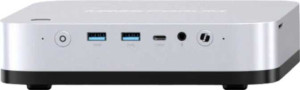
Minisforum AI X1 Pro

Apple Mac Studio 2025 (M4 Max 14-core / 32-core GPU / 36GB RAM / 8TB SSD) Minisforum AI X1 Pro

Common Features

  • Both products use an NVMe SSD for storage.
  • Both products have integrated graphics.
  • Both products support 64-bit processing.
  • Both products use DDR5 memory.
  • Both products support Wi-Fi.
  • Both products have Bluetooth connectivity.
  • Neither product has USB 2.0 ports.
  • Neither product has USB 3.2 Gen 1 ports (USB-A).
  • Neither product has USB 4 20Gbps ports.
  • Neither product has USB 3.2 Gen 2x2 ports.
  • Neither product has USB 3.2 Gen 1 ports (USB-C).
  • Neither product has Thunderbolt 4 ports.
  • Both products are classified as Laptop and Desktop type.
  • Neither product supports ECC memory.
  • Both products have the NX bit feature.

Main Differences

  • SSD storage capacity is 8000GB on Apple Mac Studio 2025 (M4 Max 14-core / 32-core GPU / 36GB RAM / 8TB SSD) and 4000GB on Minisforum AI X1 Pro.
  • Thickness is 196mm on Apple Mac Studio 2025 (M4 Max 14-core / 32-core GPU / 36GB RAM / 8TB SSD) and 167mm on Minisforum AI X1 Pro.
  • Height is 94mm on Apple Mac Studio 2025 (M4 Max 14-core / 32-core GPU / 36GB RAM / 8TB SSD) and 86mm on Minisforum AI X1 Pro.
  • Width is 196mm on Apple Mac Studio 2025 (M4 Max 14-core / 32-core GPU / 36GB RAM / 8TB SSD) and 200mm on Minisforum AI X1 Pro.
  • Volume is 3611.104 cm³ on Apple Mac Studio 2025 (M4 Max 14-core / 32-core GPU / 36GB RAM / 8TB SSD) and 2872.4 cm³ on Minisforum AI X1 Pro.
  • Thermal Design Power (TDP) is 80W on Apple Mac Studio 2025 (M4 Max 14-core / 32-core GPU / 36GB RAM / 8TB SSD) and 15W on Minisforum AI X1 Pro.
  • CPU speed is 10 x 4.05 & 4 x 2.75 GHz on Apple Mac Studio 2025 (M4 Max 14-core / 32-core GPU / 36GB RAM / 8TB SSD) and 12 x 2 GHz on Minisforum AI X1 Pro.
  • CPU threads count is 14 on Apple Mac Studio 2025 (M4 Max 14-core / 32-core GPU / 36GB RAM / 8TB SSD) and 24 on Minisforum AI X1 Pro.
  • Semiconductor size is 3nm on Apple Mac Studio 2025 (M4 Max 14-core / 32-core GPU / 36GB RAM / 8TB SSD) and 4nm on Minisforum AI X1 Pro.
  • Supported displays count is 3 on Apple Mac Studio 2025 (M4 Max 14-core / 32-core GPU / 36GB RAM / 8TB SSD) and 4 on Minisforum AI X1 Pro.
  • Number of transistors is 28000 million on Apple Mac Studio 2025 (M4 Max 14-core / 32-core GPU / 36GB RAM / 8TB SSD) and 34000 million on Minisforum AI X1 Pro.
  • RAM is 32GB on Apple Mac Studio 2025 (M4 Max 14-core / 32-core GPU / 36GB RAM / 8TB SSD) and 96GB on Minisforum AI X1 Pro.
  • Bluetooth version is 5.3 on Apple Mac Studio 2025 (M4 Max 14-core / 32-core GPU / 36GB RAM / 8TB SSD) and 5.4 on Minisforum AI X1 Pro.
  • USB 3.2 Gen 2 ports (USB-A) count is 2 on Apple Mac Studio 2025 (M4 Max 14-core / 32-core GPU / 36GB RAM / 8TB SSD) and 4 on Minisforum AI X1 Pro.
  • USB 3.2 Gen 2 ports (USB-C) are present on Apple Mac Studio 2025 (M4 Max 14-core / 32-core GPU / 36GB RAM / 8TB SSD) with 2 ports, but not available on Minisforum AI X1 Pro.
  • USB 4 40Gbps ports are present on Minisforum AI X1 Pro with 2 ports, but not available on Apple Mac Studio 2025 (M4 Max 14-core / 32-core GPU / 36GB RAM / 8TB SSD).
  • A DisplayPort output is present on Minisforum AI X1 Pro but not available on Apple Mac Studio 2025 (M4 Max 14-core / 32-core GPU / 36GB RAM / 8TB SSD).
  • PassMark result is 38870 on Apple Mac Studio 2025 (M4 Max 14-core / 32-core GPU / 36GB RAM / 8TB SSD) and 35142 on Minisforum AI X1 Pro.
  • PassMark single-core result is 4531 on Apple Mac Studio 2025 (M4 Max 14-core / 32-core GPU / 36GB RAM / 8TB SSD) and 3872 on Minisforum AI X1 Pro.
  • Geekbench 6 multi-core result is 23455 on Apple Mac Studio 2025 (M4 Max 14-core / 32-core GPU / 36GB RAM / 8TB SSD) and 13283 on Minisforum AI X1 Pro.
  • Geekbench 6 single-core result is 4007 on Apple Mac Studio 2025 (M4 Max 14-core / 32-core GPU / 36GB RAM / 8TB SSD) and 2593 on Minisforum AI X1 Pro.
  • Maximum memory amount is 128GB on Apple Mac Studio 2025 (M4 Max 14-core / 32-core GPU / 36GB RAM / 8TB SSD) and 96GB on Minisforum AI X1 Pro.
  • big.LITTLE technology is used by Apple Mac Studio 2025 (M4 Max 14-core / 32-core GPU / 36GB RAM / 8TB SSD) but not employed by Minisforum AI X1 Pro.
  • Maximum RAM speed is 6400 MHz on Apple Mac Studio 2025 (M4 Max 14-core / 32-core GPU / 36GB RAM / 8TB SSD) and 7500 MHz on Minisforum AI X1 Pro.
  • Memory channels count is 4 on Apple Mac Studio 2025 (M4 Max 14-core / 32-core GPU / 36GB RAM / 8TB SSD) and 2 on Minisforum AI X1 Pro.
Specs Comparison
Apple Mac Studio 2025 (M4 Max 14-core / 32-core GPU / 36GB RAM / 8TB SSD)

Apple Mac Studio 2025 (M4 Max 14-core / 32-core GPU / 36GB RAM / 8TB SSD)

Minisforum AI X1 Pro

Minisforum AI X1 Pro

General info:
SSD storage capacity 8000GB 4000GB
release date March 2025 January 2025
Is an NVMe SSD
thickness 196 mm 167 mm
height 94 mm 86 mm
width 196 mm 200 mm
volume 3611.104 cm³ 2872.4 cm³

Both machines use NVMe SSDs, ensuring fast storage access on either side. The key storage differentiator is capacity: the Mac Studio tops out at 8TB versus the Minisforum AI X1 Pro's 4TB — a meaningful gap for users working with large media libraries, virtual machines, or extensive local datasets where offloading to external drives is inconvenient.

Physically, these are surprisingly close in footprint, though not identical. The Mac Studio is a near-perfect square at 196 × 196 mm with a height of 94 mm, while the AI X1 Pro is slightly wider (200 mm) but notably shallower (167 mm) and shorter (86 mm). The practical result is that the AI X1 Pro occupies a roughly 20% smaller volume (2872 cm³ vs 3611 cm³), making it the more desk-friendly option in tighter spaces or multi-device setups.

On general form factor, the Minisforum AI X1 Pro has a clear size advantage, fitting into tighter spaces more easily. However, the Mac Studio holds a decisive storage edge with double the SSD capacity, which matters significantly for power users who need large fast local storage without relying on external drives.

CPU:
Thermal Design Power (TDP) 80W 15W
CPU speed 10 x 4.05 & 4 x 2.75 GHz 12 x 2 GHz
CPU threads 14 threads 24 threads
Has integrated graphics
Supports 64-bit

The TDP figures alone tell a striking story: the Mac Studio's M4 Max chip operates at a 80W TDP versus the AI X1 Pro's 15W — a more than 5x difference. That power budget translates directly into sustained performance headroom; the M4 Max can push its cores far harder for longer before thermal throttling becomes a factor, making it suited for demanding, continuous workloads like video encoding or large compilation jobs.

The CPU architectures also diverge significantly in design philosophy. The Mac Studio runs 14 cores in a hybrid configuration — 10 performance cores at 4.05 GHz and 4 efficiency cores at 2.75 GHz — prioritizing single-threaded speed where it matters most. The AI X1 Pro counters with 24 threads across 12 cores, all running at a modest 2 GHz. On paper the higher thread count looks appealing for parallelized workloads, but the low clock speed means each thread delivers substantially less throughput than the Mac Studio's performance cores.

The Mac Studio holds a clear CPU advantage for virtually any demanding task. Its combination of high clock speeds and a generous power envelope puts it in a different performance tier altogether. The AI X1 Pro's 15W envelope is optimized for efficiency and low heat in a compact chassis — a reasonable trade-off for light or intermittent workloads, but not a competitive match for sustained, heavy computation.

Graphics card:
semiconductor size 3 nm 4 nm
supported displays 3 4
number of transistors 28000 million 34000 million

Fabrication node is where the Mac Studio pulls ahead in efficiency terms: its GPU is built on a 3 nm process compared to the AI X1 Pro's 4 nm. A smaller node means more transistors can switch per watt, translating to better performance-per-watt — an advantage that compounds under sustained GPU workloads where thermal headroom is finite.

The transistor count points in the opposite direction, with the AI X1 Pro packing 34 billion transistors against the Mac Studio's 28 billion. However, transistor count alone is not a reliable proxy for GPU performance — it reflects total die complexity across the entire chip, not just graphics compute units, and the architectural efficiency of those transistors varies significantly between platforms. Reading this number in isolation would be misleading.

For multi-monitor users, the AI X1 Pro offers a concrete, unambiguous win: it supports 4 displays versus the Mac Studio's 3. That extra output could be the deciding factor for traders, editors, or anyone running a dense workstation setup. Overall, this group is too close to declare a dominant winner — the Mac Studio holds a process node efficiency edge, while the AI X1 Pro edges ahead on maximum display connectivity.

Memory:
RAM 32GB 96GB
DDR memory version 5 5

Both machines use DDR5 memory, so the generation is a wash. Where they diverge sharply is capacity: the Minisforum AI X1 Pro ships with a substantial 96GB of RAM, compared to 32GB in this configuration of the Mac Studio — a 3x difference that is hard to overlook.

In practice, 96GB opens the door to workloads that are simply memory-constrained at 32GB: running large local AI/ML models, heavy virtualization with multiple concurrent VMs, or professional applications that cache enormous datasets in memory. At 32GB, users hitting those ceilings would need to rely on swap or storage, which introduces latency even on fast NVMe drives.

On raw memory capacity, the AI X1 Pro has a clear and significant advantage. For memory-intensive workloads, 96GB versus 32GB is not a marginal difference — it determines whether certain tasks are feasible at all without paging to disk. Users whose workflows demand large memory pools will find the AI X1 Pro considerably more accommodating in this specific area.

Connectivity:
supports Wi-Fi
Has Bluetooth
Bluetooth version 5.3 5.4
USB 2.0 ports 0 0
USB 3.2 Gen 2 ports (USB-A) 2 4
USB 3.2 Gen 1 ports (USB-A) 0 0
USB 3.2 Gen 2 ports (USB-C) 2 0
USB 4 40Gbps ports 0 2
USB 4 20Gbps ports 0 0
USB 3.2 Gen 2x2 ports 0 0
USB 3.2 Gen 1 ports (USB-C) 0 0
Thunderbolt 4 ports 0 0
Thunderbolt 3 ports 0 0
DisplayPort outputs 0 1
HDMI ports 1 1
RJ45 ports 1 1
has a socket for a 3.5 mm audio jack
has a VGA connector
Has S/PDIF Out port

The most consequential difference here is in high-speed USB-C capability. The AI X1 Pro includes 2x USB4 40Gbps ports, while the Mac Studio's USB-C ports top out at USB 3.2 Gen 2 (10Gbps). In real-world terms, USB4 at 40Gbps supports fast external NVMe enclosures, high-bandwidth docks, and daisy-chained displays at full fidelity — tasks where the Mac Studio's USB-C ports would be a bottleneck.

For sheer port count, the AI X1 Pro again leads with 4 USB-A 3.2 Gen 2 ports versus the Mac Studio's 2, reducing the need for hubs in multi-peripheral setups. On video output, the AI X1 Pro also adds a DisplayPort output alongside its HDMI, giving it more flexibility for mixing monitor types without adapters. Bluetooth is a near-tie — 5.4 on the AI X1 Pro versus 5.3 on the Mac Studio — a marginal generational step with negligible practical difference for most users.

Across connectivity, the Minisforum AI X1 Pro holds a clear advantage: more USB-A ports, faster USB-C via USB4, and an additional video output. The Mac Studio's port selection is competent but notably constrained by the absence of USB4, which limits its throughput for the most demanding external peripherals and storage solutions.

Benchmarks:
PassMark result 38870 35142
PassMark result (single) 4531 3872
Geekbench 6 result (multi) 23455 13283
Geekbench 6 result (single) 4007 2593

Benchmark results paint a consistent picture across both test suites. In PassMark, the Mac Studio scores 38,870 multi-threaded against the AI X1 Pro's 35,142 — a roughly 10% lead that is meaningful but not dramatic. The single-core gap is similar in proportion: 4,531 vs 3,872. Taken together, these numbers suggest the Mac Studio edges ahead in everyday responsiveness and lightly-threaded tasks, which tend to dominate real desktop usage.

Geekbench 6 tells a more emphatic story. The Mac Studio's multi-core score of 23,455 is nearly double the AI X1 Pro's 13,283, and the single-core lead — 4,007 vs 2,593 — is over 54%. This divergence from the tighter PassMark gap likely reflects how each benchmark weights core speed versus thread count; Geekbench more heavily rewards per-core performance, where the Mac Studio's high-clock architecture has a structural advantage over the AI X1 Pro's many lower-clocked cores.

Across every measured dimension, the Mac Studio holds a clear performance advantage. The margin ranges from moderate (PassMark) to substantial (Geekbench), but the direction is unambiguous. For users who prioritize raw computational throughput — whether in single-threaded applications or heavily parallelized workloads — the benchmark data consistently favors the Mac Studio.

Miscellaneous:
maximum memory amount 128GB 96GB
Type Laptop, Desktop Laptop, Desktop
Supports ECC memory
Has NX bit
Uses big.LITTLE technology
RAM speed (max) 6400 MHz 7500 MHz
memory channels 4 2

The Apple Mac Studio 2025 (M4 Max) and the Minisforum AI X1 Pro both support laptop and desktop configurations. However, their maximum memory capacities differ. The Mac Studio supports up to 128GB of memory, while the Minisforum is limited to 96GB.

Both products do not support ECC memory, and both have the NX bit enabled for security purposes. The Mac Studio utilizes big.LITTLE technology, allowing for a combination of high-performance and energy-efficient cores, while the Minisforum does not include this feature.

Regarding RAM specifications, the Mac Studio supports a maximum RAM speed of 6400 MHz and uses 4 memory channels, whereas the Minisforum supports a higher RAM speed of 7500 MHz but uses only 2 memory channels.

Comparison Summary & Verdict

This is a specification comparison between Apple Mac Studio 2025 (M4 Max 14-core / 32-core GPU / 36GB RAM / 8TB SSD) and Minisforum AI X1 Pro. Both products feature integrated graphics and support 64-bit architecture, with both offering Wi-Fi and Bluetooth connectivity. However, there are several differences: the SSD storage capacity is 8000GB on the Apple Mac Studio 2025 and 4000GB on the Minisforum AI X1 Pro, while the CPU threads are 14 on the Apple Mac Studio 2025 and 24 on the Minisforum AI X1 Pro. The RAM is 32GB on the Apple Mac Studio 2025 and 96GB on the Minisforum AI X1 Pro. Additionally, the Thermal Design Power (TDP) is 80W on the Apple Mac Studio 2025 and 15W on the Minisforum AI X1 Pro.