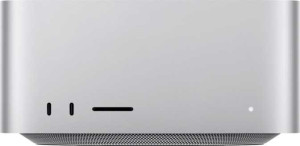
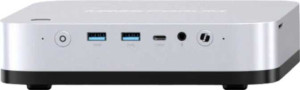
Wireless connectivity is virtually identical between the two — both support Wi-Fi and Bluetooth, with the X1 Pro on Bluetooth 5.4 versus the Mac Studio's 5.3, a negligible real-world difference. The more consequential story is in wired I/O, where the two machines take meaningfully different approaches. The Mac Studio offers 2 USB-A and 2 USB-C ports, all at USB 3.2 Gen 2 speeds (10Gbps), while the Minisforum AI X1 Pro counters with 4 USB-A ports at the same 10Gbps standard — giving it more legacy-device capacity right out of the box without a hub.
The X1 Pro's standout advantage, however, is its pair of USB4 40Gbps ports. At 40Gbps, these ports can drive high-resolution displays, connect ultra-fast external NVMe enclosures, or support capable docking stations — all simultaneously without bandwidth bottlenecks. The Mac Studio has no equivalent; its USB-C ports top out at 10Gbps, a quarter of that throughput. For users who rely on fast external storage or a single-cable docking workflow, this gap is substantial. The X1 Pro also adds a DisplayPort output alongside its HDMI, giving it a second dedicated video-out that the Mac Studio lacks — consistent with its four-display capability noted in the GPU group.
On connectivity, the Minisforum AI X1 Pro holds a clear overall edge: more USB-A ports, USB4 40Gbps bandwidth, and an additional DisplayPort output together make it the more versatile hub for a peripheral-heavy desk setup. The Mac Studio's port selection is clean and capable, but it cannot match the X1 Pro's bandwidth ceiling or output flexibility from specs alone.