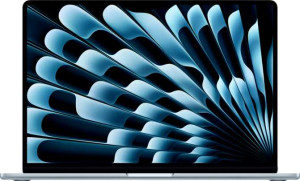
Apple MacBook Air (2025) 15.3" Apple M4 (10-core CPU) / 32GB RAM / 2TB SSD
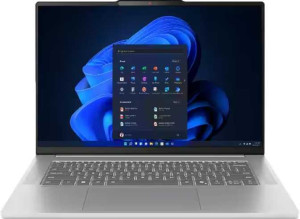
Lenovo IdeaPad Slim 5 Gen 10 16"

Apple MacBook Air (2025) 15.3" Apple M4 (10-core CPU) / 32GB RAM / 2TB SSD Lenovo IdeaPad Slim 5 Gen 10 16"

Overview

Welcome to our in-depth spec comparison between the Apple MacBook Air (2025) 15.3″ Apple M4 (10-core CPU) / 32GB RAM / 2TB SSD and the Lenovo IdeaPad Slim 5 Gen 10 16″. These two laptops take strikingly different approaches to the modern portable computing experience, with key battlegrounds spanning display technology, portability, connectivity, and overall performance — making the choice between them far from straightforward.

Common Features

  • Both laptops feature a backlit keyboard.
  • Neither laptop offers weather-sealing or splashproof protection.
  • Neither laptop has a touchscreen.
  • Both laptops share a typical brightness of 500 nits.
  • Neither laptop has an anti-reflection coating on the display.
  • Both laptops come with 32GB of RAM.
  • Both laptops use flash-based NVMe SSD storage.
  • Both laptops support multithreading.
  • Both laptops use DDR5 memory.
  • Both laptops support 64-bit computing.
  • Neither laptop includes any USB 3.2 Gen 2 Type-A, USB 3.2 Gen 1 Type-C, USB 4 20Gbps, Thunderbolt 3, RJ45, or DisplayPort connections.
  • Both laptops include at least one USB Type-C port.
  • Both laptops support Wi-Fi connectivity.
  • Both laptops have sleep-and-charge USB ports.
  • Both laptops feature stereo speakers and a 3.5 mm audio jack.
  • Neither laptop includes a stylus.
  • Both laptops have a front-facing camera.
  • Neither laptop has an S/PDIF output, gyroscope, GPS, or accelerometer.
  • Neither laptop supports ECC memory.
  • Both laptops have an NX bit, integrated graphics, and use big.LITTLE CPU technology.

Main Differences

  • Weight is 1510 g on Apple MacBook Air (2025) 15.3″ Apple M4 (10-core CPU) / 32GB RAM / 2TB SSD and 1760 g on Lenovo IdeaPad Slim 5 Gen 10 16″.
  • Apple MacBook Air (2025) 15.3″ Apple M4 (10-core CPU) / 32GB RAM / 2TB SSD uses a fanless design, while Lenovo IdeaPad Slim 5 Gen 10 16″ does not.
  • Volume is 886.38 cm³ on Apple MacBook Air (2025) 15.3″ Apple M4 (10-core CPU) / 32GB RAM / 2TB SSD and 1460 cm³ on Lenovo IdeaPad Slim 5 Gen 10 16″.
  • Width is 340 mm on Apple MacBook Air (2025) 15.3″ Apple M4 (10-core CPU) / 32GB RAM / 2TB SSD and 365 mm on Lenovo IdeaPad Slim 5 Gen 10 16″.
  • Height is 237 mm on Apple MacBook Air (2025) 15.3″ Apple M4 (10-core CPU) / 32GB RAM / 2TB SSD and 250 mm on Lenovo IdeaPad Slim 5 Gen 10 16″.
  • Thickness is 11 mm on Apple MacBook Air (2025) 15.3″ Apple M4 (10-core CPU) / 32GB RAM / 2TB SSD and 16 mm on Lenovo IdeaPad Slim 5 Gen 10 16″.
  • Screen size is 15.3″ on Apple MacBook Air (2025) 15.3″ Apple M4 (10-core CPU) / 32GB RAM / 2TB SSD and 16″ on Lenovo IdeaPad Slim 5 Gen 10 16″.
  • Resolution is 2880 x 1864 px on Apple MacBook Air (2025) 15.3″ Apple M4 (10-core CPU) / 32GB RAM / 2TB SSD and 2880 x 1800 px on Lenovo IdeaPad Slim 5 Gen 10 16″.
  • Pixel density is 224 ppi on Apple MacBook Air (2025) 15.3″ Apple M4 (10-core CPU) / 32GB RAM / 2TB SSD and 212 ppi on Lenovo IdeaPad Slim 5 Gen 10 16″.
  • The display is LCD, LED-backlit IPS on Apple MacBook Air (2025) 15.3″ Apple M4 (10-core CPU) / 32GB RAM / 2TB SSD and OLED/AMOLED on Lenovo IdeaPad Slim 5 Gen 10 16″.
  • Refresh rate is 60 Hz on Apple MacBook Air (2025) 15.3″ Apple M4 (10-core CPU) / 32GB RAM / 2TB SSD and 120 Hz on Lenovo IdeaPad Slim 5 Gen 10 16″.
  • The number of supported external displays is 2 on Apple MacBook Air (2025) 15.3″ Apple M4 (10-core CPU) / 32GB RAM / 2TB SSD and 4 on Lenovo IdeaPad Slim 5 Gen 10 16″.
  • Internal storage is 2048 GB on Apple MacBook Air (2025) 15.3″ Apple M4 (10-core CPU) / 32GB RAM / 2TB SSD and 1024 GB on Lenovo IdeaPad Slim 5 Gen 10 16″.
  • CPU speed is 4 x 4.05 GHz and 6 x 2.75 GHz on Apple MacBook Air (2025) 15.3″ Apple M4 (10-core CPU) / 32GB RAM / 2TB SSD and 4 x 2 GHz and 4 x 2 GHz on Lenovo IdeaPad Slim 5 Gen 10 16″.
  • CPU thread count is 10 on Apple MacBook Air (2025) 15.3″ Apple M4 (10-core CPU) / 32GB RAM / 2TB SSD and 16 on Lenovo IdeaPad Slim 5 Gen 10 16″.
  • Maximum supported memory is 24 GB on Apple MacBook Air (2025) 15.3″ Apple M4 (10-core CPU) / 32GB RAM / 2TB SSD and 32 GB on Lenovo IdeaPad Slim 5 Gen 10 16″.
  • Semiconductor size is 3 nm on Apple MacBook Air (2025) 15.3″ Apple M4 (10-core CPU) / 32GB RAM / 2TB SSD and 4 nm on Lenovo IdeaPad Slim 5 Gen 10 16″.
  • USB 4 40Gbps ports number 2 on Apple MacBook Air (2025) 15.3″ Apple M4 (10-core CPU) / 32GB RAM / 2TB SSD, while Lenovo IdeaPad Slim 5 Gen 10 16″ has none.
  • Thunderbolt 4 ports number 2 on Apple MacBook Air (2025) 15.3″ Apple M4 (10-core CPU) / 32GB RAM / 2TB SSD, while Lenovo IdeaPad Slim 5 Gen 10 16″ has none.
  • USB 3.2 Gen 2 Type-C ports number 2 on Lenovo IdeaPad Slim 5 Gen 10 16″, while Apple MacBook Air (2025) 15.3″ Apple M4 (10-core CPU) / 32GB RAM / 2TB SSD has none.
  • USB 3.2 Gen 1 Type-A ports number 2 on Lenovo IdeaPad Slim 5 Gen 10 16″, while Apple MacBook Air (2025) 15.3″ Apple M4 (10-core CPU) / 32GB RAM / 2TB SSD has none.
  • An HDMI output is present on Lenovo IdeaPad Slim 5 Gen 10 16″ but not available on Apple MacBook Air (2025) 15.3″ Apple M4 (10-core CPU) / 32GB RAM / 2TB SSD.
  • Wi-Fi support reaches Wi-Fi 7 (802.11be) on Lenovo IdeaPad Slim 5 Gen 10 16″, while Apple MacBook Air (2025) 15.3″ Apple M4 (10-core CPU) / 32GB RAM / 2TB SSD tops out at Wi-Fi 6E (802.11ax).
  • An external memory card slot is present on Lenovo IdeaPad Slim 5 Gen 10 16″ but not available on Apple MacBook Air (2025) 15.3″ Apple M4 (10-core CPU) / 32GB RAM / 2TB SSD.
  • Bluetooth version is 5.3 on Apple MacBook Air (2025) 15.3″ Apple M4 (10-core CPU) / 32GB RAM / 2TB SSD and 5.4 on Lenovo IdeaPad Slim 5 Gen 10 16″.
  • Battery capacity is 72.4 Wh on Apple MacBook Air (2025) 15.3″ Apple M4 (10-core CPU) / 32GB RAM / 2TB SSD and 80 Wh on Lenovo IdeaPad Slim 5 Gen 10 16″.
  • A MagSafe power adapter is supported on Apple MacBook Air (2025) 15.3″ Apple M4 (10-core CPU) / 32GB RAM / 2TB SSD but not on Lenovo IdeaPad Slim 5 Gen 10 16″.
  • Dolby Atmos support is present on Apple MacBook Air (2025) 15.3″ Apple M4 (10-core CPU) / 32GB RAM / 2TB SSD but not available on Lenovo IdeaPad Slim 5 Gen 10 16″.
  • A fingerprint scanner is present on Apple MacBook Air (2025) 15.3″ Apple M4 (10-core CPU) / 32GB RAM / 2TB SSD but not on Lenovo IdeaPad Slim 5 Gen 10 16″.
  • The number of built-in microphones is 3 on Apple MacBook Air (2025) 15.3″ Apple M4 (10-core CPU) / 32GB RAM / 2TB SSD and 2 on Lenovo IdeaPad Slim 5 Gen 10 16″.
  • 3D facial recognition is available on Lenovo IdeaPad Slim 5 Gen 10 16″ but not on Apple MacBook Air (2025) 15.3″ Apple M4 (10-core CPU) / 32GB RAM / 2TB SSD.
  • Voice command support is present on Apple MacBook Air (2025) 15.3″ Apple M4 (10-core CPU) / 32GB RAM / 2TB SSD but not on Lenovo IdeaPad Slim 5 Gen 10 16″.
  • Maximum RAM speed is 6400 MHz on Apple MacBook Air (2025) 15.3″ Apple M4 (10-core CPU) / 32GB RAM / 2TB SSD and 8000 MHz on Lenovo IdeaPad Slim 5 Gen 10 16″.
Specs Comparison
Apple MacBook Air (2025) 15.3" Apple M4 (10-core CPU) / 32GB RAM / 2TB SSD

Apple MacBook Air (2025) 15.3" Apple M4 (10-core CPU) / 32GB RAM / 2TB SSD

Lenovo IdeaPad Slim 5 Gen 10 16"

Lenovo IdeaPad Slim 5 Gen 10 16"

Design:
weight 1510 g 1760 g
Uses a fanless design
Has a backlit keyboard
volume 886.38 cm³ 1460 cm³
width 340 mm 365 mm
height 237 mm 250 mm
thickness 11 mm 16 mm
is weather-sealed (splashproof)

In terms of portability, the MacBook Air (2025) 15.3″ holds a meaningful advantage. At 1,510 g and just 11 mm thick, it is noticeably lighter and slimmer than the Lenovo IdeaPad Slim 5 Gen 10 16″, which weighs 1,760 g and measures 16 mm thick. That 250 g difference is perceptible over a full day of carrying the machine in a bag, and the 5 mm difference in thickness has a real impact on how the laptop fits into sleeves and tight compartments. The volume gap reinforces this story: the MacBook Air occupies roughly 886 cm³ versus the IdeaPad's 1,460 cm³ — nearly 65% more volume for the Lenovo — despite the IdeaPad offering only a marginally larger screen.

A significant engineering differentiator is thermal design. The MacBook Air relies on a fanless design, meaning it has no moving parts for cooling. This translates to completely silent operation at all times, which is valuable in quiet environments like libraries or meetings. The IdeaPad Slim 5, by contrast, uses active cooling with a fan — which can manage sustained workloads more aggressively but introduces audible noise under load. Whether this is a disadvantage depends on use case: for users who prioritize silence, the fanless MacBook Air wins; for those who need sustained peak performance without thermal throttling, active cooling may be preferable, though the provided specs do not speak to performance headroom directly.

Both laptops share a backlit keyboard and neither offers weather sealing, so those factors are a wash. Overall, on the design axis, the MacBook Air (2025) has a clear edge in portability and form factor compactness, while the IdeaPad's active cooling is the one design trait that could appeal to users prioritizing thermal sustained performance over silence and thinness.
Display:
screen size 15.3" 16"
resolution 2880 x 1864 px 2880 x 1800 px
pixel density 224 ppi 212 ppi
Display type LCD, LED-backlit, IPS OLED/AMOLED
has a touch screen
brightness (typical) 500 nits 500 nits
refresh rate 60Hz 120Hz
has anti-reflection coating
supported displays 2 4

The most consequential difference here is panel technology. The MacBook Air (2025) uses an IPS LCD display, while the IdeaPad Slim 5 Gen 10 ships with an OLED/AMOLED panel. In practice, OLED delivers per-pixel light emission, meaning true blacks, infinite contrast, and more vivid color depth — advantages that are immediately visible when watching content or doing color-sensitive creative work. The IPS panel on the MacBook Air is by no means poor, but it cannot match OLED's contrast characteristics on paper.

The IdeaPad also pulls ahead on refresh rate: 120Hz versus the MacBook Air's 60Hz. For everyday scrolling and UI interactions, 120Hz produces noticeably smoother motion that is hard to unsee once experienced. The MacBook Air's locked 60Hz feels comparatively less fluid for pointer-heavy workflows. Sharpness, however, slightly favors the MacBook Air — its 224 ppi pixel density edges out the IdeaPad's 212 ppi, though both are high enough that individual pixels are imperceptible at normal viewing distances. Peak brightness is identical at 500 nits on both, and neither offers a touch screen or anti-reflection coating, so those dimensions are a draw.

Where the IdeaPad extends a practical advantage is external display support: it can drive up to 4 external displays compared to the MacBook Air's 2, which matters for users building multi-monitor workstations. Taken together, the IdeaPad Slim 5 Gen 10 holds a clear display edge for most users — its OLED panel and 120Hz refresh rate are headline advantages that the MacBook Air's marginally sharper resolution cannot fully offset.

Performance:
RAM 32GB 32GB
Uses flash storage
internal storage 2048GB 1024GB
CPU speed 4 x 4.05 & 6 x 2.75 GHz 4 x 2 & 4 x 2 GHz
CPU threads 10 threads 16 threads
Is an NVMe SSD
uses multithreading
maximum memory amount 24GB 32GB
DDR memory version 5 5
semiconductor size 3 nm 4 nm
Supports 64-bit

Raw clock speed tells a pointed story here. The MacBook Air (2025) M4 chip runs its performance cores at 4.05 GHz and efficiency cores at 2.75 GHz, whereas the IdeaPad Slim 5 Gen 10 tops out at a uniform 2 GHz across all its cores. That gap in per-core frequency gives the MacBook Air a substantial advantage in single-threaded tasks — the kind that dominate everyday responsiveness like app launches, compiling, and snappy UI interactions. The IdeaPad counters with 16 CPU threads versus the MacBook Air's 10, which can be beneficial in heavily parallelized workloads, but the clock speed deficit makes it harder to leverage that thread count advantage in practice.

At the silicon level, the MacBook Air's 3 nm process node is a generation ahead of the IdeaPad's 4 nm. A smaller node typically translates to better performance-per-watt — meaning the MacBook Air can sustain higher throughput while generating less heat, a particularly meaningful trait given its fanless design noted in the Design group. Both machines match on installed RAM at 32 GB DDR5 and both use fast NVMe SSDs, but the MacBook Air ships with 2 TB of storage versus the IdeaPad's 1 TB, doubling local capacity for files, projects, and media.

One nuance from the data: the MacBook Air lists a maximum supported memory of 24 GB, while the IdeaPad supports up to 32 GB — suggesting the IdeaPad's memory ceiling is higher, which could matter for users who need to maximize RAM down the line. On balance, though, the MacBook Air (2025) holds the stronger performance profile for most users, driven by its significantly higher clock speeds, more efficient process node, and larger storage capacity.

Connectivity:
USB 3.2 Gen 2 ports (USB-C) 0 2
USB 3.2 Gen 2 ports (USB-A) 0 0
USB 4 20Gbps ports 0 0
USB 4 40Gbps ports 2 0
Thunderbolt 4 ports 2 0
USB 3.2 Gen 1 ports (USB-C) 0 0
USB 3.2 Gen 1 ports (USB-A) 0 2
Thunderbolt 3 ports 0 0
has an HDMI output
Has USB Type-C
supports Wi-Fi
Wi-Fi version Wi-Fi 6E (802.11ax), Wi-Fi 6 (802.11ax), Wi-Fi 5 (802.11ac), Wi-Fi 4 (802.11n) Wi-Fi 7 (802.11be), Wi-Fi 6E (802.11ax), Wi-Fi 6 (802.11ax), Wi-Fi 5 (802.11ac), Wi-Fi 4 (802.11n)
has an external memory slot
Bluetooth version 5.3 5.4
RJ45 ports 0 0
HDMI ports 0 1
DisplayPort outputs 0 0
has AirPlay
mini DisplayPort outputs 0 0
has a VGA connector

Port selection is where these two machines reflect very different philosophies. The MacBook Air (2025) is built around high-bandwidth, high-versatility connections: its 2 Thunderbolt 4 / USB 4 40Gbps ports are among the fastest general-purpose ports available on any laptop, capable of driving displays, transferring data at up to 40Gbps, and powering peripherals simultaneously. The trade-off is that the MacBook Air offers nothing else — no USB-A, no HDMI, no card slot — making dongles or hubs a practical necessity for users with legacy peripherals or monitors. The IdeaPad Slim 5 Gen 10, by contrast, takes a broader approach: 2 USB 3.2 Gen 2 Type-C ports, 2 USB-A ports, and a dedicated HDMI output mean most users can plug in what they already own without adapters. It also includes an external memory card slot, a genuinely useful addition for photographers and videographers.

Wireless connectivity tips further toward the IdeaPad. It supports Wi-Fi 7 (802.11be), the latest generation, which offers higher throughput and lower latency on compatible routers compared to the MacBook Air's top-end Wi-Fi 6E. Bluetooth follows the same pattern: the IdeaPad's Bluetooth 5.4 edges out the MacBook Air's 5.3, a minor but forward-looking difference. Both support AirPlay, which is somewhat notable as a shared feature.

The verdict depends on user context. For raw port bandwidth and a clean, minimal setup, the MacBook Air's Thunderbolt 4 ports are powerful — but they demand ecosystem buy-in. For plug-and-play versatility with a wider range of existing devices and the most current wireless standards, the IdeaPad Slim 5 Gen 10 has a practical edge in day-to-day connectivity flexibility.

Battery:
battery size 72.4 Wh 80 Wh
Has sleep-and-charge USB ports
Has a MagSafe power adapter

Battery capacity is close but not identical: the IdeaPad Slim 5 Gen 10 carries an 80 Wh cell versus the MacBook Air (2025)'s 72.4 Wh — a roughly 10% larger reservoir on paper. Raw watt-hours alone don't determine runtime, since power draw from the display, chip, and cooling system all factor in, and those variables aren't captured in this data set. What the numbers do confirm is that the IdeaPad starts with a slightly larger energy reserve.

On charging convenience, the MacBook Air introduces a meaningful quality-of-life feature: a dedicated MagSafe power adapter. MagSafe uses a magnetic connector that detaches cleanly if the cable is snagged, reducing the risk of the laptop being pulled off a surface. It also frees up the Thunderbolt ports for data and display use while charging — a real advantage given the MacBook Air's already limited port count. The IdeaPad has no equivalent magnetic charging connector, relying instead on its USB-C ports for power delivery. Both laptops share sleep-and-charge USB ports, allowing connected devices to charge even when the laptop itself is off or asleep.

This group is broadly balanced. The IdeaPad holds a modest edge in raw battery capacity, while the MacBook Air's MagSafe connector adds a practical usability and safety advantage that many users will appreciate. Neither product dominates decisively — the right call here depends on whether capacity headroom or charging convenience matters more to the individual user.

Features:
release date March 2025 July 2025
has stereo speakers
has a socket for a 3.5 mm audio jack
has Dolby Atmos
Stylus included
Has a fingerprint scanner
number of microphones 3 2
Uses 3D facial recognition
has voice commands
has a front camera
Has S/PDIF Out port
has a gyroscope
has GPS
has an accelerometer
has a compass
Has an optical disc drive

Security and authentication is where these two machines diverge most sharply. The MacBook Air (2025) uses a fingerprint scanner, while the IdeaPad Slim 5 Gen 10 opts for 3D facial recognition instead. Both are fast, modern biometric methods, but they serve different preferences: facial recognition is hands-free and works without touching the device, while fingerprint scanning is reliable even in low light or when the user is not directly in front of the screen. Neither approach is objectively superior — it comes down to workflow habit.

Audio capability favors the MacBook Air. It supports Dolby Atmos, a spatial audio format that adds depth and dimensionality to compatible content, and it pairs that with a 3-microphone array versus the IdeaPad's 2 microphones. An additional microphone improves directionality and noise isolation during calls or voice recordings — a tangible advantage for users who frequently use video conferencing or dictation. The MacBook Air also supports voice commands, adding a hands-free interaction layer that the IdeaPad lacks entirely. Both laptops include stereo speakers and a 3.5 mm audio jack, so the baseline audio hardware is shared.

The remaining features — front cameras, absence of an optical drive, and lack of motion sensors like gyroscope or GPS — are identical across both machines and represent no differentiator. On balance, the MacBook Air (2025) holds a clear edge in this group, driven by its richer audio ecosystem with Dolby Atmos, a superior microphone count, and voice command support, while the IdeaPad's 3D facial recognition is its one notable exclusive feature.

Miscellaneous:
Type Laptop, Desktop Laptop, Desktop
Supports ECC memory
Has NX bit
Has integrated graphics
Uses big.LITTLE technology
RAM speed (max) 6400 MHz 8000 MHz

Across most dimensions in this group, the two machines are functionally identical. Both are classified as Laptop/Desktop convertibles, both use big.LITTLE heterogeneous CPU architecture (pairing high-performance and efficiency cores), both include integrated graphics, both carry an NX bit for hardware-level security against certain memory exploits, and neither supports ECC memory — a feature typically reserved for workstation or server hardware anyway. For the majority of users, none of these shared traits create any practical difference in the purchase decision.

The sole differentiator here is maximum RAM speed. The IdeaPad Slim 5 Gen 10 supports memory up to 8000 MHz, compared to the MacBook Air (2025)'s ceiling of 6400 MHz. Faster RAM bandwidth can benefit workloads that are memory-throughput sensitive — such as large data processing, certain creative applications, or GPU tasks that draw on shared system memory. That said, the real-world impact depends heavily on whether the specific workloads being run actually saturate memory bandwidth, which many everyday tasks do not.

This is a narrow group with limited differentiation. The IdeaPad Slim 5 Gen 10 claims the only edge — its higher maximum RAM speed — but the practical significance of that advantage is workload-dependent. For most users, this group is effectively a tie.

Comparison Summary & Verdict

After reviewing all the evidence, both laptops serve distinct audiences well. The Apple MacBook Air (2025) 15.3″ M4 stands out for users who prioritize portability, with its significantly lighter 1510 g chassis, ultra-slim 11 mm profile, and fanless silent design. Its Thunderbolt 4 ports, larger 2TB SSD, Dolby Atmos audio, and MagSafe charging make it a polished all-rounder for Apple ecosystem users. The Lenovo IdeaPad Slim 5 Gen 10 16″, on the other hand, appeals to those who demand a more versatile display experience, thanks to its vibrant OLED panel with a 120Hz refresh rate, wider connectivity including HDMI, USB-A ports, an SD card slot, and Wi-Fi 7 support. Its 3D facial recognition and higher maximum RAM ceiling of 32GB also give it an edge for future-proofing. Choose the MacBook Air for silence and portability; choose the IdeaPad Slim 5 for display quality and connectivity flexibility.

Apple MacBook Air (2025) 15.3
Buy Apple MacBook Air (2025) 15.3" Apple M4 (10-core CPU) / 32GB RAM / 2TB SSD if...

Buy the Apple MacBook Air (2025) 15.3″ Apple M4 (10-core CPU) / 32GB RAM / 2TB SSD if you value a lightweight, fanless design with Thunderbolt 4 connectivity, a larger 2TB SSD, and a polished ecosystem experience including MagSafe charging and Dolby Atmos audio.

Lenovo IdeaPad Slim 5 Gen 10 16
Buy Lenovo IdeaPad Slim 5 Gen 10 16" if...

Buy the Lenovo IdeaPad Slim 5 Gen 10 16″ if you prioritize a stunning OLED display with a 120Hz refresh rate, broader connectivity options such as HDMI, USB-A ports, an external memory card slot, and cutting-edge Wi-Fi 7 support.