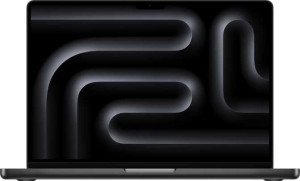
Apple MacBook Pro (2025) 14"
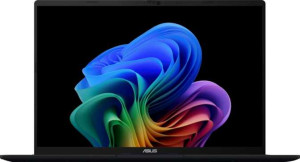
Asus VivoBook 16 (M1607) 16"

Apple MacBook Pro (2025) 14" Asus VivoBook 16 (M1607) 16"

Common Features

  • Both products use a fanless design.
  • Both products have a backlit keyboard.
  • Neither product is weather-sealed (splashproof).
  • Neither product has a rugged build.
  • Both products support flash storage.
  • Both products use an NVMe SSD.
  • Both products support multithreading.
  • Both products support 64-bit architecture.
  • Both products have stereo speakers.
  • Both products have a socket for a 3.5 mm audio jack.
  • Both products support Wi-Fi.
  • Both products have Bluetooth version 5.3.
  • Both products have sleep-and-charge USB ports.
  • Both products have a front camera.
  • Both products use big.LITTLE technology.
  • Both products have integrated graphics.
  • Both products have a Geekbench 6 result in the multi-core test.
  • Both products support USB Type-C connectivity.
  • Both products have an HDMI output.

Main Differences

  • Weight is 1550 g on Apple MacBook Pro (2025) 14″ and 1880 g on Asus VivoBook 16 (M1607) 16″.
  • Volume is 1034.28 cm³ on Apple MacBook Pro (2025) 14″ and 1517.25 cm³ on Asus VivoBook 16 (M1607) 16″.
  • Width is 312 mm on Apple MacBook Pro (2025) 14″ and 357 mm on Asus VivoBook 16 (M1607) 16″.
  • Height is 221 mm on Apple MacBook Pro (2025) 14″ and 250 mm on Asus VivoBook 16 (M1607) 16″.
  • Thickness is 15 mm on Apple MacBook Pro (2025) 14″ and 17 mm on Asus VivoBook 16 (M1607) 16″.
  • Screen size is 14.2″ on Apple MacBook Pro (2025) 14″ and 16″ on Asus VivoBook 16 (M1607) 16″.
  • Resolution is 3024 x 1964 px on Apple MacBook Pro (2025) 14″ and 1920 x 1200 px on Asus VivoBook 16 (M1607) 16″.
  • Pixel density is 253 ppi on Apple MacBook Pro (2025) 14″ and 141 ppi on Asus VivoBook 16 (M1607) 16″.
  • Display type is Mini-LED on Apple MacBook Pro (2025) 14″ and LCD, LED-backlit, IPS on Asus VivoBook 16 (M1607) 16″.
  • Brightness (typical) is 1000 nits on Apple MacBook Pro (2025) 14″ and 300 nits on Asus VivoBook 16 (M1607) 16″.
  • Refresh rate is 120Hz on Apple MacBook Pro (2025) 14″ and 60Hz on Asus VivoBook 16 (M1607) 16″.
  • Anti-reflection coating is not present on Apple MacBook Pro (2025) 14″ but is available on Asus VivoBook 16 (M1607) 16″.
  • Maximum internal storage is 4096GB on Apple MacBook Pro (2025) 14″ and 1024GB on Asus VivoBook 16 (M1607) 16″.
  • CPU speed is 4 x 4.6 & 6 x 3.2 GHz on Apple MacBook Pro (2025) 14″ and 4 x 2 & 4 x 2 GHz on Asus VivoBook 16 (M1607) 16″.
  • CPU threads are 10 on Apple MacBook Pro (2025) 14″ and 16 on Asus VivoBook 16 (M1607) 16″.
  • Maximum memory amount is 64GB on Apple MacBook Pro (2025) 14″ and 32GB on Asus VivoBook 16 (M1607) 16″.
  • Semiconductor size is 3 nm on Apple MacBook Pro (2025) 14″ and 4 nm on Asus VivoBook 16 (M1607) 16″.
  • Geekbench 6 result (multi) is 16832 on Apple MacBook Pro (2025) 14″ and 11247 on Asus VivoBook 16 (M1607) 16″.
  • Geekbench 6 result (single) is 4188 on Apple MacBook Pro (2025) 14″ and 2467 on Asus VivoBook 16 (M1607) 16″.
  • USB 4 40Gbps ports are available on Apple MacBook Pro (2025) 14″ but not on Asus VivoBook 16 (M1607) 16″.
  • Thunderbolt 4 ports are available on Apple MacBook Pro (2025) 14″ but not on Asus VivoBook 16 (M1607) 16″.
  • USB 3.2 Gen 1 ports (USB-C) are available on Asus VivoBook 16 (M1607) 16″ but not on Apple MacBook Pro (2025) 14″.
  • USB 3.2 Gen 1 ports (USB-A) are available on Asus VivoBook 16 (M1607) 16″ but not on Apple MacBook Pro (2025) 14″.
  • Wi-Fi version includes Wi-Fi 6E (802.11ax), Wi-Fi 6 (802.11ax), Wi-Fi 5 (802.11ac), Wi-Fi 4 (802.11n) on Apple MacBook Pro (2025) 14″ and Wi-Fi 6 (802.11ax), Wi-Fi 5 (802.11ac), Wi-Fi 4 (802.11n) on Asus VivoBook 16 (M1607) 16″.
  • Apple MacBook Pro (2025) 14″ has an external memory slot, but Asus VivoBook 16 (M1607) 16″ does not.
  • Apple MacBook Pro (2025) 14″ includes a MagSafe power adapter, but Asus VivoBook 16 (M1607) 16″ does not.
  • Apple MacBook Pro (2025) 14″ has Dolby Atmos support, but Asus VivoBook 16 (M1607) 16″ does not.
  • Apple MacBook Pro (2025) 14″ has a fingerprint scanner, but Asus VivoBook 16 (M1607) 16″ does not.
  • Apple MacBook Pro (2025) 14″ has 3 microphones, but Asus VivoBook 16 (M1607) 16″ has 1 microphone.
  • Apple MacBook Pro (2025) 14″ supports voice commands, but Asus VivoBook 16 (M1607) 16″ does not.
  • Clock multiplier is 46 on Apple MacBook Pro (2025) 14″ and 20 on Asus VivoBook 16 (M1607) 16″.
  • Apple MacBook Pro (2025) 14″ uses the Apple M5 GPU, while Asus VivoBook 16 (M1607) 16″ uses the Radeon 860M GPU.
  • L2 cache is 16 MB on Apple MacBook Pro (2025) 14″ and 8 MB on Asus VivoBook 16 (M1607) 16″.
  • RAM speed (max) is 6400 MHz on Apple MacBook Pro (2025) 14″ and 8000 MHz on Asus VivoBook 16 (M1607) 16″.
Specs Comparison
Apple MacBook Pro (2025) 14"

Apple MacBook Pro (2025) 14"

Asus VivoBook 16 (M1607) 16"

Asus VivoBook 16 (M1607) 16"

Design:
Type Productivity Productivity
weight 1550 g 1880 g
Uses a fanless design
Has a backlit keyboard
volume 1034.28 cm³ 1517.25 cm³
width 312 mm 357 mm
height 221 mm 250 mm
thickness 15 mm 17 mm
is weather-sealed (splashproof)
has a rugged build

The Apple MacBook Pro (2025) 14″ and the Asus VivoBook 16 (M1607) 16″ share some similarities in their design, though they differ in several key aspects. Both laptops are designed for productivity, feature a backlit keyboard, and do not use a fanless design. However, the MacBook Pro is lighter, weighing 1550 g, compared to the VivoBook's 1880 g. This makes the MacBook Pro slightly more portable.

In terms of size, the two laptops also vary significantly. The MacBook Pro measures 312 mm in width, 221 mm in height, and has a thickness of 15 mm, while the VivoBook is larger, with a width of 357 mm, a height of 250 mm, and a thickness of 17 mm. This results in the VivoBook having a larger overall volume of 1517.25 cm³, compared to the MacBook Pro's 1034.28 cm³.

Neither laptop is weather-sealed (splashproof) or has a rugged build, so neither is specifically designed to withstand harsh environmental conditions. Despite these design differences, both are aimed at delivering a solid and reliable productivity experience.

Display:
screen size 14.2" 16"
resolution 3024 x 1964 px 1920 x 1200 px
pixel density 253 ppi 141 ppi
Display type Mini-LED LCD, LED-backlit, IPS
has a touch screen
brightness (typical) 1000 nits 300 nits
refresh rate 120Hz 60Hz
has anti-reflection coating
supported displays 2 4

The Apple MacBook Pro (2025) 14″ and the Asus VivoBook 16 (M1607) 16″ both feature non-touch displays, but they differ in several display specifications. The MacBook Pro has a 14.2″ Mini-LED display with a resolution of 3024 x 1964 px and a pixel density of 253 ppi, while the VivoBook offers a larger 16″ LCD display with a resolution of 1920 x 1200 px and a pixel density of 141 ppi. The MacBook Pro's display offers a sharper image with a higher pixel density and resolution.

In terms of brightness, the MacBook Pro shines at 1000 nits (typical), compared to the VivoBook's 300 nits. This significant difference suggests the MacBook Pro offers a brighter screen, especially in well-lit environments. Additionally, the MacBook Pro has a higher refresh rate of 120Hz, while the VivoBook supports a refresh rate of 60Hz.

Both laptops support different numbers of external displays, with the MacBook Pro capable of handling up to 2 external displays, and the VivoBook supporting up to 4. The VivoBook also features an anti-reflection coating, which the MacBook Pro does not have, which may reduce glare in certain lighting conditions.

Performance:
RAM 32GB 32GB
Uses flash storage
internal storage 4096GB 1024GB
CPU speed 4 x 4.6 & 6 x 3.2 GHz 4 x 2 & 4 x 2 GHz
CPU threads 10 threads 16 threads
Is an NVMe SSD
uses multithreading
maximum memory amount 64GB 32GB
DDR memory version 5 5
semiconductor size 3 nm 4 nm
has XeSS (XMX)
Supports 64-bit

The Apple MacBook Pro (2025) 14″ and the Asus VivoBook 16 (M1607) 16″ both come with 32GB of RAM, but they differ significantly in their internal storage, CPU, and other performance-related specs. The MacBook Pro offers a much larger 4096GB of internal storage, compared to the VivoBook's 1024GB. Both laptops use flash storage and an NVMe SSD, ensuring fast read/write speeds.

When it comes to processing power, the MacBook Pro has a higher CPU clock speed, with 4 cores running at 4.6 GHz and 6 cores at 3.2 GHz, totaling 10 threads. In contrast, the VivoBook has a CPU with 4 cores at 2 GHz and 4 cores at 2 GHz, totaling 16 threads. Despite the VivoBook having more threads, the MacBook Pro’s higher clock speeds likely result in faster performance for many tasks.

Both laptops support multithreading and use DDR5 memory. The MacBook Pro can support a maximum of 64GB of RAM, whereas the VivoBook is limited to 32GB. The MacBook Pro also uses a 3 nm semiconductor size, which is smaller and more advanced compared to the 4 nm semiconductor size in the VivoBook. Neither laptop has XeSS (XMX) support, and both support 64-bit architecture.

Benchmarks:
Geekbench 6 result (multi) 16832 11247
Geekbench 6 result (single) 4188 2467

The Apple MacBook Pro (2025) 14″ and the Asus VivoBook 16 (M1607) 16″ show a clear performance difference in Geekbench 6 benchmark results. The MacBook Pro scores 4188 in the single-core test and 16832 in the multi-core test. In contrast, the VivoBook achieves 2467 in the single-core test and 11247 in the multi-core test.

These results indicate that the MacBook Pro performs significantly better in both single-core and multi-core tasks. The higher single-core score suggests that the MacBook Pro is likely to excel in tasks requiring single-threaded performance, while the multi-core score further emphasizes its superior processing power compared to the VivoBook.

Overall, the MacBook Pro delivers stronger benchmark performance in both single and multi-core tests compared to the VivoBook, reflecting its more powerful hardware configuration.

Connectivity:
USB 3.2 Gen 2 ports (USB-C) 0 0
USB 3.2 Gen 2 ports (USB-A) 0 0
USB 4 20Gbps ports 0 0
USB 4 40Gbps ports 4 0
Thunderbolt 4 ports 4 0
USB 3.2 Gen 1 ports (USB-C) 0 2
USB 3.2 Gen 1 ports (USB-A) 0 2
Thunderbolt 3 ports 0 0
has an HDMI output
Has USB Type-C
supports Wi-Fi
Wi-Fi version Wi-Fi 6E (802.11ax), Wi-Fi 6 (802.11ax), Wi-Fi 5 (802.11ac), Wi-Fi 4 (802.11n) Wi-Fi 6 (802.11ax), Wi-Fi 5 (802.11ac), Wi-Fi 4 (802.11n)
has an external memory slot
Bluetooth version 5.3 5.3
RJ45 ports 0 0
HDMI ports 1 1
DisplayPort outputs 0 0
USB 2.0 ports 0 0
has AirPlay
mini DisplayPort outputs 0 0
has a VGA connector

The Apple MacBook Pro (2025) 14″ and the Asus VivoBook 16 (M1607) 16″ both offer a solid set of connectivity features but with key differences. The MacBook Pro is equipped with 4 Thunderbolt 4 ports, supporting high-speed data transfer and multiple peripherals. In contrast, the VivoBook has 2 USB 3.2 Gen 1 Type-C ports and 2 USB 3.2 Gen 1 Type-A ports, providing versatile options but without Thunderbolt 4 support.

Both laptops feature HDMI outputs, allowing for external display connections, but neither includes DisplayPort or VGA connectors. The MacBook Pro offers more advanced connectivity options overall, including support for Wi-Fi 6E (along with Wi-Fi 6 and older versions) and has an external memory slot, while the VivoBook only supports Wi-Fi 6 and does not include an external memory slot.

Both laptops are equipped with Bluetooth 5.3 and support AirPlay, so they share similar wireless features. Neither laptop has an RJ45 port, USB 2.0 ports, mini DisplayPort outputs, or a VGA connector, so the overall connectivity in this regard is relatively similar, though the MacBook Pro provides more advanced options like Thunderbolt 4 and Wi-Fi 6E support.

Battery:
Has sleep-and-charge USB ports
Has a MagSafe power adapter

Both the Apple MacBook Pro (2025) 14″ and the Asus VivoBook 16 (M1607) 16″ come equipped with sleep-and-charge USB ports, allowing users to charge devices even when the laptop is in sleep mode. However, there is a key difference in their power adapters. The MacBook Pro features a MagSafe power adapter, which provides a dedicated charging connection, while the VivoBook does not include this feature.

While both laptops offer similar charging capabilities through sleep-and-charge USB ports, the inclusion of MagSafe in the MacBook Pro adds an additional layer of convenience and safety, especially when charging on the go.

Overall, both laptops have sleep-and-charge functionality, but the MacBook Pro offers the added benefit of a MagSafe power adapter, a feature not found in the VivoBook.

Features:
release date October 2025 January 2025
has stereo speakers
has a socket for a 3.5 mm audio jack
supports ray tracing
supports DLSS
has Dolby Atmos
Stylus included
Has a fingerprint scanner
number of microphones 3 1
Uses 3D facial recognition
has voice commands
has a front camera
Has S/PDIF Out port
has a gyroscope
has GPS
has an accelerometer
has a compass
Has an optical disc drive

The Apple MacBook Pro (2025) 14″ and the Asus VivoBook 16 (M1607) 16″ both come with stereo speakers and a 3.5 mm audio jack, but they differ in several other features. The MacBook Pro includes Dolby Atmos for enhanced audio, a fingerprint scanner for security, and 3 microphones, while the VivoBook lacks Dolby Atmos and the fingerprint scanner, featuring only 1 microphone.

Both laptops feature 3D facial recognition and a front camera, but the MacBook Pro offers voice command support, which the VivoBook does not have. Neither laptop includes an optical disc drive, GPS, accelerometer, gyroscope, or compass.

In summary, the MacBook Pro has more advanced features such as Dolby Atmos, a fingerprint scanner, and voice command support, whereas the VivoBook lacks these capabilities but still offers essential features like 3D facial recognition and a front camera.

Miscellaneous:
clock multiplier 46 20
GPU name Apple M5 GPU Radeon 860M
Has an unlocked multiplier
L2 cache 16 MB 8 MB
Type Laptop Laptop, Desktop
Supports ECC memory
Has NX bit
Has integrated graphics
Uses big.LITTLE technology
RAM speed (max) 6400 MHz 8000 MHz

The Apple MacBook Pro (2025) 14″ and the Asus VivoBook 16 (M1607) 16″ both come with integrated graphics and utilize big.LITTLE technology, but they differ in several technical aspects. The MacBook Pro features an Apple M5 GPU, while the VivoBook uses a Radeon 860M GPU. The MacBook Pro also has a higher L2 cache of 16 MB, compared to the VivoBook's 8 MB.

In terms of clock multiplier, the MacBook Pro operates with a multiplier of 46, whereas the VivoBook uses a lower multiplier of 20. The MacBook Pro supports a maximum RAM speed of 6400 MHz, while the VivoBook can handle slightly faster RAM at 8000 MHz.

Both laptops are classified as laptops, with the VivoBook also being listed as a desktop. Both also have NX bit support and do not support ECC memory. The MacBook Pro's GPU and cache are designed for high performance, while the VivoBook’s specs suggest it may be more oriented towards general-use tasks.

Comparison Summary

This is a specification comparison between Apple MacBook Pro (2025) 14″ and Asus VivoBook 16 (M1607) 16″. Both devices have a backlit keyboard, stereo speakers, and support Wi-Fi and Bluetooth version 5.3. However, the Apple MacBook Pro (2025) 14″ is lighter at 1550 g compared to the 1880 g of the Asus VivoBook 16 (M1607) 16″. The Apple MacBook Pro (2025) 14″ has a higher screen resolution of 3024 x 1964 px, while the Asus VivoBook 16 (M1607) 16″ has a lower resolution of 1920 x 1200 px. Additionally, the Apple MacBook Pro (2025) 14″ offers a maximum internal storage of 4096GB, significantly higher than the Asus VivoBook 16 (M1607) 16″'s 1024GB. The Apple MacBook Pro (2025) 14″ also has a faster CPU speed and higher Geekbench results in both single-core and multi-core tests compared to the Asus VivoBook 16 (M1607) 16″.