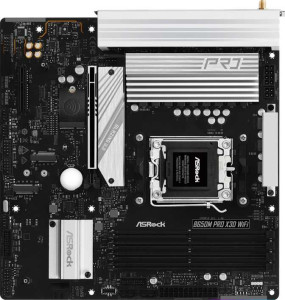
ASRock B650M Pro X3D Wi-Fi
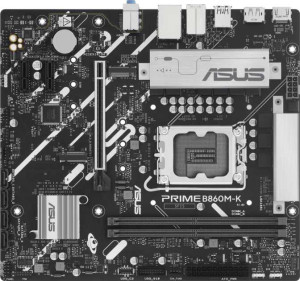
Asus Prime B860M-K

ASRock B650M Pro X3D Wi-Fi Asus Prime B860M-K

Overview

Welcome to our in-depth specification comparison between the ASRock B650M Pro X3D Wi-Fi and the Asus Prime B860M-K — two Micro-ATX motherboards that take very different approaches to the mid-range desktop market. While both boards share DDR5 memory support, PCIe expansion, and 7.1-channel audio, they diverge sharply on platform compatibility, connectivity features, and storage expansion. Read on to discover which board best matches your build requirements.

Common Features

  • Both boards use the Micro-ATX form factor.
  • Both boards feature HDMI 2.1 video output.
  • Both boards support overclocking.
  • RGB lighting is present on both boards.
  • Each board has a single CPU socket.
  • Neither board has integrated graphics.
  • Both boards come with a 3-year warranty.
  • Both boards are 244 mm wide.
  • Both boards use DDR5 memory.
  • Both boards support dual-channel memory.
  • Neither board supports ECC memory.
  • Both boards include 1 USB 3.2 Gen 2 Type-A port on the rear panel.
  • Both boards include 2 USB 3.2 Gen 1 Type-A ports on the rear panel.
  • Neither board has a USB 3.2 Gen 1 Type-C port on the rear panel.
  • Neither board has USB 3.2 Gen 2x2, USB 4, Thunderbolt 3, or Thunderbolt 4 ports.
  • Both boards provide 4 USB 2.0 headers for front-panel expansion.
  • Both boards have 4 SATA 3 connectors and no SATA 2 connectors.
  • Neither board has a mSATA connector or U.2 socket.
  • Both boards deliver 7.1-channel audio with 3 audio connectors and no S/PDIF output.
  • Both boards support RAID 0, RAID 1, and RAID 10, but not RAID 0+1.

Main Differences

  • The CPU socket is AM5 on ASRock B650M Pro X3D Wi-Fi and LGA 1851 on Asus Prime B860M-K.
  • The chipset is B650 on ASRock B650M Pro X3D Wi-Fi and B860 on Asus Prime B860M-K.
  • Wi-Fi is built into ASRock B650M Pro X3D Wi-Fi but is not available on Asus Prime B860M-K.
  • Bluetooth is built into ASRock B650M Pro X3D Wi-Fi but is not available on Asus Prime B860M-K.
  • Easy BIOS reset is supported on Asus Prime B860M-K but not on ASRock B650M Pro X3D Wi-Fi.
  • Dual BIOS is present on Asus Prime B860M-K but not on ASRock B650M Pro X3D Wi-Fi.
  • The board height is 244 mm on ASRock B650M Pro X3D Wi-Fi and 222 mm on Asus Prime B860M-K.
  • Maximum supported memory is 256 GB on ASRock B650M Pro X3D Wi-Fi and 128 GB on Asus Prime B860M-K.
  • Overclocked RAM speed reaches 8000 MHz on ASRock B650M Pro X3D Wi-Fi and 8800 MHz on Asus Prime B860M-K.
  • Memory slots number 4 on ASRock B650M Pro X3D Wi-Fi and 2 on Asus Prime B860M-K.
  • A USB 3.2 Gen 2 Type-C rear port is present on ASRock B650M Pro X3D Wi-Fi but absent on Asus Prime B860M-K.
  • USB 2.0 rear ports total 4 on ASRock B650M Pro X3D Wi-Fi and 3 on Asus Prime B860M-K.
  • A PS/2 port is available on Asus Prime B860M-K but not on ASRock B650M Pro X3D Wi-Fi.
  • USB 3.2 Gen 1 expansion headers number 4 on ASRock B650M Pro X3D Wi-Fi and 2 on Asus Prime B860M-K.
  • Fan headers total 5 on ASRock B650M Pro X3D Wi-Fi and 3 on Asus Prime B860M-K.
  • M.2 sockets number 3 on ASRock B650M Pro X3D Wi-Fi and 2 on Asus Prime B860M-K.
  • A TPM connector is present on Asus Prime B860M-K but not on ASRock B650M Pro X3D Wi-Fi.
  • ASRock B650M Pro X3D Wi-Fi has a PCIe 5.0 x16 slot, while Asus Prime B860M-K has a PCIe 4.0 x16 slot instead.
  • PCIe x1 slots number 0 on ASRock B650M Pro X3D Wi-Fi and 2 on Asus Prime B860M-K.
  • RAID 5 support is available on Asus Prime B860M-K but not on ASRock B650M Pro X3D Wi-Fi.
Specs Comparison
ASRock B650M Pro X3D Wi-Fi

ASRock B650M Pro X3D Wi-Fi

Asus Prime B860M-K

Asus Prime B860M-K

General info:
CPU socket AM5 LGA 1851
chipset B650 B860
form factor Micro-ATX Micro-ATX
release date June 2025 January 2025
supports Wi-Fi
Has Bluetooth
HDMI version HDMI 2.1 HDMI 2.1
Easy to overclock
has RGB lighting
Easy to reset BIOS
Has dual BIOS
CPU sockets 1 1
Has integrated graphics
warranty period 3 years 3 years
height 244 mm 222 mm
width 244 mm 244 mm
Has integrated CPU

The most fundamental difference here is platform: the ASRock B650M Pro X3D Wi-Fi uses the AM5 socket for AMD Ryzen processors, while the Asus Prime B860M-K uses the LGA 1851 socket for Intel Core Ultra (Arrow Lake) CPUs. This means the two boards are not interchangeable — your CPU choice locks you into one or the other. Both adopt the Micro-ATX form factor, though the ASRock is slightly taller at 244 mm versus the Asus at 222 mm, which could matter in compact cases with tight height clearances.

A significant real-world differentiator is wireless connectivity. The ASRock includes Wi-Fi and Bluetooth on-board, meaning users get wireless networking and peripheral support out of the box with no extra adapter needed. The Asus Prime B860M-K has neither Wi-Fi nor Bluetooth, which adds cost and complexity for anyone who needs them. On the other hand, the Asus has a clear reliability edge for enthusiasts: it features both easy BIOS reset and a dual BIOS — a backup chip that can recover from a failed firmware flash. The ASRock offers neither, which raises the stakes when updating firmware.

Both boards share a 3-year warranty, HDMI 2.1 output, RGB lighting, and overclocking support, so day-to-day usability is broadly similar. Overall, the ASRock holds an edge for users who value wireless connectivity and are building on the AMD platform, while the Asus is the safer choice for firmware resilience on Intel builds — provided wireless is not a requirement.

Memory:
maximum memory amount 256GB 128GB
overclocked RAM speed 8000 MHz 8800 MHz
memory slots 4 2
DDR memory version 5 5
memory channels 2 2
Supports ECC memory

Both boards run DDR5 memory across dual channels, so the baseline architecture is identical. Where they diverge sharply is in slot count and capacity ceiling: the ASRock B650M Pro X3D Wi-Fi offers 4 memory slots and supports up to 256 GB, while the Asus Prime B860M-K is limited to 2 slots and a 128 GB maximum. For most gaming or everyday workloads this won't matter, but for content creators, virtualization users, or anyone planning a long-term build with incremental upgrades, the ASRock's extra slots provide meaningful headroom — both for adding more sticks later and for redundancy if one module fails.

Flipping the script, the Asus pulls ahead on raw overclocked memory speed, topping out at 8800 MHz compared to the ASRock's 8000 MHz. In practice, the real-world performance gap between these two frequencies is marginal for most workloads, though AMD's Ryzen platform is traditionally more sensitive to memory latency and bandwidth, so pushing the ASRock to its ceiling still delivers a competitive result. Neither board supports ECC memory, so error-correcting RAM for workstation-critical applications is off the table on both.

On balance, the ASRock holds the broader memory advantage for build flexibility and long-term scalability thanks to its higher capacity ceiling and extra slots. The Asus offers a slightly higher overclocking ceiling, but that edge is too narrow to offset the practical limitations of having only two slots and half the maximum RAM.

Ports:
USB 3.2 Gen 2 ports (USB-A) 1 1
USB 3.2 Gen 1 ports (USB-A) 2 2
USB 3.2 Gen 2 ports (USB-C) 1 0
USB 3.2 Gen 1 ports (USB-C) 0 0
USB 2.0 ports 4 3
USB 3.2 Gen 2x2 ports 0 0
USB 4 40Gbps ports 0 0
USB 4 20Gbps ports 0 0
Thunderbolt 4 ports 0 0
Thunderbolt 3 ports 0 0
has an HDMI output
DisplayPort outputs 1 1
RJ45 ports 1 1
Has USB Type-C
eSATA ports 0 0
DVI outputs 0 0
has a VGA connector
PS/2 ports 0 1

The rear I/O layout of these two boards is largely comparable — both offer the same USB 3.2 Gen 2 and Gen 1 Type-A counts, an HDMI output, a DisplayPort, and a single RJ45 ethernet jack. For most users, day-to-day connectivity will feel identical. The meaningful divergence comes down to two specific ports that cater to very different user profiles.

The ASRock B650M Pro X3D Wi-Fi includes a USB 3.2 Gen 2 Type-C port on the rear panel, delivering 10 Gbps over the compact connector — useful for modern external SSDs, docks, or devices that have moved away from Type-A. The Asus Prime B860M-K has no rear Type-C at any speed, which is a notable omission as USB-C peripherals become increasingly common. Conversely, the Asus features a PS/2 port — a legacy connector that almost exclusively serves users with older keyboards or mice, or niche scenarios like KVM switches in enterprise environments. For a modern consumer build, a PS/2 port is rarely relevant.

The ASRock edges ahead in this category. The addition of a high-speed Type-C port is a practical, forward-looking feature that benefits a wide range of users, whereas the Asus trades that for a PS/2 port that serves a narrow legacy use case. Unless compatibility with older peripherals is a specific requirement, the ASRock's port selection is the more versatile of the two.

Connectors:
USB 3.2 Gen 1 ports (through expansion) 4 2
USB 2.0 ports (through expansion) 4 4
SATA 3 connectors 4 4
fan headers 5 3
USB 3.0 ports (through expansion) 4 2
M.2 sockets 3 2
Has TPM connector
U.2 sockets 0 0
Has mSATA connector
SATA 2 connectors 0 0

Internal connectors tell a lot about how much a board can grow with a build over time. Here, the ASRock B650M Pro X3D Wi-Fi pulls ahead in storage and expansion: it offers 3 M.2 sockets versus the Asus Prime B860M-K's 2, while both share an identical 4 SATA 3 connector count. That extra M.2 slot is genuinely useful — it means the ASRock can simultaneously house an OS drive, a secondary NVMe for games or projects, and a third for backup or overflow, all without touching any SATA ports.

Thermal management is another area where the two diverge. The ASRock provides 5 fan headers to the Asus's 3, which matters in builds with multiple case fans, a CPU cooler, and a separate pump header for liquid cooling. Fewer headers don't necessarily block complex cooling setups, but they force reliance on fan hubs or splitters — adding cable clutter and reducing individual control. The ASRock also doubles the Asus on internal USB 3.0 expansion headers (4 vs 2), giving front-panel and add-in card connectivity more room to breathe.

The one area where the Asus holds a distinct advantage is its TPM connector, which the ASRock lacks. This is relevant for users deploying hardware-based security, BitLocker encryption tied to a discrete TPM module, or certain enterprise and compliance scenarios. For mainstream home builders, though, this is a niche consideration. Overall, the ASRock is the stronger board for storage-heavy and thermally complex builds, while the Asus's TPM header gives it a targeted edge for security-focused deployments.
Expansion slots:
PCIe 4.0 x16 slots 0 1
PCIe 5.0 x16 slots 1 0
PCIe 3.0 x16 slots 0 0
PCIe x1 slots 0 2
PCI slots 0 0
PCIe 2.0 x16 slots 0 0
PCIe x4 slots 1 0
PCIe x8 slots 0 0

The primary GPU slot is where these two boards take meaningfully different directions. The ASRock B650M Pro X3D Wi-Fi equips a PCIe 5.0 x16 slot, while the Asus Prime B860M-K offers a PCIe 4.0 x16 slot. For current-generation graphics cards, the practical gaming performance difference between these two standards is negligible — no consumer GPU today saturates even PCIe 4.0 x16 bandwidth. However, PCIe 5.0 is forward-looking: as next-generation GPUs and high-throughput add-in cards begin to leverage the higher bandwidth ceiling, the ASRock will have headroom that the Asus simply cannot match.

Beyond the primary slot, the two boards diverge in how they handle secondary expansion. The ASRock adds a PCIe x4 slot, which is well-suited for add-in cards like high-speed NVMe adapters, capture cards, or 10GbE network cards. The Asus counters with two PCIe x1 slots, which offer lower bandwidth but greater flexibility for adding multiple low-demand peripherals simultaneously — think sound cards, USB expansion cards, or Wi-Fi adapters — without competing for the same bandwidth pool.

Which layout wins depends on the use case. The ASRock's PCIe 5.0 primary slot gives it a generational edge for GPU throughput longevity, and the x4 secondary slot handles demanding add-in cards comfortably. The Asus trades that ceiling for broader multi-card expandability via its two x1 slots. For a build centered on a powerful GPU with one high-bandwidth accessory, the ASRock is the stronger platform; for users adding several low-demand cards, the Asus's layout is more accommodating.

Audio:
audio channels 7.1 7.1
Has S/PDIF Out port
audio connectors 3 3

Audio is the rare category where these two boards are in complete lockstep. Both the ASRock B650M Pro X3D Wi-Fi and the Asus Prime B860M-K offer 7.1-channel audio support, 3 analog audio connectors, and neither includes an S/PDIF optical output. There are no differentiators to weigh here — the on-board audio experience is identical on paper.

The 7.1 configuration means both boards can drive a full surround sound speaker setup, which is the ceiling for consumer motherboard audio. The absence of S/PDIF on both is worth noting for anyone who wants a direct digital connection to an AV receiver or external DAC via optical — that path is unavailable on either board without an add-in card. Users with demanding audio needs will likely reach for a dedicated sound card or external USB DAC regardless, as integrated motherboard audio is generally a convenience feature rather than an audiophile solution.

This is a straightforward tie. Neither board holds any audio advantage over the other based on the available data, and the decision between them should rest entirely on the differentiators found in other specification groups.

Storage:
Supports RAID 1
Supports RAID 10 (1+0)
Supports RAID 5
Supports RAID 0
Supports RAID 0+1

RAID support is nearly identical across these two boards, with one exception that tips the scales slightly. Both the ASRock B650M Pro X3D Wi-Fi and the Asus Prime B860M-K support RAID 0 (striping for performance), RAID 1 (mirroring for redundancy), and RAID 10 (a combination of both) — covering the configurations most home and prosumer builders would realistically use. The Asus Prime B860M-K goes one step further by also supporting RAID 5, which the ASRock does not.

RAID 5 is meaningful in specific contexts: it distributes parity data across three or more drives, offering a balance of storage efficiency, read performance, and fault tolerance that RAID 1 and RAID 10 don't replicate as economically. For a small NAS-style setup or a workstation handling large media files across multiple drives, RAID 5 can make better use of available capacity while still protecting against a single drive failure. That said, it requires a minimum of three drives and carries higher write overhead, so it remains a niche choice for most consumer builds.

The Asus holds a narrow edge here purely by virtue of its RAID 5 support. For the vast majority of users, RAID 0, 1, and 10 are sufficient, making this a practical tie in everyday scenarios — but for anyone specifically planning a multi-drive redundant array, the Asus offers one more viable configuration than the ASRock.

Comparison Summary & Verdict

After examining every specification, it is clear that both boards serve distinct audiences. The ASRock B650M Pro X3D Wi-Fi stands out for AMD AM5 platform builders who need built-in Wi-Fi and Bluetooth, more memory slots (4 vs 2), a higher memory ceiling of 256 GB, three M.2 sockets, a PCIe 5.0 x16 slot, and more fan headers — making it the stronger choice for feature-rich or future-proofed AMD builds. The Asus Prime B860M-K, on the other hand, targets Intel LGA 1851 builders who value dual BIOS redundancy, easy BIOS reset, a TPM connector, RAID 5 support, and a slightly higher overclocked RAM speed of 8800 MHz in a more compact 222 mm height. Neither board is objectively superior; your CPU platform choice will likely be the deciding factor.

ASRock B650M Pro X3D Wi-Fi
Buy ASRock B650M Pro X3D Wi-Fi if...

Buy the ASRock B650M Pro X3D Wi-Fi if you are building on the AMD AM5 platform and want built-in Wi-Fi and Bluetooth, more memory slots and capacity, a PCIe 5.0 x16 slot, and greater storage expansion with three M.2 sockets.

Asus Prime B860M-K
Buy Asus Prime B860M-K if...

Buy the Asus Prime B860M-K if you are building on the Intel LGA 1851 platform and prioritize dual BIOS protection, easy BIOS reset, a TPM connector, RAID 5 support, and a more compact board height.