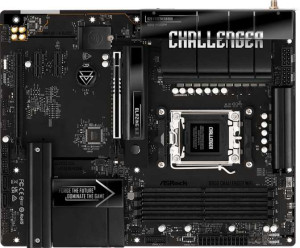
ASRock B850 Challenger Wi-Fi
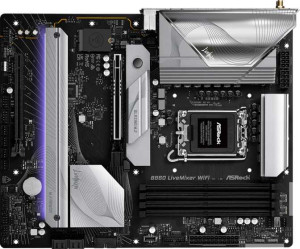
ASRock B860 LiveMixer WiFi

ASRock B850 Challenger Wi-Fi ASRock B860 LiveMixer WiFi

Overview

When choosing between the ASRock B850 Challenger Wi-Fi and the ASRock B860 LiveMixer WiFi, builders face a compelling crossroads between two ATX motherboards that share a strong foundation yet diverge in meaningful ways. Both boards bring DDR5 support, PCIe 5.0, dual BIOS, and wireless connectivity to the table, but key battlegrounds emerge around CPU platform compatibility, connectivity options, storage expansion, and overclocking headroom. Read on to see which board best fits your next build.

Common Features

  • Both motherboards use the ATX form factor.
  • Both motherboards support Wi-Fi.
  • Both motherboards have Bluetooth.
  • Both motherboards feature HDMI 2.1.
  • Both motherboards support overclocking.
  • Both motherboards have RGB lighting.
  • Neither motherboard supports easy BIOS reset.
  • Both motherboards have dual BIOS.
  • Both motherboards support a maximum memory amount of 256GB.
  • Both motherboards have 4 memory slots.
  • Both motherboards use DDR5 memory.
  • Both motherboards have 2 memory channels.
  • Neither motherboard supports ECC memory.
  • Neither motherboard has USB 3.2 Gen 2 ports in USB-C format.
  • Neither motherboard has USB 3.2 Gen 1 ports in USB-C format.
  • Neither motherboard has USB 3.2 Gen 2x2 ports.
  • Neither motherboard has USB 4 20Gbps ports.
  • Neither motherboard has Thunderbolt 3 ports.
  • Both motherboards have an HDMI output.
  • Neither motherboard has DisplayPort outputs.
  • Both motherboards have 1 RJ45 port.
  • Both motherboards provide 4 USB 3.2 Gen 1 ports through expansion.
  • Both motherboards provide 4 USB 2.0 ports through expansion.
  • Both motherboards have 4 SATA 3 connectors.
  • Both motherboards have a TPM connector.
  • Neither motherboard has a U.2 socket.
  • Neither motherboard has an mSATA connector.
  • Neither motherboard has SATA 2 connectors.
  • Both motherboards have 1 PCIe 4.0 x16 slot.
  • Both motherboards have 1 PCIe 5.0 x16 slot.
  • Neither motherboard has PCIe 3.0 x16 slots.
  • Neither motherboard has PCI slots.
  • Neither motherboard has PCIe 2.0 x16 slots.
  • Both motherboards support 7.1 audio channels.
  • Both motherboards support RAID 0, RAID 1, and RAID 10.
  • Neither motherboard supports RAID 0+1.

Main Differences

  • The CPU socket is AM5 on ASRock B850 Challenger Wi-Fi and LGA 1851 on ASRock B860 LiveMixer WiFi.
  • The chipset is B850 on ASRock B850 Challenger Wi-Fi and B860 on ASRock B860 LiveMixer WiFi.
  • Wi-Fi 7 (802.11be) support is present on ASRock B850 Challenger Wi-Fi but not available on ASRock B860 LiveMixer WiFi.
  • The Bluetooth version is 5.4 on ASRock B850 Challenger Wi-Fi and 5.3 on ASRock B860 LiveMixer WiFi.
  • The maximum overclocked RAM speed is 8000 MHz on ASRock B850 Challenger Wi-Fi and 8666 MHz on ASRock B860 LiveMixer WiFi.
  • USB 3.2 Gen 2 ports (USB-A) count is 1 on ASRock B850 Challenger Wi-Fi and 0 on ASRock B860 LiveMixer WiFi.
  • USB 3.2 Gen 1 ports (USB-A) count is 4 on ASRock B850 Challenger Wi-Fi and 6 on ASRock B860 LiveMixer WiFi.
  • USB 2.0 port count is 4 on ASRock B850 Challenger Wi-Fi and 6 on ASRock B860 LiveMixer WiFi.
  • USB 4 40Gbps port support is present on ASRock B860 LiveMixer WiFi but not available on ASRock B850 Challenger Wi-Fi.
  • Thunderbolt 4 port support is present on ASRock B860 LiveMixer WiFi but not available on ASRock B850 Challenger Wi-Fi.
  • The number of fan headers is 6 on ASRock B850 Challenger Wi-Fi and 8 on ASRock B860 LiveMixer WiFi.
  • The number of M.2 sockets is 2 on ASRock B850 Challenger Wi-Fi and 3 on ASRock B860 LiveMixer WiFi.
  • PCIe x1 slot count is 2 on ASRock B850 Challenger Wi-Fi and 0 on ASRock B860 LiveMixer WiFi.
  • S/PDIF Out port support is present on ASRock B860 LiveMixer WiFi but not available on ASRock B850 Challenger Wi-Fi.
  • The number of audio connectors is 3 on ASRock B850 Challenger Wi-Fi and 2 on ASRock B860 LiveMixer WiFi.
  • RAID 5 support is present on ASRock B860 LiveMixer WiFi but not available on ASRock B850 Challenger Wi-Fi.
Specs Comparison
ASRock B850 Challenger Wi-Fi

ASRock B850 Challenger Wi-Fi

ASRock B860 LiveMixer WiFi

ASRock B860 LiveMixer WiFi

General info:
CPU socket AM5 LGA 1851
chipset B850 B860
form factor ATX ATX
release date July 2025 January 2025
supports Wi-Fi
Wi-Fi version Wi-Fi 4 (802.11n), Wi-Fi 5 (802.11ac), Wi-Fi 6 (802.11ax), Wi-Fi 6E (802.11ax), Wi-Fi 7 (802.11be) Wi-Fi 4 (802.11n), Wi-Fi 5 (802.11ac), Wi-Fi 6 (802.11ax), Wi-Fi 6E (802.11ax)
Has Bluetooth
Bluetooth version 5.4 5.3
HDMI version HDMI 2.1 HDMI 2.1
Easy to overclock
has RGB lighting
Easy to reset BIOS
Has dual BIOS
has aptX
CPU sockets 1 1
Has integrated graphics
warranty period 3 years 3 years
height 244 mm 244 mm
width 305 mm 305 mm
Has integrated CPU

The most fundamental difference between these two boards is platform compatibility: the ASRock B850 Challenger Wi-Fi uses an AM5 socket for AMD processors, while the ASRock B860 LiveMixer WiFi uses an LGA 1851 socket for Intel processors. This means they are not interchangeable and the choice between them is largely dictated by which CPU ecosystem the user is already committed to — or planning to enter. Both use mid-range chipsets (B850 and B860 respectively) within their own platforms, and share the same ATX form factor and identical physical dimensions, making them direct counterparts in terms of case compatibility.

On the connectivity front, the B850 Challenger holds a tangible advantage: it supports Wi-Fi 7 (802.11be), whereas the B860 LiveMixer tops out at Wi-Fi 6E (802.11ax). In practical terms, Wi-Fi 7 brings significantly higher theoretical throughput and lower latency — particularly relevant as Wi-Fi 7 routers become more accessible. The Bluetooth edge also goes to the B850, with version 5.4 versus 5.3 on the B860, though this difference is minor in everyday use. Both boards share HDMI 2.1 output, dual BIOS, RGB lighting, and a 3-year warranty, making those features non-factors in the decision.

In summary, these boards are well-matched at a structural level, but the B850 Challenger Wi-Fi has a clear edge in wireless capability thanks to Wi-Fi 7 support. Beyond that, the choice comes down entirely to CPU platform: AMD builders should look at the B850, Intel builders at the B860.
Memory:
maximum memory amount 256GB 256GB
overclocked RAM speed 8000 MHz 8666 MHz
memory slots 4 4
DDR memory version 5 5
memory channels 2 2
Supports ECC memory

At a glance, these two boards are nearly identical in memory configuration: both offer 4 slots, dual-channel DDR5 support, a 256GB maximum capacity, and no ECC memory support. For the vast majority of users, this means the same upgrade ceiling and the same day-to-day memory experience regardless of which board they choose.

The one spec that separates them is overclocked RAM speed. The B860 LiveMixer WiFi supports up to 8666 MHz, while the B850 Challenger Wi-Fi caps out at 8000 MHz. In real-world terms, this gap matters mostly to memory overclocking enthusiasts pushing XMP/EXPO profiles to their limits — for gaming or productivity workloads at mainstream DDR5 speeds (5600–7200 MHz), both boards will perform identically. The higher ceiling on the B860 is a meaningful spec on paper, but its practical impact is limited to a narrow audience chasing benchmark numbers.

The B860 LiveMixer WiFi has a narrow edge in this category solely due to its higher maximum overclocked memory speed. For anyone not actively pursuing extreme memory tuning, however, these two boards are effectively tied on memory capability.

Ports:
USB 3.2 Gen 2 ports (USB-A) 1 0
USB 3.2 Gen 1 ports (USB-A) 4 6
USB 3.2 Gen 2 ports (USB-C) 0 0
USB 3.2 Gen 1 ports (USB-C) 0 0
USB 2.0 ports 4 6
USB 3.2 Gen 2x2 ports 0 0
USB 4 40Gbps ports 0 1
USB 4 20Gbps ports 0 0
Thunderbolt 4 ports 0 1
Thunderbolt 3 ports 0 0
has an HDMI output
DisplayPort outputs 0 0
RJ45 ports 1 1
Has USB Type-C
eSATA ports 0 0
DVI outputs 0 0
has a VGA connector
PS/2 ports 0 0

This is where the two boards diverge most dramatically. The B860 LiveMixer WiFi includes a Thunderbolt 4 port alongside a USB4 40Gbps port — a combination that the B850 Challenger Wi-Fi entirely lacks. Thunderbolt 4 is a premium feature typically reserved for higher-end boards: it enables daisy-chaining multiple high-bandwidth devices, connecting external GPU enclosures, driving multiple 4K displays from a single cable, and transferring data at up to 40Gbps. For content creators, video editors, or power users with demanding peripheral setups, this single difference could be decisive.

Elsewhere, the B860 also edges ahead in raw port count, offering 6 USB 3.2 Gen 1 and 6 USB 2.0 ports versus the B850's 4 of each — giving it more simultaneous device connections without a hub. The B850 counters with one USB 3.2 Gen 2 (10Gbps) Type-A port that the B860 omits, but the practical bandwidth advantage of that single Gen 2 port is far outweighed by the B860's Thunderbolt 4 and USB4 presence. Both boards share HDMI 2.1 output and a single RJ45 ethernet port, making those non-factors.

The B860 LiveMixer WiFi wins this category convincingly. Thunderbolt 4 and USB4 40Gbps represent a generational leap in connectivity versatility that the B850 Challenger simply cannot match, making the B860 the stronger choice for anyone who relies on high-bandwidth external devices or future-proofed I/O flexibility.

Connectors:
USB 3.2 Gen 1 ports (through expansion) 4 4
USB 2.0 ports (through expansion) 4 4
SATA 3 connectors 4 4
fan headers 6 8
USB 3.0 ports (through expansion) 4 4
M.2 sockets 2 3
Has TPM connector
U.2 sockets 0 0
Has mSATA connector
SATA 2 connectors 0 0

Internal connectors tell a lot about a board's expandability headroom, and here the two boards are close but not identical. The shared foundation is solid: both provide 4 SATA 3 connectors, 4 USB 3.2 Gen 1 and 4 USB 2.0 internal expansion headers, and a TPM connector — giving builders equivalent storage and front-panel USB flexibility out of the box.

Two differences stand out. First, the B860 LiveMixer WiFi includes 3 M.2 sockets versus 2 on the B850 Challenger Wi-Fi. That extra M.2 slot is meaningful for users who want to run multiple NVMe SSDs simultaneously without consuming any SATA ports — useful for fast scratch drives, large game libraries, or tiered storage setups. Second, the B860 offers 8 fan headers compared to the B850's 6. In a large or well-ventilated case with multiple cooling fans and pump headers, two additional headers can eliminate the need for a fan splitter and give finer independent control over airflow zones.

The B860 LiveMixer WiFi has the edge in this category. The extra M.2 socket meaningfully extends NVMe storage capacity, and the additional fan headers benefit users building thermally complex systems. Neither advantage is transformative on its own, but together they give the B860 a more future-proof internal connector layout.

Expansion slots:
PCIe 4.0 x16 slots 1 1
PCIe 5.0 x16 slots 1 1
PCIe 3.0 x16 slots 0 0
PCIe x1 slots 2 0
PCI slots 0 0
PCIe 2.0 x16 slots 0 0
PCIe x4 slots 0 0
PCIe x8 slots 0 0

For GPU and high-bandwidth card placement, both boards are functionally identical: each provides one PCIe 5.0 x16 slot for a primary graphics card and one PCIe 4.0 x16 slot for a secondary device. PCIe 5.0 on the primary slot ensures maximum bandwidth headroom for current and next-generation GPUs, and this parity means neither board has a structural advantage for single- or dual-card configurations.

The only differentiator here is that the B850 Challenger Wi-Fi adds 2 PCIe x1 slots, which the B860 LiveMixer WiFi entirely omits. PCIe x1 slots serve a niche but real purpose — they accommodate capture cards, sound cards, network cards, or other low-bandwidth expansion cards that don't require a full x16 lane. Users building a media production or streaming rig who need a dedicated capture card, for instance, would find those slots directly useful on the B850.

For most users focused purely on GPU performance, this category is a tie. However, builders who anticipate adding PCIe x1 expansion cards gain a practical advantage with the B850 Challenger Wi-Fi, making it the more flexible choice for slot-hungry configurations.

Audio:
audio channels 7.1 7.1
Has S/PDIF Out port
audio connectors 3 2

Both boards deliver 7.1 channel audio, meaning surround sound setups are equally supported on either platform. Where they diverge is in how that audio reaches external devices. The B860 LiveMixer WiFi includes an S/PDIF optical output, while the B850 Challenger Wi-Fi does not. S/PDIF matters for users routing audio through a receiver, soundbar, or DAC via optical cable — it passes a clean digital signal that bypasses the motherboard's analog circuitry entirely, which can noticeably improve audio fidelity in home theater or dedicated listening setups.

The trade-off is in analog connector count. The B850 provides 3 audio jacks versus 2 on the B860, giving it one extra analog port on the rear panel. This is relevant for users simultaneously connecting multiple analog devices — for example, speakers and a headset without an adapter — though it is a minor convenience advantage rather than a capability gap.

On balance, the B860 LiveMixer WiFi has the edge for users who care about audio quality or flexibility, as S/PDIF output opens a connectivity path the B850 simply cannot offer. The B850's extra analog jack is a slim consolation for a niche use case. For anyone connecting to an AV receiver or external DAC, the B860 is the stronger choice in this category.

Storage:
Supports RAID 1
Supports RAID 10 (1+0)
Supports RAID 5
Supports RAID 0
Supports RAID 0+1

RAID support is a niche but important consideration for users building NAS-adjacent workstations or any system where data redundancy matters. Both boards cover the core configurations: RAID 0 for pure performance striping, RAID 1 for mirroring, and RAID 10 for a combined striping-and-redundancy setup. For the majority of home and enthusiast builders, these three modes cover virtually every practical use case.

The single differentiator is RAID 5 support, which the B860 LiveMixer WiFi offers and the B850 Challenger Wi-Fi does not. RAID 5 distributes parity data across three or more drives, delivering a balance of read performance, storage efficiency, and fault tolerance that RAID 1 and RAID 10 cannot match at the same usable capacity ratio. It is the preferred configuration for small file servers or workstation builds where maximizing usable drive space while retaining redundancy is a priority.

The B860 LiveMixer WiFi takes a narrow win here. For most users RAID 5 will never come into play, but for those running multi-drive storage arrays — particularly in a prosumer or light server context — its absence on the B850 is a genuine limitation that the B860 does not share.

Comparison Summary & Verdict

After examining the full specification set, both boards prove to be solid mid-range ATX options, yet they clearly target different audiences. The ASRock B850 Challenger Wi-Fi is built around the AMD AM5 platform and stands out with Wi-Fi 7 support, Bluetooth 5.4, a USB 3.2 Gen 2 Type-A port, and more audio connectors, making it a strong pick for AMD enthusiasts who want cutting-edge wireless and a flexible audio setup. The ASRock B860 LiveMixer WiFi, on the other hand, targets Intel LGA 1851 users and counters with a higher overclocked RAM ceiling of 8666 MHz, an extra M.2 socket, two additional fan headers, a dedicated Thunderbolt 4 and USB 4 40Gbps port, RAID 5 support, and an S/PDIF Out connector, making it the more expansion-ready and enthusiast-oriented choice for Intel-platform builders.

ASRock B850 Challenger Wi-Fi
Buy ASRock B850 Challenger Wi-Fi if...

Buy the ASRock B850 Challenger Wi-Fi if you are building on the AMD AM5 platform and want Wi-Fi 7 support along with Bluetooth 5.4 for the latest wireless connectivity.

ASRock B860 LiveMixer WiFi
Buy ASRock B860 LiveMixer WiFi if...

Buy the ASRock B860 LiveMixer WiFi if you are on the Intel LGA 1851 platform and need Thunderbolt 4, a USB 4 40Gbps port, an extra M.2 slot, and a higher overclocked RAM speed of 8666 MHz.