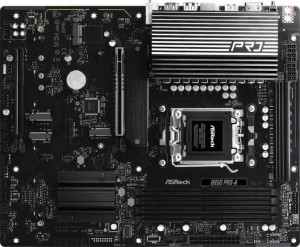
ASRock B850 Pro-A
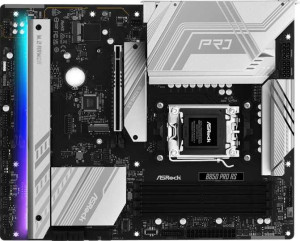
ASRock B850 Pro RS

ASRock B850 Pro-A ASRock B850 Pro RS

Overview

Welcome to this in-depth specification comparison between the ASRock B850 Pro-A and the ASRock B850 Pro RS. Both are AM5-socket motherboards built on the B850 chipset in a standard ATX form factor, making them close rivals on paper. The key battleground in this comparison centers on internal USB expansion capabilities, which could matter for builders planning complex system configurations with multiple front-panel connections.

Common Features

  • Both boards use the AM5 CPU socket.
  • Both boards feature the B850 chipset.
  • Both boards have an ATX form factor.
  • Wi-Fi is not available on either board.
  • Bluetooth is not available on either board.
  • Both boards include an HDMI 2.1 port.
  • Both boards support overclocking.
  • RGB lighting is present on both boards.
  • Both boards support a maximum memory amount of 256GB.
  • Both boards support overclocked RAM speeds of up to 8000 MHz.
  • Both boards have 4 memory slots and use DDR5 memory across 2 channels.
  • ECC memory is not supported on either board.
  • Both boards provide 4 USB 3.2 Gen 1 ports (USB-A), 1 USB 3.2 Gen 2 port (USB-C), and 1 USB 3.2 Gen 1 port (USB-C) on the rear panel.
  • Both boards have 6 USB 2.0 rear ports and no USB 3.2 Gen 2x2, USB 4 20Gbps, or USB 4 40Gbps rear ports.
  • Both boards offer 1 USB 3.2 Gen 2x2 port through internal expansion.
  • Both boards include 4 SATA 3 connectors, 4 M.2 sockets, and 7 fan headers.
  • A TPM connector is present on both boards, while neither includes a U.2 socket or mSATA connector.
  • Both boards have 1 PCIe 5.0 x16 slot and 1 PCIe 4.0 x16 slot, with no PCIe 3.0 x16, PCIe x1, or PCI slots.
  • Both boards deliver 7.1-channel audio with 3 audio connectors and no S/PDIF Out port.
  • Both boards support RAID 0, RAID 1, and RAID 10, while neither supports RAID 5 or RAID 0+1.

Main Differences

  • USB 3.2 Gen 1 ports available through internal expansion number 2 on the ASRock B850 Pro-A and 4 on the ASRock B850 Pro RS.
  • USB 2.0 ports available through internal expansion number 3 on the ASRock B850 Pro-A and 4 on the ASRock B850 Pro RS.
  • USB 3.0 ports available through internal expansion number 2 on the ASRock B850 Pro-A and 4 on the ASRock B850 Pro RS.
Specs Comparison
ASRock B850 Pro-A

ASRock B850 Pro-A

ASRock B850 Pro RS

ASRock B850 Pro RS

General info:
CPU socket AM5 AM5
chipset B850 B850
form factor ATX ATX
release date January 2025 January 2025
supports Wi-Fi
Has Bluetooth
HDMI version HDMI 2.1 HDMI 2.1
Easy to overclock
has RGB lighting
Easy to reset BIOS
Has dual BIOS
CPU sockets 1 1
Has integrated graphics
warranty period 3 years 3 years
height 244 mm 244 mm
width 305 mm 305 mm
Has integrated CPU

In terms of general specifications, the ASRock B850 Pro-A and ASRock B850 Pro RS are virtually identical twins. Both boards are built around the AM5 socket and the B850 chipset, share the standard ATX form factor (244 × 305 mm), and support overclocking — a meaningful perk on a B-series board that gives users headroom to push their AMD Ryzen processors beyond stock settings without needing a premium X-series platform.

Every binary feature checked in this group lands the same way for both boards: neither includes Wi-Fi or Bluetooth, both carry HDMI 2.1 output (useful for driving high-refresh or 4K displays directly from the board), both feature dual BIOS for firmware recovery resilience, both include RGB lighting, and neither offers an easy BIOS reset mechanism or integrated graphics. The shared 3-year warranty and single CPU socket round out a profile that is consistent down to the millimeter.

Based strictly on the general info specs provided, these two boards are in a dead tie. There is no differentiating factor in this category — a buyer choosing between them on general characteristics alone has no objective reason to prefer one over the other. Differences, if any, will need to be found in other specification groups such as connectivity, memory, or expansion slots.

Memory:
maximum memory amount 256GB 256GB
overclocked RAM speed 8000 MHz 8000 MHz
memory slots 4 4
DDR memory version 5 5
memory channels 2 2
Supports ECC memory

Both the ASRock B850 Pro-A and ASRock B850 Pro RS share an identical memory configuration across every measured spec. Each board offers four DDR5 slots arranged in a dual-channel layout, supporting up to 256GB of total RAM — a ceiling that comfortably serves workstation-class workloads, heavy virtualization, and even professional content creation tasks, well beyond what gaming or everyday desktop use demands.

The overclocked memory ceiling of 8000 MHz is particularly noteworthy on a B850 platform. This is a strong figure that allows users to extract meaningful performance gains from high-speed DDR5 kits, especially in AMD Ryzen applications where memory bandwidth directly influences CPU performance. Neither board supports ECC memory, which is expected at this tier — ECC remains largely a workstation and server feature not typically found on consumer B-series boards.

As with the general specs, this category results in a complete tie. Every memory attribute — capacity ceiling, slot count, DDR generation, channel configuration, and overclocking headroom — is perfectly mirrored between the two boards. Buyers prioritizing memory expandability or performance have no basis for differentiation here.

Ports:
USB 3.2 Gen 2 ports (USB-A) 0 0
USB 3.2 Gen 1 ports (USB-A) 4 4
USB 3.2 Gen 2 ports (USB-C) 1 1
USB 3.2 Gen 1 ports (USB-C) 1 1
USB 2.0 ports 6 6
USB 3.2 Gen 2x2 ports 0 0
USB 4 40Gbps ports 0 0
USB 4 20Gbps ports 0 0
Thunderbolt 4 ports 0 0
Thunderbolt 3 ports 0 0
has an HDMI output
DisplayPort outputs 0 0
RJ45 ports 1 1
Has USB Type-C
eSATA ports 0 0
DVI outputs 0 0
has a VGA connector
PS/2 ports 0 0

The rear I/O layout on both the ASRock B850 Pro-A and ASRock B850 Pro RS follows the same blueprint. The USB lineup combines four USB 3.2 Gen 1 Type-A ports, one USB 3.2 Gen 2 Type-C, one USB 3.2 Gen 1 Type-C, and six USB 2.0 ports — a total of twelve USB connections. The Gen 2 Type-C at 10Gbps is the headline here, useful for fast external SSDs or modern peripherals, while the generous USB 2.0 count keeps legacy devices like keyboards, mice, and audio interfaces well accommodated without occupying faster ports.

One notable absence on both boards is any USB 3.2 Gen 2x2 or USB4 connectivity, which caps the top single-port transfer ceiling at 10Gbps. For users who work with high-speed external NVMe enclosures or Thunderbolt-adjacent devices, this is a limitation worth noting — though it is typical for B-series mainstream boards rather than flagship offerings. Display output is limited to a single HDMI port with no DisplayPort, which constrains multi-monitor setups driven purely from the board's video output. Networking is handled by a solitary RJ45 Ethernet port, standard for this tier.

Once again, the two boards are in a complete tie — the port configuration is identical in every respect. Neither the Pro-A nor the Pro RS holds any I/O advantage over the other based on the data provided.

Connectors:
USB 3.2 Gen 1 ports (through expansion) 2 4
USB 3.2 Gen 2x2 ports (through expansion) 1 1
USB 2.0 ports (through expansion) 3 4
SATA 3 connectors 4 4
fan headers 7 7
USB 3.0 ports (through expansion) 2 4
M.2 sockets 4 4
Has TPM connector
U.2 sockets 0 0
Has mSATA connector
SATA 2 connectors 0 0

When it comes to internal connectors, these two boards share a strong common foundation: four M.2 sockets, four SATA 3 ports, seven fan headers, and a TPM connector are present on both the ASRock B850 Pro-A and ASRock B850 Pro RS. Four M.2 slots is a generous allocation that allows users to build fully NVMe-based storage arrays without touching the SATA ports at all — the SATA connections then become purely optional capacity for large HDDs or budget SSDs.

The only meaningful divergence between the two boards appears in the internal USB expansion headers. The Pro RS offers four USB 3.2 Gen 1 internal ports and four USB 2.0 expansion ports, compared to the Pro-A's two USB 3.2 Gen 1 and three USB 2.0. In practical terms, this means the Pro RS can support more front-panel USB connections and internal USB hubs or accessories simultaneously — a tangible advantage for users who run high-USB-demand cases, all-in-one coolers with internal USB dongles, or multiple front-panel USB headers.

This is the first category where one board pulls ahead: the Pro RS has a clear edge in internal USB expansion, offering greater flexibility for case connectivity and internal peripheral management. For users who anticipate maxing out front-panel USB headers or adding internal USB devices, this difference is worth factoring into the decision.

Expansion slots:
PCIe 4.0 x16 slots 1 1
PCIe 5.0 x16 slots 1 1
PCIe 3.0 x16 slots 0 0
PCIe x1 slots 0 0
PCI slots 0 0
PCIe 2.0 x16 slots 0 0
PCIe x4 slots 0 0
PCIe x8 slots 0 0

Expansion slot configurations are lean but modern on both the ASRock B850 Pro-A and ASRock B850 Pro RS. Each board provides one PCIe 5.0 x16 slot and one PCIe 4.0 x16 slot, with no legacy PCIe 3.0, x1, or PCI slots present. The PCIe 5.0 primary slot is the headline feature — it ensures the board is ready for current and next-generation discrete GPUs and ultra-fast NVMe add-in cards that demand the full bandwidth of the latest standard, effectively future-proofing the platform for several years.

The secondary PCIe 4.0 x16 slot adds useful flexibility for a second GPU in compute configurations, a high-speed capture card, a 10GbE NIC, or other bandwidth-hungry add-in cards — all without bottlenecking on older PCIe 3.0 speeds. The absence of PCIe x1 slots is a minor trade-off, meaning users who rely on low-profile expansion cards for sound, tuner, or older peripherals will need to occupy a full x16 physical slot for such devices.

No differentiation exists between the two boards here — the expansion slot layout is identical in every respect. This category is a tie, and neither the Pro-A nor the Pro RS offers any advantage in PCIe expandability over the other.

Audio:
audio channels 7.1 7.1
Has S/PDIF Out port
audio connectors 3 3

Audio capabilities are modest but functional on both the ASRock B850 Pro-A and ASRock B850 Pro RS. Each board supports 7.1-channel surround sound output — a respectable configuration for immersive gaming or home theater setups using analog speakers — accessed through three 3.5mm audio jacks on the rear I/O. Three connectors is the standard arrangement for 7.1 analog output on consumer motherboards, using a combination of line-in, line-out, and microphone ports alongside software-driven channel mapping.

The absence of an S/PDIF optical output on both boards is a limitation worth noting for users who prefer a direct digital connection to an external DAC, AV receiver, or soundbar. Without it, users seeking high-fidelity digital audio passthrough will need to rely on HDMI or invest in a dedicated sound card. For the majority of desktop users, however, the onboard analog output will be entirely sufficient.

Predictably at this point in the comparison, audio is another complete tie. The two boards are spec-for-spec identical in this category, giving neither the Pro-A nor the Pro RS any audio-related advantage over the other.

Storage:
Supports RAID 1
Supports RAID 10 (1+0)
Supports RAID 5
Supports RAID 0
Supports RAID 0+1

Storage redundancy support follows the same pattern seen throughout this comparison. Both the ASRock B850 Pro-A and ASRock B850 Pro RS support RAID 0, RAID 1, and RAID 10 — covering the three configurations most relevant to consumer and prosumer use cases. RAID 0 delivers striped performance gains for users who prioritize throughput, RAID 1 provides straightforward mirrored redundancy for data protection, and RAID 10 combines both for users who want speed and fault tolerance simultaneously across four or more drives.

Neither board supports RAID 5 or RAID 0+1, which is typical for B-series consumer platforms. RAID 5 in particular requires more sophisticated controller-level parity handling and is generally reserved for dedicated NAS devices or server-grade hardware, so its absence is not a practical concern for the target audience of these boards.

With every RAID mode supported and omitted being identical across both products, this category is once again a tie. Users planning any RAID configuration — whether for performance or redundancy — will find the same capabilities and the same limitations on either board.

Comparison Summary & Verdict

After reviewing all available specifications, the ASRock B850 Pro-A and ASRock B850 Pro RS are remarkably similar boards, sharing identical rear I/O, the same four M.2 sockets, DDR5 support up to 8000 MHz, and equivalent expansion slots. The distinction comes down entirely to internal USB header availability: the Pro RS offers more USB 3.2 Gen 1, USB 3.0, and USB 2.0 internal headers, giving it a clear edge for builders who need to connect multiple front-panel USB devices or multi-bay cases. The Pro-A remains a solid choice for straightforward builds where those extra headers are not a priority. Choose the Pro RS if you anticipate heavy internal USB connectivity demands; opt for the Pro-A if your build is simpler and the shared feature set fully covers your needs.

ASRock B850 Pro-A
Buy ASRock B850 Pro-A if...

Buy the ASRock B850 Pro-A if your build requires fewer internal USB connections and the standard internal expansion headers are sufficient for your front-panel needs.

ASRock B850 Pro RS
Buy ASRock B850 Pro RS if...

Buy the ASRock B850 Pro RS if you need more internal USB 3.2 Gen 1, USB 3.0, and USB 2.0 headers to support additional front-panel ports or a more complex chassis.