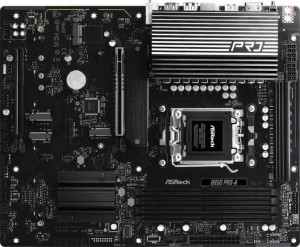
ASRock B850 Pro-A
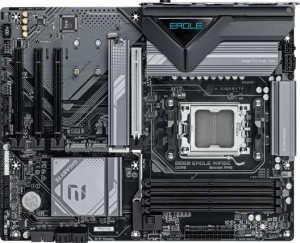
Gigabyte B850 Eagle WiFi6E

ASRock B850 Pro-A Gigabyte B850 Eagle WiFi6E

Overview

Welcome to our in-depth specification comparison between the ASRock B850 Pro-A and the Gigabyte B850 Eagle WiFi6E, two ATX motherboards sharing the AM5 socket and B850 chipset. While they agree on many fundamentals, they diverge sharply on connectivity features, expansion options, and storage flexibility. Read on to discover which board best aligns with your build priorities.

Common Features

  • Both boards use the AM5 CPU socket.
  • Both boards feature the B850 chipset.
  • Both boards have an ATX form factor.
  • Both boards support HDMI 2.1 output.
  • Both boards offer easy overclocking capability.
  • Neither board offers an easy BIOS reset function.
  • Both boards have a dual BIOS feature.
  • Both boards have a single CPU socket.
  • Both boards support up to 256GB of maximum memory.
  • Both boards have 4 memory slots.
  • Both boards use DDR5 memory.
  • Both boards operate in dual-channel memory mode.
  • ECC memory is not supported on either board.
  • Both boards include 1 USB 3.2 Gen 1 port (USB-C).
  • Neither board has USB 3.2 Gen 2x2 ports.
  • Neither board has USB 4 40Gbps or USB 4 20Gbps ports.
  • Neither board has Thunderbolt 3 or Thunderbolt 4 ports.
  • Both boards have an HDMI output.
  • Both boards include 1 RJ45 port.
  • Both boards provide 2 USB 3.2 Gen 1 ports through expansion.
  • Both boards have 4 SATA 3 connectors.
  • Both boards include a TPM connector.
  • Neither board has an mSATA connector.
  • Neither board has SATA 2 connectors or U.2 sockets.
  • Both boards feature 1 PCIe 5.0 x16 slot.
  • Neither board has PCIe 3.0 x16, PCIe 2.0 x16, PCI, PCIe x4, or PCIe x8 slots.
  • Both boards support 7.1 audio channels.
  • Both boards have 3 audio connectors.
  • Neither board has an S/PDIF Out port.
  • Both boards support RAID 0, RAID 1, and RAID 10 configurations.
  • Neither board supports RAID 0+1.

Main Differences

  • Wi-Fi support is present on Gigabyte B850 Eagle WiFi6E but not available on ASRock B850 Pro-A.
  • Bluetooth is available on Gigabyte B850 Eagle WiFi6E but not on ASRock B850 Pro-A.
  • RGB lighting is featured on ASRock B850 Pro-A but is absent on Gigabyte B850 Eagle WiFi6E.
  • Maximum overclocked RAM speed is 8000 MHz on ASRock B850 Pro-A and 8200 MHz on Gigabyte B850 Eagle WiFi6E.
  • USB 3.2 Gen 2 ports (USB-A) count is 0 on ASRock B850 Pro-A and 2 on Gigabyte B850 Eagle WiFi6E.
  • USB 3.2 Gen 1 ports (USB-A) count is 4 on ASRock B850 Pro-A and 2 on Gigabyte B850 Eagle WiFi6E.
  • USB 3.2 Gen 2 ports (USB-C) count is 1 on ASRock B850 Pro-A and 0 on Gigabyte B850 Eagle WiFi6E.
  • USB 2.0 ports count is 6 on ASRock B850 Pro-A and 4 on Gigabyte B850 Eagle WiFi6E.
  • DisplayPort outputs number 0 on ASRock B850 Pro-A and 1 on Gigabyte B850 Eagle WiFi6E.
  • PS/2 ports number 0 on ASRock B850 Pro-A and 1 on Gigabyte B850 Eagle WiFi6E.
  • USB 2.0 ports through expansion number 3 on ASRock B850 Pro-A and 4 on Gigabyte B850 Eagle WiFi6E.
  • Fan headers total 7 on ASRock B850 Pro-A and 6 on Gigabyte B850 Eagle WiFi6E.
  • M.2 sockets number 4 on ASRock B850 Pro-A and 3 on Gigabyte B850 Eagle WiFi6E.
  • PCIe 4.0 x16 slots number 1 on ASRock B850 Pro-A and 0 on Gigabyte B850 Eagle WiFi6E.
  • PCIe x1 slots number 0 on ASRock B850 Pro-A and 3 on Gigabyte B850 Eagle WiFi6E.
  • RAID 5 support is available on Gigabyte B850 Eagle WiFi6E but not on ASRock B850 Pro-A.
Specs Comparison
ASRock B850 Pro-A

ASRock B850 Pro-A

Gigabyte B850 Eagle WiFi6E

Gigabyte B850 Eagle WiFi6E

General info:
CPU socket AM5 AM5
chipset B850 B850
form factor ATX ATX
release date January 2025 January 2025
supports Wi-Fi
Has Bluetooth
HDMI version HDMI 2.1 HDMI 2.1
Easy to overclock
has RGB lighting
Easy to reset BIOS
Has dual BIOS
CPU sockets 1 1
Has integrated graphics
warranty period 3 years 3 years
height 244 mm 244 mm
width 305 mm 305 mm
Has integrated CPU

Both the ASRock B850 Pro-A and the Gigabyte B850 Eagle WiFi6E share the same foundational platform: the AM5 socket with a B850 chipset, an ATX form factor at identical dimensions (244 × 305 mm), and a matching 3-year warranty. They both support overclocking and include dual BIOS — a valuable safety net that lets you recover from a failed firmware flash without professional help. These are meaningful shared strengths that make both boards competitive starting points for an AMD Ryzen build.

The clearest differentiator in this group is wireless connectivity. The Gigabyte Eagle WiFi6E includes built-in Wi-Fi and Bluetooth, while the ASRock Pro-A has neither. In practical terms, this matters most for builds in rooms where running an Ethernet cable is impractical, or for users who rely on Bluetooth peripherals. The Eagle's Wi-Fi 6E support (implied by its name and the spec) also means access to the less-congested 6 GHz band — a real-world advantage in dense wireless environments. ASRock users would need to budget for a separate PCIe Wi-Fi card or USB adapter to match this capability. On the flip side, the ASRock Pro-A includes RGB lighting, which the Gigabyte lacks — a minor aesthetic point that matters to builders focused on a themed system appearance.

For the general configuration category, the Gigabyte B850 Eagle WiFi6E holds a clear edge due to its integrated wireless and Bluetooth, which adds tangible real-world flexibility at no extra step during setup. The ASRock B850 Pro-A is not a weaker board on fundamentals — it matches its rival on every other spec here — but buyers who need wireless connectivity will face additional cost and effort. If wired networking is your plan and aesthetics matter, the ASRock's RGB inclusion tips slightly in its favor, but that trade-off will appeal to a narrower audience.

Memory:
maximum memory amount 256GB 256GB
overclocked RAM speed 8000 MHz 8200 MHz
memory slots 4 4
DDR memory version 5 5
memory channels 2 2
Supports ECC memory

Both the ASRock B850 Pro-A and Gigabyte B850 Eagle WiFi6E support a maximum memory amount of 256GB, with both featuring four memory slots and two memory channels. Both motherboards are compatible with DDR5 memory, but when it comes to overclocking, there is a slight difference in their capabilities. The ASRock B850 Pro-A supports an overclocked RAM speed of 8000 MHz, while the Gigabyte B850 Eagle WiFi6E can handle a higher overclocked RAM speed of 8200 MHz.

Neither motherboard supports ECC memory, so users looking for error-correcting code support will need to consider other options.

Ports:
USB 3.2 Gen 2 ports (USB-A) 0 2
USB 3.2 Gen 1 ports (USB-A) 4 2
USB 3.2 Gen 2 ports (USB-C) 1 0
USB 3.2 Gen 1 ports (USB-C) 1 1
USB 2.0 ports 6 4
USB 3.2 Gen 2x2 ports 0 0
USB 4 40Gbps ports 0 0
USB 4 20Gbps ports 0 0
Thunderbolt 4 ports 0 0
Thunderbolt 3 ports 0 0
has an HDMI output
DisplayPort outputs 0 1
RJ45 ports 1 1
Has USB Type-C
eSATA ports 0 0
DVI outputs 0 0
has a VGA connector
PS/2 ports 0 1

The ASRock B850 Pro-A and Gigabyte B850 Eagle WiFi6E differ in their port configurations. The ASRock model provides 4 USB 3.2 Gen 1 ports (USB-A), 1 USB 3.2 Gen 2 port (USB-C), and 6 USB 2.0 ports, while the Gigabyte B850 Eagle WiFi6E has 2 USB 3.2 Gen 2 ports (USB-A), 2 USB 3.2 Gen 1 ports (USB-A), and 4 USB 2.0 ports. Both motherboards have 1 USB 3.2 Gen 1 port (USB-C), but the ASRock board includes 1 USB 3.2 Gen 2 port (USB-C) that the Gigabyte lacks.

For video outputs, both motherboards offer an HDMI output, but the Gigabyte B850 Eagle WiFi6E includes a DisplayPort output, while the ASRock B850 Pro-A does not. The ASRock board lacks any DisplayPort outputs and has no VGA connector, which is also true for the Gigabyte board.

Both motherboards have 1 RJ45 port for Ethernet connectivity. The ASRock B850 Pro-A has no PS/2 ports, while the Gigabyte B850 Eagle WiFi6E includes 1 PS/2 port. Neither board supports Thunderbolt 3 or 4 ports, USB 4 40Gbps or 20Gbps ports, or eSATA ports. Additionally, neither motherboard includes DVI outputs or a VGA connector.

Connectors:
USB 3.2 Gen 1 ports (through expansion) 2 2
USB 2.0 ports (through expansion) 3 4
SATA 3 connectors 4 4
fan headers 7 6
USB 3.0 ports (through expansion) 2 2
M.2 sockets 4 3
Has TPM connector
U.2 sockets 0 0
Has mSATA connector
SATA 2 connectors 0 0

The ASRock B850 Pro-A and Gigabyte B850 Eagle WiFi6E both provide similar connector options in many areas. Both motherboards offer 2 USB 3.2 Gen 1 ports (through expansion) and 2 USB 3.0 ports (through expansion). The ASRock board provides 3 USB 2.0 ports (through expansion), while the Gigabyte board offers 4 USB 2.0 ports (through expansion), giving it a slight advantage in this category.

When it comes to storage connectors, both motherboards are equipped with 4 SATA 3 connectors and have no SATA 2 connectors. The ASRock B850 Pro-A has 4 M.2 sockets, whereas the Gigabyte B850 Eagle WiFi6E includes 3 M.2 sockets, meaning the ASRock model provides one additional M.2 socket for storage expansion.

Both motherboards include a TPM connector, but the ASRock board offers 7 fan headers, while the Gigabyte board has 6 fan headers. Neither motherboard features a U.2 socket or an mSATA connector.

Expansion slots:
PCIe 4.0 x16 slots 1 0
PCIe 5.0 x16 slots 1 1
PCIe 3.0 x16 slots 0 0
PCIe x1 slots 0 3
PCI slots 0 0
PCIe 2.0 x16 slots 0 0
PCIe x4 slots 0 0
PCIe x8 slots 0 0

The ASRock B850 Pro-A and Gigabyte B850 Eagle WiFi6E both feature PCIe 5.0 x16 slots, but the ASRock board has one PCIe 4.0 x16 slot, while the Gigabyte model lacks a PCIe 4.0 x16 slot. The ASRock B850 Pro-A does not have any PCIe x1, PCI, or PCIe 2.0 x16 slots, while the Gigabyte B850 Eagle WiFi6E offers 3 PCIe x1 slots, with no PCIe 3.0 x16 slots either.

In terms of expansion, the ASRock B850 Pro-A is more limited with its one PCIe 4.0 x16 slot and one PCIe 5.0 x16 slot, while the Gigabyte B850 Eagle WiFi6E offers more PCIe x1 slots, but lacks the PCIe 4.0 x16 slot found on the ASRock board.

Both motherboards lack PCIe x4, PCIe x8, and PCI slots, and neither includes a PCIe 3.0 x16 slot.

Audio:
audio channels 7.1 7.1
Has S/PDIF Out port
audio connectors 3 3

Both the ASRock B850 Pro-A and Gigabyte B850 Eagle WiFi6E feature 7.1 audio channels, providing similar sound capabilities. Neither motherboard includes an S/PDIF Out port, which would be used for digital audio output. Both models are equipped with 3 audio connectors, offering a standard level of connectivity for audio devices.

Overall, the audio specs for both motherboards are identical, with the same audio channel support, lack of S/PDIF Out, and number of audio connectors.

Storage:
Supports RAID 1
Supports RAID 10 (1+0)
Supports RAID 5
Supports RAID 0
Supports RAID 0+1

Both the ASRock B850 Pro-A and Gigabyte B850 Eagle WiFi6E support RAID 1 and RAID 10 (1+0), allowing for mirrored and striped arrays for redundancy and performance. However, the ASRock B850 Pro-A does not support RAID 5, while the Gigabyte B850 Eagle WiFi6E does, providing additional flexibility for those who need a RAID 5 configuration for fault tolerance and better storage management. Both motherboards do not support RAID 0+1, a nested RAID level combining RAID 0 and RAID 1.

Overall, the main difference between these two motherboards in terms of storage is the RAID 5 support available on the Gigabyte board, which the ASRock board lacks.

Comparison Summary & Verdict

Both the ASRock B850 Pro-A and the Gigabyte B850 Eagle WiFi6E are capable AM5 B850 motherboards that share a solid foundation, including DDR5 support, a PCIe 5.0 x16 slot, and 7.1 audio. However, their differences reveal distinct target audiences. The ASRock B850 Pro-A is the stronger choice for builders who want more M.2 storage slots (4 vs 3), a dedicated PCIe 4.0 x16 slot, more fan headers, and an RGB-lit aesthetic. The Gigabyte B850 Eagle WiFi6E appeals to users who need built-in Wi-Fi 6E and Bluetooth, faster overclocked RAM support at 8200 MHz, additional PCIe x1 expansion slots, and a DisplayPort output. Choose the ASRock if a wired, storage-heavy build is your goal; opt for the Gigabyte if wireless connectivity and broader expansion flexibility matter most.

ASRock B850 Pro-A
Buy ASRock B850 Pro-A if...

Buy the ASRock B850 Pro-A if you want more M.2 storage slots, an extra PCIe 4.0 x16 slot, more fan headers, and RGB lighting without needing built-in Wi-Fi or Bluetooth.

Gigabyte B850 Eagle WiFi6E
Buy Gigabyte B850 Eagle WiFi6E if...

Buy the Gigabyte B850 Eagle WiFi6E if built-in Wi-Fi 6E and Bluetooth connectivity are essential, or if you need a DisplayPort output, higher overclocked RAM speeds, and more PCIe x1 expansion slots.