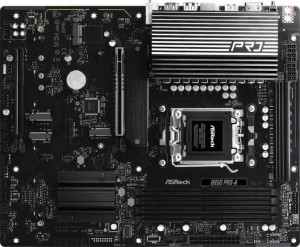
ASRock B850 Pro-A
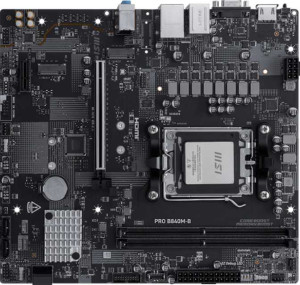
MSI Pro B840M-B

ASRock B850 Pro-A MSI Pro B840M-B

Overview

Welcome to our detailed spec comparison between the ASRock B850 Pro-A and the MSI Pro B840M-B, two AM5-platform motherboards that share a common foundation but diverge in some meaningful ways. Both boards bring DDR5 support, RAID compatibility, and 7.1 audio to the table, yet they differ significantly in form factor, memory capacity, expansion options, and connectivity. Read on to see how these two boards stack up across every key specification category.

Common Features

  • Both boards use the AM5 CPU socket.
  • Neither board includes Wi-Fi support.
  • Neither board includes Bluetooth.
  • Both boards feature HDMI 2.1 output.
  • Both boards support overclocking.
  • RGB lighting is present on both boards.
  • Each board has a single CPU socket.
  • Neither board has integrated graphics.
  • Both boards support DDR5 memory.
  • Both boards have 2 memory channels.
  • The maximum overclocked RAM speed is 8000 MHz on both boards.
  • Neither board supports ECC memory.
  • Both boards have 4 USB 3.2 Gen 1 ports (USB-A).
  • Neither board includes USB 3.2 Gen 2 ports (USB-A).
  • Neither board includes USB 3.2 Gen 2x2, USB 4, or Thunderbolt ports.
  • Both boards have an HDMI output.
  • Both boards include 4 SATA 3 connectors and no SATA 2 connectors.
  • Both boards provide 2 USB 3.2 Gen 1 ports and 2 USB 3.0 ports through expansion.
  • A TPM connector is present on both boards.
  • Neither board has an mSATA connector.
  • Both boards have 1 PCIe 4.0 x16 slot and no PCIe 3.0 or PCIe 2.0 x16 slots.
  • Both boards support 7.1 audio channels with 3 audio connectors.
  • Neither board has an S/PDIF Out port.
  • Both boards support RAID 0, RAID 1, and RAID 10, but not RAID 5 or RAID 0+1.

Main Differences

  • The chipset is B850 on ASRock B850 Pro-A and B840 on MSI Pro B840M-B.
  • The form factor is ATX on ASRock B850 Pro-A and Micro-ATX on MSI Pro B840M-B.
  • Easy BIOS reset is not available on ASRock B850 Pro-A but is present on MSI Pro B840M-B.
  • Dual BIOS is present on ASRock B850 Pro-A but not available on MSI Pro B840M-B.
  • The board height is 244 mm on ASRock B850 Pro-A and 226 mm on MSI Pro B840M-B.
  • The board width is 305 mm on ASRock B850 Pro-A and 243.8 mm on MSI Pro B840M-B.
  • Maximum memory capacity is 256 GB on ASRock B850 Pro-A and 128 GB on MSI Pro B840M-B.
  • Memory slots total 4 on ASRock B850 Pro-A and 2 on MSI Pro B840M-B.
  • USB 3.2 Gen 2 ports (USB-C) number 1 on ASRock B850 Pro-A and 0 on MSI Pro B840M-B.
  • USB 3.2 Gen 1 ports (USB-C) number 1 on ASRock B850 Pro-A and 0 on MSI Pro B840M-B.
  • USB 2.0 ports total 6 on ASRock B850 Pro-A and 2 on MSI Pro B840M-B.
  • A VGA connector is absent on ASRock B850 Pro-A but present on MSI Pro B840M-B.
  • USB 3.2 Gen 2x2 ports through expansion total 1 on ASRock B850 Pro-A and 0 on MSI Pro B840M-B.
  • USB 2.0 ports through expansion total 3 on ASRock B850 Pro-A and 4 on MSI Pro B840M-B.
  • Fan headers total 7 on ASRock B850 Pro-A and 3 on MSI Pro B840M-B.
  • M.2 sockets total 4 on ASRock B850 Pro-A and 2 on MSI Pro B840M-B.
  • A PCIe 5.0 x16 slot is present on ASRock B850 Pro-A but not available on MSI Pro B840M-B.
  • PCIe x1 slots total 0 on ASRock B850 Pro-A and 1 on MSI Pro B840M-B.
Specs Comparison
ASRock B850 Pro-A

ASRock B850 Pro-A

MSI Pro B840M-B

MSI Pro B840M-B

General info:
CPU socket AM5 AM5
chipset B850 B840
form factor ATX Micro-ATX
release date January 2025 May 2025
supports Wi-Fi
Has Bluetooth
HDMI version HDMI 2.1 HDMI 2.1
Easy to overclock
has RGB lighting
Easy to reset BIOS
Has dual BIOS
CPU sockets 1 1
Has integrated graphics
warranty period 3 years 3 years
height 244 mm 226 mm
width 305 mm 243.8 mm
Has integrated CPU

Both boards target the AMD AM5 platform and share a strong common foundation: identical AM5 CPU socket compatibility, HDMI 2.1 output, overclocking support, RGB lighting, a 3-year warranty, and no integrated Wi-Fi or Bluetooth — meaning neither saves you from buying a separate wireless adapter if needed. The real divergence begins with the chipset and physical format. The ASRock uses the higher-tier B850 chipset, which offers more PCIe lanes and USB bandwidth than the B840 found on the MSI, making it better suited for builds with multiple high-speed storage drives or peripherals. The MSI, however, adopts a Micro-ATX form factor (226 × 243.8 mm) versus the ASRock's full ATX footprint (244 × 305 mm), giving it a clear advantage in compact or small-mid-tower builds where space is at a premium.

On the reliability and maintenance front, the two boards trade blows in opposite directions. The ASRock Pro-A includes dual BIOS, a hardware-level safety net that lets the board recover automatically from a failed firmware flash — a meaningful feature for enthusiasts who update BIOS frequently or push overclocks aggressively. The MSI Pro B840M-B counters with an easy BIOS reset mechanism, which is more accessible for everyday users who might need to recover from a bad overclock without hunting for the right jumper or button sequence. Neither approach is strictly superior; dual BIOS protects against corruption, while easy reset prioritizes convenience.

Overall, the ASRock B850 Pro-A holds a general edge for full-size ATX builds where expandability, a stronger chipset, and firmware resilience matter most. The MSI Pro B840M-B is the better pick for compact system builders or those who value straightforward maintenance over raw platform capability. Neither board is a clear all-around winner — the right choice depends almost entirely on case size and how aggressively the user intends to push the platform.
Memory:
maximum memory amount 256GB 128GB
overclocked RAM speed 8000 MHz 8000 MHz
memory slots 4 2
DDR memory version 5 5
memory channels 2 2
Supports ECC memory

Where these two boards converge is on the fundamentals: both run DDR5 memory in a dual-channel configuration and top out at an overclocked speed of 8000 MHz, meaning neither has an edge in raw memory bandwidth potential. For most gaming and productivity workloads, dual-channel DDR5 at these speeds is more than sufficient, so the shared ceiling here is a genuine tie.

The meaningful split comes down to physical slots and maximum capacity. The ASRock B850 Pro-A offers 4 memory slots and supports up to 256 GB, while the MSI Pro B840M-B is limited to 2 slots and a 128 GB ceiling. In practical terms, four slots give the ASRock a significant upgrade path advantage — a user can start with two modules and add two more later without replacing existing sticks. The MSI's two-slot design means you either buy your full intended capacity upfront or replace both modules entirely when upgrading, which is a real long-term cost consideration.

The ASRock B850 Pro-A has a clear edge in this category. The doubled slot count and capacity ceiling matter most for content creators, virtualization users, or anyone planning a memory upgrade down the road. For a compact everyday build where 64 GB or less covers all foreseeable needs, the MSI's two-slot limitation is unlikely to sting — but as a platform investment, the ASRock simply leaves more room to grow.

Ports:
USB 3.2 Gen 2 ports (USB-A) 0 0
USB 3.2 Gen 1 ports (USB-A) 4 4
USB 3.2 Gen 2 ports (USB-C) 1 0
USB 3.2 Gen 1 ports (USB-C) 1 0
USB 2.0 ports 6 2
USB 3.2 Gen 2x2 ports 0 0
USB 4 40Gbps ports 0 0
USB 4 20Gbps ports 0 0
Thunderbolt 4 ports 0 0
Thunderbolt 3 ports 0 0
has an HDMI output
DisplayPort outputs 0 0
RJ45 ports 1 1
Has USB Type-C
eSATA ports 0 0
DVI outputs 0 0
has a VGA connector
PS/2 ports 0 0

Strip away the specs that are identical — four USB 3.2 Gen 1 Type-A ports, a single RJ45 ethernet jack, and an HDMI output on both boards — and the real story is about USB-C and legacy connectivity. The ASRock B850 Pro-A includes a USB 3.2 Gen 2 Type-C port (10 Gbps) plus an additional USB 3.2 Gen 1 Type-C port (5 Gbps) on the rear panel, making it meaningfully more useful for modern peripherals, fast external SSDs, and newer monitors that accept USB-C video or data. The MSI Pro B840M-B lists USB Type-C as present but carries no Gen 1 or Gen 2 Type-C ports in the rear I/O breakdown, suggesting that port operates at lower throughput — a notable gap for anyone relying on high-speed Type-C devices.

The MSI does include a VGA output, which the ASRock omits entirely. While VGA is a decades-old analog standard rarely needed in new builds, it can be a practical lifeline in office or enterprise environments where older monitors or projectors are still in use. The ASRock, meanwhile, counters with 6 USB 2.0 ports versus the MSI's 2 — a meaningful difference for users with multiple low-bandwidth peripherals like keyboards, mice, USB headsets, or dongles that don't need high-speed connections but do need physical ports.

The ASRock B850 Pro-A takes a clear edge here. Its higher-speed USB-C ports and greater total USB port count make it the more forward-looking and versatile option for the majority of modern builds. The MSI's VGA output is the one scenario where it pulls ahead, but that advantage is narrowly targeted at legacy display setups rather than general use.

Connectors:
USB 3.2 Gen 1 ports (through expansion) 2 2
USB 3.2 Gen 2x2 ports (through expansion) 1 0
USB 2.0 ports (through expansion) 3 4
SATA 3 connectors 4 4
fan headers 7 3
USB 3.0 ports (through expansion) 2 2
M.2 sockets 4 2
Has TPM connector
U.2 sockets 0 0
Has mSATA connector
SATA 2 connectors 0 0

Storage expansion tells a significant part of this story. The ASRock B850 Pro-A packs 4 M.2 sockets compared to the MSI Pro B840M-B's 2, while both share an identical 4 SATA 3 connector count. For a modern build leaning on NVMe SSDs — whether for a primary drive, secondary storage, or a dedicated cache drive — the ASRock's doubled M.2 count is a substantial advantage, eliminating the need for add-in cards to expand fast storage capacity. The MSI's two M.2 slots are adequate for mainstream configurations, but leave little room to grow without SATA fallback.

Thermal management is where the gap widens further. The ASRock offers 7 fan headers to the MSI's 3, which is a notable real-world difference in builds with aggressive cooling setups — think multiple case fans, a large air cooler or AIO pump, and optional supplemental fans for chipset or storage areas. Fewer headers mean more reliance on fan hubs or splitters, adding cable complexity and reducing per-header control granularity. The ASRock also adds a USB 3.2 Gen 2x2 internal connector (20 Gbps), enabling front-panel Type-C ports at full speed on compatible cases — something the MSI entirely lacks.

Across nearly every dimension of internal connectivity, the ASRock B850 Pro-A holds a clear and decisive advantage. More M.2 slots, more fan headers, and a faster internal USB connector collectively make it the stronger platform for storage-heavy, thermally demanding, or future-proof builds. The MSI Pro B840M-B covers the basics competently, but its connector set reflects its role as a compact, no-frills option rather than an expandable enthusiast board.

Expansion slots:
PCIe 4.0 x16 slots 1 1
PCIe 5.0 x16 slots 1 0
PCIe 3.0 x16 slots 0 0
PCIe x1 slots 0 1
PCI slots 0 0
PCIe 2.0 x16 slots 0 0
PCIe x4 slots 0 0
PCIe x8 slots 0 0

The primary GPU slot tells a shared story: both boards provide one PCIe 4.0 x16 slot, which is perfectly capable of running any current discrete graphics card without a meaningful performance penalty for gaming or creative workloads. The real divergence is what sits alongside it. The ASRock B850 Pro-A adds a PCIe 5.0 x16 slot — the latest generation, doubling the bandwidth ceiling of PCIe 4.0 — making it ready for next-generation GPUs or enterprise-grade NVMe add-in cards that are beginning to leverage that headroom. The MSI Pro B840M-B has no PCIe 5.0 slot at all, which is a tangible gap in platform longevity.

On the other side of the ledger, the MSI includes a PCIe x1 slot that the ASRock lacks entirely. This slim slot is typically used for add-in cards like dedicated sound cards, Wi-Fi adapters, or capture cards — low-bandwidth accessories that don't need a full x16 connection. For users who rely on such cards, that single x1 slot quietly solves a real problem, particularly given that neither board includes built-in Wi-Fi.

Taken together, the ASRock B850 Pro-A holds the stronger position for users prioritizing future GPU or storage upgrades, thanks to its PCIe 5.0 slot. The MSI's x1 slot is a niche but practical advantage for add-in card users. If expansion bandwidth and longevity are the priority, the ASRock wins this category; if low-bandwidth accessory cards matter more, the MSI has a specific edge.

Audio:
audio channels 7.1 7.1
Has S/PDIF Out port
audio connectors 3 3

Audio is the one category where there is simply nothing to separate these two boards. Both offer 7.1-channel surround sound support, 3 analog audio connectors, and no S/PDIF optical output — a spec-for-spec draw across every available data point. The 7.1-channel capability means both can drive a full surround sound speaker setup, which is a reasonable feature for a motherboard at this tier, though in practice most users will be running stereo headsets or 2.1 speakers through the analog jacks.

The absence of S/PDIF on both boards is worth noting for anyone who owns an external DAC, AV receiver, or soundbar that relies on optical digital input. Neither board accommodates that connection natively, so users with such setups would need a USB DAC or a dedicated sound card regardless of which board they choose — a consideration that ties back to the expansion slot discussion.

This category is a complete tie. There is no basis in the provided data to favor one board over the other for audio. Buyers with demanding audio requirements will find both boards equally limited on paper, and should factor in the same external solutions for either choice.

Storage:
Supports RAID 1
Supports RAID 10 (1+0)
Supports RAID 5
Supports RAID 0
Supports RAID 0+1

RAID support is identical across both boards: RAID 0, RAID 1, and RAID 10 are all supported, while RAID 5 and RAID 0+1 are absent on both. This covers the configurations that matter most to consumer and prosumer users — RAID 0 for striped performance, RAID 1 for mirrored redundancy, and RAID 10 for a balanced combination of both. The omission of RAID 5 is standard at this market tier and is unlikely to affect the vast majority of home or small office builders.

This is another category that produces a complete tie. Neither board offers any RAID capability the other does not, making storage redundancy and array configuration a non-factor in choosing between them. Users planning multi-drive setups for either speed or data protection will find both platforms equally capable within the same boundaries.

Comparison Summary & Verdict

After examining every specification, it is clear that these two boards serve distinct audiences. The ASRock B850 Pro-A is the more capable and expansive option: its full ATX footprint accommodates 4 memory slots for up to 256 GB of DDR5, 4 M.2 sockets, a PCIe 5.0 x16 slot, 7 fan headers, dual BIOS, and richer USB connectivity including USB-C ports. It is the stronger pick for enthusiasts, content creators, or builders who need headroom to grow. The MSI Pro B840M-B, on the other hand, prioritizes compactness with its Micro-ATX form factor, offers a straightforward easy BIOS reset feature, and includes a VGA connector for legacy display compatibility, making it a practical and space-efficient choice for budget-conscious or small-form-factor builds that do not demand maximum expandability.

ASRock B850 Pro-A
Buy ASRock B850 Pro-A if...

Buy the ASRock B850 Pro-A if you want maximum expandability, with 4 memory slots supporting up to 256 GB DDR5, 4 M.2 sockets, a PCIe 5.0 x16 slot, 7 fan headers, and dual BIOS for a future-proof ATX build.

MSI Pro B840M-B
Buy MSI Pro B840M-B if...

Buy the MSI Pro B840M-B if you need a compact Micro-ATX board for a smaller build and value features like easy BIOS reset and a VGA connector for legacy display support.