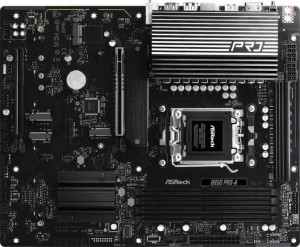
ASRock B850 Pro-A
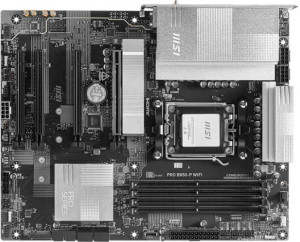
MSI Pro B850-P WiFi

ASRock B850 Pro-A MSI Pro B850-P WiFi

Overview

Welcome to our in-depth specification comparison between the ASRock B850 Pro-A and the MSI Pro B850-P WiFi, two ATX motherboards sharing the AM5 socket and B850 chipset. While they agree on many fundamentals, key battlegrounds emerge around connectivity and wireless features, storage and expansion options, rear I/O configuration, and memory overclocking headroom — making the choice between them far from straightforward.

Common Features

  • Both motherboards use the AM5 CPU socket.
  • Both motherboards feature the B850 chipset.
  • Both use the ATX form factor.
  • Both support HDMI 2.1 output.
  • Overclocking is supported on both motherboards.
  • RGB lighting is present on both motherboards.
  • Dual BIOS is available on both motherboards.
  • Both boards have a single CPU socket.
  • Both support a maximum memory amount of 256GB.
  • Both have 4 memory slots.
  • Both use DDR5 memory.
  • Both support 2 memory channels.
  • ECC memory is not supported on either motherboard.
  • Neither board has USB 3.2 Gen 2x2 ports.
  • Neither board has USB 4 ports of any speed.
  • Neither board has Thunderbolt 3 or Thunderbolt 4 ports.
  • Both boards have an HDMI output.
  • Neither board has DisplayPort outputs.
  • Both boards have 1 RJ45 port.
  • Both boards have 4 SATA 3 connectors.
  • A TPM connector is present on both motherboards.
  • Neither board has a U.2 socket.
  • An mSATA connector is not available on either motherboard.
  • Neither board has SATA 2 connectors.
  • Both boards have 1 PCIe 4.0 x16 slot.
  • Both boards have 1 PCIe 5.0 x16 slot.
  • Neither board has PCIe 3.0 x16, PCIe 2.0 x16, PCIe x4, or PCIe x8 slots.
  • Both boards support 7.1 audio channels.
  • Both boards support RAID 0 and RAID 1.
  • Neither board supports RAID 5 or RAID 0+1.

Main Differences

  • Wi-Fi support is present on the MSI Pro B850-P WiFi but not available on the ASRock B850 Pro-A.
  • Bluetooth is available on the MSI Pro B850-P WiFi but not on the ASRock B850 Pro-A.
  • Easy BIOS reset is supported on the MSI Pro B850-P WiFi but not on the ASRock B850 Pro-A.
  • Height is 244 mm on the ASRock B850 Pro-A and 243.8 mm on the MSI Pro B850-P WiFi.
  • Width is 305 mm on the ASRock B850 Pro-A and 304.8 mm on the MSI Pro B850-P WiFi.
  • Maximum overclocked RAM speed is 8000 MHz on the ASRock B850 Pro-A and 8200 MHz on the MSI Pro B850-P WiFi.
  • USB 3.2 Gen 2 ports (USB-A) count is 0 on the ASRock B850 Pro-A and 1 on the MSI Pro B850-P WiFi.
  • USB 3.2 Gen 1 ports (USB-A) count is 4 on the ASRock B850 Pro-A and 1 on the MSI Pro B850-P WiFi.
  • USB 3.2 Gen 2 ports (USB-C) count is 1 on the ASRock B850 Pro-A and 2 on the MSI Pro B850-P WiFi.
  • USB 3.2 Gen 1 ports (USB-C) count is 1 on the ASRock B850 Pro-A and 0 on the MSI Pro B850-P WiFi.
  • USB 2.0 ports count is 6 on the ASRock B850 Pro-A and 4 on the MSI Pro B850-P WiFi.
  • USB 3.2 Gen 1 ports available through expansion are 2 on the ASRock B850 Pro-A and 4 on the MSI Pro B850-P WiFi.
  • USB 2.0 ports available through expansion are 3 on the ASRock B850 Pro-A and 4 on the MSI Pro B850-P WiFi.
  • USB 3.0 ports available through expansion are 2 on the ASRock B850 Pro-A and 4 on the MSI Pro B850-P WiFi.
  • Fan headers count is 7 on the ASRock B850 Pro-A and 6 on the MSI Pro B850-P WiFi.
  • M.2 sockets count is 4 on the ASRock B850 Pro-A and 3 on the MSI Pro B850-P WiFi.
  • PCIe x1 slots count is 0 on the ASRock B850 Pro-A and 2 on the MSI Pro B850-P WiFi.
  • An S/PDIF Out port is present on the MSI Pro B850-P WiFi but not available on the ASRock B850 Pro-A.
  • Audio connectors count is 3 on the ASRock B850 Pro-A and 2 on the MSI Pro B850-P WiFi.
  • RAID 10 (1+0) support is available on the ASRock B850 Pro-A but not on the MSI Pro B850-P WiFi.
Specs Comparison
ASRock B850 Pro-A

ASRock B850 Pro-A

MSI Pro B850-P WiFi

MSI Pro B850-P WiFi

General info:
CPU socket AM5 AM5
chipset B850 B850
form factor ATX ATX
release date January 2025 January 2025
supports Wi-Fi
Has Bluetooth
HDMI version HDMI 2.1 HDMI 2.1
Easy to overclock
has RGB lighting
Easy to reset BIOS
Has dual BIOS
CPU sockets 1 1
Has integrated graphics
warranty period 3 years 3 years
height 244 mm 243.8 mm
width 305 mm 304.8 mm
Has integrated CPU

Both the ASRock B850 Pro-A and the MSI Pro B850-P WiFi share the same fundamental platform: the AM5 socket, B850 chipset, and standard ATX form factor. Their dimensions are virtually identical (within fractions of a millimeter), they both support overclocking, feature dual BIOS protection, RGB lighting, and carry a 3-year warranty. For users building a mid-range AMD Ryzen system, either board offers the same core foundation.

The meaningful differentiator between these two boards lies in wireless connectivity. The MSI Pro B850-P WiFi includes built-in Wi-Fi and Bluetooth, while the ASRock B850 Pro-A offers neither. In a modern desktop build, this matters most when a wired Ethernet run is inconvenient or impossible, or when the user needs Bluetooth for peripherals like headsets or controllers. The ASRock board would require a separate PCIe or USB wireless adapter to match this capability, adding cost and potentially occupying an expansion slot.

The MSI also has a slight usability edge with its easy BIOS reset feature, which the ASRock lacks — a practical convenience during troubleshooting or after a failed overclock. Overall, the MSI Pro B850-P WiFi holds a clear advantage in this group: it delivers the same platform fundamentals while adding wireless connectivity and easier BIOS recovery, making it the more versatile out-of-the-box choice for most users.

Memory:
maximum memory amount 256GB 256GB
overclocked RAM speed 8000 MHz 8200 MHz
memory slots 4 4
DDR memory version 5 5
memory channels 2 2
Supports ECC memory

On paper, both boards are nearly identical in memory capability: four DDR5 slots, dual-channel architecture, a 256GB maximum capacity, and no ECC support. For the vast majority of users — including gamers, content creators, and workstation builders — this shared foundation is more than sufficient, and the dual-channel setup ensures full bandwidth utilization when slots are populated in pairs.

The one measurable difference is the maximum overclocked RAM speed: the MSI Pro B850-P WiFi tops out at 8200 MHz, compared to 8000 MHz on the ASRock B850 Pro-A. In practical terms, this gap is extremely narrow. Real-world performance differences between these two frequencies are negligible in gaming and most productivity workloads, and achieving either speed still depends heavily on the specific memory kit and CPU's integrated memory controller.

This group is effectively a near-tie, with the MSI holding a marginal technical edge in peak overclocked frequency. Unless you are specifically pushing RAM speeds to the absolute limit, this difference alone should not drive a purchasing decision.

Ports:
USB 3.2 Gen 2 ports (USB-A) 0 1
USB 3.2 Gen 1 ports (USB-A) 4 1
USB 3.2 Gen 2 ports (USB-C) 1 2
USB 3.2 Gen 1 ports (USB-C) 1 0
USB 2.0 ports 6 4
USB 3.2 Gen 2x2 ports 0 0
USB 4 40Gbps ports 0 0
USB 4 20Gbps ports 0 0
Thunderbolt 4 ports 0 0
Thunderbolt 3 ports 0 0
has an HDMI output
DisplayPort outputs 0 0
RJ45 ports 1 1
Has USB Type-C
eSATA ports 0 0
DVI outputs 0 0
has a VGA connector
PS/2 ports 0 0

The two boards take noticeably different approaches to rear I/O, and the right choice here depends on what devices you actually plug in. The ASRock B850 Pro-A leans heavily on quantity and legacy compatibility, offering four USB 3.2 Gen 1 Type-A ports and six USB 2.0 ports — a generous spread for users with mice, keyboards, headsets, and other low-bandwidth peripherals that simply need a reliable connection.

The MSI Pro B850-P WiFi, by contrast, trades raw port count for higher-speed modern connectivity. It provides two USB 3.2 Gen 2 Type-C ports on the rear panel — double what the ASRock offers in that category — alongside one Gen 2 Type-A. Gen 2 delivers up to 10 Gbps, which matters when connecting fast external SSDs, modern docking stations, or high-speed peripherals. The ASRock counters with one Gen 2 Type-C and one Gen 1 Type-C, but its total high-speed Type-C bandwidth ceiling is lower.

Neither board offers USB4 or Thunderbolt, so neither stands out for cutting-edge connectivity. The edge here goes to the MSI for users with modern USB-C peripherals or external storage, while the ASRock is a stronger fit for setups that rely on a larger number of traditional USB-A devices simultaneously.

Connectors:
USB 3.2 Gen 1 ports (through expansion) 2 4
USB 2.0 ports (through expansion) 3 4
SATA 3 connectors 4 4
fan headers 7 6
USB 3.0 ports (through expansion) 2 4
M.2 sockets 4 3
Has TPM connector
U.2 sockets 0 0
Has mSATA connector
SATA 2 connectors 0 0

Storage expansion is where these two boards diverge most meaningfully. The ASRock B850 Pro-A includes four M.2 sockets — one more than the MSI's three — making it the stronger choice for NVMe-heavy builds where multiple fast SSDs are a priority, whether for large game libraries, video editing scratch drives, or tiered storage setups. Both boards offer four SATA 3 ports, so traditional drive support is identical.

Cooling control gives a slight nod to the ASRock as well, with seven fan headers versus six on the MSI. In a high-airflow case with multiple case fans plus a CPU cooler and optional pump header, that extra header can mean avoiding a splitter cable entirely — a small but genuine convenience. The MSI compensates on the front-panel USB side, providing four internal USB 3.0 headers for expansion compared to two on the ASRock, which benefits cases with multiple front-panel USB ports.

On balance, the ASRock B850 Pro-A holds the edge in this group for storage-focused builders, thanks to its additional M.2 slot and extra fan header. The MSI is more accommodating for cases with extensive front-panel USB connectivity, but that advantage applies to a narrower set of use cases.

Expansion slots:
PCIe 4.0 x16 slots 1 1
PCIe 5.0 x16 slots 1 1
PCIe 3.0 x16 slots 0 0
PCIe x1 slots 0 2
PCI slots 0 0
PCIe 2.0 x16 slots 0 0
PCIe x4 slots 0 0
PCIe x8 slots 0 0

For GPU and primary expansion needs, these two boards are identical: both feature one PCIe 5.0 x16 slot for a modern graphics card and one PCIe 4.0 x16 slot as a secondary option. The PCIe 5.0 slot ensures full bandwidth compatibility with current and next-generation GPUs, so neither board creates a bottleneck for high-end graphics cards.

The only differentiator here is the MSI Pro B850-P WiFi's inclusion of two PCIe x1 slots, which the ASRock B850 Pro-A lacks entirely. These smaller slots are used for add-in cards such as dedicated audio cards, additional network adapters, or capture cards. For most mainstream users they go unused, but for builders who need to slot in a specific expansion card without sacrificing the secondary x16 slot, their presence is a genuine advantage.

This group is largely a tie for typical builds, with a mild edge to the MSI for users who require additional low-bandwidth expansion cards. If your build involves only a GPU and nothing else in the expansion slots, both boards serve that need equally well.

Audio:
audio channels 7.1 7.1
Has S/PDIF Out port
audio connectors 3 2

Audio output capability is matched at the top level — both boards support 7.1-channel surround sound, which is the standard ceiling for onboard motherboard audio and covers any mainstream speaker or headset configuration. Where they diverge is in how that audio reaches your devices.

The ASRock B850 Pro-A provides three analog audio connectors, giving users more 3.5mm jacks to simultaneously connect separate front/rear/side speaker pairs or a combination of input and output devices without adapters. The MSI Pro B850-P WiFi offers only two analog connectors but adds an S/PDIF optical output — a digital audio passthrough that is particularly valuable for connecting to AV receivers, soundbars, or DACs that accept optical input, delivering a clean, interference-free signal path.

Which board wins here depends entirely on your audio setup. The ASRock suits users relying on analog multi-speaker configurations, while the MSI is the better fit for anyone routing audio through a digital receiver or external DAC via optical — a meaningful advantage for home theater or audiophile-adjacent builds.

Storage:
Supports RAID 1
Supports RAID 10 (1+0)
Supports RAID 5
Supports RAID 0
Supports RAID 0+1

RAID support on consumer motherboards is a niche but important consideration for users who want redundancy or performance striping across multiple drives without a dedicated controller card. Both boards share support for RAID 0 (striping for speed) and RAID 1 (mirroring for redundancy) — the two most commonly used configurations in home and small office builds.

The meaningful difference is that the ASRock B850 Pro-A also supports RAID 10, a combination of striping and mirroring that delivers both improved read performance and drive-failure tolerance simultaneously. This requires at least four drives but is the preferred configuration for users who need a balance of speed and data protection — common in small NAS-style builds or prosumer workstations. The MSI Pro B850-P WiFi does not support RAID 10, limiting users to the simpler single-mode configurations.

For the vast majority of desktop users, this distinction is irrelevant — most never configure RAID at all. But for anyone specifically planning a multi-drive array with redundancy and performance in mind, the ASRock holds a clear advantage in this group.

Comparison Summary & Verdict

Both the ASRock B850 Pro-A and the MSI Pro B850-P WiFi are well-rounded B850 motherboards that share a strong foundation: DDR5 support up to 256GB, PCIe 5.0 x16, dual BIOS, and 7.1 audio. However, their differences reveal distinct target audiences. The ASRock B850 Pro-A stands out with 4 M.2 sockets, 7 fan headers, a USB 3.2 Gen 1 Type-C rear port, RAID 10 support, and more USB 2.0 ports, making it a strong pick for storage-heavy and cooling-focused builds. The MSI Pro B850-P WiFi counters with built-in Wi-Fi and Bluetooth, a higher 8200 MHz RAM overclock ceiling, 2 USB 3.2 Gen 2 Type-C ports, an S/PDIF Out port, 2 PCIe x1 slots, and more expansion headers — catering to users who value wireless connectivity and richer peripheral flexibility.

ASRock B850 Pro-A
Buy ASRock B850 Pro-A if...

Buy the ASRock B850 Pro-A if you need maximum local storage capacity with 4 M.2 sockets, prefer more fan headers for advanced cooling control, and do not require built-in Wi-Fi or Bluetooth.

MSI Pro B850-P WiFi
Buy MSI Pro B850-P WiFi if...

Buy the MSI Pro B850-P WiFi if built-in Wi-Fi and Bluetooth are essential, you want higher RAM overclocking headroom at 8200 MHz, or you need more USB 3.2 Gen 2 Type-C ports and PCIe x1 expansion slots.