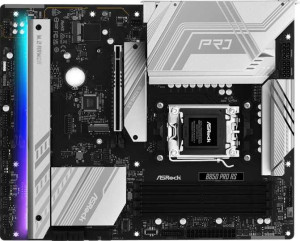
ASRock B850 Pro RS
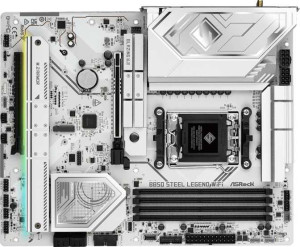
ASRock B850 Steel Legend WiFi

ASRock B850 Pro RS ASRock B850 Steel Legend WiFi

Overview

Welcome to our detailed specification comparison between the ASRock B850 Pro RS and the ASRock B850 Steel Legend WiFi, two ATX motherboards sharing the same AM5 socket and B850 chipset foundation. While both boards offer a strong common feature set including DDR5 memory support, dual BIOS, and PCIe 5.0, the differences between them could be decisive depending on your build requirements. In this comparison, we examine their connectivity options, USB port configurations, and audio features to help you find the right fit for your next PC build.

Common Features

  • Both motherboards use the AM5 CPU socket.
  • Both motherboards are built on the B850 chipset.
  • Both motherboards have an ATX form factor.
  • Both motherboards support HDMI 2.1 output.
  • Both motherboards support overclocking.
  • RGB lighting is present on both motherboards.
  • Easy BIOS reset is not available on either motherboard.
  • Both motherboards feature dual BIOS.
  • Both motherboards support up to 256GB of maximum memory.
  • Both motherboards support overclocked RAM speeds up to 8000 MHz.
  • Both motherboards have 4 memory slots with 2 memory channels.
  • Both motherboards use DDR5 memory.
  • ECC memory is not supported on either motherboard.
  • Neither motherboard has USB 3.2 Gen 2x2, USB 4 40Gbps, USB 4 20Gbps, Thunderbolt 4, or Thunderbolt 3 ports.
  • Both motherboards have 1 RJ45 port.
  • Both motherboards have no DisplayPort outputs.
  • Both motherboards provide 4 USB 3.2 Gen 1 ports through expansion, 4 USB 2.0 ports through expansion, and 4 USB 3.0 ports through expansion.
  • Both motherboards have 4 SATA 3 connectors and 4 M.2 sockets.
  • A TPM connector is present on both motherboards.
  • An mSATA connector is not available on either motherboard.
  • Both motherboards have 1 PCIe 5.0 x16 slot and 1 PCIe 4.0 x16 slot, with no PCIe 3.0, 2.0, x8, x4, or x1 slots.
  • Both motherboards support 7.1 audio channels.
  • Both motherboards support RAID 0, RAID 1, and RAID 10, but neither supports RAID 5 or RAID 0+1.

Main Differences

  • Wi-Fi support is present on the ASRock B850 Steel Legend WiFi but not available on the ASRock B850 Pro RS.
  • Bluetooth support is present on the ASRock B850 Steel Legend WiFi but not available on the ASRock B850 Pro RS.
  • USB 3.2 Gen 2 ports (USB-A) count is 0 on the ASRock B850 Pro RS and 2 on the ASRock B850 Steel Legend WiFi.
  • USB 3.2 Gen 1 ports (USB-A) count is 4 on the ASRock B850 Pro RS and 3 on the ASRock B850 Steel Legend WiFi.
  • USB 3.2 Gen 2 ports (USB-C) count is 1 on the ASRock B850 Pro RS and 2 on the ASRock B850 Steel Legend WiFi.
  • USB 3.2 Gen 1 ports (USB-C) count is 1 on the ASRock B850 Pro RS and 0 on the ASRock B850 Steel Legend WiFi.
  • USB 2.0 ports count is 6 on the ASRock B850 Pro RS and 4 on the ASRock B850 Steel Legend WiFi.
  • Fan headers count is 7 on the ASRock B850 Pro RS and 6 on the ASRock B850 Steel Legend WiFi.
  • An S/PDIF Out port is present on the ASRock B850 Steel Legend WiFi but not available on the ASRock B850 Pro RS.
  • Audio connectors count is 3 on the ASRock B850 Pro RS and 2 on the ASRock B850 Steel Legend WiFi.
Specs Comparison
ASRock B850 Pro RS

ASRock B850 Pro RS

ASRock B850 Steel Legend WiFi

ASRock B850 Steel Legend WiFi

General info:
CPU socket AM5 AM5
chipset B850 B850
form factor ATX ATX
release date January 2025 January 2025
supports Wi-Fi
Has Bluetooth
HDMI version HDMI 2.1 HDMI 2.1
Easy to overclock
has RGB lighting
Easy to reset BIOS
Has dual BIOS
CPU sockets 1 1
Has integrated graphics
warranty period 3 years 3 years
height 244 mm 244 mm
width 305 mm 305 mm
Has integrated CPU

Both the ASRock B850 Pro RS and the ASRock B850 Steel Legend WiFi share the same fundamental platform: the AM5 socket with a B850 chipset, standard ATX form factor (244 × 305 mm), and identical feature flags across overclocking support, RGB lighting, dual BIOS, and HDMI 2.1 output. For builders evaluating the platform itself, both boards offer the same foundation, warranty coverage of 3 years, and the same physical footprint, meaning case compatibility is a non-issue when choosing between them.

The sole but meaningful distinction lies in wireless connectivity. The Steel Legend WiFi includes integrated Wi-Fi and Bluetooth, while the Pro RS ships with neither. In practical terms, this affects not just cable-free internet access but also peripheral connectivity — Bluetooth enables wireless headsets, controllers, and peripherals without a USB dongle. For a desktop in a well-wired environment, the absence of Wi-Fi on the Pro RS is easily mitigated with a PCIe adapter, but it adds cost and consumes a slot. For anyone building in a location where running Ethernet is impractical, or who values a clean, adapter-free build, the omission on the Pro RS is a genuine limitation.

The Steel Legend WiFi has a clear edge in this category purely due to its built-in wireless capabilities. Everything else is a draw. Buyers who already have wired Ethernet and no need for Bluetooth may reasonably prefer the Pro RS if it carries a lower price, but based solely on general specifications, the Steel Legend WiFi delivers a more complete out-of-the-box feature set.
Memory:
maximum memory amount 256GB 256GB
overclocked RAM speed 8000 MHz 8000 MHz
memory slots 4 4
DDR memory version 5 5
memory channels 2 2
Supports ECC memory

When it comes to memory, the ASRock B850 Pro RS and the ASRock B850 Steel Legend WiFi are identical in every measurable way. Both run DDR5 across 4 slots in a dual-channel configuration, top out at 256GB of maximum capacity, and support overclocked speeds up to 8000 MHz. Neither board supports ECC memory, which is expected at this tier — ECC is typically reserved for workstation and server platforms.

The practical implications of this shared spec sheet are worth unpacking. DDR5 with dual-channel unlocks meaningful bandwidth gains over DDR4 platforms, benefiting memory-intensive workloads like video editing, 3D rendering, and large dataset processing. The 256GB ceiling is more than sufficient for any consumer or prosumer use case. More notably, the 8000 MHz overclocked ceiling is competitive at the B850 tier, giving enthusiasts room to push high-speed kits that can noticeably tighten latency and improve performance in games and applications sensitive to memory bandwidth.

This category is a complete tie. There is no differentiator between the two boards here — a builder's memory choice, budget, and kit compatibility will matter far more than which of these two boards they select.

Ports:
USB 3.2 Gen 2 ports (USB-A) 0 2
USB 3.2 Gen 1 ports (USB-A) 4 3
USB 3.2 Gen 2 ports (USB-C) 1 2
USB 3.2 Gen 1 ports (USB-C) 1 0
USB 2.0 ports 6 4
USB 3.2 Gen 2x2 ports 0 0
USB 4 40Gbps ports 0 0
USB 4 20Gbps ports 0 0
Thunderbolt 4 ports 0 0
Thunderbolt 3 ports 0 0
has an HDMI output
DisplayPort outputs 0 0
RJ45 ports 1 1
Has USB Type-C
eSATA ports 0 0
DVI outputs 0 0
has a VGA connector
PS/2 ports 0 0

Port selection is where these two boards start to diverge more meaningfully. The ASRock B850 Steel Legend WiFi offers 2 USB 3.2 Gen 2 (10Gbps) Type-A ports and 2 USB 3.2 Gen 2 (10Gbps) Type-C ports on the rear I/O, giving it four high-speed connections capable of fast storage transfers and rapid device charging. The ASRock B850 Pro RS, by contrast, has zero USB 3.2 Gen 2 Type-A ports at the rear — its fastest Type-A connections are Gen 1 (5Gbps), with only a single Gen 2 Type-C rounding out its high-speed options. For users regularly plugging in fast external SSDs, high-resolution webcams, or modern peripherals, this gap is tangible.

The Pro RS compensates somewhat with 6 USB 2.0 ports versus the Steel Legend WiFi's 4, which is useful for legacy peripherals like keyboards, mice, and USB hubs that do not benefit from higher bandwidth anyway. Both boards share the same HDMI output and single RJ45 Ethernet port, so display and network connectivity are equivalent. Neither board offers DisplayPort, Thunderbolt, or USB4, which is consistent with the B850 mainstream positioning.

The Steel Legend WiFi holds a clear edge in port quality. More Gen 2 connections across both Type-A and Type-C means faster real-world throughput for modern devices, while the Pro RS leans on a larger pool of slower USB 2.0 ports that are largely redundant in a contemporary build. Users who prioritize high-speed peripheral and storage connectivity will find the Steel Legend WiFi the stronger choice here.

Connectors:
USB 3.2 Gen 1 ports (through expansion) 4 4
USB 2.0 ports (through expansion) 4 4
SATA 3 connectors 4 4
fan headers 7 6
USB 3.0 ports (through expansion) 4 4
M.2 sockets 4 4
Has TPM connector
U.2 sockets 0 0
Has mSATA connector
SATA 2 connectors 0 0

Internal connectivity is nearly identical across these two boards. Both the ASRock B850 Pro RS and the ASRock B850 Steel Legend WiFi provide 4 M.2 sockets and 4 SATA 3 connectors, enabling flexible storage configurations — whether that means a full array of NVMe SSDs, a mix of M.2 and traditional drives, or any combination in between. Expansion USB headers are also matched at 4 Gen 1 and 4 USB 2.0 ports apiece, leaving ample room for front-panel connections and add-on hubs.

The only measurable difference in this category is fan header count. The Pro RS includes 7 fan headers compared to the Steel Legend WiFi's 6. One additional header may seem minor, but in a high-airflow build with multiple case fans, a dedicated pump header, and a CPU cooler, that extra header can eliminate the need for a fan splitter cable — keeping the build cleaner and giving the board's PWM controller direct oversight of each fan individually for more precise thermal management.

The Pro RS has a narrow edge here due to its additional fan header. For most standard builds this will make no practical difference, but for builders planning cooling-heavy configurations, the extra header offers a small but genuine convenience advantage. All other internal connectors are evenly matched.

Expansion slots:
PCIe 4.0 x16 slots 1 1
PCIe 5.0 x16 slots 1 1
PCIe 3.0 x16 slots 0 0
PCIe x1 slots 0 0
PCI slots 0 0
PCIe 2.0 x16 slots 0 0
PCIe x4 slots 0 0
PCIe x8 slots 0 0

Expansion slot configurations are identical on both boards. The ASRock B850 Pro RS and the ASRock B850 Steel Legend WiFi each offer one PCIe 5.0 x16 slot and one PCIe 4.0 x16 slot, with no additional x1, x4, or legacy PCI slots present on either. This is a focused, no-frills layout that prioritizes the two most relevant connections for modern builds over breadth of legacy options.

The PCIe 5.0 x16 slot is the primary GPU lane, delivering the full bandwidth headroom that current and next-generation graphics cards can leverage as support matures. The secondary PCIe 4.0 x16 slot is well-suited for add-in cards like capture cards, high-speed networking adapters, or PCIe storage expansion — though at reduced lane counts depending on platform configuration. The absence of PCIe x1 slots means users relying on compact add-in cards will need to use the x16 physical slots, which is a minor inconvenience but rarely a real-world constraint in typical builds.

This category is a complete tie. The slot layout is exactly mirrored across both boards, and neither offers any expansion advantage over the other. The decision between these two products will rest on factors covered in other spec groups.

Audio:
audio channels 7.1 7.1
Has S/PDIF Out port
audio connectors 3 2

Audio is one of the subtler differentiators between these two boards, yet it reveals a meaningful split in how each approaches connectivity. Both the ASRock B850 Pro RS and the ASRock B850 Steel Legend WiFi support 7.1-channel surround sound, which is the standard ceiling for onboard audio at this tier and sufficient for immersive gaming or home theater setups routed through analog outputs.

The key divergence is twofold. The Pro RS provides 3 analog audio connectors but lacks an S/PDIF output, while the Steel Legend WiFi flips this — it carries an S/PDIF optical output but only 2 analog connectors. S/PDIF is significant for users feeding audio into an external DAC, AV receiver, or soundbar via optical cable, as it transfers a clean digital signal and bypasses the onboard analog circuitry entirely, which can reduce interference and improve perceived audio quality. The Pro RS's extra analog jack offers slightly more flexibility for multi-device analog setups — such as simultaneously connecting headphones, front speakers, and a microphone — without a splitter.

Which board has the edge here depends entirely on the user's audio chain. For those invested in an optical-connected receiver or external DAC, the Steel Legend WiFi's S/PDIF output is a meaningful advantage. For users relying purely on analog connections, the Pro RS's additional jack is more practical. Neither board is strictly superior — the advantage shifts based on the audio setup each builder already has or plans to use.

Storage:
Supports RAID 1
Supports RAID 10 (1+0)
Supports RAID 5
Supports RAID 0
Supports RAID 0+1

RAID support is identical across the ASRock B850 Pro RS and the ASRock B850 Steel Legend WiFi. Both boards support RAID 0, RAID 1, and RAID 10, while neither supports RAID 5 or RAID 0+1. This is a typical and practical subset for a consumer B850 platform — covering the configurations most relevant to home and prosumer users.

In real-world terms, RAID 0 stripes data across drives for a raw throughput boost at the cost of redundancy, making it appealing for scratch disks or performance-focused workloads. RAID 1 mirrors data for fault tolerance, a sensible choice for protecting irreplaceable files. RAID 10 combines both approaches — striping across mirrored pairs — offering a balance of speed and redundancy that suits users with four or more drives who want both performance and protection. The absence of RAID 5 is expected at this tier, as parity-based RAID typically requires controller-level support more commonly found on enterprise or HEDT platforms.

This category is a complete tie. The RAID feature set is perfectly matched, and neither board offers any storage configuration capability the other does not. Builders planning multi-drive arrays will find both boards equally capable of supporting their setup.

Comparison Summary & Verdict

Both the ASRock B850 Pro RS and the ASRock B850 Steel Legend WiFi share a solid foundation: AM5 socket, B850 chipset, DDR5 support up to 256GB, four M.2 sockets, and PCIe 5.0 readiness. However, their differences reveal distinct target audiences. The Steel Legend WiFi stands out with its built-in Wi-Fi and Bluetooth, two USB 3.2 Gen 2 Type-A ports, an additional USB 3.2 Gen 2 Type-C port, and an S/PDIF Out connector, making it the stronger choice for users who need wireless connectivity and modern high-speed USB options. The B850 Pro RS counters with more fan headers (7 vs 6), an extra USB 3.2 Gen 1 Type-C port, and a higher USB 2.0 port count, appealing to builders focused on thermal management and legacy device compatibility.

ASRock B850 Pro RS
Buy ASRock B850 Pro RS if...

Buy the ASRock B850 Pro RS if you want more fan headers for advanced cooling control and do not need built-in Wi-Fi or Bluetooth, keeping your wireless options flexible via a separate adapter.

ASRock B850 Steel Legend WiFi
Buy ASRock B850 Steel Legend WiFi if...

Buy the ASRock B850 Steel Legend WiFi if built-in Wi-Fi and Bluetooth are essential for your setup, and you want faster USB 3.2 Gen 2 Type-A ports and an S/PDIF Out connector for digital audio.