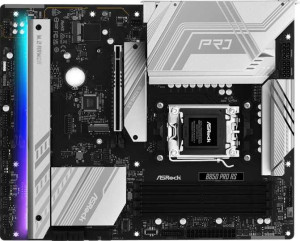
ASRock B850 Pro RS
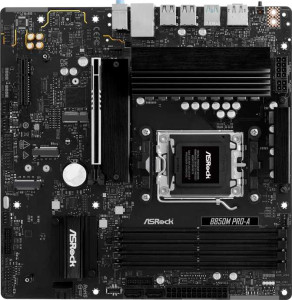
ASRock B850M Pro-A

ASRock B850 Pro RS ASRock B850M Pro-A

Overview

Welcome to our detailed specification comparison between the ASRock B850 Pro RS and the ASRock B850M Pro-A, two B850 chipset motherboards targeting the AMD AM5 platform. While these boards share a strong common foundation, they diverge in key areas such as form factor, expansion options, and connectivity — making the choice between them far from trivial. Read on to discover which board aligns best with your build requirements.

Common Features

  • Both boards use the AM5 CPU socket.
  • Both boards feature the B850 chipset.
  • Neither board supports Wi-Fi.
  • Neither board has Bluetooth.
  • Both boards output HDMI at version 2.1.
  • Both boards are easy to overclock.
  • Neither board offers easy BIOS reset.
  • Both boards have a dual BIOS feature.
  • Both boards support a maximum memory amount of 256GB.
  • Both boards support a maximum RAM speed of 8000 MHz.
  • Both boards have 4 memory slots.
  • Both boards use DDR5 memory.
  • Both boards operate on 2 memory channels.
  • Neither board supports ECC memory.
  • Both boards include 1 USB 3.2 Gen 2 USB-C port.
  • Neither board has USB 3.2 Gen 2x2, USB 4, or Thunderbolt ports.
  • Both boards have an HDMI output.
  • Both boards include 1 RJ45 port.
  • Both boards provide 4 USB 3.2 Gen 1 ports through expansion and 4 USB 2.0 ports through expansion.
  • Both boards include 4 SATA 3 connectors and no SATA 2 connectors.
  • Both boards have a TPM connector.
  • Neither board has an mSATA connector.
  • Both boards feature 1 PCIe 5.0 x16 slot and no PCIe 3.0 x16, PCIe 2.0 x16, PCIe x8, PCIe x1, or PCI slots.
  • Both boards support 7.1 audio channels with 3 audio connectors.
  • Neither board has an S/PDIF Out port.
  • Both boards support RAID 0, RAID 1, and RAID 10, but neither supports RAID 5 or RAID 0+1.

Main Differences

  • The form factor is ATX on the ASRock B850 Pro RS and Micro-ATX on the ASRock B850M Pro-A.
  • RGB lighting is present on the ASRock B850 Pro RS but not available on the ASRock B850M Pro-A.
  • The board width is 305 mm on the ASRock B850 Pro RS and 244 mm on the ASRock B850M Pro-A.
  • USB 3.2 Gen 2 USB-A ports number 0 on the ASRock B850 Pro RS and 1 on the ASRock B850M Pro-A.
  • USB 3.2 Gen 1 USB-A ports number 4 on the ASRock B850 Pro RS and 2 on the ASRock B850M Pro-A.
  • USB 3.2 Gen 1 USB-C ports number 1 on the ASRock B850 Pro RS and 0 on the ASRock B850M Pro-A.
  • USB 2.0 ports number 6 on the ASRock B850 Pro RS and 4 on the ASRock B850M Pro-A.
  • A DisplayPort output is present on the ASRock B850M Pro-A but not available on the ASRock B850 Pro RS.
  • Fan headers number 7 on the ASRock B850 Pro RS and 5 on the ASRock B850M Pro-A.
  • M.2 sockets number 4 on the ASRock B850 Pro RS and 3 on the ASRock B850M Pro-A.
  • A PCIe 4.0 x16 slot is present on the ASRock B850 Pro RS but not available on the ASRock B850M Pro-A.
  • A PCIe x4 slot is present on the ASRock B850M Pro-A but not available on the ASRock B850 Pro RS.
Specs Comparison
ASRock B850 Pro RS

ASRock B850 Pro RS

ASRock B850M Pro-A

ASRock B850M Pro-A

General info:
CPU socket AM5 AM5
chipset B850 B850
form factor ATX Micro-ATX
release date January 2025 January 2025
supports Wi-Fi
Has Bluetooth
HDMI version HDMI 2.1 HDMI 2.1
Easy to overclock
has RGB lighting
Easy to reset BIOS
Has dual BIOS
CPU sockets 1 1
Has integrated graphics
warranty period 3 years 3 years
height 244 mm 244 mm
width 305 mm 244 mm
Has integrated CPU

Both the ASRock B850 Pro RS and the ASRock B850M Pro-A are built on the same foundation: the AM5 socket with a B850 chipset, offering AMD Ryzen compatibility with mid-range platform features. They share a strong set of core capabilities — dual BIOS for recovery safety, support for overclocking, HDMI 2.1 output, and identical 3-year warranties. Neither includes Wi-Fi or Bluetooth, so users requiring wireless connectivity will need to budget for an add-in card or adapter regardless of which board they choose.

The most meaningful difference in this group is form factor. The Pro RS is a full ATX board (305 × 244 mm), while the Pro-A is Micro-ATX (244 × 244 mm). In practice, ATX provides more PCIe slots and expansion headroom, making the Pro RS the better fit for builds with multiple GPUs, NVMe cards, or capture cards. The Pro-A's smaller footprint suits compact or budget cases where space is at a premium, but it trades away that expandability. The Pro RS also includes RGB lighting, which the Pro-A omits — a minor aesthetic point, but relevant for users building themed systems.

For general platform fundamentals, these boards are closely matched. The edge goes to the B850 Pro RS for users who want a full-size build with more expansion potential and aesthetic flexibility, while the B850M Pro-A is the rational pick for small-form-factor or no-frills builds where a smaller footprint matters more than slot count or lighting.
Memory:
maximum memory amount 256GB 256GB
RAM speed (max) 8000 MHz 8000 MHz
overclocked RAM speed 8000 MHz 8000 MHz
memory slots 4 4
DDR memory version 5 5
memory channels 2 2
Supports ECC memory

When it comes to memory, the ASRock B850 Pro RS and ASRock B850M Pro-A are functionally identical across every measurable spec in this category. Both boards support DDR5 RAM with a maximum capacity of 256GB across 4 slots, running in dual-channel configuration — the practical sweet spot for gaming and workstation builds alike.

The shared ceiling of 8000 MHz (both native and overclocked) is noteworthy for a B850 platform: it gives enthusiasts meaningful headroom to push fast DDR5 kits without stepping up to the X870 chipset. Dual-channel at these speeds translates to substantial real-world bandwidth gains in CPU-bound workloads, content creation, and memory-sensitive games. Neither board supports ECC memory, which is expected at this tier and only relevant for users with server or workstation-grade reliability requirements.

This group is a clear tie. No matter which board you choose, the memory subsystem is identical — same capacity ceiling, same speed support, same slot count, same channel configuration. Your decision should rest entirely on the other specification groups rather than anything memory-related.

Ports:
USB 3.2 Gen 2 ports (USB-A) 0 1
USB 3.2 Gen 1 ports (USB-A) 4 2
USB 3.2 Gen 2 ports (USB-C) 1 1
USB 3.2 Gen 1 ports (USB-C) 1 0
USB 2.0 ports 6 4
USB 3.2 Gen 2x2 ports 0 0
USB 4 40Gbps ports 0 0
USB 4 20Gbps ports 0 0
Thunderbolt 4 ports 0 0
Thunderbolt 3 ports 0 0
has an HDMI output
DisplayPort outputs 0 1
RJ45 ports 1 1
Has USB Type-C
eSATA ports 0 0
DVI outputs 0 0
has a VGA connector
PS/2 ports 0 0

The port layouts on these two boards reveal meaningfully different priorities. The B850 Pro RS offers a higher raw USB count — 4 USB 3.2 Gen 1 Type-A ports plus 6 USB 2.0 ports — making it the more practical choice for desks crowded with peripherals: keyboards, mice, hubs, and audio interfaces can all be plugged in simultaneously without a hub. The B850M Pro-A counters with a USB 3.2 Gen 2 Type-A port (10Gbps) that the Pro RS entirely lacks on its rear panel, which is a meaningful advantage if you regularly transfer large files to fast external SSDs or NVMe enclosures.

The sharpest distinction, however, is display output. The Pro-A includes both HDMI and a DisplayPort output, while the Pro RS offers HDMI only. For users running integrated graphics through a Ryzen APU, or those who want a secondary display without a discrete GPU, the Pro-A's additional DisplayPort connection opens up multi-monitor flexibility that the Pro RS simply cannot match. Both boards share a single RJ45 ethernet port and a USB 3.2 Gen 2 Type-C, so fast wired networking and modern device charging are equally covered.

The verdict here depends on use case. The Pro RS suits users who need more simultaneous peripheral connections, while the Pro-A holds the edge for anyone prioritizing display versatility or faster single-device USB transfers. On balance, the Pro-A's DisplayPort output and Gen 2 Type-A port represent higher-value additions than the Pro RS's extra USB 2.0 slots, giving the Pro-A a slight practical edge in this category.

Connectors:
USB 3.2 Gen 1 ports (through expansion) 4 4
USB 2.0 ports (through expansion) 4 4
SATA 3 connectors 4 4
fan headers 7 5
USB 3.0 ports (through expansion) 4 4
M.2 sockets 4 3
Has TPM connector
U.2 sockets 0 0
Has mSATA connector
SATA 2 connectors 0 0

Internal connectivity is where the ATX advantage of the B850 Pro RS becomes tangible. Its 4 M.2 sockets versus the Pro-A's 3 is the headline difference — and it matters more than it might initially seem. M.2 is the dominant interface for modern NVMe SSDs, and having a fourth slot means the Pro RS can natively support a boot drive, a secondary storage drive, a dedicated cache or scratch drive, and still leave a slot free for future expansion, all without touching any SATA ports.

Fan header count is the other differentiator worth noting. The Pro RS provides 7 fan headers compared to the Pro-A's 5. In a high-airflow build with multiple case fans, a CPU cooler, and potentially a pump header for liquid cooling, two extra headers eliminate the need for splitters or external fan controllers — a small but genuinely convenient advantage for thermal management enthusiasts. Where the boards converge is meaningful too: both offer 4 SATA 3 ports, identical internal USB expansion headers, and a TPM connector — giving them the same baseline for storage arrays and security module support.

The B850 Pro RS holds a clear edge in this group. The additional M.2 slot and extra fan headers give it notably more headroom for storage-heavy or thermally demanding builds, making it the stronger choice for users who plan to scale their system over time.

Expansion slots:
PCIe 4.0 x16 slots 1 0
PCIe 5.0 x16 slots 1 1
PCIe 3.0 x16 slots 0 0
PCIe x1 slots 0 0
PCI slots 0 0
PCIe 2.0 x16 slots 0 0
PCIe x4 slots 0 1
PCIe x8 slots 0 0

Both boards lead with a single PCIe 5.0 x16 slot — the current gold standard for discrete GPU installation, offering bandwidth headroom that even today's most demanding graphics cards cannot fully saturate. That shared foundation means neither board will bottleneck a modern GPU. The divergence comes in what each board offers as a secondary slot.

The B850 Pro RS adds a PCIe 4.0 x16 slot, which is a significant bonus for users who want to install a second card — whether that's a dedicated capture card running at full x16 electrical bandwidth, a high-end NVMe controller, or a future GPU in a multi-card workload scenario. The B850M Pro-A, by contrast, includes a PCIe x4 slot in place of a second x16. A x4 slot is adequate for lower-bandwidth add-in cards like Wi-Fi adapters, SATA expansion cards, or entry-level capture devices, but it cannot match the throughput of a full x16 lane slot for bandwidth-hungry workloads.

The B850 Pro RS takes a clear edge here. The secondary PCIe 4.0 x16 slot meaningfully expands what the board can accommodate compared to the Pro-A's x4 slot, making the Pro RS the stronger pick for users who anticipate installing any high-throughput expansion card alongside their GPU.

Audio:
audio channels 7.1 7.1
Has S/PDIF Out port
audio connectors 3 3

Audio is a non-issue when choosing between these two boards — the specs are identical across every provided data point. Both the B850 Pro RS and the B850M Pro-A deliver 7.1-channel surround audio support with 3 analog audio connectors on the rear panel, and neither includes an S/PDIF optical output.

The 7.1-channel capability is a reasonable offering at this price tier, supporting full surround sound setups for gaming or home theater use. The absence of S/PDIF means users who rely on optical output to connect to an AV receiver or a DAC will need a dedicated sound card or USB audio interface — a consideration that applies equally to both boards.

This group is a straight tie. There is no audio-based reason to favor one board over the other; any decision should be driven entirely by the differences identified in other specification categories.

Storage:
Supports RAID 1
Supports RAID 10 (1+0)
Supports RAID 5
Supports RAID 0
Supports RAID 0+1

Storage redundancy support is identical across both boards. The B850 Pro RS and B850M Pro-A each support RAID 0, RAID 1, and RAID 10, while neither supports RAID 5 or RAID 0+1. This is a typical and practical configuration for a consumer-grade B850 platform.

The supported RAID modes cover the most relevant real-world use cases: RAID 0 for striped performance gains across multiple drives, RAID 1 for straightforward mirrored redundancy and data protection, and RAID 10 for users who want both speed and fault tolerance simultaneously. The absence of RAID 5 is unsurprising at this tier — it demands more controller overhead and is more commonly found on workstation or server-class hardware.

This is another complete tie. Both boards offer the same RAID capabilities, and neither has any storage configuration advantage over the other. As with audio, this category should not factor into a decision between these two products.

Comparison Summary & Verdict

Both the ASRock B850 Pro RS and ASRock B850M Pro-A deliver a solid AM5 platform with DDR5 support, PCIe 5.0, and identical memory capabilities up to 256GB. However, their differences define their ideal audiences. The ASRock B850 Pro RS stands out with its full ATX form factor, 4 M.2 sockets, 7 fan headers, an extra PCIe 4.0 x16 slot, and RGB lighting — making it the stronger choice for enthusiast or high-end builds with complex storage and cooling needs. The ASRock B850M Pro-A, in its compact Micro-ATX footprint, trades some expansion for a DisplayPort output, a USB 3.2 Gen 2 USB-A port, and a more space-efficient design, suiting users building smaller, tidier systems without sacrificing core functionality.

ASRock B850 Pro RS
Buy ASRock B850 Pro RS if...

Buy the ASRock B850 Pro RS if you need a full ATX board with more M.2 slots, additional fan headers, and a PCIe 4.0 x16 slot for a feature-rich, expandable build.

ASRock B850M Pro-A
Buy ASRock B850M Pro-A if...

Buy the ASRock B850M Pro-A if you prefer a compact Micro-ATX build and want the added convenience of a DisplayPort output and a USB 3.2 Gen 2 USB-A port.