ASRock B850 Pro RS
Gigabyte B850 Eagle Wi-Fi7 Ice

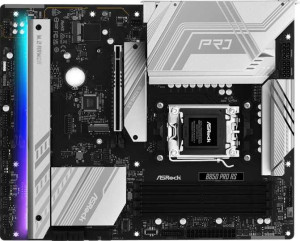
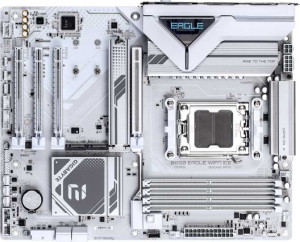
ASRock B850 Pro RS Gigabyte B850 Eagle Wi-Fi7 Ice

Overview

Welcome to our in-depth spec comparison between the ASRock B850 Pro RS and the Gigabyte B850 Eagle Wi-Fi7 Ice, two AM5 motherboards built around the B850 chipset in a standard ATX form factor. While they share a strong common foundation, the two boards diverge in key areas such as wireless connectivity, storage and expansion options, and memory speed capabilities — making the choice between them far from straightforward for demanding builders.

Common Features

  • Both motherboards use the AM5 CPU socket.
  • Both motherboards feature the B850 chipset.
  • Both motherboards use the ATX form factor.
  • Both motherboards support HDMI 2.1 output.
  • Overclocking is supported on both motherboards.
  • RGB lighting is present on both motherboards.
  • Easy BIOS reset is not available on either motherboard.
  • Both motherboards have a single CPU socket.
  • Both motherboards support up to 256GB of maximum memory.
  • Both motherboards have 4 memory slots.
  • Both motherboards use DDR5 memory.
  • Both motherboards operate in dual-channel memory mode.
  • ECC memory is not supported on either motherboard.
  • Both motherboards include 1 USB 3.2 Gen 1 USB-C port.
  • Neither motherboard has USB 3.2 Gen 2x2, USB 4, or Thunderbolt ports.
  • Both motherboards include an HDMI output.
  • Both motherboards have 1 RJ45 port.
  • Both motherboards provide 4 USB 2.0 ports through expansion.
  • Both motherboards have 4 SATA 3 connectors.
  • A TPM connector is present on both motherboards.
  • Neither motherboard has an mSATA connector or SATA 2 connectors.
  • Both motherboards feature 1 PCIe 5.0 x16 slot.
  • Neither motherboard includes PCIe 3.0 x16, PCIe 2.0 x16, PCIe x8, or PCI slots.
  • Both motherboards support 7.1 audio channels.
  • Both motherboards have 3 audio connectors.
  • S/PDIF Out is not available on either motherboard.
  • Both motherboards support RAID 0, RAID 1, and RAID 10.
  • RAID 0+1 is not supported on either motherboard.

Main Differences

  • Wi-Fi support is present on the Gigabyte B850 Eagle Wi-Fi7 Ice but not available on the ASRock B850 Pro RS.
  • Bluetooth is available on the Gigabyte B850 Eagle Wi-Fi7 Ice but not on the ASRock B850 Pro RS.
  • Dual BIOS is featured on the ASRock B850 Pro RS but not on the Gigabyte B850 Eagle Wi-Fi7 Ice.
  • Maximum RAM speed is 8000 MHz on the ASRock B850 Pro RS and 5200 MHz on the Gigabyte B850 Eagle Wi-Fi7 Ice.
  • Overclocked RAM speed reaches 8000 MHz on the ASRock B850 Pro RS and 8200 MHz on the Gigabyte B850 Eagle Wi-Fi7 Ice.
  • USB 3.2 Gen 2 USB-A ports number 0 on the ASRock B850 Pro RS and 2 on the Gigabyte B850 Eagle Wi-Fi7 Ice.
  • USB 3.2 Gen 1 USB-A ports number 4 on the ASRock B850 Pro RS and 2 on the Gigabyte B850 Eagle Wi-Fi7 Ice.
  • USB 3.2 Gen 2 USB-C ports number 1 on the ASRock B850 Pro RS and 0 on the Gigabyte B850 Eagle Wi-Fi7 Ice.
  • USB 2.0 ports total 6 on the ASRock B850 Pro RS and 4 on the Gigabyte B850 Eagle Wi-Fi7 Ice.
  • A DisplayPort output is absent on the ASRock B850 Pro RS but present on the Gigabyte B850 Eagle Wi-Fi7 Ice.
  • A PS/2 port is absent on the ASRock B850 Pro RS but present on the Gigabyte B850 Eagle Wi-Fi7 Ice.
  • USB 3.2 Gen 1 expansion ports number 4 on the ASRock B850 Pro RS and 2 on the Gigabyte B850 Eagle Wi-Fi7 Ice.
  • Fan headers number 7 on the ASRock B850 Pro RS and 6 on the Gigabyte B850 Eagle Wi-Fi7 Ice.
  • USB 3.0 expansion ports number 4 on the ASRock B850 Pro RS and 2 on the Gigabyte B850 Eagle Wi-Fi7 Ice.
  • M.2 sockets number 4 on the ASRock B850 Pro RS and 3 on the Gigabyte B850 Eagle Wi-Fi7 Ice.
  • A PCIe 4.0 x16 slot is present on the ASRock B850 Pro RS but absent on the Gigabyte B850 Eagle Wi-Fi7 Ice.
  • PCIe x1 slots number 0 on the ASRock B850 Pro RS and 2 on the Gigabyte B850 Eagle Wi-Fi7 Ice.
  • A PCIe x4 slot is absent on the ASRock B850 Pro RS but present on the Gigabyte B850 Eagle Wi-Fi7 Ice.
  • RAID 5 support is present on the Gigabyte B850 Eagle Wi-Fi7 Ice but not available on the ASRock B850 Pro RS.
Specs Comparison
ASRock B850 Pro RS

ASRock B850 Pro RS

Gigabyte B850 Eagle Wi-Fi7 Ice

Gigabyte B850 Eagle Wi-Fi7 Ice

General info:
CPU socket AM5 AM5
chipset B850 B850
form factor ATX ATX
release date January 2025 April 2025
supports Wi-Fi
Has Bluetooth
HDMI version HDMI 2.1 HDMI 2.1
Easy to overclock
has RGB lighting
Easy to reset BIOS
Has dual BIOS
CPU sockets 1 1
Has integrated graphics
warranty period 3 years 3 years
height 244 mm 244 mm
width 305 mm 305 mm
Has integrated CPU

Both the ASRock B850 Pro RS and the Gigabyte B850 Eagle Wi-Fi7 Ice share the same fundamental platform: an AM5 socket, B850 chipset, standard ATX form factor (244 × 305 mm), and identical overclocking support. For a builder choosing between these two boards, the shared foundation means neither has an inherent advantage in CPU compatibility, physical fit, or raw tuning headroom.

The single most meaningful differentiator in this group is connectivity: the Gigabyte includes Wi-Fi and Bluetooth, while the ASRock offers neither. In a desktop build without a nearby Ethernet run — or in any setup where wireless peripherals, audio devices, or smart-home integration matter — the Gigabyte eliminates the need for a separate adapter, saving a PCIe slot and reducing cable clutter. For a wired-only workstation or gaming rig already planned around Ethernet, this advantage is irrelevant.

A secondary but notable trade-off runs in the opposite direction: the ASRock carries a dual BIOS feature, while the Gigabyte does not. Dual BIOS provides a hardware-level fallback chip that can recover a corrupted firmware automatically — a meaningful safety net during aggressive overclocking or a failed BIOS update. Overall, the Gigabyte B850 Eagle Wi-Fi7 Ice holds the edge for most users thanks to built-in wireless, but builders who prioritize firmware resilience and plan to run wired-only will find the ASRock's dual BIOS more valuable than any wireless module.
Memory:
maximum memory amount 256GB 256GB
RAM speed (max) 8000 MHz 5200 MHz
overclocked RAM speed 8000 MHz 8200 MHz
memory slots 4 4
DDR memory version 5 5
memory channels 2 2
Supports ECC memory

On paper, both boards share a solid DDR5 foundation: 4 slots, dual-channel architecture, a 256 GB capacity ceiling, and no ECC support — meaning neither targets workstation or server use cases. For mainstream and enthusiast desktop builds, these shared traits make them functionally equivalent in terms of how much RAM you can install and how the memory controller operates.

The interesting divergence lies in how each board handles speed. The ASRock B850 Pro RS lists its native maximum and overclocked ceiling at the same 8000 MHz, suggesting a straightforward, unified speed rating. The Gigabyte B850 Eagle Wi-Fi7 Ice, by contrast, advertises a native max of 5200 MHz but an overclocked ceiling of 8200 MHz — a wider gap between stock and boosted operation. That 5200 MHz native figure is closer to JEDEC baseline DDR5 speeds, implying the Gigabyte may require more deliberate EXPO/XMP profile tuning to reach high frequencies, whereas the ASRock appears to support faster speeds more readily out of the box.

For users who simply plug in a high-speed DDR5 kit and enable an EXPO profile without deep BIOS tinkering, the ASRock's consistently high ceiling is the more convenient story. The Gigabyte technically reaches 8200 MHz at its peak — a marginal 200 MHz advantage — but only through overclocking. The edge here goes to the ASRock B850 Pro RS for offering higher out-of-the-box RAM speed accessibility, unless you are chasing the absolute frequency ceiling through manual tuning.

Ports:
USB 3.2 Gen 2 ports (USB-A) 0 2
USB 3.2 Gen 1 ports (USB-A) 4 2
USB 3.2 Gen 2 ports (USB-C) 1 0
USB 3.2 Gen 1 ports (USB-C) 1 1
USB 2.0 ports 6 4
USB 3.2 Gen 2x2 ports 0 0
USB 4 40Gbps ports 0 0
USB 4 20Gbps ports 0 0
Thunderbolt 4 ports 0 0
Thunderbolt 3 ports 0 0
has an HDMI output
DisplayPort outputs 0 1
RJ45 ports 1 1
Has USB Type-C
eSATA ports 0 0
DVI outputs 0 0
has a VGA connector
PS/2 ports 0 1

Rear I/O port selections reveal two meaningfully different philosophies here. The ASRock B850 Pro RS prioritizes sheer port count — 6 USB 2.0 and 4 USB 3.2 Gen 1 Type-A ports give it more total USB real estate, which suits desks crowded with keyboards, mice, dongles, and legacy peripherals. Crucially, it also includes a USB 3.2 Gen 2 Type-C port (10 Gbps), making it the only board of the two with a high-speed USB-C output on the rear panel — valuable for fast external SSDs or modern accessories connected via cable.

The Gigabyte B850 Eagle Wi-Fi7 Ice trades raw USB quantity for better high-speed Type-A coverage, offering 2 USB 3.2 Gen 2 (10 Gbps) Type-A ports alongside 2 Gen 1 ports. It also adds a DisplayPort output alongside HDMI, giving it two independent video outputs versus the ASRock's single HDMI — a real advantage for users leveraging integrated graphics across dual monitors or needing display output flexibility. The lone PS/2 port is a niche legacy inclusion of little consequence for most builders.

The verdict depends on use case. For users who need more USB ports or a fast USB-C rear connection, the ASRock B850 Pro RS is the stronger choice. For those who want dual display outputs or faster USB-A throughput in fewer ports, the Gigabyte wins. On balance, the Gigabyte's DisplayPort addition and Gen 2 Type-A ports give it a slight edge for modern, display-connected desktop setups, while the ASRock serves peripheral-heavy configurations better.

Connectors:
USB 3.2 Gen 1 ports (through expansion) 4 2
USB 2.0 ports (through expansion) 4 4
SATA 3 connectors 4 4
fan headers 7 6
USB 3.0 ports (through expansion) 4 2
M.2 sockets 4 3
Has TPM connector
U.2 sockets 0 0
Has mSATA connector
SATA 2 connectors 0 0

Storage expansion is where these two boards diverge most meaningfully. The ASRock B850 Pro RS offers 4 M.2 sockets versus the Gigabyte's 3 — a tangible difference for builders planning NVMe-heavy configurations, whether for a large game library, video editing scratch drives, or a combined OS-plus-data-plus-cache setup. Both share 4 SATA 3 connectors, so legacy 2.5″ SSDs and HDDs are equally well served on either board.

Internal USB expansion also favors the ASRock. It provides 4 internal USB 3.2 Gen 1 headers compared to the Gigabyte's 2, meaning more front-panel USB 3.0 ports can be supported simultaneously — relevant for larger cases with multiple front-panel connectors or USB expansion cards. The USB 2.0 internal header count is identical at 4 on both boards, keeping legacy front-panel audio controllers and fan controllers equally covered.

Fan and thermal management gives the ASRock another marginal lead with 7 fan headers to the Gigabyte's 6. In a high-airflow build with multiple case fans, a CPU cooler, and an AIO pump header, that extra header removes the need for a fan splitter. Taken together, the ASRock B850 Pro RS holds a clear advantage in this group — more M.2 slots, more internal USB 3.0 headers, and more fan headers make it the stronger choice for storage-rich or thermally complex builds.

Expansion slots:
PCIe 4.0 x16 slots 1 0
PCIe 5.0 x16 slots 1 1
PCIe 3.0 x16 slots 0 0
PCIe x1 slots 0 2
PCI slots 0 0
PCIe 2.0 x16 slots 0 0
PCIe x4 slots 0 1
PCIe x8 slots 0 0

Both boards anchor their slot lineup with a single PCIe 5.0 x16 slot — the primary GPU lane — ensuring the latest discrete graphics cards run at full bandwidth on either platform. That shared foundation means neither board compromises the core graphics use case. The divergence comes in how each fills out the remaining expansion real estate.

The ASRock B850 Pro RS adds a second full-size slot in the form of a PCIe 4.0 x16, which is a meaningful asset for builders wanting to install a second discrete GPU, a high-bandwidth capture card, or a top-tier NVMe expansion card without sacrificing electrical bandwidth. The Gigabyte B850 Eagle Wi-Fi7 Ice takes a different approach, offering 2 PCIe x1 slots and a PCIe x4 slot in place of any second x16 slot. These smaller slots are well-suited for accessory cards — sound cards, 10GbE NICs, USB expansion cards — but cannot accommodate a second GPU or any card requiring x8 or x16 physical and electrical bandwidth.

The right choice hinges entirely on intended use. For multi-GPU setups or bandwidth-hungry PCIe accessories, the ASRock B850 Pro RS holds a clear structural advantage with its second x16 slot. For builders who want a wider variety of smaller expansion cards — network adapters, audio interfaces, or capture devices — the Gigabyte's mix of x1 and x4 slots covers more peripheral categories simultaneously. As a general-purpose expansion platform, the ASRock edges ahead due to the greater flexibility its second PCIe 4.0 x16 slot provides.

Audio:
audio channels 7.1 7.1
Has S/PDIF Out port
audio connectors 3 3

Audio is a clean draw between these two boards — every provided spec is identical. Both deliver 7.1-channel surround support, 3 analog audio connectors, and no S/PDIF optical output. For the vast majority of users with stereo headsets or standard speaker setups, this configuration is more than sufficient. The 7.1-channel capability means multi-speaker surround rigs are supported without a dedicated sound card.

The absence of S/PDIF on both boards is worth noting for users who rely on optical output to connect to an AV receiver or DAC — neither board accommodates that use case natively. Anyone requiring digital optical audio passthrough will need a discrete sound card or USB DAC on either platform equally.

There is no advantage to be found here for either product. The ASRock B850 Pro RS and the Gigabyte B850 Eagle Wi-Fi7 Ice are fully tied on audio specs, and this group should not factor into a purchase decision between the two.

Storage:
Supports RAID 1
Supports RAID 10 (1+0)
Supports RAID 5
Supports RAID 0
Supports RAID 0+1

RAID support is nearly identical across these two boards, with both covering the essentials: RAID 0 for performance striping, RAID 1 for mirroring and redundancy, and RAID 10 for a combined stripe-and-mirror configuration. For most desktop users — even those running multi-drive NAS-style setups or wanting basic data protection — these three modes cover virtually every practical scenario.

The single differentiator is the Gigabyte B850 Eagle Wi-Fi7 Ice's support for RAID 5, which the ASRock B850 Pro RS lacks. RAID 5 distributes parity data across three or more drives, offering a balance of storage efficiency, read performance, and single-drive fault tolerance that neither RAID 1 nor RAID 10 can match in terms of usable capacity per drive. It is a configuration more commonly associated with NAS devices and workstation builds where three or more drives need to be pooled efficiently without sacrificing redundancy.

For the vast majority of desktop builders, the missing RAID 5 on the ASRock will never matter. But for users specifically planning a three-drive or larger array that prioritizes storage efficiency alongside redundancy, the Gigabyte holds a narrow but real advantage as the only board here that supports it.

Comparison Summary & Verdict

Both boards deliver a solid B850 platform with DDR5 support, PCIe 5.0, and 7.1 audio, but their strengths point to different types of users. The ASRock B850 Pro RS stands out with its dual BIOS protection, 4 M.2 sockets, more fan headers, higher native RAM speed of 8000 MHz, and a greater number of USB and expansion connectors — making it an excellent pick for power users and enthusiast builders who want maximum internal expandability and reliability. The Gigabyte B850 Eagle Wi-Fi7 Ice, on the other hand, offers built-in Wi-Fi 7 and Bluetooth, a DisplayPort output, RAID 5 support, and slightly higher overclocked RAM headroom at 8200 MHz, catering well to users who prioritize wireless connectivity and a cleaner, more modern feature set out of the box.

ASRock B850 Pro RS
Buy ASRock B850 Pro RS if...

Buy the ASRock B850 Pro RS if you want maximum internal expandability with 4 M.2 slots, more USB ports, dual BIOS safety, and no need for built-in wireless.

Gigabyte B850 Eagle Wi-Fi7 Ice
Buy Gigabyte B850 Eagle Wi-Fi7 Ice if...

Buy the Gigabyte B850 Eagle Wi-Fi7 Ice if built-in Wi-Fi 7 and Bluetooth connectivity are essential, or if you need a DisplayPort output and RAID 5 storage support.