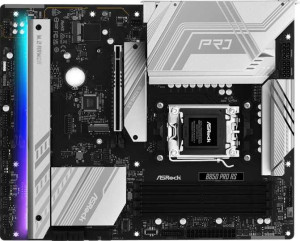
ASRock B850 Pro RS
MSI B840 Gaming Plus WiFi

ASRock B850 Pro RS MSI B840 Gaming Plus WiFi

Overview

When choosing between the ASRock B850 Pro RS and the MSI B840 Gaming Plus WiFi, builders face a compelling decision across several key areas. Both are AM5-compatible ATX motherboards with DDR5 support and dual BIOS, but they diverge meaningfully in connectivity, expansion, and storage options. This comparison breaks down every specification to help you determine which board best fits your build.

Common Features

  • Both boards use the AM5 CPU socket.
  • Both boards feature the ATX form factor.
  • Both boards support HDMI 2.1 output.
  • Overclocking is supported on both boards.
  • RGB lighting is present on both boards.
  • Dual BIOS is available on both boards.
  • Each board has a single CPU socket.
  • Neither board has integrated graphics.
  • Both boards support a maximum of 256GB of RAM.
  • Both boards support overclocked RAM speeds up to 8000 MHz.
  • Both boards have 4 memory slots.
  • Both boards use DDR5 memory.
  • Both boards operate in dual-channel memory mode.
  • ECC memory is not supported on either board.
  • Both boards include 1 USB 3.2 Gen 2 USB-C port.
  • Neither board has USB 3.2 Gen 2x2, USB 4, or Thunderbolt ports.
  • Both boards have an HDMI output and no DisplayPort outputs.
  • Both boards provide 4 USB 2.0 ports through expansion.
  • Both boards include 4 SATA 3 connectors.
  • A TPM connector is present on both boards.
  • Neither board has an mSATA connector or SATA 2 connectors.
  • Both boards have no U.2 sockets.
  • Both boards include 1 PCIe 4.0 x16 slot.
  • Neither board has PCI, PCIe 2.0 x16, PCIe x4, or PCIe x8 slots.
  • Both boards support 7.1 audio channels with 3 audio connectors.
  • Neither board has an S/PDIF Out port.
  • Both boards support RAID 0 and RAID 1.
  • Neither board supports RAID 5 or RAID 0+1.

Main Differences

  • The chipset is B850 on ASRock B850 Pro RS and B840 on MSI B840 Gaming Plus WiFi.
  • Wi-Fi is present on MSI B840 Gaming Plus WiFi but not available on ASRock B850 Pro RS.
  • Bluetooth is present on MSI B840 Gaming Plus WiFi but not available on ASRock B850 Pro RS.
  • Easy BIOS reset is supported on MSI B840 Gaming Plus WiFi but not on ASRock B850 Pro RS.
  • The board height is 244 mm on ASRock B850 Pro RS and 243.8 mm on MSI B840 Gaming Plus WiFi.
  • The board width is 305 mm on ASRock B850 Pro RS and 304.8 mm on MSI B840 Gaming Plus WiFi.
  • The maximum native RAM speed is 8000 MHz on ASRock B850 Pro RS and 5600 MHz on MSI B840 Gaming Plus WiFi.
  • USB 3.2 Gen 2 USB-A ports number 0 on ASRock B850 Pro RS and 1 on MSI B840 Gaming Plus WiFi.
  • USB 3.2 Gen 1 USB-A ports number 4 on ASRock B850 Pro RS and 2 on MSI B840 Gaming Plus WiFi.
  • USB 3.2 Gen 1 USB-C ports number 1 on ASRock B850 Pro RS and 0 on MSI B840 Gaming Plus WiFi.
  • USB 2.0 ports number 6 on ASRock B850 Pro RS and 4 on MSI B840 Gaming Plus WiFi.
  • USB 3.2 Gen 1 ports through expansion number 4 on ASRock B850 Pro RS and 2 on MSI B840 Gaming Plus WiFi.
  • Fan headers number 7 on ASRock B850 Pro RS and 6 on MSI B840 Gaming Plus WiFi.
  • USB 3.0 ports through expansion number 4 on ASRock B850 Pro RS and 2 on MSI B840 Gaming Plus WiFi.
  • M.2 sockets number 4 on ASRock B850 Pro RS and 2 on MSI B840 Gaming Plus WiFi.
  • ASRock B850 Pro RS has 1 PCIe 5.0 x16 slot while MSI B840 Gaming Plus WiFi has none.
  • MSI B840 Gaming Plus WiFi has 1 PCIe 3.0 x16 slot while ASRock B850 Pro RS has none.
  • PCIe x1 slots number 0 on ASRock B850 Pro RS and 3 on MSI B840 Gaming Plus WiFi.
  • RAID 10 support is available on ASRock B850 Pro RS but not on MSI B840 Gaming Plus WiFi.
Specs Comparison
ASRock B850 Pro RS

ASRock B850 Pro RS

MSI B840 Gaming Plus WiFi

MSI B840 Gaming Plus WiFi

General info:
CPU socket AM5 AM5
chipset B850 B840
form factor ATX ATX
release date January 2025 January 2025
supports Wi-Fi
Has Bluetooth
HDMI version HDMI 2.1 HDMI 2.1
Easy to overclock
has RGB lighting
Easy to reset BIOS
Has dual BIOS
CPU sockets 1 1
Has integrated graphics
warranty period 3 years 3 years
height 244 mm 243.8 mm
width 305 mm 304.8 mm
Has integrated CPU

Both boards share the same fundamental platform: the AM5 socket, ATX form factor, and near-identical physical footprint, meaning either will fit the same cases and support the same current AMD processors. They also match on HDMI 2.1 output, RGB lighting, dual BIOS, a 3-year warranty, and overclocking support — so on paper, a large portion of the feature sheet looks identical at a glance.

The most meaningful real-world split is connectivity. The ASRock B850 Pro RS ships with no onboard Wi-Fi or Bluetooth, which means a wired Ethernet setup or the added cost and clutter of a PCIe adapter. The MSI B840 Gaming Plus WiFi includes both Wi-Fi and Bluetooth out of the box, a genuine convenience advantage for any build where running a LAN cable is impractical. Beyond connectivity, the MSI also supports easy BIOS reset — a small but useful quality-of-life feature that matters during overclocking experiments or recovery from a bad flash. The ASRock lacks this. On the other hand, the ASRock runs the slightly higher-tier B850 chipset versus the B840, which in AMD's stack typically means more PCIe lanes and broader overclocking headroom — though both boards are listed as equally easy to overclock here.

For most users, the MSI B840 Gaming Plus WiFi holds the practical edge in this category: integrated wireless connectivity and easier BIOS recovery offset the modest chipset step-down for the majority of builds. The ASRock's B850 chipset is the better choice only if maximizing PCIe bandwidth or future expansion potential is a priority and you're content adding networking separately.

Memory:
maximum memory amount 256GB 256GB
RAM speed (max) 8000 MHz 5600 MHz
overclocked RAM speed 8000 MHz 8000 MHz
memory slots 4 4
DDR memory version 5 5
memory channels 2 2
Supports ECC memory

The memory configurations here are largely parallel — both boards offer 4 slots, DDR5, dual-channel architecture, a 256GB capacity ceiling, and no ECC support. For everyday builds, this common ground means neither board constrains you in terms of how much RAM you can install or how it's organized.

Where they diverge is in native versus overclocked speed support. The ASRock B850 Pro RS lists its maximum RAM speed at 8000 MHz even without overclocking context, implying broader out-of-the-box compatibility with high-speed DDR5 kits. The MSI B840 Gaming Plus WiFi, by contrast, caps native support at 5600 MHz — which is closer to DDR5's JEDEC baseline — and only reaches 8000 MHz through overclocking (EXPO/XMP profiles). In practice, this means that on the MSI, running a fast DDR5 kit at its rated speed requires enabling an OC profile in the BIOS, which is standard procedure but adds a step and can occasionally introduce instability on less mature platforms.

For users who plan to run high-frequency DDR5 memory, the ASRock B850 Pro RS holds a clear edge here, as its higher native ceiling reduces friction when pairing with premium RAM kits. The MSI is perfectly capable of hitting the same speeds, but requires relying on overclocking profiles to get there.

Ports:
USB 3.2 Gen 2 ports (USB-A) 0 1
USB 3.2 Gen 1 ports (USB-A) 4 2
USB 3.2 Gen 2 ports (USB-C) 1 1
USB 3.2 Gen 1 ports (USB-C) 1 0
USB 2.0 ports 6 4
USB 3.2 Gen 2x2 ports 0 0
USB 4 40Gbps ports 0 0
USB 4 20Gbps ports 0 0
Thunderbolt 4 ports 0 0
Thunderbolt 3 ports 0 0
has an HDMI output
DisplayPort outputs 0 0
RJ45 ports 1 1
Has USB Type-C
eSATA ports 0 0
DVI outputs 0 0
has a VGA connector
PS/2 ports 0 0

The rear I/O layout tells two different stories about port philosophy. The ASRock B850 Pro RS prioritizes raw port count, offering a total of 12 USB ports across its rear panel — including 4 USB-A Gen 1 ports, 6 USB 2.0 ports, and a USB-C Gen 2 plus a USB-C Gen 1. The MSI B840 Gaming Plus WiFi is leaner at 8 USB ports total, with fewer USB-A and USB 2.0 connections. For users with many wired peripherals — keyboards, mice, headsets, controllers, external drives — the ASRock's higher port count reduces dependence on hubs.

The MSI counters with one area where it pulls ahead: it includes a USB-A Gen 2 (10Gbps) port that the ASRock entirely lacks on the rear panel. That 10Gbps bandwidth is a meaningful advantage when connecting fast external SSDs or high-speed USB devices directly to a Type-A connector, which remains the more common plug on storage accessories. The ASRock's fastest Type-A ports top out at Gen 1 (5Gbps), so for external storage transfers, the MSI's single Gen 2 Type-A is the quicker option despite having fewer ports overall. Both boards offer one USB-C Gen 2 rear port, a single RJ45, and HDMI output, with no DisplayPort or Thunderbolt on either.

The verdict depends on use case: the ASRock wins for sheer peripheral capacity and desk-ready convenience, while the MSI's USB-A Gen 2 inclusion gives it an edge for users who regularly transfer large files to external Type-A drives. Neither board dominates outright, but the ASRock's broader port spread makes it the more versatile choice for most desktop setups.
Connectors:
USB 3.2 Gen 1 ports (through expansion) 4 2
USB 2.0 ports (through expansion) 4 4
SATA 3 connectors 4 4
fan headers 7 6
USB 3.0 ports (through expansion) 4 2
M.2 sockets 4 2
Has TPM connector
U.2 sockets 0 0
Has mSATA connector
SATA 2 connectors 0 0

The internal connector layout is where the ASRock B850 Pro RS pulls ahead most decisively in this comparison. Its 4 M.2 sockets versus the MSI's 2 M.2 sockets is the single biggest differentiator in this group — and in practical terms, it doubles the number of NVMe SSDs or other M.2 devices you can install without touching a single SATA cable. For content creators, PC enthusiasts, or anyone building a high-capacity storage array, that extra room is a genuine structural advantage rather than a marginal spec bump.

The ASRock also edges out the MSI on internal USB expansion headers, offering 4 USB 3.2 Gen 1 internal ports compared to the MSI's 2, giving more flexibility for front-panel USB connections on cases with multiple Type-A or Type-C front ports. Fan header count follows the same pattern — 7 headers on the ASRock versus 6 on the MSI — a modest but real advantage in highly cooled builds with multiple case fans, radiator pumps, and AIO headers to manage. Both boards are otherwise matched on SATA 3 connectors (4 each), USB 2.0 expansion headers, and TPM support.

Across every internal connector metric that varies between these two boards, the ASRock B850 Pro RS consistently comes out ahead. The doubled M.2 capacity alone makes it the stronger platform for storage-intensive builds, and the additional fan headers and USB expansion only reinforce that lead.

Expansion slots:
PCIe 4.0 x16 slots 1 1
PCIe 5.0 x16 slots 1 0
PCIe 3.0 x16 slots 0 1
PCIe x1 slots 0 3
PCI slots 0 0
PCIe 2.0 x16 slots 0 0
PCIe x4 slots 0 0
PCIe x8 slots 0 0

The primary GPU slot tells the most important story here. The ASRock B850 Pro RS provides a PCIe 5.0 x16 slot for the main graphics card, while the MSI B840 Gaming Plus WiFi tops out at PCIe 4.0 x16 for its primary slot. In today's GPU landscape the bandwidth difference is largely theoretical — current graphics cards do not saturate PCIe 4.0 x16 — but PCIe 5.0 does offer meaningful headroom for next-generation GPUs and high-speed PCIe 5.0 NVMe cards that use an x16 slot adapter, making the ASRock the more future-proof choice on this front.

The MSI counters with greater slot variety. Alongside its PCIe 4.0 x16, it adds a PCIe 3.0 x16 slot and 3 PCIe x1 slots — a much more expansion-friendly layout for users who want to install capture cards, sound cards, networking cards, or other add-in peripherals simultaneously. The ASRock, by contrast, offers no x1 slots and no secondary full-length slot, leaving the PCIe 5.0 primary slot as the only expansion option beyond M.2. That is a notable constraint if you plan on populating the board with multiple expansion cards.

Which layout wins depends entirely on the build's purpose. The ASRock B850 Pro RS is the better choice for a focused, GPU-centric build that wants the highest-bandwidth primary slot and forward compatibility. The MSI B840 Gaming Plus WiFi is the stronger platform for versatile, multi-card configurations — its additional x1 slots and secondary x16-length slot give it a clear practical edge for expansion-heavy use cases.

Audio:
audio channels 7.1 7.1
Has S/PDIF Out port
audio connectors 3 3

Audio is the one category where there is nothing to debate: the ASRock B850 Pro RS and MSI B840 Gaming Plus WiFi are identical across every provided data point. Both deliver 7.1-channel onboard audio, both offer 3 analog audio connectors, and neither includes an S/PDIF optical output — ruling out a direct digital connection to AV receivers or DACs that rely on that interface.

The absence of S/PDIF is worth noting for users who route audio through external hardware, as it means both boards are limited to analog rear-panel output or USB-based audio solutions for that use case. That said, 7.1-channel support is more than sufficient for the vast majority of headset and speaker setups, and 3 analog connectors is a standard complement for a board at this tier.

This group is a straightforward tie — neither board holds any audio advantage over the other based on the available data, and the choice between them should rest entirely on the differentiators found in other spec categories.

Storage:
Supports RAID 1
Supports RAID 10 (1+0)
Supports RAID 5
Supports RAID 0
Supports RAID 0+1

RAID support is narrow on both boards, but there is one meaningful split. The ASRock B850 Pro RS and MSI B840 Gaming Plus WiFi both support RAID 0 (striping for performance) and RAID 1 (mirroring for redundancy) — covering the two most commonly used consumer RAID configurations. Neither supports RAID 5, which requires three or more drives with parity and is more typical of NAS or workstation platforms.

The differentiator is RAID 10, which the ASRock supports and the MSI does not. RAID 10 combines striping and mirroring across four drives, delivering both the speed benefits of RAID 0 and the fault tolerance of RAID 1 simultaneously. For users running storage-intensive workloads — video editing, databases, or any application where both throughput and data protection matter — RAID 10 is a significantly more capable configuration than either RAID 0 or RAID 1 alone. The MSI's omission of this mode limits its RAID flexibility to an either/or choice between speed and redundancy.

The ASRock B850 Pro RS takes a clear edge here, and notably, this advantage pairs well with its superior M.2 socket count highlighted in the connectors category — having four M.2 slots makes a four-drive RAID 10 array a realistic proposition on the ASRock, whereas the MSI's two M.2 slots would require SATA drives to achieve the same.

Comparison Summary & Verdict

After reviewing all specifications, both boards share a strong foundation: AM5 socket, DDR5 support, 7.1 audio, and HDMI 2.1. However, their strengths point to different builders. The ASRock B850 Pro RS stands out with its PCIe 5.0 x16 slot, four M.2 sockets, seven fan headers, and RAID 10 support, making it the stronger pick for enthusiasts who demand future-ready storage and GPU bandwidth. The MSI B840 Gaming Plus WiFi, on the other hand, brings built-in Wi-Fi and Bluetooth, an easier BIOS reset, and three PCIe x1 slots, making it a more convenient all-in-one solution for users who value wireless connectivity and a simpler setup experience out of the box.

ASRock B850 Pro RS
Buy ASRock B850 Pro RS if...

Buy the ASRock B850 Pro RS if you want a future-ready build with a PCIe 5.0 x16 slot, four M.2 sockets, more fan headers, and RAID 10 support for advanced storage configurations.

MSI B840 Gaming Plus WiFi
Buy MSI B840 Gaming Plus WiFi if...

Buy the MSI B840 Gaming Plus WiFi if built-in Wi-Fi and Bluetooth, easy BIOS reset, and three PCIe x1 expansion slots are priorities for your build.