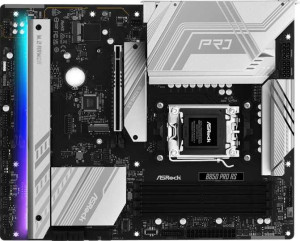
ASRock B850 Pro RS
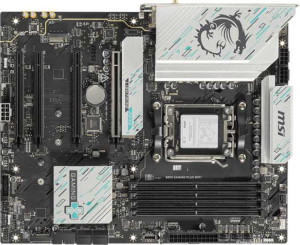
MSI B850 Gaming Plus WiFi

ASRock B850 Pro RS MSI B850 Gaming Plus WiFi

Overview

Welcome to our in-depth specification comparison between the ASRock B850 Pro RS and the MSI B850 Gaming Plus WiFi. Both boards share the AM5 socket, B850 chipset, and ATX form factor, making this a closely contested matchup. The key battlegrounds include connectivity features such as Wi-Fi and Bluetooth, memory support, storage expansion, and rear port configurations. Read on to find out which of these two B850 motherboards is the better fit for your next build.

Common Features

  • Both boards use the AM5 CPU socket.
  • Both boards feature the B850 chipset.
  • Both boards use the ATX form factor.
  • Overclocking is supported on both products.
  • RGB lighting is present on both products.
  • Dual BIOS is available on both products.
  • Each board has a single CPU socket.
  • Integrated graphics are not supported on either product.
  • Both boards support up to 256GB of maximum memory.
  • Both boards have 4 memory slots.
  • Both boards use DDR5 memory.
  • Both boards operate with 2 memory channels.
  • ECC memory is not supported on either product.
  • Neither board has USB 3.2 Gen 2x2, USB 4 40Gbps, USB 4 20Gbps, Thunderbolt 4, or Thunderbolt 3 ports.
  • Both boards include 1 RJ45 port.
  • USB Type-C connectivity is available on both products.
  • eSATA ports are not present on either product.
  • Both boards provide 4 USB 3.2 Gen 1 ports through expansion.
  • Both boards provide 4 USB 2.0 ports through expansion.
  • Both boards include 4 SATA 3 connectors.
  • A TPM connector is present on both products.
  • mSATA connectors are not available on either product.
  • SATA 2 connectors are not present on either product.
  • Both boards include 1 PCIe 5.0 x16 slot and 1 PCIe 4.0 x16 slot.
  • Neither board has PCIe 3.0 x16, PCIe 2.0 x16, PCIe x8, PCIe x4, or legacy PCI slots.
  • Both boards support 7.1 audio channels.
  • Both boards support RAID 0 and RAID 1.
  • RAID 5 and RAID 0+1 are not supported on either product.

Main Differences

  • Wi-Fi is available on the MSI B850 Gaming Plus WiFi but not on the ASRock B850 Pro RS.
  • Bluetooth is available on the MSI B850 Gaming Plus WiFi but not on the ASRock B850 Pro RS.
  • Easy BIOS reset is supported on the MSI B850 Gaming Plus WiFi but not on the ASRock B850 Pro RS.
  • Height is 244 mm on the ASRock B850 Pro RS and 243.8 mm on the MSI B850 Gaming Plus WiFi.
  • Width is 305 mm on the ASRock B850 Pro RS and 304.8 mm on the MSI B850 Gaming Plus WiFi.
  • Maximum native RAM speed is 8000 MHz on the ASRock B850 Pro RS and 5600 MHz on the MSI B850 Gaming Plus WiFi.
  • Maximum overclocked RAM speed is 8000 MHz on the ASRock B850 Pro RS and 8200 MHz on the MSI B850 Gaming Plus WiFi.
  • USB 3.2 Gen 2 ports (USB-A) count is 0 on the ASRock B850 Pro RS and 1 on the MSI B850 Gaming Plus WiFi.
  • USB 3.2 Gen 1 ports (USB-A) count is 4 on the ASRock B850 Pro RS and 1 on the MSI B850 Gaming Plus WiFi.
  • USB 3.2 Gen 2 ports (USB-C) count is 1 on the ASRock B850 Pro RS and 2 on the MSI B850 Gaming Plus WiFi.
  • USB 3.2 Gen 1 ports (USB-C) count is 1 on the ASRock B850 Pro RS and 0 on the MSI B850 Gaming Plus WiFi.
  • USB 2.0 port count is 6 on the ASRock B850 Pro RS and 4 on the MSI B850 Gaming Plus WiFi.
  • An HDMI output is present on the ASRock B850 Pro RS but not on the MSI B850 Gaming Plus WiFi.
  • DisplayPort output count is 0 on the ASRock B850 Pro RS and 1 on the MSI B850 Gaming Plus WiFi.
  • Fan header count is 7 on the ASRock B850 Pro RS and 6 on the MSI B850 Gaming Plus WiFi.
  • M.2 socket count is 4 on the ASRock B850 Pro RS and 3 on the MSI B850 Gaming Plus WiFi.
  • PCIe x1 slot count is 0 on the ASRock B850 Pro RS and 2 on the MSI B850 Gaming Plus WiFi.
  • An S/PDIF Out port is present on the MSI B850 Gaming Plus WiFi but not on the ASRock B850 Pro RS.
  • Audio connector count is 3 on the ASRock B850 Pro RS and 2 on the MSI B850 Gaming Plus WiFi.
  • RAID 10 (1+0) support is available on the ASRock B850 Pro RS but not on the MSI B850 Gaming Plus WiFi.
Specs Comparison
ASRock B850 Pro RS

ASRock B850 Pro RS

MSI B850 Gaming Plus WiFi

MSI B850 Gaming Plus WiFi

General info:
CPU socket AM5 AM5
chipset B850 B850
form factor ATX ATX
release date January 2025 January 2025
supports Wi-Fi
Has Bluetooth
Easy to overclock
has RGB lighting
Easy to reset BIOS
Has dual BIOS
CPU sockets 1 1
Has integrated graphics
warranty period 3 years 3 years
height 244 mm 243.8 mm
width 305 mm 304.8 mm
Has integrated CPU

Both the ASRock B850 Pro RS and the MSI B850 Gaming Plus WiFi share the same foundational profile: AM5 socket, B850 chipset, standard ATX form factor, and identical physical dimensions to within fractions of a millimeter. They also match on overclock support, RGB lighting, dual BIOS, and a 3-year warranty — meaning neither board has an edge on platform compatibility, build flexibility, or long-term support.

The meaningful separation comes down to connectivity and BIOS usability. The MSI includes Wi-Fi and Bluetooth out of the box, which is a genuine convenience advantage for users who cannot run an Ethernet cable or who want to pair wireless peripherals without a separate adapter. The ASRock offers neither, so wireless connectivity would require an add-in card at extra cost. Additionally, the MSI supports easy BIOS reset while the ASRock does not — a small but practical difference when troubleshooting a failed overclock or a no-POST situation, where being able to clear the BIOS without disassembling the system saves real time.

For this spec group, the MSI B850 Gaming Plus WiFi holds a clear edge. Its built-in wireless stack and easier BIOS recovery make it the more self-contained and user-friendly option, without giving anything up on the core platform specs where both boards are effectively identical.

Memory:
maximum memory amount 256GB 256GB
RAM speed (max) 8000 MHz 5600 MHz
overclocked RAM speed 8000 MHz 8200 MHz
memory slots 4 4
DDR memory version 5 5
memory channels 2 2
Supports ECC memory

At the structural level, these two boards are identical in their memory architecture: both support DDR5, offer 4 slots across dual channels, cap out at 256GB maximum capacity, and neither supports ECC memory. For the vast majority of desktop users, this shared foundation means the same upgrade path and the same maximum headroom.

The interesting divergence lies in how each board handles memory speeds. The ASRock B850 Pro RS lists its official and overclocked maximum at the same 8000 MHz, suggesting that figure represents the practical ceiling under XMP/EXPO profiles. The MSI B850 Gaming Plus WiFi takes a different approach: its native rated maximum is a more conservative 5600 MHz, but its overclocked ceiling reaches 8200 MHz — actually edging out the ASRock at the very top. In practice, that 200 MHz gap at the extreme end is unlikely to produce perceptible real-world performance differences, but it does indicate the MSI has slightly more headroom for enthusiasts pushing high-speed kits.

This category is essentially a near-tie, but the MSI B850 Gaming Plus WiFi takes a narrow edge for memory overclocking enthusiasts due to its marginally higher overclocked ceiling. For users running standard XMP/EXPO profiles well below those limits, the two boards are functionally equivalent in the memory department.

Ports:
USB 3.2 Gen 2 ports (USB-A) 0 1
USB 3.2 Gen 1 ports (USB-A) 4 1
USB 3.2 Gen 2 ports (USB-C) 1 2
USB 3.2 Gen 1 ports (USB-C) 1 0
USB 2.0 ports 6 4
USB 3.2 Gen 2x2 ports 0 0
USB 4 40Gbps ports 0 0
USB 4 20Gbps ports 0 0
Thunderbolt 4 ports 0 0
Thunderbolt 3 ports 0 0
has an HDMI output
DisplayPort outputs 0 1
RJ45 ports 1 1
Has USB Type-C
eSATA ports 0 0
DVI outputs 0 0
has a VGA connector
PS/2 ports 0 0

Raw port count favors the ASRock B850 Pro RS: it offers 4 USB 3.2 Gen 1 Type-A ports on the rear panel alongside 6 USB 2.0 ports, giving users who run many peripherals — keyboards, mice, audio interfaces, dongles — plenty of slots without a hub. The MSI trims that down to just 2 high-speed Type-A ports total and 4 USB 2.0, which may feel tight on a fully loaded desk setup.

Where the MSI B850 Gaming Plus WiFi pushes back is on USB-C quality. It provides two USB 3.2 Gen 2 Type-C ports (each at 10Gbps), compared to the ASRock's one Gen 2 and one slower Gen 1 Type-C. For users connecting modern external SSDs, high-resolution webcams, or newer displays via USB-C, having two full-speed 10Gbps Type-C ports is a meaningful advantage. The display output split also reflects different use cases: the ASRock includes an HDMI output while the MSI offers a DisplayPort output — HDMI is more universally compatible with TVs and monitors, while DisplayPort is generally preferred for high-refresh-rate gaming displays.

There is no outright winner here — the right board depends on what you plug in. The ASRock B850 Pro RS is the stronger choice for users who need more Type-A and USB 2.0 ports for traditional peripherals, while the MSI B850 Gaming Plus WiFi suits those who prioritize fast USB-C throughput and a DisplayPort connection.

Connectors:
USB 3.2 Gen 1 ports (through expansion) 4 4
USB 2.0 ports (through expansion) 4 4
SATA 3 connectors 4 4
fan headers 7 6
USB 3.0 ports (through expansion) 4 4
M.2 sockets 4 3
Has TPM connector
U.2 sockets 0 0
Has mSATA connector
SATA 2 connectors 0 0

Internal connectivity is largely consistent across both boards: identical expansion USB headers, 4 SATA 3 connectors, and a shared TPM connector make them equivalent for standard storage and front-panel setups. Where they diverge is on the two specs that matter most for storage and cooling customization.

The ASRock B850 Pro RS includes 4 M.2 sockets versus the MSI's 3. That extra slot is a genuine advantage for NVMe-heavy builds — content creators, video editors, or enthusiasts who want to run multiple fast SSDs without touching the SATA ports will appreciate the additional slot, which also preserves SATA lanes for other devices. Fan header count follows a similar pattern: the ASRock provides 7 fan headers compared to the MSI's 6, a small but practical difference for users building systems with larger radiators, multiple case fans, or dense cooling configurations who want direct motherboard control over every fan without a splitter.

The ASRock B850 Pro RS takes a clear edge in this category. An extra M.2 slot expands high-speed storage options meaningfully, and the additional fan header gives builders more native control over airflow. Neither difference is dramatic, but for a storage-focused or cooling-intensive build, the ASRock offers more room to grow.

Expansion slots:
PCIe 4.0 x16 slots 1 1
PCIe 5.0 x16 slots 1 1
PCIe 3.0 x16 slots 0 0
PCIe x1 slots 0 2
PCI slots 0 0
PCIe 2.0 x16 slots 0 0
PCIe x4 slots 0 0
PCIe x8 slots 0 0

For primary GPU and high-bandwidth card installation, both boards are identical: one PCIe 5.0 x16 slot for the main graphics card and one PCIe 4.0 x16 slot for a secondary device. The PCIe 5.0 primary slot ensures full bandwidth compatibility with current and next-generation GPUs, and the shared configuration means neither board has an advantage for the core graphics use case.

The only differentiator in this group is the MSI B850 Gaming Plus WiFi's inclusion of two PCIe x1 slots, which the ASRock lacks entirely. These smaller slots are used for add-in cards such as sound cards, additional USB or SATA controllers, capture cards, or network adapters. For most users these slots go unused, but they offer meaningful flexibility for enthusiasts who need to expand functionality without consuming the larger x16 slots.

The MSI B850 Gaming Plus WiFi holds a modest edge here. Users who need to install legacy or specialized expansion cards will find the two PCIe x1 slots valuable, while pure gaming or single-GPU builds will find both boards equally sufficient.

Audio:
audio channels 7.1 7.1
Has S/PDIF Out port
audio connectors 3 2

Both boards deliver 7.1 channel audio, meaning surround sound setups are supported on either platform without an add-in card. That shared capability covers the needs of most home theater and gaming audio configurations equally well.

The split comes down to connectivity options. The ASRock B850 Pro RS offers 3 analog audio connectors, which provides more flexibility for users running multi-channel speaker systems via separate analog jacks. The MSI B850 Gaming Plus WiFi counters with just 2 analog connectors but adds an S/PDIF optical output — a digital audio interface that allows lossless signal transmission to external DACs, AV receivers, or soundbars. S/PDIF effectively bypasses the motherboard's onboard audio circuitry entirely, which can result in cleaner output when paired with quality external hardware.

Which board wins here depends entirely on the user's audio setup. The ASRock suits those using analog multi-channel speakers directly, while the MSI is the stronger choice for anyone routing audio through an external receiver or DAC via optical — a setup common among home theater enthusiasts and audiophiles. Neither is universally superior, but the MSI's S/PDIF output is the rarer and more specialized feature of the two.

Storage:
Supports RAID 1
Supports RAID 10 (1+0)
Supports RAID 5
Supports RAID 0
Supports RAID 0+1

RAID support is narrow on both boards, with neither offering RAID 5 — the parity-based configuration favored for balancing redundancy and usable capacity across three or more drives. For the common use cases of pure performance striping or basic mirroring, both boards cover the bases equally with RAID 0 and RAID 1 support.

The single differentiator here is that the ASRock B850 Pro RS also supports RAID 10, a combination of striping and mirroring across four drives that delivers both redundancy and improved read performance. It is the most practical advanced RAID mode for desktop users who want data protection without sacrificing speed — common in small workstation or prosumer NAS-adjacent builds. The MSI B850 Gaming Plus WiFi does not support RAID 10, limiting users to the more basic RAID 0 or RAID 1 configurations.

For users who care about RAID at all, the ASRock B850 Pro RS holds a clear advantage. RAID 10 support meaningfully broadens storage configuration options for multi-drive setups where both performance and redundancy are priorities. That said, the majority of consumer desktop users never configure RAID in the first place, so this edge is relevant only to a specific subset of buyers.

Comparison Summary & Verdict

After examining all the specifications, both boards prove to be capable B850 platforms, but they cater to somewhat different builders. The ASRock B850 Pro RS stands out for users who value maximum storage expansion, offering 4 M.2 slots, 7 fan headers, RAID 10 support, and a higher native RAM speed ceiling of 8000 MHz, making it a strong choice for power users and storage-heavy workstation builds. The MSI B850 Gaming Plus WiFi, on the other hand, is the better pick for those who need built-in Wi-Fi and Bluetooth, an easier BIOS reset experience, more PCIe x1 expansion slots, and a higher overclocked RAM ceiling of 8200 MHz. It also adds an S/PDIF Out port and a DisplayPort output, giving it an edge in connectivity versatility. Choose the ASRock if raw storage and wired flexibility matter most; choose the MSI if wireless connectivity and out-of-the-box convenience are your priorities.

ASRock B850 Pro RS
Buy ASRock B850 Pro RS if...

Buy the ASRock B850 Pro RS if you need maximum storage expansion with 4 M.2 slots, more fan headers for complex cooling setups, RAID 10 support, and prefer a wired-only board with a higher native RAM speed.

MSI B850 Gaming Plus WiFi
Buy MSI B850 Gaming Plus WiFi if...

Buy the MSI B850 Gaming Plus WiFi if built-in Wi-Fi and Bluetooth are essential, or if you want a higher overclocked RAM ceiling, an S/PDIF Out port, a DisplayPort output, and a more straightforward BIOS reset experience.