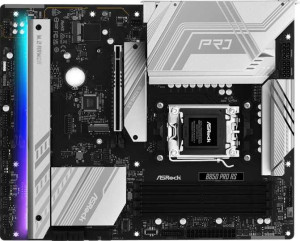
ASRock B850 Pro RS
Sapphire Pulse B850M Wi-Fi

ASRock B850 Pro RS Sapphire Pulse B850M Wi-Fi

Overview

Welcome to our detailed spec comparison of the ASRock B850 Pro RS and the Sapphire Pulse B850M Wi-Fi, two AM5 motherboards built on the B850 chipset targeting different kinds of builders. While they share a strong common foundation, key battlegrounds include form factor and connectivity, wireless capabilities, expansion slots, and storage options. Read on to see which board best fits your build.

Common Features

  • Both products use the AM5 CPU socket with the B850 chipset.
  • Both products support overclocking easily.
  • Neither product supports easy BIOS reset.
  • Both products have a single CPU socket.
  • Neither product has integrated graphics or an integrated CPU.
  • Both products come with a 3-year warranty.
  • Both products support up to 256 GB of maximum memory across 4 DDR5 memory slots in a dual-channel configuration.
  • ECC memory is not supported on either product.
  • Both products have 6 USB 2.0 ports, no USB 3.2 Gen 2 Type-A ports, no USB 3.2 Gen 2x2 ports, no USB 4 ports, no Thunderbolt ports, and include an HDMI output.
  • Both products provide 4 USB 2.0 ports through expansion and 4 SATA 3 connectors.
  • Neither product has a U.2 socket, an mSATA connector, or any SATA 2 connectors.
  • Both products have one PCIe 4.0 x16 slot, no PCIe 3.0 x16 slots, no PCIe x1 slots, no PCI slots, no PCIe 2.0 x16 slots, and no PCIe x8 slots.
  • Neither product has an S/PDIF output, and both have 3 audio connectors.
  • Neither product supports RAID 0+1.

Main Differences

  • The form factor is ATX on ASRock B850 Pro RS and Micro-ATX on Sapphire Pulse B850M Wi-Fi.
  • Wi-Fi support is present on Sapphire Pulse B850M Wi-Fi but not available on ASRock B850 Pro RS.
  • Bluetooth is present on Sapphire Pulse B850M Wi-Fi but not available on ASRock B850 Pro RS.
  • RGB lighting is present on ASRock B850 Pro RS but not available on Sapphire Pulse B850M Wi-Fi.
  • Dual BIOS is present on ASRock B850 Pro RS but not available on Sapphire Pulse B850M Wi-Fi.
  • The board height is 244 mm on ASRock B850 Pro RS and 235 mm on Sapphire Pulse B850M Wi-Fi.
  • The board width is 305 mm on ASRock B850 Pro RS and 244 mm on Sapphire Pulse B850M Wi-Fi.
  • The maximum overclocked RAM speed is 8000 MHz on ASRock B850 Pro RS and 7600 MHz on Sapphire Pulse B850M Wi-Fi.
  • USB 3.2 Gen 1 Type-A ports number 4 on ASRock B850 Pro RS and 2 on Sapphire Pulse B850M Wi-Fi.
  • USB Type-C connectivity is present on ASRock B850 Pro RS (with one USB 3.2 Gen 2 Type-C and one USB 3.2 Gen 1 Type-C port) but not available on Sapphire Pulse B850M Wi-Fi.
  • DisplayPort outputs number 0 on ASRock B850 Pro RS and 1 on Sapphire Pulse B850M Wi-Fi.
  • USB 3.2 Gen 1 ports available through expansion number 4 on ASRock B850 Pro RS and 2 on Sapphire Pulse B850M Wi-Fi.
  • M.2 sockets number 4 on ASRock B850 Pro RS and 2 on Sapphire Pulse B850M Wi-Fi.
  • PCIe 5.0 x16 slots number 1 on ASRock B850 Pro RS and 0 on Sapphire Pulse B850M Wi-Fi.
  • PCIe x4 slots number 0 on ASRock B850 Pro RS and 1 on Sapphire Pulse B850M Wi-Fi.
  • Audio channel support is 7.1 on ASRock B850 Pro RS and 5.1 on Sapphire Pulse B850M Wi-Fi.
Specs Comparison
ASRock B850 Pro RS

ASRock B850 Pro RS

Sapphire Pulse B850M Wi-Fi

Sapphire Pulse B850M Wi-Fi

General info:
CPU socket AM5 AM5
chipset B850 B850
form factor ATX Micro-ATX
release date January 2025 September 2025
supports Wi-Fi
Has Bluetooth
Easy to overclock
has RGB lighting
Easy to reset BIOS
Has dual BIOS
CPU sockets 1 1
Has integrated graphics
warranty period 3 years 3 years
height 244 mm 235 mm
width 305 mm 244 mm
Has integrated CPU

Both the ASRock B850 Pro RS and the Sapphire Pulse B850M Wi-Fi share the same AM5 socket and B850 chipset, meaning they target the same generation of AMD processors and offer equivalent platform-level capabilities. Both also support overclocking and carry a 3-year warranty, so on the fundamentals they are evenly matched.

The most impactful differences come down to form factor and connectivity. The ASRock is a full-size ATX board (305 × 244 mm), while the Sapphire is a more compact Micro-ATX (244 × 235 mm) — a meaningful choice for anyone building in a smaller case. The Sapphire also includes built-in Wi-Fi and Bluetooth, which the ASRock entirely lacks; users choosing the ASRock who need wireless connectivity will need to budget for an add-in card or adapter. Conversely, the ASRock offers dual BIOS — a hardware failsafe that lets the board recover from a corrupted firmware flash — a feature absent on the Sapphire. The ASRock also includes RGB lighting, which is a minor aesthetic point but relevant for system builders focused on visual customization.

Overall, neither board is strictly superior — the choice depends on use case. The Sapphire Pulse B850M Wi-Fi has a clear edge for compact, wireless-ready builds, while the ASRock B850 Pro RS appeals to builders who want a full ATX layout, dual BIOS resilience, and RGB aesthetics in a wired setup.

Memory:
maximum memory amount 256GB 256GB
overclocked RAM speed 8000 MHz 7600 MHz
memory slots 4 4
DDR memory version 5 5
memory channels 2 2
Supports ECC memory

At the platform level, both boards are identical in memory architecture: DDR5, 4 slots, dual-channel configuration, a 256GB maximum capacity, and no ECC support. For the vast majority of desktop users — gamers, content creators, and workstation builders alike — this shared foundation means neither board imposes any meaningful limitation on memory expandability or configuration.

The one differentiator here is overclocked RAM speed. The ASRock B850 Pro RS supports memory overclocking up to 8000 MHz, while the Sapphire Pulse B850M Wi-Fi tops out at 7600 MHz. In practice, the gap between these two figures is unlikely to produce noticeable differences in everyday workloads, but for enthusiasts chasing maximum memory bandwidth — particularly in latency-sensitive tasks like competitive gaming or tightly tuned creative pipelines — the ASRock′s higher ceiling does offer more headroom.

The ASRock B850 Pro RS holds a narrow edge in this category purely on overclocking ceiling, though for users running standard or moderately overclocked DDR5 kits, both boards are functionally equivalent.

Ports:
USB 3.2 Gen 2 ports (USB-A) 0 0
USB 3.2 Gen 1 ports (USB-A) 4 2
USB 3.2 Gen 2 ports (USB-C) 1 0
USB 3.2 Gen 1 ports (USB-C) 1 0
USB 2.0 ports 6 6
USB 3.2 Gen 2x2 ports 0 0
USB 4 40Gbps ports 0 0
USB 4 20Gbps ports 0 0
Thunderbolt 4 ports 0 0
Thunderbolt 3 ports 0 0
has an HDMI output
DisplayPort outputs 0 1
RJ45 ports 1 1
Has USB Type-C
eSATA ports 0 0
DVI outputs 0 0
has a VGA connector
PS/2 ports 0 0

Rear I/O connectivity is where these two boards diverge most noticeably. The ASRock B850 Pro RS offers a considerably richer USB layout, with 4 USB 3.2 Gen 1 Type-A ports plus both a Gen 2 Type-C and a Gen 1 Type-C — the latter being particularly valuable for users who connect modern peripherals, external SSDs, or smartphones that rely on the Type-C form factor. The Sapphire Pulse B850M Wi-Fi, by contrast, provides only 2 USB 3.2 Gen 1 Type-A ports and no Type-C at the rear panel whatsoever, which could be a real friction point for users with Type-C-dependent workflows.

On the display output side, the situation flips. The Sapphire pairs its HDMI port with a DisplayPort output, giving it two independent video connections — useful for multi-monitor setups driven by an AMD APU or for use as a secondary display output. The ASRock has HDMI only, with no DisplayPort, limiting its video output flexibility. Both boards share an identical RJ45 ethernet port and an equivalent bank of 6 USB 2.0 ports, so legacy peripheral connectivity is a wash.

Taking the full picture into account, the ASRock B850 Pro RS holds a meaningful advantage in USB connectivity depth and modern Type-C support, while the Sapphire Pulse B850M Wi-Fi edges ahead for display versatility. Users prioritizing peripheral connectivity should favor the ASRock; those needing dual video outputs from the rear panel will find the Sapphire more accommodating.
Connectors:
USB 3.2 Gen 1 ports (through expansion) 4 2
USB 2.0 ports (through expansion) 4 4
SATA 3 connectors 4 4
USB 3.0 ports (through expansion) 4 2
M.2 sockets 4 2
U.2 sockets 0 0
Has mSATA connector
SATA 2 connectors 0 0

Storage expansion is where the ASRock B850 Pro RS pulls ahead most decisively in this category. It offers 4 M.2 sockets compared to the Sapphire Pulse B850M Wi-Fi′s 2 — a significant difference for builders planning NVMe-heavy configurations, such as those running multiple fast SSDs for OS, scratch, and bulk storage simultaneously. Both boards provide 4 SATA 3 connectors, so traditional drive arrays are equally supported on either platform.

The internal USB header situation follows the same pattern. The ASRock provides 4 USB 3.2 Gen 1 internal headers for front-panel and expansion connectivity, while the Sapphire is limited to 2. For builders using cases with multiple front-panel USB ports or adding internal USB hubs, this difference matters. USB 2.0 internal headers are equal at 4 on both boards, covering legacy front-panel connections without issue.

The ASRock B850 Pro RS has a clear advantage in this group, offering meaningfully more M.2 slots and internal USB 3.2 headers. This makes it the stronger choice for storage-intensive or expansion-focused builds, while the Sapphire′s connector set is more appropriate for compact, straightforward configurations where two NVMe drives are sufficient.

Expansion slots:
PCIe 4.0 x16 slots 1 1
PCIe 5.0 x16 slots 1 0
PCIe 3.0 x16 slots 0 0
PCIe x1 slots 0 0
PCI slots 0 0
PCIe 2.0 x16 slots 0 0
PCIe x4 slots 0 1
PCIe x8 slots 0 0

Both boards share a PCIe 4.0 x16 slot, which serves as the primary GPU slot on each — so current-generation graphics cards are equally at home on either platform. The critical divergence is that the ASRock B850 Pro RS adds a PCIe 5.0 x16 slot, while the Sapphire Pulse B850M Wi-Fi does not. PCIe 5.0 doubles the bandwidth of PCIe 4.0, and while today′s consumer GPUs don′t yet saturate PCIe 4.0 lanes, next-generation cards and high-throughput add-in devices are increasingly designed with PCIe 5.0 in mind — making this a meaningful longevity advantage for the ASRock.

The Sapphire counters with a PCIe x4 slot, which the ASRock lacks entirely. This slot is practical for adding expansion cards such as additional NVMe controllers, capture cards, or networking adapters without occupying the primary GPU slot. Given that the Sapphire only has 2 M.2 sockets, this PCIe x4 slot does offer a reasonable workaround for users needing more storage or peripheral bandwidth.

For forward-looking builds or users who want the most upgrade headroom, the ASRock B850 Pro RS has a clear edge thanks to its PCIe 5.0 slot. The Sapphire′s PCIe x4 slot adds modest utility but does not offset the generational bandwidth advantage the ASRock holds for primary GPU and high-speed device use.

Audio:
audio channels 7.1 5.1
Has S/PDIF Out port
audio connectors 3 3

Audio output channel support is the one meaningful differentiator here. The ASRock B850 Pro RS supports 7.1-channel surround audio, while the Sapphire Pulse B850M Wi-Fi is capped at 5.1 channels. For users running a full home-theater-style speaker setup connected directly to the motherboard′s analog outputs, that distinction matters — 7.1 adds a pair of side-surround channels that contribute to a more enveloping soundstage in supported games and media. Both boards share the same 3 analog audio connectors, so the ASRock achieves its wider channel support through how those connectors are configured and shared across the speaker layout.

Neither board includes an S/PDIF optical output, which rules out a direct digital connection to AV receivers or DACs that rely on that interface. Users with such equipment will need a dedicated sound card or USB DAC regardless of which board they choose.

The ASRock B850 Pro RS holds a modest edge in this category for users with multi-speaker analog setups. For the majority of users relying on headphones, USB audio, or a discrete sound card, however, the difference is inconsequential and both boards are effectively equivalent in practical audio terms.

Storage:
Supports RAID 0+1

The only data point available for this group is RAID 0+1 support, and both the ASRock B850 Pro RS and the Sapphire Pulse B850M Wi-Fi are identical — neither supports RAID 0+1. This means users looking to configure combined striping-and-mirroring arrays at the motherboard level will not find that capability on either platform.

This is a tie by definition, and for the overwhelming majority of desktop users it is a non-issue — RAID configurations of any kind are rare outside of workstation or NAS-oriented builds, and the B850 chipset is not positioned as a workstation platform. Both boards are evenly matched here, with no advantage on either side.

Comparison Summary & Verdict

Both the ASRock B850 Pro RS and the Sapphire Pulse B850M Wi-Fi deliver a solid AM5 and B850 foundation with DDR5 support up to 256 GB, four memory slots, and identical core port layouts. The ASRock B850 Pro RS is the stronger choice for enthusiast full-tower builds, offering an ATX form factor, 4 M.2 sockets, a PCIe 5.0 x16 slot, USB Type-C rear ports, 7.1 audio, dual BIOS, RGB lighting, and support for RAM overclocking up to 8000 MHz. The Sapphire Pulse B850M Wi-Fi, on the other hand, is ideal for compact system builders who prioritize built-in Wi-Fi and Bluetooth, a smaller Micro-ATX footprint, and a DisplayPort output, accepting fewer M.2 slots and a 5.1 audio setup as the trade-off.

ASRock B850 Pro RS
Buy ASRock B850 Pro RS if...

Buy the ASRock B850 Pro RS if you want maximum expandability with 4 M.2 sockets, a PCIe 5.0 x16 slot, USB Type-C rear ports, 7.1 audio, dual BIOS, and faster RAM overclocking up to 8000 MHz in a full ATX build.

Sapphire Pulse B850M Wi-Fi
Buy Sapphire Pulse B850M Wi-Fi if...

Buy the Sapphire Pulse B850M Wi-Fi if you need built-in Wi-Fi and Bluetooth in a compact Micro-ATX form factor, and your build does not require more than 2 M.2 sockets or USB Type-C rear connectivity.