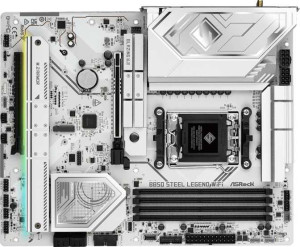
ASRock B850 Steel Legend WiFi
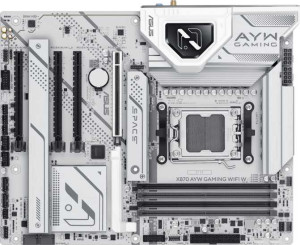
Asus X870 AYW Gaming Wi-Fi W

ASRock B850 Steel Legend WiFi Asus X870 AYW Gaming Wi-Fi W

Overview

Welcome to our in-depth specification comparison between the ASRock B850 Steel Legend WiFi and the Asus X870 AYW Gaming Wi-Fi W. Both are AM5-socket ATX motherboards packed with DDR5 support, Wi-Fi, Bluetooth, and PCIe 5.0, but they diverge sharply when it comes to wireless standards, USB connectivity, and expansion slot configurations. Read on to discover which board best suits your next build.

Common Features

  • Both boards use the AM5 CPU socket.
  • Both boards come in the ATX form factor.
  • Wi-Fi connectivity is available on both products.
  • Bluetooth is available on both products.
  • Both boards output via HDMI 2.1.
  • Overclocking is supported on both products.
  • RGB lighting is present on both products.
  • Neither product offers an easy BIOS reset feature.
  • Both boards support a maximum of 256GB of memory.
  • Both boards support overclocked RAM speeds up to 8000 MHz.
  • Both boards have 4 memory slots across 2 memory channels.
  • Both boards use DDR5 memory.
  • ECC memory is not supported on either product.
  • Both boards have 3 USB 3.2 Gen 1 Type-A ports on the rear panel.
  • Neither board has a USB 3.2 Gen 1 Type-C port on the rear panel.
  • Both boards have 4 USB 2.0 rear ports.
  • Neither board has USB 3.2 Gen 2x2, USB 4 20Gbps, or Thunderbolt 3 ports.
  • An HDMI output is present on both products.
  • Neither board has a DisplayPort output.
  • Both boards provide 4 USB 2.0 expansion headers, 4 SATA 3 connectors, 6 fan headers, and a TPM connector.
  • Neither board has a U.2 socket or mSATA connector, and neither has SATA 2 connectors.
  • Both boards have one PCIe 5.0 x16 slot and no PCIe x1, PCI, PCIe 2.0 x16, x4, or x8 slots.
  • Both boards deliver 7.1-channel audio.
  • RAID 0, RAID 1, and RAID 10 are supported on both products.
  • RAID 0+1 is not supported on either product.

Main Differences

  • The chipset is B850 on the ASRock B850 Steel Legend WiFi and X870 on the Asus X870 AYW Gaming Wi-Fi W.
  • The ASRock B850 Steel Legend WiFi supports Wi-Fi 4, Wi-Fi 5, Wi-Fi 6, Wi-Fi 6E, and Wi-Fi 7, while the Asus X870 AYW Gaming Wi-Fi W supports only Wi-Fi 4, Wi-Fi 5, and Wi-Fi 6.
  • Bluetooth version is 5.4 on the ASRock B850 Steel Legend WiFi and 5.2 on the Asus X870 AYW Gaming Wi-Fi W.
  • USB 3.2 Gen 2 Type-A rear ports number 2 on the ASRock B850 Steel Legend WiFi and 1 on the Asus X870 AYW Gaming Wi-Fi W.
  • USB 3.2 Gen 2 Type-C rear ports number 2 on the ASRock B850 Steel Legend WiFi, while the Asus X870 AYW Gaming Wi-Fi W has none.
  • USB 4 40Gbps ports are present on the Asus X870 AYW Gaming Wi-Fi W (2 ports) but not available on the ASRock B850 Steel Legend WiFi.
  • Thunderbolt 4 ports are present on the Asus X870 AYW Gaming Wi-Fi W (2 ports) but not available on the ASRock B850 Steel Legend WiFi.
  • USB 3.2 Gen 1 expansion headers number 4 on the ASRock B850 Steel Legend WiFi and 2 on the Asus X870 AYW Gaming Wi-Fi W.
  • USB 3.0 expansion headers number 4 on the ASRock B850 Steel Legend WiFi and 2 on the Asus X870 AYW Gaming Wi-Fi W.
  • M.2 sockets number 4 on the ASRock B850 Steel Legend WiFi and 3 on the Asus X870 AYW Gaming Wi-Fi W.
  • PCIe 4.0 x16 slots number 1 on the ASRock B850 Steel Legend WiFi and 2 on the Asus X870 AYW Gaming Wi-Fi W.
  • A PCIe 3.0 x16 slot is present on the Asus X870 AYW Gaming Wi-Fi W but not available on the ASRock B850 Steel Legend WiFi.
  • An S/PDIF Out port is present on the ASRock B850 Steel Legend WiFi but not available on the Asus X870 AYW Gaming Wi-Fi W.
  • Audio connectors number 2 on the ASRock B850 Steel Legend WiFi and 3 on the Asus X870 AYW Gaming Wi-Fi W.
  • RAID 5 support is present on the Asus X870 AYW Gaming Wi-Fi W but not available on the ASRock B850 Steel Legend WiFi.
Specs Comparison
ASRock B850 Steel Legend WiFi

ASRock B850 Steel Legend WiFi

Asus X870 AYW Gaming Wi-Fi W

Asus X870 AYW Gaming Wi-Fi W

General info:
CPU socket AM5 AM5
chipset B850 X870
form factor ATX ATX
release date January 2025 January 2025
supports Wi-Fi
Wi-Fi version Wi-Fi 4 (802.11n), Wi-Fi 5 (802.11ac), Wi-Fi 6 (802.11ax), Wi-Fi 6E (802.11ax), Wi-Fi 7 (802.11be) Wi-Fi 4 (802.11n), Wi-Fi 5 (802.11ac), Wi-Fi 6 (802.11ax)
Has Bluetooth
Bluetooth version 5.4 5.2
HDMI version HDMI 2.1 HDMI 2.1
Easy to overclock
has RGB lighting
Easy to reset BIOS
Has dual BIOS
has aptX
CPU sockets 1 1
Has integrated graphics
warranty period 3 years 3 years
height 244 mm 244 mm
width 305 mm 305 mm
Has integrated CPU

Both boards share a solid common foundation: the AM5 socket, standard ATX form factor (identical 305 × 244 mm footprint), HDMI 2.1 output, dual BIOS, RGB lighting, and a 3-year warranty. They are equally easy to overclock and neither supports an easy BIOS reset — so on the surface, these two look like close siblings. The real divergence lies in the chipset and, somewhat paradoxically, in the wireless stack.

The Asus X870 AYW carries the higher-tier X870 chipset, which in AMD's platform hierarchy sits above B850 and is typically associated with more PCIe lanes, greater overclocking headroom, and broader connectivity options. However, a striking reversal appears in the wireless department: the ASRock B850 Steel Legend WiFi ships with Wi-Fi 7 (802.11be) and Bluetooth 5.4, while the Asus X870 tops out at Wi-Fi 6 (802.11ax) with Bluetooth 5.2. Wi-Fi 7 delivers substantially higher theoretical throughput and lower latency than Wi-Fi 6, and Bluetooth 5.4 brings improvements in connection reliability and broadcast audio support over 5.2.

The verdict depends on what the buyer prioritizes. If a premium chipset with its associated platform bandwidth and future-proofing for high-end CPU configurations is the priority, the Asus X870 holds the edge there. But for wireless connectivity, the ASRock B850 is the clear winner in this group — delivering next-generation Wi-Fi 7 and newer Bluetooth on what is technically the more affordable chipset tier, which is a meaningful real-world advantage for anyone on a modern wireless network.
Memory:
maximum memory amount 256GB 256GB
overclocked RAM speed 8000 MHz 8000 MHz
memory slots 4 4
DDR memory version 5 5
memory channels 2 2
Supports ECC memory

On memory, these two boards are in complete lockstep. Both support DDR5 across 4 DIMM slots in a dual-channel configuration, cap out at 256GB of maximum RAM, and push overclocked speeds up to 8000 MHz. That ceiling is noteworthy — 8000 MHz DDR5 sits at the high end of what AMD's AM5 platform supports, meaning neither board artificially limits enthusiast memory kits.

The dual-channel architecture is the standard for consumer AM5 platforms and delivers a healthy balance of bandwidth and latency for gaming, content creation, and productivity workloads. Neither board supports ECC memory, which is expected at this tier — ECC remains the domain of workstation and server platforms. The 256GB ceiling, while unlikely to be reached by most users today, provides genuine headroom for memory-intensive professional workflows.

This group is a straightforward tie. Every single memory specification is identical between the ASRock B850 Steel Legend WiFi and the Asus X870 AYW Gaming Wi-Fi W, so memory capability alone should not factor into a buying decision between these two boards.

Ports:
USB 3.2 Gen 2 ports (USB-A) 2 1
USB 3.2 Gen 1 ports (USB-A) 3 3
USB 3.2 Gen 2 ports (USB-C) 2 0
USB 3.2 Gen 1 ports (USB-C) 0 0
USB 2.0 ports 4 4
USB 3.2 Gen 2x2 ports 0 0
USB 4 40Gbps ports 0 2
USB 4 20Gbps ports 0 0
Thunderbolt 4 ports 0 2
Thunderbolt 3 ports 0 0
has an HDMI output
DisplayPort outputs 0 0
RJ45 ports 1 1
Has USB Type-C
eSATA ports 0 0
DVI outputs 0 0
has a VGA connector
PS/2 ports 0 0

The rear I/O tells two very different stories here. The ASRock B850 Steel Legend WiFi leans into breadth: it offers 2 USB 3.2 Gen 2 Type-A ports alongside 2 USB 3.2 Gen 2 Type-C ports, giving it a well-rounded selection of 10Gbps connections for everyday high-speed peripherals. The Asus X870 AYW Gaming Wi-Fi W takes a different approach entirely — it trades most of that mid-tier USB density for 2 Thunderbolt 4 ports and 2 USB4 40Gbps ports, which operate at four times the bandwidth of USB 3.2 Gen 2.

That distinction matters significantly depending on the use case. Thunderbolt 4 and USB4 40Gbps unlock connectivity that USB 3.2 Gen 2 simply cannot match: external GPU enclosures, high-resolution Thunderbolt displays, ultra-fast NVMe enclosures capable of saturating 40Gbps, and daisy-chaining multiple devices through a single port. For professionals working with external storage arrays or high-bandwidth docks, the Asus's port selection is a qualitative leap, not just a quantitative one. The ASRock's Type-C ports, while useful, top out at 10Gbps and do not support Thunderbolt protocols.

For general desktop use, both boards cover the basics adequately — identical USB 2.0, USB 3.2 Gen 1 Type-A counts, HDMI, and a single RJ45. But in terms of cutting-edge connectivity, the Asus X870 AYW holds a clear and meaningful advantage, particularly for users who rely on Thunderbolt peripherals or next-generation external storage.

Connectors:
USB 3.2 Gen 1 ports (through expansion) 4 2
USB 2.0 ports (through expansion) 4 4
SATA 3 connectors 4 4
fan headers 6 6
USB 3.0 ports (through expansion) 4 2
M.2 sockets 4 3
Has TPM connector
U.2 sockets 0 0
Has mSATA connector
SATA 2 connectors 0 0

Internal connectivity is where storage builders will want to pay close attention. The ASRock B850 Steel Legend WiFi offers 4 M.2 sockets compared to the Asus X870 AYW Gaming Wi-Fi W's 3 M.2 sockets. That extra slot is not trivial — M.2 has become the dominant interface for fast NVMe SSDs, and a fourth socket means an additional high-speed drive can be installed without resorting to add-in cards or sacrificing a SATA port. Both boards match each other on 4 SATA 3 connectors, so traditional SSD and HDD users are equally served.

The ASRock also edges out the Asus on internal USB expansion headers, offering 4 USB 3.0 internal ports versus 2 on the Asus. This affects how many front-panel USB 3.0 headers are available for cases with built-in USB hubs or multi-port front panels — a detail that matters in larger chassis builds. Where the two boards are evenly matched: both provide 6 fan headers, 4 USB 2.0 expansion ports, and a TPM connector, covering thermal management and security requirements without differentiation.

Across this group, the ASRock B850 Steel Legend WiFi holds a clear advantage. The additional M.2 slot and greater internal USB 3.0 header count give it more flexibility for storage-dense or case-feature-rich builds, making it the stronger choice for users who plan to maximize internal expandability.

Expansion slots:
PCIe 4.0 x16 slots 1 2
PCIe 5.0 x16 slots 1 1
PCIe 3.0 x16 slots 0 1
PCIe x1 slots 0 0
PCI slots 0 0
PCIe 2.0 x16 slots 0 0
PCIe x4 slots 0 0
PCIe x8 slots 0 0

Both boards anchor their primary GPU slot with a PCIe 5.0 x16 connection — the current gold standard for discrete graphics cards, delivering up to 128GB/s of bandwidth and ensuring full compatibility with the latest and next-generation GPUs. That shared foundation means neither board bottlenecks a high-end graphics card in a single-GPU configuration.

Beyond that primary slot, the Asus X870 AYW Gaming Wi-Fi W pulls ahead in sheer slot count. It adds 2 PCIe 4.0 x16 slots and a PCIe 3.0 x16 slot, whereas the ASRock B850 Steel Legend WiFi provides only 1 PCIe 4.0 x16 slot and no PCIe 3.0 slots at all. In practice, those additional slots on the Asus board accommodate multi-card setups, high-bandwidth capture cards, 10GbE network adapters, or professional accelerator cards without forcing a compromise on bandwidth tiers. The PCIe 3.0 slot, while older, is perfectly adequate for latency-tolerant add-in cards like sound cards or USB expansion controllers.

For users running a single GPU with no expansion ambitions, the difference is largely academic. But for anyone building a system with multiple high-bandwidth add-in cards, the Asus X870 AYW holds a clear structural advantage here, offering greater slot diversity and more room to grow.

Audio:
audio channels 7.1 7.1
Has S/PDIF Out port
audio connectors 2 3

Audio is a category where these two boards split their advantages in opposite directions. Both deliver 7.1-channel onboard audio, which is the standard for immersive surround sound in gaming and home theater PC setups. The similarity ends there.

The ASRock B850 Steel Legend WiFi includes an S/PDIF optical output, which the Asus X870 AYW Gaming Wi-Fi W omits entirely. S/PDIF remains the preferred digital audio passthrough for users connecting to AV receivers, soundbars, or DACs that lack USB input — its absence on the Asus is a genuine gap for home theater builders. Conversely, the Asus counters with 3 analog audio connectors versus the ASRock's 2, offering more simultaneous analog output options for multi-speaker configurations without an external switch or splitter.

Which board wins here depends squarely on the user's audio setup. For digital passthrough to an external receiver or DAC, the ASRock B850 Steel Legend WiFi is the only viable choice between the two. For analog-first setups requiring more physical jacks, the Asus has a marginal edge. Neither board dominates outright — this is a trade-off, not a clear victory for either side.

Storage:
Supports RAID 1
Supports RAID 10 (1+0)
Supports RAID 5
Supports RAID 0
Supports RAID 0+1

RAID support is narrowly but meaningfully separated here. Both boards cover the consumer essentials — RAID 0 for striped performance, RAID 1 for mirrored redundancy, and RAID 10 for the combined speed-and-redundancy sweet spot across four drives. For the vast majority of desktop users, that trio covers every practical multi-drive scenario.

The single differentiator is RAID 5, which only the Asus X870 AYW Gaming Wi-Fi W supports. RAID 5 distributes parity data across three or more drives, delivering a balance of storage efficiency, read performance, and fault tolerance that neither RAID 1 nor RAID 10 can match in terms of usable capacity per drive. It is particularly attractive for NAS-adjacent workstation builds where maximizing usable storage across multiple drives while retaining single-drive failure protection is a priority.

For typical gaming or enthusiast builds, the absence of RAID 5 on the ASRock B850 Steel Legend WiFi is unlikely to matter. But for users specifically planning a multi-drive array with an eye toward storage efficiency and redundancy, the Asus X870 AYW edges ahead in this group by virtue of that one additional and technically meaningful RAID mode.

Comparison Summary & Verdict

After examining every specification, these two boards serve meaningfully different audiences. The ASRock B850 Steel Legend WiFi stands out with its Wi-Fi 7 and Bluetooth 5.4 support, more USB 3.2 Gen 2 ports, an additional M.2 socket, and an S/PDIF Out connector, making it a strong choice for users who want cutting-edge wireless and flexible storage expansion at a likely lower price point. The Asus X870 AYW Gaming Wi-Fi W counters with its X870 chipset, two Thunderbolt 4 and USB 4 40Gbps ports, extra PCIe 4.0 and 3.0 x16 slots, RAID 5 support, and more audio connectors, appealing to power users who need maximum PCIe lanes, pro-grade connectivity, and future-proof peripheral bandwidth. Both boards share identical memory support, core port counts, and RAID fundamentals, so neither leaves mainstream builders wanting.

ASRock B850 Steel Legend WiFi
Buy ASRock B850 Steel Legend WiFi if...

Buy the ASRock B850 Steel Legend WiFi if you want the latest Wi-Fi 7 and Bluetooth 5.4 wireless standards, more USB 3.2 Gen 2 ports, and a fourth M.2 slot for additional storage flexibility.

Asus X870 AYW Gaming Wi-Fi W
Buy Asus X870 AYW Gaming Wi-Fi W if...

Buy the Asus X870 AYW Gaming Wi-Fi W if you need Thunderbolt 4 and USB 4 40Gbps connectivity, more PCIe x16 expansion slots, or RAID 5 storage support for demanding professional workloads.