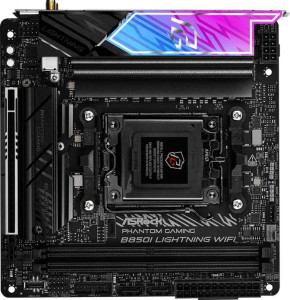
ASRock B850I Lightning WiFi
Asus ROG Strix B850-I Gaming WiFi

ASRock B850I Lightning WiFi Asus ROG Strix B850-I Gaming WiFi

Overview

Welcome to our in-depth spec comparison between the ASRock B850I Lightning WiFi and the Asus ROG Strix B850-I Gaming WiFi — two compact Mini-ITX motherboards built on the AM5 platform with the B850 chipset. Both boards target enthusiasts who demand serious performance in a small form factor, but they take notably different approaches when it comes to wireless connectivity, USB port selection, and memory capacity. Read on to find out which board best matches your build goals.

Common Features

  • Both boards use the AM5 CPU socket.
  • Both boards feature the B850 chipset.
  • Both boards have a Mini-ITX form factor.
  • Wi-Fi connectivity is supported on both boards.
  • Bluetooth is available on both boards.
  • Both boards include an HDMI 2.1 output.
  • Overclocking support is present on both boards.
  • RGB lighting is featured on both boards.
  • Both boards have 2 memory slots.
  • Both boards use DDR5 memory.
  • Both boards support dual-channel memory.
  • ECC memory support is not available on either board.
  • Both boards include 1 USB 3.2 Gen 2 port (USB-C) on the rear panel.
  • Both boards provide 2 SATA 3 connectors.
  • Both boards have 2 M.2 sockets.
  • A TPM connector is not present on either board.
  • Both boards feature 1 PCIe 5.0 x16 slot.
  • Both boards deliver a 120 dB signal-to-noise ratio on the DAC.
  • Both boards support 7.1 audio channels.
  • An S/PDIF Out port is available on both boards.
  • Both boards support RAID 0, RAID 1, and RAID 10 (1+0).
  • RAID 0+1 support is not available on either board.

Main Differences

  • Wi-Fi 7 (802.11be) support is present on the Asus ROG Strix B850-I Gaming WiFi but not available on the ASRock B850I Lightning WiFi.
  • The Bluetooth version is 5.4 on the Asus ROG Strix B850-I Gaming WiFi and 5.2 on the ASRock B850I Lightning WiFi.
  • Easy BIOS reset capability is present on the Asus ROG Strix B850-I Gaming WiFi but not available on the ASRock B850I Lightning WiFi.
  • The maximum supported memory amount is 128 GB on the ASRock B850I Lightning WiFi and 96 GB on the Asus ROG Strix B850-I Gaming WiFi.
  • The maximum overclocked RAM speed is 8400 MHz on the Asus ROG Strix B850-I Gaming WiFi and 8200 MHz on the ASRock B850I Lightning WiFi.
  • The rear panel includes 4 USB 3.2 Gen 2 Type-A ports on the Asus ROG Strix B850-I Gaming WiFi and 2 on the ASRock B850I Lightning WiFi.
  • There is 1 USB 3.2 Gen 1 Type-A port on the ASRock B850I Lightning WiFi and none on the Asus ROG Strix B850-I Gaming WiFi.
  • There are 4 USB 2.0 ports on the ASRock B850I Lightning WiFi and 2 on the Asus ROG Strix B850-I Gaming WiFi.
  • A USB 3.2 Gen 2x2 port is present on the Asus ROG Strix B850-I Gaming WiFi but not on the ASRock B850I Lightning WiFi.
  • There are 6 fan headers on the Asus ROG Strix B850-I Gaming WiFi and 3 on the ASRock B850I Lightning WiFi.
  • A PCIe 4.0 x16 slot is present on the Asus ROG Strix B850-I Gaming WiFi but not on the ASRock B850I Lightning WiFi.
  • There are 3 audio connectors on the Asus ROG Strix B850-I Gaming WiFi and 2 on the ASRock B850I Lightning WiFi.
  • RAID 5 support is present on the Asus ROG Strix B850-I Gaming WiFi but not available on the ASRock B850I Lightning WiFi.
Specs Comparison
ASRock B850I Lightning WiFi

ASRock B850I Lightning WiFi

Asus ROG Strix B850-I Gaming WiFi

Asus ROG Strix B850-I Gaming WiFi

General info:
CPU socket AM5 AM5
chipset B850 B850
form factor Mini-ITX Mini-ITX
release date January 2025 January 2025
supports Wi-Fi
Wi-Fi version Wi-Fi 4 (802.11n), Wi-Fi 5 (802.11ac), Wi-Fi 6 (802.11ax), Wi-Fi 6E (802.11ax) Wi-Fi 4 (802.11n), Wi-Fi 5 (802.11ac), Wi-Fi 6 (802.11ax), Wi-Fi 6E (802.11ax), Wi-Fi 7 (802.11be)
Has Bluetooth
Bluetooth version 5.2 5.4
HDMI version HDMI 2.1 HDMI 2.1
Easy to overclock
has RGB lighting
Easy to reset BIOS
Has dual BIOS
has aptX
CPU sockets 1 1
Has integrated graphics
warranty period 3 years 3 years
height 170 mm 170 mm
width 170 mm 170 mm
Has integrated CPU

Both the ASRock B850I Lightning WiFi and the Asus ROG Strix B850-I Gaming WiFi share the same foundational platform: the AM5 socket, B850 chipset, and Mini-ITX form factor at an identical 170 × 170 mm footprint. They also match on HDMI 2.1 output, dual BIOS, RGB lighting, overclocking support, and a 3-year warranty. For anyone building a compact AMD system, both boards are cut from the same cloth in terms of core architecture.

The real divergence appears in wireless connectivity and usability. The ROG Strix steps ahead with Wi-Fi 7 (802.11be) versus the ASRock's Wi-Fi 6E ceiling — a meaningful difference for future-proofing, as Wi-Fi 7 delivers substantially higher theoretical throughput and lower latency on compatible routers. The ROG Strix also carries Bluetooth 5.4 against the ASRock's 5.2, offering modestly improved connection stability and energy efficiency. On the usability front, the ROG Strix supports easy BIOS reset while the ASRock does not — a small but practical advantage during overclocking sessions or recovery scenarios.

For this spec group, the Asus ROG Strix B850-I Gaming WiFi holds a clear edge. Its Wi-Fi 7 support is the standout differentiator: users with a Wi-Fi 7 router will see tangible benefits, and those without one today are still better positioned for the future. The BIOS reset convenience adds further polish. The ASRock is a competitive board in every shared category, but it simply offers less headroom in wireless capability and hands-on flexibility.

Memory:
maximum memory amount 128GB 96GB
overclocked RAM speed 8200 MHz 8400 MHz
memory slots 2 2
DDR memory version 5 5
memory channels 2 2
Supports ECC memory

The ASRock B850I Lightning WiFi and Asus ROG Strix B850-I Gaming WiFi both feature 2 memory slots and support DDR5 memory with 2 memory channels. The ASRock model supports a maximum memory amount of 128GB, whereas the Asus model supports up to 96GB. In terms of overclocked RAM speed, the ASRock board reaches up to 8200 MHz, while the Asus board offers a slightly higher overclocked RAM speed of 8400 MHz.

Neither product supports ECC memory, which is common for consumer-grade boards. The two boards share the same DDR memory version (DDR5) and both support dual memory channels for enhanced performance.

Overall, the ASRock board provides a higher maximum memory capacity, while the Asus model offers a slightly faster overclocked RAM speed. The memory configurations are otherwise quite similar, with both boards being designed for high-performance memory use.

Ports:
USB 3.2 Gen 2 ports (USB-A) 2 4
USB 3.2 Gen 1 ports (USB-A) 1 0
USB 3.2 Gen 2 ports (USB-C) 1 1
USB 3.2 Gen 1 ports (USB-C) 0 0
USB 2.0 ports 4 2
USB 3.2 Gen 2x2 ports 0 1
USB 4 40Gbps ports 0 0
USB 4 20Gbps ports 0 0
Thunderbolt 4 ports 0 0
Thunderbolt 3 ports 0 0
has an HDMI output
DisplayPort outputs 0 0
RJ45 ports 1 1
Has USB Type-C
eSATA ports 0 0
DVI outputs 0 0
has a VGA connector
PS/2 ports 0 0

The ASRock B850I Lightning WiFi and Asus ROG Strix B850-I Gaming WiFi both offer a variety of USB ports, though with some differences in the configurations. The ASRock model includes 2 USB 3.2 Gen 2 USB-A ports, 1 USB 3.2 Gen 1 USB-A port, and 1 USB 3.2 Gen 2 USB-C port, while the Asus model provides 4 USB 3.2 Gen 2 USB-A ports and 1 USB 3.2 Gen 2 USB-C port. The ASRock board also includes 4 USB 2.0 ports, while the Asus has 2. The Asus board additionally features 1 USB 3.2 Gen 2x2 port, which is absent on the ASRock board.

Both motherboards have an HDMI output, but neither has DisplayPort outputs, DVI outputs, a VGA connector, or PS/2 ports. The RJ45 ports on both models are the same, with each offering 1 port for wired networking. Both products also support USB Type-C, and neither includes eSATA ports, Thunderbolt 3, or Thunderbolt 4 ports.

In summary, the ASRock board offers fewer USB 3.2 Gen 2 USB-A ports and lacks the USB 3.2 Gen 2x2 port found on the Asus model. However, it does have more USB 2.0 ports than the Asus. Both products provide similar video output options and networking connectivity, though the Asus offers slightly more flexibility with its USB port setup.

Connectors:
USB 3.2 Gen 1 ports (through expansion) 2 2
USB 2.0 ports (through expansion) 2 2
SATA 3 connectors 2 2
fan headers 3 6
USB 3.0 ports (through expansion) 2 2
M.2 sockets 2 2
Has TPM connector
U.2 sockets 0 0
Has mSATA connector
SATA 2 connectors 0 0

The ASRock B850I Lightning WiFi and Asus ROG Strix B850-I Gaming WiFi share several common connectors but also have some differences. Both models provide 2 USB 3.2 Gen 1 ports, 2 USB 2.0 ports, and 2 SATA 3 connectors, as well as 2 USB 3.0 ports (through expansion) and 2 M.2 sockets. Both also lack U.2 and mSATA connectors, and neither has a TPM connector. The main difference between the two is the number of fan headers, with the ASRock board offering 3 fan headers, while the Asus board provides 6 fan headers, giving it more potential for cooling options.

Both motherboards also have identical SATA 2 connectors (none) and feature the same M.2 socket configuration. This means that the expansion and storage capabilities are quite similar between the two boards, with the Asus model having a clear advantage in terms of cooling options due to its additional fan headers.

Overall, the main distinction in connectors between the two is the increased fan header count on the Asus model, which may be important for users looking for more cooling flexibility. Both products otherwise share similar storage and expansion options.

Expansion slots:
PCIe 4.0 x16 slots 0 1
PCIe 5.0 x16 slots 1 1
PCIe 3.0 x16 slots 0 0
PCIe x1 slots 0 0
PCI slots 0 0
PCIe 2.0 x16 slots 0 0
PCIe x4 slots 0 0
PCIe x8 slots 0 0

The ASRock B850I Lightning WiFi and Asus ROG Strix B850-I Gaming WiFi both feature a PCIe 5.0 x16 slot, but they differ in the number of PCIe 4.0 x16 slots. The ASRock model does not have a PCIe 4.0 x16 slot, while the Asus model includes 1 PCIe 4.0 x16 slot. Neither motherboard includes PCIe 3.0 x16, PCIe x1, PCI, PCIe 2.0 x16, PCIe x4, or PCIe x8 slots.

Both motherboards have a similar expansion slot configuration, with the primary difference being the presence of a PCIe 4.0 x16 slot on the Asus model, which gives it an additional option for certain expansion cards.

In summary, while both boards provide a PCIe 5.0 x16 slot, the Asus model offers slightly more expansion flexibility with the addition of a PCIe 4.0 x16 slot, whereas the ASRock model has no PCIe 4.0 x16 slot at all.

Audio:
Signal-to-Noise ratio (DAC) 120 dB 120 dB
audio channels 7.1 7.1
Has S/PDIF Out port
audio connectors 2 3

The ASRock B850I Lightning WiFi and Asus ROG Strix B850-I Gaming WiFi offer similar audio capabilities. Both models feature a 120 dB Signal-to-Noise ratio (DAC), ensuring high-quality audio performance. They also support 7.1 audio channels, providing a rich and immersive sound experience. Additionally, both motherboards include an S/PDIF Out port for digital audio output.

The main difference between the two is the number of audio connectors. The ASRock board has 2 audio connectors, while the Asus board offers 3. This extra connector on the Asus model provides more flexibility for connecting additional audio devices.

Overall, both motherboards offer comparable audio performance, but the Asus model has one more audio connector, which could be useful for users requiring additional connections.

Storage:
Supports RAID 1
Supports RAID 10 (1+0)
Supports RAID 5
Supports RAID 0
Supports RAID 0+1

The ASRock B850I Lightning WiFi and Asus ROG Strix B850-I Gaming WiFi both support RAID 1 and RAID 10 (1+0), offering users flexibility in creating mirrored or striped RAID arrays. However, the two motherboards differ in their RAID 5 support. The ASRock model does not support RAID 5, while the Asus model does. Both motherboards do not support RAID 0+1, making that configuration unavailable for either product.

In summary, both boards provide similar RAID options for basic redundancy and performance setups, but the Asus board stands out with the addition of RAID 5 support, offering an extra level of flexibility for users looking for fault tolerance with more storage devices.

Comparison Summary & Verdict

Both the ASRock B850I Lightning WiFi and the Asus ROG Strix B850-I Gaming WiFi are capable Mini-ITX boards sharing the same AM5 socket, B850 chipset, DDR5 support, and PCIe 5.0 x16 slot. The ASRock B850I Lightning WiFi stands out with its higher maximum memory capacity of 128 GB, making it the better pick for memory-intensive workloads. The Asus ROG Strix B850-I Gaming WiFi, on the other hand, pulls ahead with Wi-Fi 7 support, a newer Bluetooth 5.4 implementation, six fan headers, an easy BIOS reset button, a PCIe 4.0 x16 slot, RAID 5 support, and a higher overclocked RAM speed ceiling of 8400 MHz — giving it a clear edge for feature-rich, future-oriented builds. Choose the ASRock if raw memory headroom matters most; choose the Asus ROG Strix for a more connectivity-rich and thermally flexible premium build.

ASRock B850I Lightning WiFi
Buy ASRock B850I Lightning WiFi if...

Buy the ASRock B850I Lightning WiFi if you need the maximum possible memory capacity of 128 GB for memory-intensive workloads and can work within a simpler port and fan header configuration.

Asus ROG Strix B850-I Gaming WiFi
Buy Asus ROG Strix B850-I Gaming WiFi if...

Buy the Asus ROG Strix B850-I Gaming WiFi if you want cutting-edge Wi-Fi 7, more USB 3.2 Gen 2 Type-A ports, six fan headers for advanced cooling control, and a broader feature set including RAID 5 support and easy BIOS reset.