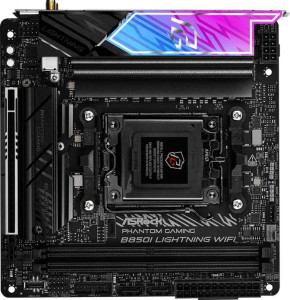
ASRock B850I Lightning WiFi
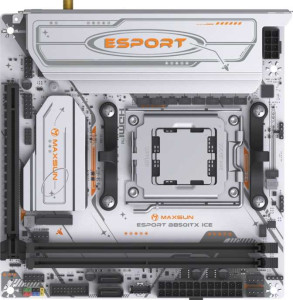
Maxsun eSport B850ITX WiFi Ice

ASRock B850I Lightning WiFi Maxsun eSport B850ITX WiFi Ice

Overview

Welcome to our head-to-head comparison of the ASRock B850I Lightning WiFi and the Maxsun eSport B850ITX WiFi Ice, two compact Mini-ITX motherboards built on the AM5 platform with the B850 chipset. While they share a strong common foundation, key battlegrounds emerge around Wi-Fi generation support, maximum memory capacity, display output quality, and the variety of rear USB connectivity — making the choice between them far from straightforward.

Common Features

  • Both boards use the AM5 CPU socket.
  • Both boards feature the B850 chipset.
  • Both boards use the Mini-ITX form factor.
  • Wi-Fi connectivity is available on both products.
  • Bluetooth is available on both products, with version 5.2 on each.
  • Overclocking is supported on both boards.
  • RGB lighting is present on both boards.
  • Both boards have 2 memory slots supporting DDR5 in dual-channel configuration.
  • ECC memory is not supported on either board.
  • Both boards include 4 USB 2.0 ports.
  • Neither board has USB 3.2 Gen 1 USB-C ports, USB 3.2 Gen 2x2 ports, USB 4 ports, or Thunderbolt ports.
  • An HDMI output is present on both boards.
  • Both boards provide 2 USB 3.2 Gen 1 ports through expansion and 2 USB 2.0 ports through expansion.
  • Both boards include 2 SATA 3 connectors and 2 M.2 sockets.
  • Both boards have 3 fan headers.
  • An mSATA connector is not present on either board.
  • Both boards feature exactly 1 PCIe 5.0 x16 slot and no other PCIe or PCI slots.
  • RAID 0+1 is not supported on either board.

Main Differences

  • Wi-Fi 6E support is available on the ASRock B850I Lightning WiFi but not on the Maxsun eSport B850ITX WiFi Ice.
  • The HDMI version is 2.1 on the ASRock B850I Lightning WiFi and 1.4 on the Maxsun eSport B850ITX WiFi Ice.
  • Easy BIOS reset is supported on the Maxsun eSport B850ITX WiFi Ice but not available on the ASRock B850I Lightning WiFi.
  • Maximum memory capacity is 128 GB on the ASRock B850I Lightning WiFi and 96 GB on the Maxsun eSport B850ITX WiFi Ice.
  • Maximum overclocked RAM speed is 8200 MHz on the ASRock B850I Lightning WiFi and 8000 MHz on the Maxsun eSport B850ITX WiFi Ice.
  • USB 3.2 Gen 2 USB-A ports number 2 on the ASRock B850I Lightning WiFi and 0 on the Maxsun eSport B850ITX WiFi Ice.
  • USB 3.2 Gen 1 USB-A ports number 1 on the ASRock B850I Lightning WiFi and 2 on the Maxsun eSport B850ITX WiFi Ice.
  • A USB 3.2 Gen 2 USB-C port is present on the ASRock B850I Lightning WiFi but not available on the Maxsun eSport B850ITX WiFi Ice.
  • USB Type-C is present on the ASRock B850I Lightning WiFi but not available on the Maxsun eSport B850ITX WiFi Ice.
  • A DisplayPort output is available on the Maxsun eSport B850ITX WiFi Ice but not present on the ASRock B850I Lightning WiFi.
  • A TPM connector is present on the Maxsun eSport B850ITX WiFi Ice but not available on the ASRock B850I Lightning WiFi.
  • An S/PDIF Out port is present on the ASRock B850I Lightning WiFi but not available on the Maxsun eSport B850ITX WiFi Ice.
  • The number of audio connectors is 2 on the ASRock B850I Lightning WiFi and 3 on the Maxsun eSport B850ITX WiFi Ice.
Specs Comparison
ASRock B850I Lightning WiFi

ASRock B850I Lightning WiFi

Maxsun eSport B850ITX WiFi Ice

Maxsun eSport B850ITX WiFi Ice

General info:
CPU socket AM5 AM5
chipset B850 B850
form factor Mini-ITX Mini-ITX
release date January 2025 January 2025
supports Wi-Fi
Wi-Fi version Wi-Fi 4 (802.11n), Wi-Fi 5 (802.11ac), Wi-Fi 6 (802.11ax), Wi-Fi 6E (802.11ax) Wi-Fi 4 (802.11n), Wi-Fi 5 (802.11ac), Wi-Fi 6 (802.11ax)
Has Bluetooth
Bluetooth version 5.2 5.2
HDMI version HDMI 2.1 HDMI 1.4
Easy to overclock
has RGB lighting
Easy to reset BIOS
Has dual BIOS
has aptX
CPU sockets 1 1
Has integrated graphics
warranty period 3 years 3 years
height 170 mm 170 mm
width 170 mm 170 mm
Has integrated CPU

Both the ASRock B850I Lightning WiFi and the Maxsun eSport B850ITX WiFi Ice share the same fundamental platform: the AM5 socket, B850 chipset, and Mini-ITX form factor at an identical 170 × 170 mm footprint. They also match on Bluetooth 5.2, dual BIOS, RGB lighting, overclocking support, and a 3-year warranty. For a buyer comparing these two at a glance, the shared foundation is strong — both are modern, AM5-ready Mini-ITX boards aimed at compact builds.

The meaningful differences emerge in connectivity and usability. The ASRock supports Wi-Fi 6E (802.11ax), which adds access to the less-congested 6 GHz band, offering real-world benefits in dense wireless environments with a compatible router. The Maxsun tops out at Wi-Fi 6, missing that 6 GHz headroom. On the display output side, the ASRock's HDMI 2.1 port supports up to 4K@120Hz or 8K output, while the Maxsun's HDMI 1.4 is limited to 4K@30Hz — a significant gap if you plan to use integrated display output for a high-refresh monitor. Conversely, the Maxsun offers an easy BIOS reset mechanism that the ASRock lacks, which is a small but genuine quality-of-life advantage during troubleshooting or after a failed overclock.

Overall, the ASRock B850I Lightning WiFi holds a clear edge in this category. Its Wi-Fi 6E support and HDMI 2.1 port are not minor spec bumps — they represent meaningfully more capable connectivity for modern peripherals and networks. The Maxsun's easier BIOS reset is a convenience perk but does not offset those advantages for most users.
Memory:
maximum memory amount 128GB 96GB
overclocked RAM speed 8200 MHz 8000 MHz
memory slots 2 2
DDR memory version 5 5
memory channels 2 2
Supports ECC memory

At their core, both boards share the same DDR5 architecture with 2 slots and a dual-channel configuration — meaning neither has a structural advantage in memory bandwidth or expandability slot count. The real divergence lies in the ceiling each board sets for your build. The ASRock supports up to 128 GB of RAM versus the Maxsun's 96 GB cap, and pushes overclocked speeds to 8200 MHz compared to 8000 MHz on the Maxsun.

In practical terms, the 8200 vs. 8000 MHz gap is narrow enough that most users will never feel it in day-to-day workloads — the difference becomes relevant only in memory-sensitive benchmarks or highly tuned workstation tasks. The capacity gap is more consequential: 128 GB headroom means the ASRock can accommodate future-proofing scenarios like heavy virtual machine stacks or large in-memory datasets, while 96 GB, though still generous for the vast majority of use cases, represents a harder ceiling with no upgrade path beyond it given the fixed 2-slot layout.

The ASRock B850I Lightning WiFi takes the edge here. The higher memory ceiling is the deciding factor — on a Mini-ITX board where you cannot add more slots, that extra 32 GB of potential capacity is the only expansion buffer you get, and it matters for power users planning a long-term build.

Ports:
USB 3.2 Gen 2 ports (USB-A) 2 0
USB 3.2 Gen 1 ports (USB-A) 1 2
USB 3.2 Gen 2 ports (USB-C) 1 0
USB 3.2 Gen 1 ports (USB-C) 0 0
USB 2.0 ports 4 4
USB 3.2 Gen 2x2 ports 0 0
USB 4 40Gbps ports 0 0
USB 4 20Gbps ports 0 0
Thunderbolt 4 ports 0 0
Thunderbolt 3 ports 0 0
has an HDMI output
DisplayPort outputs 0 1
RJ45 ports 1 1
Has USB Type-C
eSATA ports 0 0
DVI outputs 0 0
has a VGA connector
PS/2 ports 0 0

The rear I/O panels of these two boards reveal a clear philosophical split. The ASRock invests in faster USB throughput: its two USB 3.2 Gen 2 (10 Gbps) Type-A ports and one USB 3.2 Gen 2 Type-C port mean that high-speed peripherals — fast SSDs in enclosures, modern docking stations, or rapid data transfers — are well served without needing an adapter. The Maxsun, by contrast, offers only USB 3.2 Gen 1 (5 Gbps) Type-A ports and no USB-C whatsoever, cutting maximum external USB bandwidth in half and leaving out a connector type that is increasingly standard on modern peripherals and accessories.

Where the Maxsun pushes back is on display output. It pairs its HDMI port with a DisplayPort output, enabling dual-monitor setups from the board's rear I/O — a genuinely useful differentiator for users relying on integrated or iGPU-adjacent display paths. The ASRock, with only HDMI and no DisplayPort, is limited to a single display from the rear panel. Both boards share the same four USB 2.0 ports and a single RJ45 ethernet jack, so those cancel out as factors.

Weighing the trade-offs, the ASRock B850I Lightning WiFi has the stronger port lineup for most users — faster USB speeds and a USB-C port reflect more modern connectivity needs. The Maxsun's DisplayPort is a meaningful advantage only for those specifically needing dual video outputs from the board itself; for everyone else, the ASRock's superior USB bandwidth and Type-C inclusion are the more broadly useful wins.

Connectors:
USB 3.2 Gen 1 ports (through expansion) 2 2
USB 2.0 ports (through expansion) 2 2
SATA 3 connectors 2 2
fan headers 3 3
USB 3.0 ports (through expansion) 2 2
M.2 sockets 2 2
Has TPM connector
U.2 sockets 0 0
Has mSATA connector
SATA 2 connectors 0 0

For internal connectors, these two boards are remarkably alike. Both offer 2 M.2 sockets, 2 SATA 3 ports, 3 fan headers, and identical internal USB expansion headers — a tidy, well-balanced layout that is about as much as you can reasonably expect from a Mini-ITX design. The dual M.2 sockets are particularly important here: they allow two NVMe drives without consuming any SATA ports, keeping storage options flexible in a chassis where space is already at a premium.

The sole differentiator in this group is the TPM connector present on the Maxsun and absent on the ASRock. A dedicated TPM header allows the addition of a discrete Trusted Platform Module chip, which is relevant for enterprise security policies, BitLocker encryption workflows, and certain compliance requirements. For mainstream home or gaming builds this rarely matters, but for users deploying the board in a business or security-sensitive context, having that header available provides flexibility the ASRock simply cannot match.

This group is effectively a near-tie, but the Maxsun eSport B850ITX WiFi Ice takes a narrow edge solely due to its TPM connector. The advantage is niche — most consumers will never use it — but it is the only concrete internal connector difference between the two, and for the subset of users who need it, it is a deciding factor.

Expansion slots:
PCIe 4.0 x16 slots 0 0
PCIe 5.0 x16 slots 1 1
PCIe 3.0 x16 slots 0 0
PCIe x1 slots 0 0
PCI slots 0 0
PCIe 2.0 x16 slots 0 0
PCIe x4 slots 0 0
PCIe x8 slots 0 0

Expansion slot configurations on Mini-ITX boards are inherently constrained by the form factor, and these two are no exception — each offers exactly one PCIe 5.0 x16 slot and nothing else. That single slot is reserved for a discrete GPU in virtually every practical build scenario, and the PCIe 5.0 interface ensures it is not a bottleneck for even the most demanding current-generation graphics cards, which still largely operate comfortably within PCIe 4.0 bandwidth.

This is a complete tie. There is nothing to differentiate the two boards here, and that is entirely expected given the Mini-ITX constraint. Buyers should not factor expansion slots into their decision between these two products — the choice of one PCIe 5.0 x16 slot is standard for this class of board, and both implement it identically.

Audio:
Has S/PDIF Out port
audio connectors 2 3

Audio is a area where these two boards make different trade-offs. The Maxsun provides 3 analog audio connectors, which typically translates to dedicated jacks for front/rear speakers, line-in, and microphone — useful for users running multi-channel analog speaker setups or who simply want more plug-in flexibility on the rear panel. The ASRock counters with only 2 analog connectors but adds an S/PDIF optical output, which allows a direct digital signal path to an AV receiver, soundbar, or external DAC without any analog conversion loss at the board level.

The practical implication hinges entirely on the user's audio setup. S/PDIF is the more specialized feature — it serves audiophiles and home theater users who route audio through external hardware, and in those scenarios it is clearly the more valuable option. For users plugging headphones and a microphone directly into the board, the Maxsun's extra analog jack is simply more convenient and requires no additional equipment.

This group is a context-dependent trade-off with no universal winner. Users with external audio receivers or DACs will favor the ASRock B850I Lightning WiFi for its S/PDIF output; those relying purely on analog connections will find the Maxsun's three-jack layout more accommodating. Neither approach is objectively superior — it comes down to how you intend to connect your audio hardware.

Storage:
Supports RAID 0+1

The storage group provides only a single data point for comparison: neither the ASRock B850I Lightning WiFi nor the Maxsun eSport B850ITX WiFi Ice supports RAID 0+1. This is a complete tie, and for the overwhelming majority of compact Mini-ITX builds — which are typically consumer gaming or workstation configurations rather than server or NAS deployments — the absence of RAID support is unlikely to matter at all.

This group offers no basis for differentiation between the two boards. Users with a genuine need for hardware RAID redundancy should look beyond either of these options regardless, as that use case falls outside the typical scope of consumer B850 Mini-ITX platforms.

Comparison Summary & Verdict

Both boards are capable AM5 Mini-ITX options, but they cater to slightly different priorities. The ASRock B850I Lightning WiFi pulls ahead for users who demand cutting-edge wireless with Wi-Fi 6E support, a higher 128 GB memory ceiling, faster 8200 MHz RAM overclocking, and a richer rear USB layout that includes USB 3.2 Gen 2 Type-A and Type-C ports plus an S/PDIF audio output. The Maxsun eSport B850ITX WiFi Ice counters with a more user-friendly easy BIOS reset feature, a dedicated DisplayPort output with HDMI alongside it, a TPM connector for security needs, and an extra audio jack on the rear panel — making it the more accessible and versatile pick for everyday builders who do not need the absolute top-end connectivity.

ASRock B850I Lightning WiFi
Buy ASRock B850I Lightning WiFi if...

Choose the ASRock B850I Lightning WiFi if you want Wi-Fi 6E support, a higher 128 GB memory capacity, and a more versatile rear USB selection including USB 3.2 Gen 2 Type-A and Type-C ports.

Maxsun eSport B850ITX WiFi Ice
Buy Maxsun eSport B850ITX WiFi Ice if...

Choose the Maxsun eSport B850ITX WiFi Ice if you value easy BIOS reset functionality, a dedicated DisplayPort output, a TPM connector for platform security, and an extra rear audio connector.