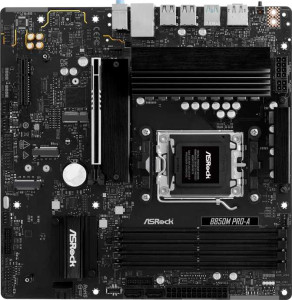
ASRock B850M Pro-A
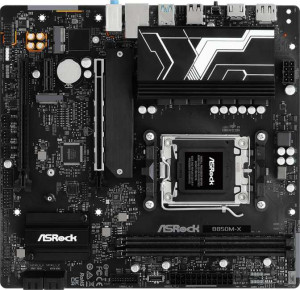
ASRock B850M-X

ASRock B850M Pro-A ASRock B850M-X

Overview

Choosing between the ASRock B850M Pro-A and the ASRock B850M-X is a decision that hinges on your specific build priorities. Both boards share the same AM5 socket, B850 chipset, and Micro-ATX form factor, making them close competitors on paper. Yet beneath that shared foundation lie meaningful differences in memory capacity, expansion slot configurations, and USB connectivity that could make one a significantly better fit for your needs than the other. Read on as we break down every key specification.

Common Features

  • Both boards use the AM5 CPU socket.
  • Both boards feature the B850 chipset.
  • Both boards have a Micro-ATX form factor.
  • Neither board supports Wi-Fi.
  • Neither board has Bluetooth.
  • Both boards have an HDMI 2.1 output.
  • Both boards support overclocking.
  • Neither board has RGB lighting.
  • Both boards use DDR5 memory.
  • Both boards have 2 memory channels.
  • Neither board supports ECC memory.
  • Neither board has USB 3.2 Gen 2x2 ports.
  • Neither board has USB 4 40Gbps ports.
  • Neither board has USB 4 20Gbps ports.
  • Neither board has Thunderbolt 4 or Thunderbolt 3 ports.
  • Both boards have 1 DisplayPort output.
  • Both boards have 1 RJ45 port.
  • Both boards have 4 SATA 3 connectors and no SATA 2 connectors.
  • Both boards have a TPM connector.
  • Both boards support 7.1 audio channels with 3 audio connectors.
  • Both boards support RAID 0, RAID 1, and RAID 10, but neither supports RAID 5 or RAID 0+1.
  • Both boards share 4 USB 2.0 ports through expansion.

Main Differences

  • Board height is 244 mm on ASRock B850M Pro-A and 226 mm on ASRock B850M-X.
  • Maximum memory capacity is 256 GB on ASRock B850M Pro-A and 128 GB on ASRock B850M-X.
  • Overclocked RAM speed reaches 8000 MHz on ASRock B850M Pro-A and 8200 MHz on ASRock B850M-X.
  • Memory slots number 4 on ASRock B850M Pro-A and 2 on ASRock B850M-X.
  • USB 3.2 Gen 2 ports (USB-A) count is 1 on ASRock B850M Pro-A and 0 on ASRock B850M-X.
  • USB 3.2 Gen 1 ports (USB-A) count is 2 on ASRock B850M Pro-A and 3 on ASRock B850M-X.
  • USB 3.2 Gen 2 ports (USB-C) count is 1 on ASRock B850M Pro-A and 0 on ASRock B850M-X.
  • USB 3.2 Gen 1 ports (USB-C) count is 0 on ASRock B850M Pro-A and 1 on ASRock B850M-X.
  • USB 2.0 ports count is 4 on ASRock B850M Pro-A and 2 on ASRock B850M-X.
  • USB 3.2 Gen 1 ports through expansion number 4 on ASRock B850M Pro-A and 2 on ASRock B850M-X.
  • USB 3.0 ports through expansion number 4 on ASRock B850M Pro-A and 2 on ASRock B850M-X.
  • Fan headers number 5 on ASRock B850M Pro-A and 6 on ASRock B850M-X.
  • M.2 sockets number 3 on ASRock B850M Pro-A and 2 on ASRock B850M-X.
  • PCIe 5.0 x16 slot is present on ASRock B850M Pro-A but not available on ASRock B850M-X.
  • PCIe 4.0 x16 slots number 0 on ASRock B850M Pro-A and 2 on ASRock B850M-X.
  • PCIe x1 slot is present on ASRock B850M-X but not available on ASRock B850M Pro-A.
  • PCIe x4 slot is present on ASRock B850M Pro-A but not available on ASRock B850M-X.
Specs Comparison
ASRock B850M Pro-A

ASRock B850M Pro-A

ASRock B850M-X

ASRock B850M-X

General info:
CPU socket AM5 AM5
chipset B850 B850
form factor Micro-ATX Micro-ATX
release date January 2025 January 2025
supports Wi-Fi
Has Bluetooth
HDMI version HDMI 2.1 HDMI 2.1
Easy to overclock
has RGB lighting
Easy to reset BIOS
Has dual BIOS
CPU sockets 1 1
Has integrated graphics
warranty period 3 years 3 years
height 244 mm 226 mm
width 244 mm 244 mm
Has integrated CPU

At their core, the ASRock B850M Pro-A and ASRock B850M-X are remarkably similar boards. Both share the same AM5 socket, B850 chipset, and Micro-ATX form factor, and neither includes Wi-Fi, Bluetooth, RGB lighting, or integrated graphics. They support the same HDMI 2.1 output, are equally rated for overclocking, carry a dual BIOS safety net, and come with a 3-year warranty. For a user scanning the spec sheet, these two boards look nearly identical on paper.

The only measurable difference in this group is physical: the Pro-A stands 244 mm tall, while the B850M-X is slightly shorter at 226 mm. Both share the same 244 mm width. In practice, the 18 mm height difference is a niche concern — it only matters if you are fitting a board into a very compact Micro-ATX case with tight vertical clearance. For most standard Micro-ATX enclosures, neither dimension will cause fitment issues.

Based strictly on the general info specs, these two boards are essentially tied. The B850M-X has a marginal footprint advantage due to its shorter height, which could be a tiebreaker in space-constrained builds, but this is a minor edge at best. The decision between them will almost certainly come down to specs in other categories such as connectivity, memory support, or pricing.

Memory:
maximum memory amount 256GB 128GB
overclocked RAM speed 8000 MHz 8200 MHz
memory slots 4 2
DDR memory version 5 5
memory channels 2 2
Supports ECC memory

The memory configurations of these two boards diverge significantly despite sharing the same DDR5 standard and dual-channel architecture. The Pro-A offers 4 DIMM slots supporting up to 256 GB of RAM, while the B850M-X provides only 2 DIMM slots with a ceiling of 128 GB. In practical terms, four slots give builders far more flexibility — you can start with two sticks and upgrade later without replacing existing modules, whereas a two-slot board locks you into your final configuration from the outset.

The one area where the B850M-X nudges ahead is peak overclocked memory speed: 8200 MHz versus the Pro-A's 8000 MHz. That 200 MHz gap is real but narrow — in everyday workloads and even in memory-sensitive tasks like video editing or gaming, the performance delta would be negligible and likely imperceptible without benchmarking tools.

The Pro-A holds a clear advantage in this category for most users. Greater slot count and double the maximum capacity make it the more scalable and future-proof choice, whether you are building a content creation workstation or simply want room to grow. The B850M-X's marginal speed edge does not offset the hard ceiling it places on memory expansion.

Ports:
USB 3.2 Gen 2 ports (USB-A) 1 0
USB 3.2 Gen 1 ports (USB-A) 2 3
USB 3.2 Gen 2 ports (USB-C) 1 0
USB 3.2 Gen 1 ports (USB-C) 0 1
USB 2.0 ports 4 2
USB 3.2 Gen 2x2 ports 0 0
USB 4 40Gbps ports 0 0
USB 4 20Gbps ports 0 0
Thunderbolt 4 ports 0 0
Thunderbolt 3 ports 0 0
has an HDMI output
DisplayPort outputs 1 1
RJ45 ports 1 1
Has USB Type-C
eSATA ports 0 0
DVI outputs 0 0
has a VGA connector
PS/2 ports 0 0

Both boards share the same video output lineup — HDMI plus a DisplayPort — and each includes a single RJ45 ethernet port and a USB-C connector on the rear panel. That common ground established, the USB implementation is where the two diverge in meaningful ways. The Pro-A delivers a higher-bandwidth rear I/O: it includes a USB 3.2 Gen 2 Type-A port and a USB 3.2 Gen 2 Type-C port, both running at 10 Gbps, alongside two Gen 1 Type-A ports at 5 Gbps and four USB 2.0 ports. The B850M-X, by contrast, tops out at USB 3.2 Gen 1 speeds across all its faster ports — three Type-A and one Type-C — with only two USB 2.0 ports rounding out the count.

The practical consequence is straightforward: the Pro-A's Gen 2 ports are twice as fast as anything the B850M-X offers, which matters when connecting high-speed external SSDs, modern docking stations, or fast-charging devices that leverage the full 10 Gbps pipe. The B850M-X's USB-C is limited to 5 Gbps, reducing its utility with newer peripherals that expect faster throughput.

The Pro-A has a clear edge here. It offers faster peak USB speeds on both its Type-A and Type-C ports, and also edges out the B850M-X on total USB port count. For users who rely heavily on external storage or high-bandwidth peripherals, that difference is tangible rather than theoretical.

Connectors:
USB 3.2 Gen 1 ports (through expansion) 4 2
USB 2.0 ports (through expansion) 4 4
SATA 3 connectors 4 4
fan headers 5 6
USB 3.0 ports (through expansion) 4 2
M.2 sockets 3 2
Has TPM connector
U.2 sockets 0 0
Has mSATA connector
SATA 2 connectors 0 0

Storage expansion tells an interesting story here. The Pro-A packs 3 M.2 sockets versus the B850M-X's 2, while both offer identical 4 SATA 3 connectors. That extra M.2 slot on the Pro-A is genuinely useful — it means you can run three NVMe drives simultaneously without sacrificing any SATA ports, giving builders more headroom for fast storage configurations without compromise.

Fan header counts flip the advantage the other way: the B850M-X offers 6 fan headers compared to the Pro-A's 5. For most standard builds this difference is inconsequential, but in thermally demanding systems with multiple case fans, radiator pumps, and cooler headers all needing direct motherboard control, that one extra header can eliminate the need for a splitter or fan hub. Internal USB expansion also favors the Pro-A, which provides 4 USB 3.2 Gen 1 internal ports versus the B850M-X's 2, useful for front-panel connectivity on cases with multiple USB 3.0 headers.

On balance, the Pro-A holds the stronger position in this group. The additional M.2 socket and greater internal USB expansion capacity are more broadly impactful advantages than the B850M-X's single extra fan header. Builders prioritizing storage flexibility and front-panel USB options will find the Pro-A the more capable platform.

Expansion slots:
PCIe 4.0 x16 slots 0 2
PCIe 5.0 x16 slots 1 0
PCIe 3.0 x16 slots 0 0
PCIe x1 slots 0 1
PCI slots 0 0
PCIe 2.0 x16 slots 0 0
PCIe x4 slots 1 0
PCIe x8 slots 0 0

This is one of the most philosophically different spec comparisons between these two boards. The Pro-A goes all-in on the latest standard, offering a single PCIe 5.0 x16 slot for the primary GPU. PCIe 5.0 doubles the bandwidth of Gen 4, and while most current graphics cards do not yet saturate even a Gen 4 x16 connection, this slot is a genuine investment in forward compatibility as next-generation GPUs begin to leverage the wider pipe.

The B850M-X takes a different approach, providing two PCIe 4.0 x16 slots plus a PCIe x1 slot. Having a second full-size slot opens up practical options — a dedicated capture card in x16 physical form, a secondary GPU for compute tasks, or simply more flexibility for large add-in cards. The additional PCIe x1 slot also accommodates smaller expansion cards like network adapters or sound cards, something the Pro-A cannot offer given its single secondary slot is a PCIe x4.

Which board wins here depends entirely on the use case. For a single-GPU build focused on longevity, the Pro-A's PCIe 5.0 slot is the stronger choice. For users who need multi-card flexibility or a dedicated slot for a smaller peripheral card today, the B850M-X's broader slot selection is more accommodating. Neither board has an outright universal advantage — this is a genuine trade-off between generational bandwidth and slot versatility.

Audio:
audio channels 7.1 7.1
Has S/PDIF Out port
audio connectors 3 3

Audio is the rare category where these two boards are in complete lockstep. Both offer 7.1-channel surround sound support through 3 analog audio connectors, and neither includes an S/PDIF optical output. There is simply nothing to separate them here.

This is a tie, and the decision for audio-conscious users will hinge on factors outside this spec group entirely. Those requiring S/PDIF for connecting to an AV receiver or external DAC via optical will need to factor in a dedicated sound card for either board regardless of which they choose.

Storage:
Supports RAID 1
Supports RAID 10 (1+0)
Supports RAID 5
Supports RAID 0
Supports RAID 0+1

Storage redundancy support is identical across both boards. Each supports RAID 0 (striping for performance), RAID 1 (mirroring for redundancy), and RAID 10 (a combined stripe-and-mirror array), while neither supports RAID 5 or RAID 0+1. This is a perfectly adequate set of RAID modes for a consumer-grade platform — RAID 5 is rarely implemented at this tier, and the three supported modes cover the vast majority of real-world use cases for home and prosumer builds.

This category is an unambiguous tie. Storage RAID configuration will not be a differentiating factor between these two boards, and users with specific multi-drive redundancy requirements can proceed with either option equally confidently.

Comparison Summary & Verdict

After a thorough look at both boards, clear use-case profiles emerge for each. The ASRock B850M Pro-A stands out for builders who demand maximum expandability: its 4 memory slots supporting up to 256 GB of DDR5, a PCIe 5.0 x16 slot, 3 M.2 sockets, and superior USB-A port selection make it the stronger choice for power users and workstation-oriented builds. The ASRock B850M-X, on the other hand, appeals to those building in tighter spaces or on tighter budgets, offering a more compact 226 mm footprint, a slightly higher overclocked RAM speed ceiling of 8200 MHz, dual PCIe 4.0 x16 slots for multi-GPU or accessory flexibility, and an extra fan header for better thermal management. Neither board offers Wi-Fi or Bluetooth, so both audiences will need external networking solutions.

ASRock B850M Pro-A
Buy ASRock B850M Pro-A if...

Buy the ASRock B850M Pro-A if you need maximum memory capacity with 4 slots and up to 256 GB of DDR5, a PCIe 5.0 x16 slot for a next-gen GPU, and 3 M.2 sockets for extensive storage options.

ASRock B850M-X
Buy ASRock B850M-X if...

Buy the ASRock B850M-X if you prefer a more compact board with a smaller 226 mm footprint, dual PCIe 4.0 x16 slots for flexible expansion, a slightly higher RAM overclocking ceiling of 8200 MHz, and an extra fan header for improved cooling control.