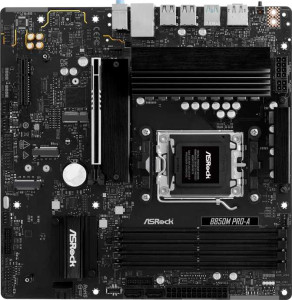
ASRock B850M Pro-A
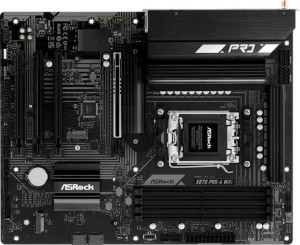
ASRock X870 Pro-A Wi-Fi

ASRock B850M Pro-A ASRock X870 Pro-A Wi-Fi

Overview

Welcome to our in-depth specification comparison between the ASRock B850M Pro-A and the ASRock X870 Pro-A Wi-Fi. Both boards share the AM5 socket, DDR5 memory support, and a solid feature foundation, yet they diverge sharply in form factor, connectivity, and chipset tier. Whether you are planning a compact build or a full-sized enthusiast rig, understanding their distinct approaches to expansion, wireless features, and port selection will be key to making the right choice.

Common Features

  • Both products use the AM5 CPU socket.
  • Both products feature the HDMI 2.1 standard.
  • Both products support overclocking easily.
  • Neither product supports easy BIOS reset.
  • Both products include a dual BIOS feature.
  • Both products have a single CPU socket.
  • Neither product has integrated graphics.
  • Both products come with a 3-year warranty.
  • Both products support a maximum memory amount of 256GB.
  • Both products support overclocked RAM speeds up to 8000 MHz.
  • Both products have 4 memory slots.
  • Both products use DDR5 memory.
  • Both products feature 2 memory channels.
  • Neither product supports ECC memory.
  • Neither product has USB 3.2 Gen 1 ports of Type-C on the rear.
  • Both products include 4 USB 2.0 rear ports.
  • Neither product has USB 3.2 Gen 2x2 ports.
  • Neither product has USB 4 20Gbps ports.
  • Neither product has Thunderbolt 3 ports.
  • Both products include an HDMI output.
  • Both products have 1 RJ45 port.
  • Both products include at least one USB Type-C port.
  • Both products provide 4 USB 3.2 Gen 1 ports through expansion.
  • Both products provide 4 USB 2.0 ports through expansion.
  • Both products include 4 SATA 3 connectors.
  • Both products provide 4 USB 3.0 ports through expansion.
  • Both products feature 3 M.2 sockets.
  • Both products include a TPM connector.
  • Neither product has a U.2 socket.
  • Neither product has an mSATA connector.
  • Both products have 1 PCIe 5.0 x16 slot.
  • Neither product includes PCIe 3.0 x16, PCIe 2.0 x16, PCIe x8, or PCIe x1 slots.
  • Both products support 7.1 audio channels.
  • Neither product includes an S/PDIF Out port.
  • Both products have 3 audio connectors.
  • Both products support RAID 0, RAID 1, and RAID 10.
  • Neither product supports RAID 5 or RAID 0+1.

Main Differences

  • The chipset is B850 on ASRock B850M Pro-A and X870 on ASRock X870 Pro-A Wi-Fi.
  • The form factor is Micro-ATX on ASRock B850M Pro-A and ATX on ASRock X870 Pro-A Wi-Fi.
  • Wi-Fi support is present on ASRock X870 Pro-A Wi-Fi but not available on ASRock B850M Pro-A.
  • Bluetooth is present on ASRock X870 Pro-A Wi-Fi but not available on ASRock B850M Pro-A.
  • RGB lighting is present on ASRock X870 Pro-A Wi-Fi but not available on ASRock B850M Pro-A.
  • The board width is 244 mm on ASRock B850M Pro-A and 305 mm on ASRock X870 Pro-A Wi-Fi.
  • USB 3.2 Gen 2 ports (USB-A) total 1 on ASRock B850M Pro-A and 2 on ASRock X870 Pro-A Wi-Fi.
  • USB 3.2 Gen 1 ports (USB-A) total 2 on ASRock B850M Pro-A and 1 on ASRock X870 Pro-A Wi-Fi.
  • USB 3.2 Gen 2 ports (USB-C) total 1 on ASRock B850M Pro-A and 0 on ASRock X870 Pro-A Wi-Fi.
  • USB 4 40Gbps ports total 0 on ASRock B850M Pro-A and 2 on ASRock X870 Pro-A Wi-Fi.
  • Thunderbolt 4 ports total 0 on ASRock B850M Pro-A and 2 on ASRock X870 Pro-A Wi-Fi.
  • A DisplayPort output is present on ASRock B850M Pro-A but not available on ASRock X870 Pro-A Wi-Fi.
  • Fan headers total 5 on ASRock B850M Pro-A and 6 on ASRock X870 Pro-A Wi-Fi.
  • PCIe 4.0 x16 slots total 0 on ASRock B850M Pro-A and 3 on ASRock X870 Pro-A Wi-Fi.
  • PCIe x4 slots total 1 on ASRock B850M Pro-A and 0 on ASRock X870 Pro-A Wi-Fi.
Specs Comparison
ASRock B850M Pro-A

ASRock B850M Pro-A

ASRock X870 Pro-A Wi-Fi

ASRock X870 Pro-A Wi-Fi

General info:
CPU socket AM5 AM5
chipset B850 X870
form factor Micro-ATX ATX
release date January 2025 June 2025
supports Wi-Fi
Has Bluetooth
HDMI version HDMI 2.1 HDMI 2.1
Easy to overclock
has RGB lighting
Easy to reset BIOS
Has dual BIOS
CPU sockets 1 1
Has integrated graphics
warranty period 3 years 3 years
height 244 mm 244 mm
width 244 mm 305 mm
Has integrated CPU

Both boards share the same AM5 socket and single-CPU design, making them fully compatible with the same range of AMD Ryzen processors. They also match on HDMI 2.1 output, dual BIOS protection, overclocking support, and a 3-year warranty — so on the fundamentals, neither board has an edge over the other.

The clearest differentiators lie in form factor and connectivity. The ASRock X870 Pro-A Wi-Fi uses a full ATX form factor (305 mm wide vs. 244 mm for the Micro-ATX B850M Pro-A), giving it more physical space for additional slots, VRM heatsinks, and airflow management in a standard mid-tower or full-tower case. More practically, the X870 Pro-A Wi-Fi adds built-in Wi-Fi and Bluetooth, eliminating the need for an add-in card or USB adapter — a meaningful convenience advantage for builds where cable routing is limited or a clean desk setup is a priority. It also includes RGB lighting, which matters for aesthetics-focused builds.

The B850M Pro-A trades those extras for a more compact Micro-ATX footprint, making it the right choice for smaller chassis builds where physical space is a constraint — but buyers should budget for a separate Wi-Fi solution if wireless connectivity is needed. Overall, the X870 Pro-A Wi-Fi holds a clear advantage in this group for users who want a full-featured, wireless-ready board in a standard ATX build; the B850M Pro-A only wins if compact size is the deciding factor.

Memory:
maximum memory amount 256GB 256GB
overclocked RAM speed 8000 MHz 8000 MHz
memory slots 4 4
DDR memory version 5 5
memory channels 2 2
Supports ECC memory

Across every memory specification in this group, the two boards are identical. Both support DDR5 memory with 4 slots across 2 channels, a maximum capacity of 256 GB, and overclocked speeds up to 8000 MHz — and neither supports ECC memory.

The practical takeaway is straightforward: a 256 GB ceiling is more than sufficient for gaming, content creation, and most professional workloads. The dual-channel architecture is the standard for consumer AM5 builds and delivers strong real-world bandwidth. The 8000 MHz overclocked ceiling is notably high, meaning both boards can take full advantage of fast DDR5 kits without hitting a platform-imposed wall.

This group is a complete tie. Memory configuration should play no role in choosing between these two boards — any RAM decision made for one applies equally to the other.

Ports:
USB 3.2 Gen 2 ports (USB-A) 1 2
USB 3.2 Gen 1 ports (USB-A) 2 1
USB 3.2 Gen 2 ports (USB-C) 1 0
USB 3.2 Gen 1 ports (USB-C) 0 0
USB 2.0 ports 4 4
USB 3.2 Gen 2x2 ports 0 0
USB 4 40Gbps ports 0 2
USB 4 20Gbps ports 0 0
Thunderbolt 4 ports 0 2
Thunderbolt 3 ports 0 0
has an HDMI output
DisplayPort outputs 1 0
RJ45 ports 1 1
Has USB Type-C
eSATA ports 0 0
DVI outputs 0 0
has a VGA connector
PS/2 ports 0 0

The shared baseline is reasonable on both boards: four USB 2.0 ports, a single RJ45 ethernet jack, HDMI output, and a mix of USB-A connectivity. Where things diverge sharply is at the high-speed end of the spec sheet. The ASRock X870 Pro-A Wi-Fi includes 2 Thunderbolt 4 ports — which also function as USB 4 at 40 Gbps — making it a fundamentally different proposition for users who rely on fast external storage, daisy-chained displays, or high-bandwidth peripherals like eGPUs. At 40 Gbps, these ports deliver roughly four times the throughput of a standard USB 3.2 Gen 2 connection.

The B850M Pro-A takes a different approach: it forgoes USB 4 entirely but offers a USB 3.2 Gen 2 Type-C port on the rear panel alongside a DisplayPort output — the latter being absent on the X870 Pro-A Wi-Fi. For users with a DisplayPort monitor who want a direct board-level video output without relying solely on HDMI, this is a genuine practical advantage. The Type-C port at Gen 2 speeds (10 Gbps) is also useful for modern accessories, even if it falls well short of Thunderbolt 4 capability.

The X870 Pro-A Wi-Fi holds a clear edge in this group for power users and professionals who need the bandwidth and versatility of Thunderbolt 4 / USB 4. The B850M Pro-A's DisplayPort output gives it a narrow win for display flexibility, but that advantage is unlikely to outweigh two full-speed Thunderbolt 4 ports for most buyers.

Connectors:
USB 3.2 Gen 1 ports (through expansion) 4 4
USB 2.0 ports (through expansion) 4 4
SATA 3 connectors 4 4
fan headers 5 6
USB 3.0 ports (through expansion) 4 4
M.2 sockets 3 3
Has TPM connector
U.2 sockets 0 0
Has mSATA connector
SATA 2 connectors 0 0

Internal connector layouts are nearly identical across these two boards. Both offer 3 M.2 sockets, 4 SATA 3 ports, matching internal USB expansion headers, and a TPM connector — giving builders the same storage flexibility and security module support regardless of which board they choose.

The only meaningful difference is that the X870 Pro-A Wi-Fi ships with 6 fan headers versus 5 on the B850M Pro-A. In practice, one extra header matters most in thermally demanding builds with multiple case fans, a large CPU cooler, and possibly a supplemental chipset or VRM fan. Builders running a high-airflow ATX chassis — which pairs naturally with the X870's full ATX form factor — are more likely to actually use that sixth header.

This group is nearly a tie, with the X870 Pro-A Wi-Fi holding a minor edge purely due to the additional fan header. For the vast majority of builds, five headers is sufficient, so this difference is unlikely to be a deciding factor on its own.

Expansion slots:
PCIe 4.0 x16 slots 0 3
PCIe 5.0 x16 slots 1 1
PCIe 3.0 x16 slots 0 0
PCIe x1 slots 0 0
PCI slots 0 0
PCIe 2.0 x16 slots 0 0
PCIe x4 slots 1 0
PCIe x8 slots 0 0

At the top end, both boards offer a single PCIe 5.0 x16 slot — the primary GPU slot — so neither has an advantage for housing a current-generation graphics card at full bandwidth. The divergence comes in everything else. The ASRock X870 Pro-A Wi-Fi adds 3 PCIe 4.0 x16 slots, which dramatically expands the board's capacity for additional GPUs, high-speed PCIe 4.0 NVMe cards, capture cards, or other expansion devices. The B850M Pro-A, by contrast, offers only a single PCIe x4 slot alongside its primary PCIe 5.0 slot — sufficient for one add-in card, but nothing more.

This gap is a direct consequence of form factor. The Micro-ATX B850M Pro-A simply doesn't have the physical length to accommodate multiple full-size slots, so its expansion story ends early. The X870 Pro-A Wi-Fi's ATX layout allows for a much richer slot configuration, making it genuinely suitable for multi-card or highly expanded builds — workstation setups, multi-GPU compute tasks, or enthusiasts who run several PCIe devices simultaneously.

The X870 Pro-A Wi-Fi holds a clear advantage here. For a single-GPU gaming build the difference is irrelevant, but any use case requiring more than one expansion card makes the B850M Pro-A a limiting choice. The X870's slot count is the more future-proof and versatile configuration by a significant margin.

Audio:
audio channels 7.1 7.1
Has S/PDIF Out port
audio connectors 3 3

Audio is a non-issue in this comparison. Both boards offer identical onboard audio: 7.1-channel support, 3 analog connectors, and no S/PDIF optical output. There is nothing to differentiate them here.

The 7.1-channel configuration is the standard for consumer motherboard audio and supports full surround sound setups. The absence of S/PDIF output means neither board can send a digital audio signal directly to an external DAC or AV receiver via optical — users who need that capability would require a dedicated sound card or USB audio interface on either platform.

This group is a complete tie. Audio performance and connectivity should carry no weight in the decision between these two boards.

Storage:
Supports RAID 1
Supports RAID 10 (1+0)
Supports RAID 5
Supports RAID 0
Supports RAID 0+1

RAID support is identical on both boards. Each supports RAID 0, RAID 1, and RAID 10, while neither supports RAID 5 or RAID 0+1. This covers the configurations most relevant to consumer and prosumer use cases — RAID 0 for striped performance, RAID 1 for mirrored redundancy, and RAID 10 for a combination of both across four drives.

The absence of RAID 5 is worth noting for users who want parity-based redundancy with better storage efficiency than RAID 10, but since neither board supports it, it is not a differentiator — just a shared limitation to be aware of for storage-critical workloads.

This group is a complete tie. Storage configuration options are identical, and this spec should have no bearing on which board a buyer chooses.

Comparison Summary & Verdict

After examining every specification, the ASRock B850M Pro-A and the ASRock X870 Pro-A Wi-Fi each serve a clearly defined audience. The ASRock B850M Pro-A is the stronger pick for builders who need a compact Micro-ATX footprint with a useful DisplayPort output and a rear USB-C Gen 2 port, all without paying for wireless features they may not need. The ASRock X870 Pro-A Wi-Fi, on the other hand, is built for those who demand a full ATX platform with built-in Wi-Fi and Bluetooth, two Thunderbolt 4 and two USB 4 40Gbps ports, three PCIe 4.0 x16 slots for heavy expansion, and an extra fan header for more complex cooling setups. Both boards are equally matched on memory capability, RAID support, audio, and storage connectivity, making the decision straightforward: choose based on physical size, wireless needs, and how much PCIe bandwidth your build truly requires.

ASRock B850M Pro-A
Buy ASRock B850M Pro-A if...

Buy the ASRock B850M Pro-A if you want a compact Micro-ATX board without built-in Wi-Fi, and you value having a DisplayPort output and a rear USB 3.2 Gen 2 Type-C port at a lower chipset tier.

ASRock X870 Pro-A Wi-Fi
Buy ASRock X870 Pro-A Wi-Fi if...

Buy the ASRock X870 Pro-A Wi-Fi if you need a full ATX platform with built-in Wi-Fi, Bluetooth, two Thunderbolt 4 ports, two USB 4 40Gbps ports, and extensive PCIe 4.0 expansion for a high-end enthusiast build.