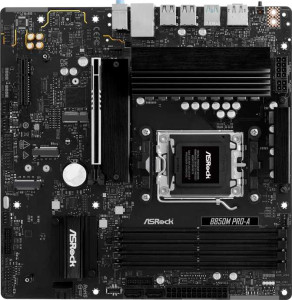
ASRock B850M Pro-A
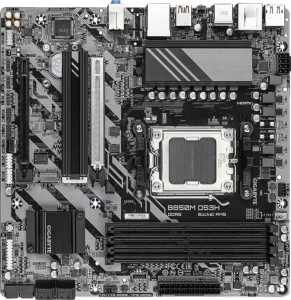
Gigabyte B850M DS3H

ASRock B850M Pro-A Gigabyte B850M DS3H

Overview

Welcome to our detailed specification comparison between the ASRock B850M Pro-A and the Gigabyte B850M DS3H, two Micro-ATX motherboards sharing the AM5 socket and B850 chipset. While both boards target similar builds, key battlegrounds emerge around storage and expansion options, rear connectivity, and memory speed support — differences that could meaningfully influence your next AMD-powered build.

Common Features

  • Both boards use the AM5 CPU socket.
  • Both boards feature the B850 chipset.
  • Both boards have a Micro-ATX form factor.
  • Neither board supports Wi-Fi.
  • Neither board has Bluetooth.
  • Both boards have an HDMI 2.1 output.
  • Both boards support overclocking.
  • Neither board has RGB lighting.
  • Both boards support a maximum of 256GB of RAM.
  • Both boards have 4 memory slots.
  • Both boards use DDR5 memory.
  • Both boards have 2 memory channels.
  • Neither board supports ECC memory.
  • Both boards have 1 USB 3.2 Gen 2 Type-A port on the rear.
  • Both boards have 2 USB 3.2 Gen 1 Type-A ports on the rear.
  • Both boards have 1 USB 3.2 Gen 2 Type-C port on the rear.
  • Neither board has USB 3.2 Gen 2x2, USB 4, or Thunderbolt 4 ports.
  • Both boards have 4 USB 2.0 ports available through expansion headers.
  • Both boards have 4 SATA 3 connectors.
  • Both boards include a TPM connector.
  • Neither board has an mSATA connector or SATA 2 connectors.
  • Both boards have 1 PCIe 5.0 x16 slot and 1 PCIe x4 slot, with no PCIe 3.0, 4.0, x1, x8, or PCI slots.
  • Both boards deliver 7.1 audio channels with 3 audio connectors and no S/PDIF Out port.
  • Both boards support RAID 0, RAID 1, and RAID 10, but neither supports RAID 0+1.

Main Differences

  • Maximum native RAM speed is 8000 MHz on ASRock B850M Pro-A and 5200 MHz on Gigabyte B850M DS3H.
  • Maximum overclocked RAM speed is 8000 MHz on ASRock B850M Pro-A and 8200 MHz on Gigabyte B850M DS3H.
  • USB 2.0 rear ports number 4 on ASRock B850M Pro-A, while Gigabyte B850M DS3H has none.
  • DisplayPort outputs total 1 on ASRock B850M Pro-A and 2 on Gigabyte B850M DS3H.
  • A PS/2 port is present on Gigabyte B850M DS3H but not available on ASRock B850M Pro-A.
  • USB 3.2 Gen 1 expansion headers support 4 ports on ASRock B850M Pro-A and 2 ports on Gigabyte B850M DS3H.
  • Fan headers total 5 on ASRock B850M Pro-A and 4 on Gigabyte B850M DS3H.
  • M.2 sockets number 3 on ASRock B850M Pro-A and 2 on Gigabyte B850M DS3H.
  • RAID 5 support is present on Gigabyte B850M DS3H but not available on ASRock B850M Pro-A.
Specs Comparison
ASRock B850M Pro-A

ASRock B850M Pro-A

Gigabyte B850M DS3H

Gigabyte B850M DS3H

General info:
CPU socket AM5 AM5
chipset B850 B850
form factor Micro-ATX Micro-ATX
release date January 2025 January 2025
supports Wi-Fi
Has Bluetooth
HDMI version HDMI 2.1 HDMI 2.1
Easy to overclock
has RGB lighting
Easy to reset BIOS
Has dual BIOS
CPU sockets 1 1
Has integrated graphics
warranty period 3 years 3 years
height 244 mm 244 mm
width 244 mm 244 mm
Has integrated CPU

In terms of general specifications, the ASRock B850M Pro-A and the Gigabyte B850M DS3H are remarkably alike. Both boards share the same AM5 socket, B850 chipset, and Micro-ATX form factor with identical 244 × 244 mm dimensions, meaning they will fit the same cases and support the same generation of AMD processors without distinction.

Key platform features are also mirrored across both boards: neither offers Wi-Fi or Bluetooth, so users who need wireless connectivity will need to budget for an add-in card or adapter on either platform. Both support HDMI 2.1 for display output, allow overclocking, include a dual BIOS safety net for failed firmware updates, and carry a 3-year warranty. Neither board includes integrated graphics or an integrated CPU, which is standard for this class of motherboard.

Based solely on the general info specs provided, these two boards are in a complete tie. Every single attribute in this category is identical, from physical size to feature set to warranty coverage. Buyers should look to other specification groups — such as memory support, connectivity, or audio — to find meaningful differences between the two.

Memory:
maximum memory amount 256GB 256GB
RAM speed (max) 8000 MHz 5200 MHz
overclocked RAM speed 8000 MHz 8200 MHz
memory slots 4 4
DDR memory version 5 5
memory channels 2 2
Supports ECC memory

Both boards share a solid memory foundation: 4 slots, DDR5, dual-channel architecture, and a 256 GB maximum capacity. For most users — gaming, content creation, or everyday workloads — these shared traits mean either board can accommodate large, fast memory kits without compromise.

The meaningful divergence lies in how each board handles RAM speeds. The ASRock B850M Pro-A lists a native maximum of 8000 MHz, with its overclocked ceiling also at 8000 MHz — suggesting that top-end speed is achievable within its standard supported range. The Gigabyte B850M DS3H, by contrast, has a native maximum of only 5200 MHz, which reflects the JEDEC baseline for DDR5, but its overclocked ceiling actually reaches 8200 MHz — marginally higher than the ASRock. In practice, this means the Gigabyte board can technically push memory slightly faster via XMP/EXPO profiles, but casual users running memory at default speeds would be capped at a much lower 5200 MHz unless they manually enable overclocking.

For users who plan to run high-speed memory kits with XMP/EXPO enabled, the boards are broadly competitive, with the Gigabyte holding a slim 200 MHz overclock ceiling advantage. However, for those who leave memory settings at default, the ASRock's higher native ceiling is a practical edge. On balance, the ASRock B850M Pro-A offers the more straightforward memory experience for performance-oriented users.

Ports:
USB 3.2 Gen 2 ports (USB-A) 1 1
USB 3.2 Gen 1 ports (USB-A) 2 2
USB 3.2 Gen 2 ports (USB-C) 1 1
USB 3.2 Gen 1 ports (USB-C) 0 0
USB 2.0 ports 4 0
USB 3.2 Gen 2x2 ports 0 0
USB 4 40Gbps ports 0 0
USB 4 20Gbps ports 0 0
Thunderbolt 4 ports 0 0
Thunderbolt 3 ports 0 0
has an HDMI output
DisplayPort outputs 1 2
RJ45 ports 1 1
Has USB Type-C
eSATA ports 0 0
DVI outputs 0 0
has a VGA connector
PS/2 ports 0 1

The rear I/O layouts of these two boards are largely identical where it counts most: both offer the same USB 3.2 Gen 2 mix — one USB-A and one USB-C at 10 Gbps — alongside two USB 3.2 Gen 1 Type-A ports, a single RJ45 ethernet jack, and HDMI output. For the typical desktop user, this shared core is perfectly adequate for keyboards, mice, storage, and display connectivity.

The divergences, however, are telling. The ASRock B850M Pro-A adds 4 USB 2.0 ports to its rear panel, which the Gigabyte omits entirely — a meaningful convenience for users with older peripherals like DACs, MIDI controllers, or USB hubs that don't require high bandwidth. On the display side, the Gigabyte B850M DS3H pulls ahead with 2 DisplayPort outputs versus the ASRock's single one, making it the stronger choice for anyone running a dual-monitor setup from integrated graphics. The Gigabyte also includes a PS/2 port, a niche addition that will matter only to users with legacy keyboards or mice.

The verdict hinges on use case. For multi-monitor users, the Gigabyte's dual DisplayPort is a genuine advantage. For those with a collection of older USB peripherals, the ASRock's four USB 2.0 ports offer more plug-and-play flexibility. Neither board dominates outright, but the Gigabyte B850M DS3H edges ahead for display versatility, while the ASRock B850M Pro-A better serves users prioritizing legacy device compatibility.

Connectors:
USB 3.2 Gen 1 ports (through expansion) 4 2
USB 2.0 ports (through expansion) 4 4
SATA 3 connectors 4 4
fan headers 5 4
USB 3.0 ports (through expansion) 4 2
M.2 sockets 3 2
Has TPM connector
U.2 sockets 0 0
Has mSATA connector
SATA 2 connectors 0 0

Where internal connectors are concerned, the ASRock B850M Pro-A consistently offers more headroom than the Gigabyte B850M DS3H. The most impactful difference is in M.2 sockets: the ASRock provides 3 M.2 slots versus the Gigabyte's 2, which directly translates to one additional NVMe SSD without needing to fall back on SATA drives. For a storage-heavy build — whether for large game libraries, video editing scratch space, or OS plus data drive separation — that extra slot is a tangible benefit.

The ASRock also leads in internal USB expansion, offering 4 USB 3.2 Gen 1 headers compared to the Gigabyte's 2, and includes a fifth fan header versus the Gigabyte's 4. More fan headers mean greater flexibility in managing airflow across larger or more complex cooling setups without requiring a separate fan controller hub. Both boards match on 4 SATA 3 connectors and 4 USB 2.0 expansion ports, and both include a TPM connector — relevant for Windows 11 compliance and hardware security configurations.

Across this category, the ASRock B850M Pro-A holds a clear advantage. Its additional M.2 socket, extra USB 3.2 Gen 1 header, and extra fan header collectively make it the more expansion-friendly board — particularly for builders who anticipate a multi-drive NVMe setup or a more demanding thermal management configuration.

Expansion slots:
PCIe 4.0 x16 slots 0 0
PCIe 5.0 x16 slots 1 1
PCIe 3.0 x16 slots 0 0
PCIe x1 slots 0 0
PCI slots 0 0
PCIe 2.0 x16 slots 0 0
PCIe x4 slots 1 1
PCIe x8 slots 0 0

Expansion slot configurations are identical on both boards: one PCIe 5.0 x16 slot for the primary GPU, and one PCIe x4 slot for secondary cards such as add-in NVMe controllers, capture cards, or network adapters. No PCIe x1, x8, or legacy PCI slots are present on either board.

The PCIe 5.0 x16 primary slot is the headline here. It provides double the bandwidth of PCIe 4.0, future-proofing both boards for current and next-generation discrete GPUs that can leverage that throughput. For today's graphics cards, most of which still saturate PCIe 4.0 x16 at most, the practical gaming or rendering difference is minimal — but the headroom is there as GPU architectures evolve. The secondary x4 slot serves well for most common add-in use cases, where x4 bandwidth is rarely a bottleneck.

This category is a complete tie. Every slot type, generation, and count is identical across the ASRock B850M Pro-A and the Gigabyte B850M DS3H. Neither board offers any expansion advantage over the other, and buyers with multi-card or specialized PCIe needs will face the same constraints — and the same capable foundation — on both platforms.

Audio:
audio channels 7.1 7.1
Has S/PDIF Out port
audio connectors 3 3

Audio capabilities are identical on both boards: 7.1-channel surround sound support, 3 analog audio connectors, and no S/PDIF optical output on either. The 7.1-channel configuration covers the full range of surround sound setups, making both boards suitable for home theater PC builds or immersive gaming audio without an add-in sound card.

The absence of S/PDIF out on both boards is worth noting for users who rely on optical connections to external DACs, AV receivers, or soundbars. Neither board accommodates that workflow, so users with such requirements would need a dedicated sound card on either platform. The 3-jack analog layout — typically line-in, line-out, and microphone — is standard for this class of motherboard and handles the vast majority of headset and speaker configurations without issue.

This category is a complete tie. The ASRock B850M Pro-A and the Gigabyte B850M DS3H offer an identical audio feature set, and neither holds any advantage. Users with demanding audio needs — such as high-fidelity DAC connectivity or low-latency studio recording — will face the same limitations on both boards and should factor in an add-in audio solution regardless of which they choose.

Storage:
Supports RAID 1
Supports RAID 10 (1+0)
Supports RAID 5
Supports RAID 0
Supports RAID 0+1

The ASRock B850M Pro-A and Gigabyte B850M DS3H both support RAID 1 and RAID 10 (1+0), providing redundancy and performance for users requiring storage arrays. However, there is a difference in the RAID 5 support. The ASRock B850M Pro-A does not support RAID 5, while the Gigabyte B850M DS3H does. Both motherboards do not support RAID 0+1, a legacy RAID level.

In summary, the key difference between the two motherboards in the storage category is RAID 5 support. The Gigabyte board offers RAID 5, whereas the ASRock board does not. Both motherboards share support for RAID 1 and RAID 10 (1+0) but lack support for RAID 0+1.

Comparison Summary & Verdict

Both the ASRock B850M Pro-A and the Gigabyte B850M DS3H are competent Micro-ATX AM5 boards with strong shared foundations, including DDR5 support, a PCIe 5.0 x16 slot, 7.1 audio, and RAID 0/1/10 capability. Where they diverge is telling: the ASRock B850M Pro-A pulls ahead with 3 M.2 sockets, 5 fan headers, 4 rear USB 2.0 ports, and a higher native RAM speed ceiling of 8000 MHz, making it the stronger choice for storage-heavy or cooling-focused builds. The Gigabyte B850M DS3H counters with dual DisplayPort outputs, a slightly higher overclocked RAM speed of 8200 MHz, RAID 5 support, and a PS/2 port for legacy peripherals, suiting users who need multi-monitor flexibility or niche storage configurations. Neither board includes Wi-Fi or Bluetooth, so wireless connectivity will require a separate adapter regardless of your choice.

ASRock B850M Pro-A
Buy ASRock B850M Pro-A if...

Buy the ASRock B850M Pro-A if you want more M.2 storage slots, additional fan headers for better cooling control, and higher native RAM speed support for your AM5 build.

Gigabyte B850M DS3H
Buy Gigabyte B850M DS3H if...

Buy the Gigabyte B850M DS3H if you need dual DisplayPort outputs for a multi-monitor setup, RAID 5 support, or a PS/2 port for legacy peripherals.