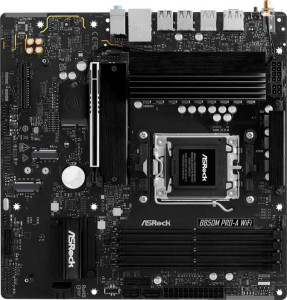
ASRock B850M Pro-A WiFi
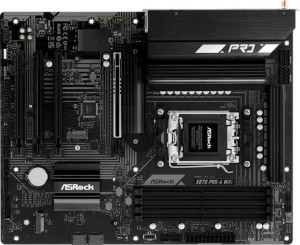
ASRock X870 Pro-A Wi-Fi

ASRock B850M Pro-A WiFi ASRock X870 Pro-A Wi-Fi

Overview

When choosing between the ASRock B850M Pro-A WiFi and the ASRock X870 Pro-A Wi-Fi, the decision goes well beyond chipset tier alone. Both boards are built on the AM5 platform with DDR5 memory support and a solid shared feature set, yet they diverge in meaningful ways across form factor, wireless generation, rear connectivity, and PCIe expansion. Whether a compact Micro-ATX build or a full-sized ATX powerhouse better matches your goals, this side-by-side comparison breaks down every specification that sets these two boards apart.

Common Features

  • Both products use the AM5 CPU socket.
  • Wi-Fi connectivity is available on both products.
  • Bluetooth is present on both products.
  • Both products feature HDMI 2.1.
  • Overclocking is supported on both products.
  • BIOS reset via a dedicated button is not available on either product.
  • Both products include a dual BIOS feature.
  • aptX audio is not supported on either product.
  • Both products support a maximum memory amount of 256GB.
  • The maximum overclocked RAM speed is 8000 MHz on both products.
  • Both products have 4 memory slots and support DDR5 across 2 memory channels.
  • ECC memory is not supported on either product.
  • Both products have 4 USB 2.0 rear ports and no USB 3.2 Gen 2x2 or USB 4 20Gbps ports.
  • An HDMI output is present on both products.
  • Both products include 1 RJ45 port and at least one USB Type-C port.
  • Both products offer 4 SATA 3 connectors, 3 M.2 sockets, and a TPM connector.
  • Neither product includes a U.2 socket or an mSATA connector.
  • Both products have 1 PCIe 5.0 x16 slot and no PCIe x1, PCI, PCIe 2.0 x16, or PCIe 3.0 x16 slots.
  • 7.1 audio channels and 3 audio connectors are available on both products, with no S/PDIF Out port on either.
  • Both products support RAID 0, RAID 1, and RAID 10, but neither supports RAID 5 or RAID 0+1.

Main Differences

  • The chipset is B850 on ASRock B850M Pro-A WiFi and X870 on ASRock X870 Pro-A Wi-Fi.
  • The form factor is Micro-ATX on ASRock B850M Pro-A WiFi and ATX on ASRock X870 Pro-A Wi-Fi.
  • The board width is 244 mm on ASRock B850M Pro-A WiFi and 305 mm on ASRock X870 Pro-A Wi-Fi.
  • Wi-Fi support goes up to Wi-Fi 6E on ASRock B850M Pro-A WiFi, while ASRock X870 Pro-A Wi-Fi additionally supports Wi-Fi 7.
  • The Bluetooth version is 5.2 on ASRock B850M Pro-A WiFi and 5.4 on ASRock X870 Pro-A Wi-Fi.
  • RGB lighting is present on ASRock X870 Pro-A Wi-Fi but not available on ASRock B850M Pro-A WiFi.
  • USB 3.2 Gen 2 ports (USB-A) count is 1 on ASRock B850M Pro-A WiFi and 2 on ASRock X870 Pro-A Wi-Fi.
  • USB 3.2 Gen 1 ports (USB-A) count is 2 on ASRock B850M Pro-A WiFi and 1 on ASRock X870 Pro-A Wi-Fi.
  • ASRock B850M Pro-A WiFi has 1 USB 3.2 Gen 2 port (USB-C), while ASRock X870 Pro-A Wi-Fi has none.
  • USB 4 40Gbps ports are absent on ASRock B850M Pro-A WiFi but 2 are present on ASRock X870 Pro-A Wi-Fi.
  • Thunderbolt 4 ports are not available on ASRock B850M Pro-A WiFi, while ASRock X870 Pro-A Wi-Fi includes 2.
  • ASRock B850M Pro-A WiFi has 1 DisplayPort output, while ASRock X870 Pro-A Wi-Fi has none.
  • The number of fan headers is 5 on ASRock B850M Pro-A WiFi and 6 on ASRock X870 Pro-A Wi-Fi.
  • PCIe 4.0 x16 slots are absent on ASRock B850M Pro-A WiFi but 3 are present on ASRock X870 Pro-A Wi-Fi.
  • ASRock B850M Pro-A WiFi has 1 PCIe x4 slot, while ASRock X870 Pro-A Wi-Fi has none.
Specs Comparison
ASRock B850M Pro-A WiFi

ASRock B850M Pro-A WiFi

ASRock X870 Pro-A Wi-Fi

ASRock X870 Pro-A Wi-Fi

General info:
CPU socket AM5 AM5
chipset B850 X870
form factor Micro-ATX ATX
release date January 2025 June 2025
supports Wi-Fi
Wi-Fi version Wi-Fi 4 (802.11n), Wi-Fi 5 (802.11ac), Wi-Fi 6 (802.11ax), Wi-Fi 6E (802.11ax) Wi-Fi 4 (802.11n), Wi-Fi 5 (802.11ac), Wi-Fi 6 (802.11ax), Wi-Fi 6E (802.11ax), Wi-Fi 7 (802.11be)
Has Bluetooth
Bluetooth version 5.2 5.4
HDMI version HDMI 2.1 HDMI 2.1
Easy to overclock
has RGB lighting
Easy to reset BIOS
Has dual BIOS
has aptX
CPU sockets 1 1
Has integrated graphics
warranty period 3 years 3 years
height 244 mm 244 mm
width 244 mm 305 mm
Has integrated CPU

Both boards share the same AM5 socket, support overclocking, include dual BIOS, and carry a 3-year warranty — a solid common foundation. The most fundamental difference lies in their chipsets and physical footprint: the Pro-A WiFi uses a B850 chipset in a compact Micro-ATX form factor (244×244 mm), while the X870 Pro-A Wi-Fi steps up to an X870 chipset with a full ATX layout (244×305 mm). In practice, the X870 chipset unlocks higher-end platform features and better suits enthusiast or workstation builds, whereas B850 is a more cost-efficient choice for mainstream users who still want overclocking capability.

On the connectivity front, the X870 Pro-A Wi-Fi pulls ahead with support for Wi-Fi 7 (802.11be), the latest standard offering significantly higher throughput and lower latency compared to the Wi-Fi 6E ceiling of the B850M. Its Bluetooth 5.4 also edges out the B850M's Bluetooth 5.2, bringing modestly improved connection stability and efficiency. Both boards share the same HDMI 2.1 output, though neither has integrated graphics, so a discrete GPU is required regardless.

The X870 Pro-A Wi-Fi also adds RGB lighting, which matters for users building aesthetically themed systems. Overall, the ASRock X870 Pro-A Wi-Fi has a clear edge in this group: it offers a more capable chipset, a larger and more expansion-friendly form factor, newer wireless standards, and RGB support. The B850M Pro-A WiFi's advantage is its smaller size, which makes it the better fit for compact builds where board footprint is a constraint.
Memory:
maximum memory amount 256GB 256GB
overclocked RAM speed 8000 MHz 8000 MHz
memory slots 4 4
DDR memory version 5 5
memory channels 2 2
Supports ECC memory

When it comes to memory, these two boards are a perfect match on paper. Both support DDR5 RAM across 4 slots in a dual-channel configuration, cap out at 256GB maximum capacity, and push overclocked speeds up to 8000 MHz — a ceiling that comfortably accommodates even the fastest consumer DDR5 kits available today.

The dual-channel setup is worth highlighting: running two or four sticks in the correct slots nearly doubles memory bandwidth compared to single-channel, which has a measurable impact on CPU-bound workloads and integrated graphics scenarios. With 4 slots and a 256GB ceiling, both boards give builders ample room to start with a modest 32GB or 64GB kit and upgrade later without replacing anything. Neither board supports ECC memory, which is expected at this market tier and only relevant to server or professional workstation use cases.

This group is a complete tie. Every memory specification is identical across both boards, so memory capability should play no role in choosing between the B850M Pro-A WiFi and the X870 Pro-A Wi-Fi.

Ports:
USB 3.2 Gen 2 ports (USB-A) 1 2
USB 3.2 Gen 1 ports (USB-A) 2 1
USB 3.2 Gen 2 ports (USB-C) 1 0
USB 3.2 Gen 1 ports (USB-C) 0 0
USB 2.0 ports 4 4
USB 3.2 Gen 2x2 ports 0 0
USB 4 40Gbps ports 0 2
USB 4 20Gbps ports 0 0
Thunderbolt 4 ports 0 2
Thunderbolt 3 ports 0 0
has an HDMI output
DisplayPort outputs 1 0
RJ45 ports 1 1
Has USB Type-C
eSATA ports 0 0
DVI outputs 0 0
has a VGA connector
PS/2 ports 0 0

The rear I/O is where these two boards diverge most dramatically. The X870 Pro-A Wi-Fi includes 2x Thunderbolt 4 ports — each capable of 40Gbps bandwidth and compatible with the USB4 standard — making it a fundamentally different proposition for users who connect high-speed peripherals like external NVMe enclosures, pro audio interfaces, or Thunderbolt docks. The B850M Pro-A WiFi offers no USB4 or Thunderbolt connectivity whatsoever, which is a significant gap for power users who rely on that ecosystem.

The B850M counters with a DisplayPort output alongside its HDMI 2.1, giving it two video-out options versus the X870's single HDMI — a practical advantage for users running multiple monitors directly from the board without a discrete GPU. The B850M also includes a USB 3.2 Gen 2 Type-C port on the rear panel, whereas the X870 has no rear Type-C at standard speeds outside of its Thunderbolt 4 ports. Both boards share 4x USB 2.0, a single RJ45 LAN port, and no legacy connectors like VGA or PS/2.

The X870 Pro-A Wi-Fi holds a clear edge in this group. Its dual Thunderbolt 4 / USB4 40Gbps ports represent a generational leap in rear connectivity that no combination of standard USB ports on the B850M can replicate. The B850M's DisplayPort output is a useful differentiator for multi-monitor users without a GPU, but it does not offset the X870's advantage for anyone invested in high-bandwidth external devices.

Connectors:
USB 3.2 Gen 1 ports (through expansion) 4 4
USB 2.0 ports (through expansion) 4 4
SATA 3 connectors 4 4
fan headers 5 6
USB 3.0 ports (through expansion) 4 4
M.2 sockets 3 3
Has TPM connector
U.2 sockets 0 0
Has mSATA connector
SATA 2 connectors 0 0

Internal connector layouts are nearly identical across these two boards. Both offer 3x M.2 sockets for NVMe storage, 4x SATA 3 ports for traditional drives, and matching internal USB expansion headers — enough to populate a well-rounded mid-range or enthusiast build without compromise on either side.

The only measurable difference is the X870 Pro-A Wi-Fi's 6 fan headers versus the B850M Pro-A WiFi's 5. That extra header is a genuine practical benefit in larger, more thermally demanding builds — particularly those running multiple case fans, a CPU cooler, and an AIO pump simultaneously. For a compact Micro-ATX build, five headers is typically sufficient, but the ATX X870 is more likely to be paired with a larger chassis where that sixth header earns its place.

Aside from fan headers, this group is effectively a tie. Storage expandability, internal USB options, and TPM support are identical. Users prioritizing internal connectivity flexibility will find no meaningful difference between the two boards here.

Expansion slots:
PCIe 4.0 x16 slots 0 3
PCIe 5.0 x16 slots 1 1
PCIe 3.0 x16 slots 0 0
PCIe x1 slots 0 0
PCI slots 0 0
PCIe 2.0 x16 slots 0 0
PCIe x4 slots 1 0
PCIe x8 slots 0 0

Expansion slot count is one of the starkest contrasts between these two boards. Both share a single PCIe 5.0 x16 slot — the primary GPU lane — delivering the same top-tier bandwidth to a discrete graphics card. Beyond that, however, the X870 Pro-A Wi-Fi pulls far ahead with 3 additional PCIe 4.0 x16 slots, enabling multi-card configurations, high-speed add-in cards, or dedicated capture and networking cards. The B850M Pro-A WiFi adds only a single PCIe x4 slot, which is adequate for one supplementary card but leaves little room to grow.

In practical terms, the B850M's limited slot count is a natural consequence of its Micro-ATX form factor — the smaller board simply has less physical space for additional slots. For a focused single-GPU gaming or productivity build, one PCIe 5.0 x16 and one x4 slot covers most use cases comfortably. Where it becomes a constraint is in more complex setups: adding a dedicated NVMe controller, a 10GbE networking card, and a GPU simultaneously would exhaust the B850M's available lanes, whereas the X870 handles that scenario with slots to spare.

The X870 Pro-A Wi-Fi has a clear advantage here. Its additional PCIe 4.0 x16 slots make it significantly more versatile for multi-device or expansion-heavy builds, and that flexibility is a direct benefit of its full ATX footprint and higher-tier chipset.

Audio:
audio channels 7.1 7.1
Has S/PDIF Out port
audio connectors 3 3

Audio is another category where these two boards offer exactly the same specification. Both support 7.1 surround sound and provide 3 analog audio connectors on the rear panel — a standard layout that typically covers line-in, line-out, and microphone, with software remapping enabling the full surround channel configuration.

Neither board includes an S/PDIF optical output, which means users who rely on a digital optical connection to an AV receiver or external DAC will need to source that capability elsewhere — either through a discrete sound card or a USB audio device. For the majority of users connecting headphones or desktop speakers directly, the analog output is perfectly adequate.

This group is a complete tie. Audio specifications are identical across both boards, so this category offers no basis for choosing one over the other.

Storage:
Supports RAID 1
Supports RAID 10 (1+0)
Supports RAID 5
Supports RAID 0
Supports RAID 0+1

RAID support is identical on both boards. Each offers RAID 0 for pure performance striping, RAID 1 for mirroring and data redundancy, and RAID 10 — a combination of both — for users who want speed and fault tolerance simultaneously. Neither board supports RAID 5, which requires three or more drives and distributes parity data for a balance of performance, capacity, and redundancy; its absence is typical at this market level and rarely a concern for desktop builders.

This group is a complete tie. Storage configuration options are identical across both boards, and RAID support should carry no weight in the decision between the B850M Pro-A WiFi and the X870 Pro-A Wi-Fi.

Comparison Summary & Verdict

Both boards deliver a strong AM5 foundation with DDR5, three M.2 slots, dual BIOS, and 7.1 audio, but they are clearly aimed at different builders. The ASRock B850M Pro-A WiFi earns its place as the pragmatic choice for compact Micro-ATX systems, offering a DisplayPort output, a USB 3.2 Gen 2 Type-C rear port, and a smaller 244 mm width, all while keeping costs tied to the B850 chipset. The ASRock X870 Pro-A Wi-Fi raises the ceiling considerably with the X870 chipset, Wi-Fi 7, Bluetooth 5.4, two Thunderbolt 4 ports, two USB 4 40Gbps ports, three PCIe 4.0 x16 slots, and RGB lighting, positioning it firmly as the board for power users and content creators who demand maximum connectivity and long-term expandability in a full ATX build.

ASRock B850M Pro-A WiFi
Buy ASRock B850M Pro-A WiFi if...

Buy the ASRock B850M Pro-A WiFi if you are building a compact Micro-ATX system and want a capable AM5 board with a DisplayPort output and a USB 3.2 Gen 2 Type-C rear port without paying for a premium chipset.

ASRock X870 Pro-A Wi-Fi
Buy ASRock X870 Pro-A Wi-Fi if...

Buy the ASRock X870 Pro-A Wi-Fi if you need a full ATX platform with Wi-Fi 7, Thunderbolt 4, USB 4 40Gbps ports, and three PCIe 4.0 x16 slots for a high-bandwidth, future-ready desktop build.