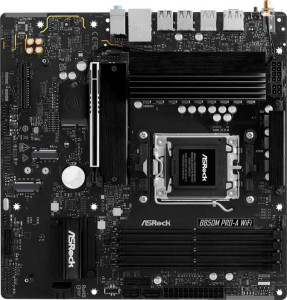
ASRock B850M Pro-A WiFi
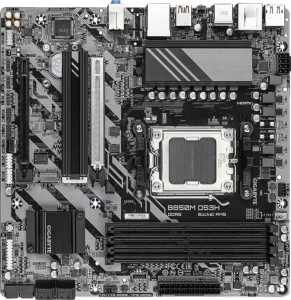
Gigabyte B850M DS3H

ASRock B850M Pro-A WiFi Gigabyte B850M DS3H

Overview

Welcome to our in-depth specification comparison between the ASRock B850M Pro-A WiFi and the Gigabyte B850M DS3H — two Micro-ATX motherboards built on the B850 chipset for AMD AM5 processors. While they share a solid common foundation, key battlegrounds emerge around wireless connectivity, storage expansion, RAM speed support, and rear port selection. Read on to see which board best matches your build requirements.

Common Features

  • Both boards use the AM5 CPU socket.
  • Both boards feature the B850 chipset.
  • Both boards have a Micro-ATX form factor.
  • Both boards support HDMI 2.1.
  • Both boards are easy to overclock.
  • Neither board has RGB lighting.
  • Neither board supports easy BIOS reset.
  • Both boards have a dual BIOS feature.
  • Both boards support a maximum of 256GB of RAM.
  • Both boards have 4 memory slots.
  • Both boards use DDR5 memory.
  • Both boards support dual-channel memory.
  • Neither board supports ECC memory.
  • Both boards have 1 USB 3.2 Gen 2 Type-A port.
  • Both boards have 2 USB 3.2 Gen 1 Type-A ports.
  • Both boards have 1 USB 3.2 Gen 2 Type-C port.
  • Neither board has USB 3.2 Gen 2x2, USB 4, or Thunderbolt 4 ports.
  • Both boards have 4 SATA 3 connectors and no SATA 2 connectors.
  • Both boards include a TPM connector.
  • Both boards have 4 USB 2.0 ports available through expansion.
  • Both boards have 1 PCIe 5.0 x16 slot and 1 PCIe x4 slot, with no PCIe 3.0, 4.0, x1, x8, or PCI slots.
  • Both boards support 7.1 audio channels with 3 audio connectors.
  • Neither board has an S/PDIF Out port.
  • Both boards support RAID 0, RAID 1, and RAID 10, but neither supports RAID 0+1.

Main Differences

  • Wi-Fi is built into the ASRock B850M Pro-A WiFi but is not available on the Gigabyte B850M DS3H.
  • Bluetooth is present on the ASRock B850M Pro-A WiFi but not available on the Gigabyte B850M DS3H.
  • Maximum official RAM speed is 8000 MHz on the ASRock B850M Pro-A WiFi and 5200 MHz on the Gigabyte B850M DS3H.
  • Maximum overclocked RAM speed is 8000 MHz on the ASRock B850M Pro-A WiFi and 8200 MHz on the Gigabyte B850M DS3H.
  • The ASRock B850M Pro-A WiFi has 4 rear USB 2.0 ports, while the Gigabyte B850M DS3H has none.
  • DisplayPort outputs number 1 on the ASRock B850M Pro-A WiFi and 2 on the Gigabyte B850M DS3H.
  • The Gigabyte B850M DS3H includes 1 PS/2 port, while the ASRock B850M Pro-A WiFi has none.
  • USB 3.2 Gen 1 expansion ports number 4 on the ASRock B850M Pro-A WiFi and 2 on the Gigabyte B850M DS3H.
  • USB 3.0 expansion ports number 4 on the ASRock B850M Pro-A WiFi and 2 on the Gigabyte B850M DS3H.
  • Fan headers total 5 on the ASRock B850M Pro-A WiFi and 4 on the Gigabyte B850M DS3H.
  • M.2 sockets number 3 on the ASRock B850M Pro-A WiFi and 2 on the Gigabyte B850M DS3H.
  • RAID 5 support is present on the Gigabyte B850M DS3H but not available on the ASRock B850M Pro-A WiFi.
Specs Comparison
ASRock B850M Pro-A WiFi

ASRock B850M Pro-A WiFi

Gigabyte B850M DS3H

Gigabyte B850M DS3H

General info:
CPU socket AM5 AM5
chipset B850 B850
form factor Micro-ATX Micro-ATX
release date January 2025 January 2025
supports Wi-Fi
Has Bluetooth
HDMI version HDMI 2.1 HDMI 2.1
Easy to overclock
has RGB lighting
Easy to reset BIOS
Has dual BIOS
CPU sockets 1 1
Has integrated graphics
warranty period 3 years 3 years
height 244 mm 244 mm
width 244 mm 244 mm
Has integrated CPU

At their core, the ASRock B850M Pro-A WiFi and the Gigabyte B850M DS3H are built on the same foundation: both use the AM5 socket with a B850 chipset, share a Micro-ATX form factor at identical 244 × 244 mm dimensions, support overclocking, include dual BIOS, output video via HDMI 2.1, and come with a 3-year warranty. For builders prioritizing platform stability and longevity, both are solid, equivalent choices on paper.

The single but meaningful split between these two boards is wireless connectivity. The ASRock includes both Wi-Fi and Bluetooth, while the Gigabyte offers neither. In practice, this matters significantly for small-form builds in a Micro-ATX case where routing an Ethernet cable is inconvenient, or for users who want to pair wireless peripherals, audio devices, or controllers without adding a separate adapter. Conversely, users who plan to run a dedicated Ethernet connection and have no need for Bluetooth peripherals will find the Gigabyte's omission completely irrelevant — and may benefit from a lower price point as a result.

On general specs alone, the ASRock B850M Pro-A WiFi holds a clear edge for most users purely due to its built-in wireless capabilities, which add flexibility without requiring any additional hardware. The Gigabyte B850M DS3H is only the better pick if wireless connectivity is already handled externally and cost savings are the priority — in which case the two boards are functionally equivalent in every other measurable way in this category.
Memory:
maximum memory amount 256GB 256GB
RAM speed (max) 8000 MHz 5200 MHz
overclocked RAM speed 8000 MHz 8200 MHz
memory slots 4 4
DDR memory version 5 5
memory channels 2 2
Supports ECC memory

Both boards share the same memory skeleton: 4 slots, DDR5, dual-channel architecture, and a 256 GB maximum capacity. For the vast majority of builds — gaming rigs, workstations, content creation machines — this headroom is more than sufficient, and neither board will limit you in terms of how much RAM you can physically install.

Where things get nuanced is in supported speeds. The ASRock's officially rated maximum is 8000 MHz, which also happens to be its overclocked ceiling. The Gigabyte, by contrast, lists a native max of only 5200 MHz — noticeably conservative — but its overclocked ceiling actually edges slightly higher at 8200 MHz. In practice, this distinction matters most to enthusiasts who intend to push high-speed DDR5 kits to their limits: the Gigabyte technically allows a marginally higher overclock, but reaching it requires more tuning effort, and real-world stability at those frequencies will depend heavily on the specific memory kit and cooling conditions. For users running jedec-standard or XMP/EXPO profiles in the 6000–7200 MHz sweet spot, both boards are effectively equivalent.

On balance, the memory specs here favor neither board decisively. The ASRock offers a more straightforward high-speed experience with its higher native ceiling, while the Gigabyte's slightly higher overclocked cap is a paper advantage for a narrow audience. For most users, this category is essentially a tie.

Ports:
USB 3.2 Gen 2 ports (USB-A) 1 1
USB 3.2 Gen 1 ports (USB-A) 2 2
USB 3.2 Gen 2 ports (USB-C) 1 1
USB 3.2 Gen 1 ports (USB-C) 0 0
USB 2.0 ports 4 0
USB 3.2 Gen 2x2 ports 0 0
USB 4 40Gbps ports 0 0
USB 4 20Gbps ports 0 0
Thunderbolt 4 ports 0 0
Thunderbolt 3 ports 0 0
has an HDMI output
DisplayPort outputs 1 2
RJ45 ports 1 1
Has USB Type-C
eSATA ports 0 0
DVI outputs 0 0
has a VGA connector
PS/2 ports 0 1

The rear I/O on these two boards is largely identical where it counts for most users — both offer the same USB 3.2 Gen 2 and Gen 1 mix across Type-A and Type-C, a shared HDMI output, and a single RJ45 ethernet port. The high-speed USB lineup being a match means neither board has an edge for fast external storage or modern peripherals.

The meaningful divergences lie in two areas pulling in opposite directions. The ASRock brings 4 USB 2.0 ports that the Gigabyte completely omits — a genuine practical advantage for users with legacy peripherals like older keyboards, mice, audio interfaces, or USB hubs that don't require speed but do need reliable, low-overhead connections. The Gigabyte counters with 2 DisplayPort outputs versus the ASRock's single one, which is a real benefit for anyone running a multi-monitor setup driven by the CPU's integrated graphics. The Gigabyte also includes a PS/2 port, a niche addition relevant only to users with legacy input devices or those requiring PS/2 for specific BIOS-level input scenarios.

Neither board dominates outright — the winner here depends entirely on use case. The ASRock is the stronger pick for users with a collection of USB 2.0 peripherals, while the Gigabyte has the edge for multi-display productivity builds relying on video output from the rear I/O. For a single-monitor setup with all-modern peripherals, the two are effectively tied.

Connectors:
USB 3.2 Gen 1 ports (through expansion) 4 2
USB 2.0 ports (through expansion) 4 4
SATA 3 connectors 4 4
fan headers 5 4
USB 3.0 ports (through expansion) 4 2
M.2 sockets 3 2
Has TPM connector
U.2 sockets 0 0
Has mSATA connector
SATA 2 connectors 0 0

Internal connectivity is where the ASRock pulls ahead more decisively than any previous category. Its 3 M.2 sockets versus the Gigabyte's 2 is arguably the headline difference — in an era where fast NVMe storage is the norm and many builds run multiple SSDs for OS, games, and bulk storage separately, that extra slot means one more drive without ever touching the SATA ports. Both boards provide 4 SATA 3 connectors, so traditional drive capacity is equal, but the ASRock's M.2 advantage gives it more flexibility for all-NVMe configurations.

The ASRock also leads on internal USB expansion, offering 4 USB 3.2 Gen 1 headers compared to the Gigabyte's 2. For cases with front-panel USB 3.0 ports or USB expansion brackets, this doubles the available connections, which matters in more port-hungry setups. Fan header count tells a similar story: 5 headers on the ASRock versus 4 on the Gigabyte — a modest but real advantage for builders running larger cooling arrays with multiple case fans and pump headers.

Across every internal connector metric that varies between these two boards, the ASRock B850M Pro-A WiFi comes out ahead. The Gigabyte matches it only on SATA, USB 2.0 expansion, and TPM. For builders who want more storage flexibility, better front-panel USB provisioning, or richer fan control without relying on a separate hub, the ASRock holds a clear and meaningful advantage in this category.

Expansion slots:
PCIe 4.0 x16 slots 0 0
PCIe 5.0 x16 slots 1 1
PCIe 3.0 x16 slots 0 0
PCIe x1 slots 0 0
PCI slots 0 0
PCIe 2.0 x16 slots 0 0
PCIe x4 slots 1 1
PCIe x8 slots 0 0

Expansion slot configurations are identical between these two boards, leaving nothing to separate them here. Each provides one PCIe 5.0 x16 slot — the primary GPU slot — and one PCIe x4 slot for additional cards such as NVMe adapters, capture cards, or networking add-ins. Everything else registers as zero across the board.

The PCIe 5.0 x16 primary slot is worth noting in context: it represents the current-generation standard for discrete graphics, ensuring neither board creates a bottleneck for modern GPUs. The secondary x4 slot provides a reasonable amount of expandability given the Micro-ATX form factor, which by design trades slot count for a smaller footprint. Expecting more than two slots from either of these boards would be unrealistic for their class.

This category is a straightforward tie — every spec matches exactly. Expansion slot configuration should play no role in choosing between these two boards.

Audio:
audio channels 7.1 7.1
Has S/PDIF Out port
audio connectors 3 3

Audio is the shortest story in this comparison. Both boards offer 7.1-channel surround sound support with 3 analog audio connectors and no S/PDIF optical output — a spec-for-spec match with nothing to distinguish one from the other.

The 7.1 channel capability is suitable for multi-speaker surround setups and high-quality stereo headphones alike, and the 3-connector arrangement covers the standard line-in, line-out, and microphone configuration typical of motherboard audio. The absence of S/PDIF on both means users who need a digital optical connection to an external receiver or DAC will require a dedicated sound card or USB audio interface on either board.

This is another clean tie — audio hardware should carry zero weight in the decision between these two boards.

Storage:
Supports RAID 1
Supports RAID 10 (1+0)
Supports RAID 5
Supports RAID 0
Supports RAID 0+1

RAID support between these two boards is nearly identical, with one exception that matters to a specific type of user. Both handle RAID 0, RAID 1, and RAID 10 — covering the most common configurations for performance striping, mirroring for redundancy, and a combination of both. The Gigabyte B850M DS3H adds RAID 5 support, which the ASRock omits entirely.

RAID 5 is worth highlighting for those it applies to: it distributes parity data across three or more drives, offering a balance of read performance, storage efficiency, and fault tolerance that RAID 1 and RAID 10 cannot match at scale. It is the preferred configuration in small NAS-adjacent or workstation setups where maximizing usable capacity while retaining redundancy is the goal. For the typical desktop builder running two drives in RAID 0 or RAID 1, the difference is academic — but for anyone building a multi-drive storage server around this board, the Gigabyte's RAID 5 support is a concrete functional advantage.

The Gigabyte B850M DS3H edges ahead in this category, though the gap is relevant only to a narrow audience. Users with no plans for RAID 5 configurations will find both boards completely equivalent here.

Comparison Summary & Verdict

Both the ASRock B850M Pro-A WiFi and the Gigabyte B850M DS3H are competent B850 Micro-ATX boards sharing the same AM5 socket, DDR5 support, and core PCIe layout. The ASRock B850M Pro-A WiFi stands out with its built-in Wi-Fi and Bluetooth, more M.2 sockets (3 vs 2), an extra fan header, and more USB expansion ports — making it the stronger choice for feature-rich, wireless-capable builds. The Gigabyte B850M DS3H counters with a slightly higher overclocked RAM ceiling of 8200 MHz, dual DisplayPort outputs, and RAID 5 support, appealing to users who prefer wired setups and need more display flexibility or advanced storage configurations.

ASRock B850M Pro-A WiFi
Buy ASRock B850M Pro-A WiFi if...

Buy the ASRock B850M Pro-A WiFi if you want built-in Wi-Fi and Bluetooth, more M.2 slots for NVMe storage, and additional USB expansion headers for a fully featured wireless-ready AM5 build.

Gigabyte B850M DS3H
Buy Gigabyte B850M DS3H if...

Buy the Gigabyte B850M DS3H if you prefer a wired setup and need dual DisplayPort outputs, RAID 5 storage support, or the slightly higher overclocked RAM speed ceiling of 8200 MHz.