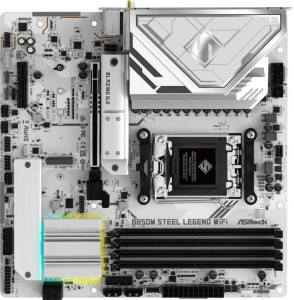
ASRock B850M Steel Legend WiFi
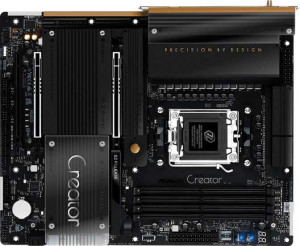
ASRock X870 Taichi Creator

ASRock B850M Steel Legend WiFi ASRock X870 Taichi Creator

Overview

Welcome to our in-depth specification face-off between the ASRock B850M Steel Legend WiFi and the ASRock X870 Taichi Creator. Both boards share the AM5 platform, DDR5 memory support, and Wi-Fi 7 connectivity, yet they target distinctly different builders. In this comparison, we examine their key battlegrounds: form factor and expansion options, rear port selection, storage capacity, and audio performance — to help you decide which board truly fits your build.

Common Features

  • Both boards use the AM5 CPU socket.
  • Wi-Fi is supported on both products, covering Wi-Fi 4, Wi-Fi 5, Wi-Fi 6, Wi-Fi 6E, and Wi-Fi 7.
  • Bluetooth 5.4 is present on both products.
  • HDMI 2.1 output is available on both products.
  • Overclocking support is available on both products.
  • RGB lighting is present on both products.
  • Both products support a maximum of 256GB of memory.
  • Both products support DDR5 memory.
  • Both products have 4 memory slots.
  • Both products operate in dual-channel memory mode.
  • ECC memory is not supported on either product.
  • Overclocked RAM speed reaches up to 8000 MHz on both products.
  • Neither product has USB 3.2 Gen 1 ports (USB-C) on the rear panel.
  • Neither product has USB 3.2 Gen 2x2 ports.
  • Neither product has USB 4 20Gbps ports.
  • Neither product has Thunderbolt 3 ports.
  • HDMI output is present on both products.
  • USB Type-C connectivity is available on both products.
  • Neither product has eSATA ports.
  • Neither product has DVI outputs.
  • Both products provide 4 USB 3.2 Gen 1 ports through expansion.
  • Both products have 4 SATA 3 connectors.
  • Neither product has an mSATA connector.
  • Neither product has SATA 2 connectors.
  • Neither product has U.2 sockets.
  • Both products have 4 USB 3.0 ports through expansion.
  • Neither product has PCIe 4.0 x16 slots.
  • Neither product has PCIe x1 slots.
  • Neither product has PCI slots.
  • Neither product has PCIe 2.0 x16 slots.
  • Neither product has PCIe x8 slots.
  • Both products support 7.1 audio channels.
  • RAID 0 is supported on both products.
  • RAID 1 is supported on both products.
  • RAID 10 (1+0) is supported on both products.
  • RAID 5 is not supported on either product.
  • RAID 0+1 is not supported on either product.

Main Differences

  • The chipset is B850 on ASRock B850M Steel Legend WiFi and X870 on ASRock X870 Taichi Creator.
  • The form factor is Micro-ATX on ASRock B850M Steel Legend WiFi and ATX on ASRock X870 Taichi Creator.
  • Easy BIOS reset is not available on ASRock B850M Steel Legend WiFi but is available on ASRock X870 Taichi Creator.
  • The board width is 244 mm on ASRock B850M Steel Legend WiFi and 305 mm on ASRock X870 Taichi Creator.
  • USB 3.2 Gen 2 ports (USB-A) total 1 on ASRock B850M Steel Legend WiFi and 2 on ASRock X870 Taichi Creator.
  • USB 3.2 Gen 1 ports (USB-A) total 2 on ASRock B850M Steel Legend WiFi and 6 on ASRock X870 Taichi Creator.
  • USB 3.2 Gen 2 ports (USB-C) total 1 on ASRock B850M Steel Legend WiFi and 0 on ASRock X870 Taichi Creator.
  • USB 2.0 ports total 4 on ASRock B850M Steel Legend WiFi and 2 on ASRock X870 Taichi Creator.
  • USB 4 40Gbps ports are absent on ASRock B850M Steel Legend WiFi but 2 are present on ASRock X870 Taichi Creator.
  • Thunderbolt 4 ports are absent on ASRock B850M Steel Legend WiFi but 2 are present on ASRock X870 Taichi Creator.
  • A DisplayPort output is present on ASRock B850M Steel Legend WiFi but absent on ASRock X870 Taichi Creator.
  • RJ45 ports total 1 on ASRock B850M Steel Legend WiFi and 2 on ASRock X870 Taichi Creator.
  • USB 2.0 ports through expansion total 4 on ASRock B850M Steel Legend WiFi and 6 on ASRock X870 Taichi Creator.
  • Fan headers total 5 on ASRock B850M Steel Legend WiFi and 7 on ASRock X870 Taichi Creator.
  • M.2 sockets total 3 on ASRock B850M Steel Legend WiFi and 4 on ASRock X870 Taichi Creator.
  • A TPM connector is present on ASRock B850M Steel Legend WiFi but absent on ASRock X870 Taichi Creator.
  • PCIe 5.0 x16 slots total 1 on ASRock B850M Steel Legend WiFi and 2 on ASRock X870 Taichi Creator.
  • A PCIe 3.0 x16 slot is absent on ASRock B850M Steel Legend WiFi but 1 is present on ASRock X870 Taichi Creator.
  • A PCIe x4 slot is present on ASRock B850M Steel Legend WiFi but absent on ASRock X870 Taichi Creator.
  • The audio DAC signal-to-noise ratio is 120 dB on ASRock B850M Steel Legend WiFi and 130 dB on ASRock X870 Taichi Creator.
  • An S/PDIF Out port is absent on ASRock B850M Steel Legend WiFi but present on ASRock X870 Taichi Creator.
  • Audio connectors total 3 on ASRock B850M Steel Legend WiFi and 2 on ASRock X870 Taichi Creator.
Specs Comparison
ASRock B850M Steel Legend WiFi

ASRock B850M Steel Legend WiFi

ASRock X870 Taichi Creator

ASRock X870 Taichi Creator

General info:
CPU socket AM5 AM5
chipset B850 X870
form factor Micro-ATX ATX
release date January 2025 July 2025
supports Wi-Fi
Wi-Fi version Wi-Fi 4 (802.11n), Wi-Fi 5 (802.11ac), Wi-Fi 6 (802.11ax), Wi-Fi 6E (802.11ax), Wi-Fi 7 (802.11be) Wi-Fi 4 (802.11n), Wi-Fi 5 (802.11ac), Wi-Fi 6 (802.11ax), Wi-Fi 6E (802.11ax), Wi-Fi 7 (802.11be)
Has Bluetooth
Bluetooth version 5.4 5.4
HDMI version HDMI 2.1 HDMI 2.1
Easy to overclock
has RGB lighting
Easy to reset BIOS
Has dual BIOS
has aptX
CPU sockets 1 1
Has integrated graphics
warranty period 3 years 3 years
height 244 mm 244 mm
width 244 mm 305 mm
Has integrated CPU

Both boards share the same AM5 socket, making them compatible with the same range of AMD Ryzen processors, and both offer Wi-Fi 7, Bluetooth 5.4, HDMI 2.1, dual BIOS, and a 3-year warranty. For most users, this common foundation means neither board leaves you wanting on connectivity or future-proofing at the platform level.

The most meaningful differences lie in chipset and form factor. The Steel Legend uses a B850 chipset in a Micro-ATX footprint (244 × 244 mm), while the Taichi Creator steps up to the X870 chipset in a full ATX layout (244 × 305 mm). The X870 chipset is AMD's higher-tier platform, typically unlocking more PCIe lanes, greater overclocking headroom, and additional I/O bandwidth — relevant if you plan to run multiple high-speed NVMe drives or GPU configurations simultaneously. The larger ATX size also means more physical room for VRM phases, expansion slots, and M.2 slots, which matters for demanding or expandable builds.

One practical edge goes to the Taichi Creator: it supports easy BIOS reset, while the Steel Legend does not — a small but real convenience advantage when troubleshooting or recovering from a failed overclock. Overall, the Taichi Creator holds a clear advantage for power users and enthusiast builders who need the headroom that X870 and full ATX provide, while the Steel Legend is the more compact, cost-tier-appropriate choice for mainstream builds where that extra platform headroom is unlikely to be utilized.
Memory:
maximum memory amount 256GB 256GB
overclocked RAM speed 8000 MHz 8000 MHz
memory slots 4 4
DDR memory version 5 5
memory channels 2 2
Supports ECC memory

On memory, these two boards are in complete lockstep. Both support DDR5 across 4 slots in a dual-channel configuration, cap out at 256GB maximum capacity, and push overclocked speeds up to 8000 MHz. That ceiling is notably high — most DDR5 kits top out well below that in practice — meaning neither board is the bottleneck for even the fastest consumer memory available today.

The dual-channel setup is worth underlining: running two or four sticks in the correct slots (rather than a single stick) effectively doubles the memory bandwidth available to the CPU, which has a tangible impact on workloads like video editing, 3D rendering, and gaming at high frame rates. With four slots available, users on both boards can start with two sticks and expand later without replacing existing modules. Neither board supports ECC memory, which is expected at this tier — that feature is reserved for workstation and server platforms.

This category is a dead heat. Every memory specification is identical across the Steel Legend WiFi and the Taichi Creator, so your memory subsystem experience will be indistinguishable between the two. The decision between these boards should rest entirely on the other spec groups.

Ports:
USB 3.2 Gen 2 ports (USB-A) 1 2
USB 3.2 Gen 1 ports (USB-A) 2 6
USB 3.2 Gen 2 ports (USB-C) 1 0
USB 3.2 Gen 1 ports (USB-C) 0 0
USB 2.0 ports 4 2
USB 3.2 Gen 2x2 ports 0 0
USB 4 40Gbps ports 0 2
USB 4 20Gbps ports 0 0
Thunderbolt 4 ports 0 2
Thunderbolt 3 ports 0 0
has an HDMI output
DisplayPort outputs 1 0
RJ45 ports 1 2
Has USB Type-C
eSATA ports 0 0
DVI outputs 0 0
has a VGA connector
PS/2 ports 0 0

Port selection is where these two boards diverge sharply, and the gap tells you a lot about their intended audiences. The Taichi Creator arrives with 2 Thunderbolt 4 ports — each capable of 40Gbps throughput and compatible with USB 4 — making it a serious option for creators who chain high-speed external SSDs, connect Thunderbolt docks, or drive external GPUs. The Steel Legend WiFi offers none of that; its fastest rear I/O connection is a single USB 3.2 Gen 2 Type-C at 10Gbps, which is perfectly adequate for mainstream use but falls well short of Thunderbolt territory.

Raw port count also favors the Taichi Creator: it provides 8 USB-A ports in total on the rear panel versus the Steel Legend's 3, and it doubles up on RJ45 ethernet jacks — useful for content creators or streamers who want simultaneous wired connections to two networks without a separate adapter. The Steel Legend counters with a DisplayPort 1.x output and more USB 2.0 ports, the latter being relevant primarily for legacy peripherals like older keyboards, mice, or BIOS flash drives, where speed is irrelevant.

The Taichi Creator holds a decisive advantage in this category. The presence of Thunderbolt 4 and USB 4 alone elevates it to a different tier of connectivity — those interfaces are rare even on premium boards and open up an ecosystem of high-bandwidth peripherals that the Steel Legend simply cannot access. Unless you specifically need a DisplayPort output or have no use for high-speed external connectivity, the Taichi Creator's port lineup is substantially more capable.

Connectors:
USB 3.2 Gen 1 ports (through expansion) 4 4
USB 2.0 ports (through expansion) 4 6
SATA 3 connectors 4 4
fan headers 5 7
USB 3.0 ports (through expansion) 4 4
M.2 sockets 3 4
Has TPM connector
U.2 sockets 0 0
Has mSATA connector
SATA 2 connectors 0 0

Internal connector counts tend to reflect a board's ambitions for complex builds, and the Taichi Creator edges ahead in the areas that matter most. Its 4 M.2 sockets versus the Steel Legend's 3 may seem like a minor difference, but for a workstation or high-performance storage build — where fast NVMe drives for the OS, scratch disk, and project storage are all desirable simultaneously — that extra slot avoids the need to fall back on SATA drives or give up a PCIe slot for an add-in card. Both boards share 4 SATA 3 connectors, adequate for conventional HDDs or SSDs where M.2 slots run out.

Cooling management is another area where the Taichi Creator has more flexibility, offering 7 fan headers compared to the Steel Legend's 5. In a large ATX chassis with multiple radiator fans, case fans, and pump headers all competing for connections, those two extra headers can eliminate the need for a fan splitter or external hub — a cleaner, more reliable solution. The Steel Legend's 5 headers are reasonable for a Micro-ATX build where the chassis is smaller and typically runs fewer fans by default.

One noteworthy reversal: the Steel Legend includes a dedicated TPM connector, while the Taichi Creator does not. This is relevant for enterprise environments or users who require a discrete TPM module for hardware-level security compliance. Taken as a whole, the Taichi Creator has a moderate advantage in this category thanks to its additional M.2 slot and fan headers, but the Steel Legend's TPM connector is a meaningful differentiator for security-focused deployments.

Expansion slots:
PCIe 4.0 x16 slots 0 0
PCIe 5.0 x16 slots 1 2
PCIe 3.0 x16 slots 0 1
PCIe x1 slots 0 0
PCI slots 0 0
PCIe 2.0 x16 slots 0 0
PCIe x4 slots 1 0
PCIe x8 slots 0 0

Expansion slot configuration is one of the clearest reflections of a board's target use case, and here the gap between these two is significant. The Steel Legend WiFi offers a single PCIe 5.0 x16 slot — more than sufficient for a primary GPU — plus a PCIe x4 slot for an additional card such as a capture card, network adapter, or NVMe expansion. The Taichi Creator, by contrast, provides two PCIe 5.0 x16 slots alongside a PCIe 3.0 x16 slot, opening the door to multi-GPU configurations, a dedicated PCIe 5.0 storage card alongside a GPU, or pairing a high-bandwidth accelerator card with a discrete graphics card without compromising lane allocation.

The presence of two full-bandwidth PCIe 5.0 x16 slots on the Taichi Creator is particularly notable. PCIe 5.0 doubles the bandwidth of PCIe 4.0, and having two such slots means the board can sustain maximum throughput to two separate devices simultaneously — a configuration relevant for AI workloads, professional rendering, or next-generation NVMe arrays that demand the highest possible bus speeds. The Steel Legend's PCIe x4 secondary slot, while useful, operates at a fraction of that bandwidth ceiling.

The Taichi Creator holds a clear advantage in this category. For a single-GPU gaming or productivity build, the Steel Legend's lone PCIe 5.0 x16 slot is perfectly adequate, but any workflow that benefits from multiple high-bandwidth expansion cards — or that anticipates future PCIe 5.0 peripherals — will find the Taichi Creator's layout substantially more capable and forward-looking.

Audio:
Signal-to-Noise ratio (DAC) 120 dB 130 dB
audio channels 7.1 7.1
Has S/PDIF Out port
audio connectors 3 2

Audio quality on motherboards is largely determined by the onboard DAC's signal-to-noise ratio (SNR) — the higher the number, the cleaner the audio signal relative to background noise. The Taichi Creator's 130 dB SNR versus the Steel Legend's 120 dB SNR is a meaningful 10 dB gap. In practical terms, a 10 dB improvement represents a significant reduction in audible hiss and noise floor, which becomes noticeable when using high-impedance headphones or studio monitors where any coloration in the signal is more exposed. Both boards deliver 7.1 surround sound, making them equally capable for home theater or surround-sound gaming setups on paper.

The tradeoffs on connectivity are interesting. The Steel Legend provides 3 audio jacks — typically covering front, rear, and mic inputs — while the Taichi Creator manages with 2, which may feel limiting if you regularly switch between multiple analog devices. However, the Taichi Creator compensates with an S/PDIF optical output, a digital connection that bypasses the onboard DAC entirely and passes a clean bitstream directly to an external receiver or DAC/amp. For users with AV receivers or high-end external audio equipment, S/PDIF is often the preferred connection precisely because it sidesteps any analog noise concerns on the motherboard altogether.

The Taichi Creator edges ahead in this category. Its higher SNR benefits analog audio users with quality headphones or speakers, and the addition of S/PDIF output adds flexibility for audiophiles and home theater setups that the Steel Legend simply cannot match. The Steel Legend's extra analog jack is a minor convenience, but it does not offset the Taichi Creator's qualitative audio advantages.

Storage:
Supports RAID 1
Supports RAID 10 (1+0)
Supports RAID 5
Supports RAID 0
Supports RAID 0+1

Storage redundancy support is identical across both boards. Each offers RAID 0 (striping for speed), RAID 1 (mirroring for redundancy), and RAID 10 (a combination of both), while neither supports RAID 5 or RAID 0+1. For the vast majority of desktop users, this trio covers all practically relevant configurations — RAID 0 for maximum sequential throughput across multiple drives, RAID 1 for straightforward data protection, and RAID 10 for those who want both performance and fault tolerance without the parity overhead of RAID 5.

The absence of RAID 5 is worth noting for completeness. RAID 5 distributes parity data across all drives, allowing one drive to fail without data loss while using storage capacity more efficiently than RAID 10. However, RAID 5 is computationally demanding and is generally more at home in dedicated NAS or server hardware than in consumer desktop platforms, so its omission here is not a practical limitation for the intended audience of either board.

This category is a complete tie. With no differences across any supported or unsupported RAID mode, storage configuration capability offers no basis for choosing one board over the other.

Comparison Summary & Verdict

After examining every specification, these two boards reveal clearly different identities. The ASRock B850M Steel Legend WiFi is the smarter choice for builders working within compact Micro-ATX cases who still want solid feature coverage, including a DisplayPort output, a USB 3.2 Gen 2 Type-C rear port, and a TPM connector — all at a more accessible tier. The ASRock X870 Taichi Creator, on the other hand, is purpose-built for power users and content creators who demand maximum expandability: it offers two Thunderbolt 4 and two USB 4 40Gbps ports, four M.2 sockets, seven fan headers, a superior 130 dB SNR audio DAC, dual RJ45 ports, and two PCIe 5.0 x16 slots. If connectivity depth and professional-grade features matter most, the X870 Taichi Creator is the clear fit.

ASRock B850M Steel Legend WiFi
Buy ASRock B850M Steel Legend WiFi if...

Buy the ASRock B850M Steel Legend WiFi if you are building a compact Micro-ATX system and need a capable AM5 board with a DisplayPort output, a rear USB 3.2 Gen 2 Type-C port, and a TPM connector without stepping up to a full ATX platform.

ASRock X870 Taichi Creator
Buy ASRock X870 Taichi Creator if...

Buy the ASRock X870 Taichi Creator if you need a full-featured ATX board with Thunderbolt 4, USB 4 40Gbps connectivity, four M.2 slots, dual LAN ports, and premium audio output for demanding creative or professional workloads.