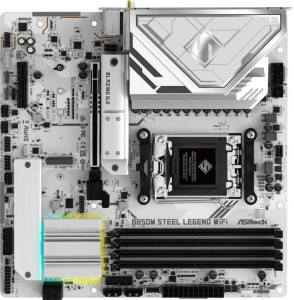
ASRock B850M Steel Legend WiFi
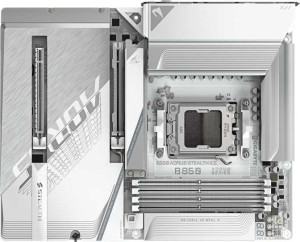
Gigabyte B850 Aorus Stealth Ice

ASRock B850M Steel Legend WiFi Gigabyte B850 Aorus Stealth Ice

Overview

Choosing between the ASRock B850M Steel Legend WiFi and the Gigabyte B850 Aorus Stealth Ice means weighing two capable B850-chipset motherboards that share a strong common foundation yet diverge in meaningful ways. Both support AM5 CPUs, Wi-Fi 7, DDR5 memory, and PCIe 5.0, but key battlegrounds emerge around form factor and physical size, storage and connectivity options, RAM speed, and audio features — making the right choice highly dependent on your specific build priorities.

Common Features

  • Both motherboards use the AM5 CPU socket.
  • Both motherboards are based on the B850 chipset.
  • Wi-Fi is supported on both motherboards, covering Wi-Fi 4 (802.11n), Wi-Fi 5 (802.11ac), Wi-Fi 6 (802.11ax), Wi-Fi 6E (802.11ax), and Wi-Fi 7 (802.11be).
  • Bluetooth 5.4 is available on both motherboards.
  • Both motherboards include an HDMI 2.1 port.
  • Overclocking is supported on both motherboards.
  • Both motherboards support a maximum of 256GB of RAM.
  • Both motherboards have 4 memory slots.
  • Both motherboards use DDR5 memory.
  • Both motherboards support dual-channel memory.
  • ECC memory is not supported on either motherboard.
  • Both motherboards include 1 USB 3.2 Gen 2 port in USB-C form factor.
  • Neither motherboard includes a USB 3.2 Gen 1 USB-C port.
  • Both motherboards include 4 USB 2.0 ports.
  • Neither motherboard includes USB 3.2 Gen 2x2, USB 4 40Gbps, USB 4 20Gbps, Thunderbolt 3, or Thunderbolt 4 ports.
  • Both motherboards provide 4 USB 2.0 ports through expansion.
  • A TPM connector is present on both motherboards.
  • Neither motherboard includes a U.2 socket or mSATA connector.
  • Both motherboards feature 1 PCIe 5.0 x16 slot and 1 PCIe x4 slot, with no PCIe 4.0 x16, PCIe 3.0 x16, PCIe 2.0 x16, PCIe x1, or PCI slots.
  • Both motherboards deliver a 120 dB signal-to-noise ratio on the DAC and support 7.1 audio channels.
  • RAID 0, RAID 1, and RAID 10 are supported on both motherboards, while RAID 0+1 is not supported on either.

Main Differences

  • The ASRock B850M Steel Legend WiFi has a Micro-ATX form factor, while the Gigabyte B850 Aorus Stealth Ice has an ATX form factor.
  • The width is 244 mm on the ASRock B850M Steel Legend WiFi and 305 mm on the Gigabyte B850 Aorus Stealth Ice.
  • The maximum native RAM speed is 8000 MHz on the ASRock B850M Steel Legend WiFi and 5200 MHz on the Gigabyte B850 Aorus Stealth Ice.
  • The maximum overclocked RAM speed is 8000 MHz on the ASRock B850M Steel Legend WiFi and 8200 MHz on the Gigabyte B850 Aorus Stealth Ice.
  • There is 1 USB 3.2 Gen 2 USB-A port on the ASRock B850M Steel Legend WiFi and 2 on the Gigabyte B850 Aorus Stealth Ice.
  • There are 2 USB 3.2 Gen 1 USB-A ports on the ASRock B850M Steel Legend WiFi and 4 on the Gigabyte B850 Aorus Stealth Ice.
  • The ASRock B850M Steel Legend WiFi includes 1 DisplayPort output, while no DisplayPort output is present on the Gigabyte B850 Aorus Stealth Ice.
  • USB 3.2 Gen 1 ports available through expansion number 4 on the ASRock B850M Steel Legend WiFi and 2 on the Gigabyte B850 Aorus Stealth Ice.
  • There are 4 SATA 3 connectors on the ASRock B850M Steel Legend WiFi and 2 on the Gigabyte B850 Aorus Stealth Ice.
  • The ASRock B850M Steel Legend WiFi has 5 fan headers, while the Gigabyte B850 Aorus Stealth Ice has 8 fan headers.
  • USB 3.0 ports through expansion number 4 on the ASRock B850M Steel Legend WiFi and 2 on the Gigabyte B850 Aorus Stealth Ice.
  • There are 3 M.2 sockets on the ASRock B850M Steel Legend WiFi and 4 on the Gigabyte B850 Aorus Stealth Ice.
  • An S/PDIF Out port is present on the Gigabyte B850 Aorus Stealth Ice but not available on the ASRock B850M Steel Legend WiFi.
  • The ASRock B850M Steel Legend WiFi has 3 audio connectors, while the Gigabyte B850 Aorus Stealth Ice has 2.
  • RAID 5 support is present on the Gigabyte B850 Aorus Stealth Ice but not available on the ASRock B850M Steel Legend WiFi.
Specs Comparison
ASRock B850M Steel Legend WiFi

ASRock B850M Steel Legend WiFi

Gigabyte B850 Aorus Stealth Ice

Gigabyte B850 Aorus Stealth Ice

General info:
CPU socket AM5 AM5
chipset B850 B850
form factor Micro-ATX ATX
release date January 2025 May 2025
supports Wi-Fi
Wi-Fi version Wi-Fi 4 (802.11n), Wi-Fi 5 (802.11ac), Wi-Fi 6 (802.11ax), Wi-Fi 6E (802.11ax), Wi-Fi 7 (802.11be) Wi-Fi 4 (802.11n), Wi-Fi 5 (802.11ac), Wi-Fi 6 (802.11ax), Wi-Fi 6E (802.11ax), Wi-Fi 7 (802.11be)
Has Bluetooth
Bluetooth version 5.4 5.4
HDMI version HDMI 2.1 HDMI 2.1
Easy to overclock
has RGB lighting
Easy to reset BIOS
Has dual BIOS
has aptX
CPU sockets 1 1
Has integrated graphics
warranty period 3 years 3 years
height 244 mm 244 mm
width 244 mm 305 mm
Has integrated CPU

Both the ASRock B850M Steel Legend WiFi and the Gigabyte B850 Aorus Stealth Ice share the same foundational platform: the AM5 socket with a B850 chipset, making them equally capable in terms of CPU compatibility and overclocking support. They also match on connectivity, both offering Wi-Fi 7 (backward compatible down to Wi-Fi 4), Bluetooth 5.4, and HDMI 2.1 — a strong and modern feature set that neither board compromises on.

The single defining difference in this group is form factor. The ASRock is a Micro-ATX board measuring 244 × 244 mm, while the Gigabyte is a full ATX board at 244 × 305 mm. In practice, this means the Gigabyte will require a mid-tower or full-tower ATX case and offers more physical space for additional PCIe slots, VRM layout, and expansion — advantages that matter for power users or those planning multi-card or high-expansion builds. The ASRock, being smaller, opens the door to more compact Micro-ATX cases, which can result in a smaller, lighter, and potentially more portable system without sacrificing the core feature set.

If case size and build footprint are a priority, the ASRock B850M Steel Legend WiFi holds a clear edge for compact builds. For users who want maximum expandability and are building in a standard ATX chassis, the Gigabyte B850 Aorus Stealth Ice is the natural choice. On every other general specification in this group — warranty, BIOS features, wireless, and RGB — the two boards are evenly matched.
Memory:
maximum memory amount 256GB 256GB
RAM speed (max) 8000 MHz 5200 MHz
overclocked RAM speed 8000 MHz 8200 MHz
memory slots 4 4
DDR memory version 5 5
memory channels 2 2
Supports ECC memory

The memory configurations of these two boards share a strong common foundation: both support DDR5 with 4 slots, dual-channel operation, and a maximum capacity of 256GB — more than sufficient for any consumer workload, including heavy content creation and virtualization. Neither supports ECC memory, which is expected at this mainstream chipset tier.

Where things diverge is in how each board handles RAM speeds. The ASRock B850M Steel Legend WiFi lists a native maximum of 8000 MHz, with its overclocked ceiling matching at the same figure. The Gigabyte B850 Aorus Stealth Ice tells a different story: its official (JEDEC) maximum is a more conservative 5200 MHz, but it reaches 8200 MHz under overclocking via XMP/EXPO profiles. This distinction matters in practice — the ASRock appears to treat high-speed DDR5 as a standard operating ceiling, while the Gigabyte draws a clearer line between stock and overclocked operation, ultimately peaking slightly higher at 8200 MHz.

For users who intend to run high-frequency DDR5 kits with XMP/EXPO enabled, the Gigabyte Aorus Stealth Ice holds a narrow edge with its 8200 MHz overclocked ceiling versus the ASRock's 8000 MHz. However, for those who prefer plug-and-play simplicity without explicitly enabling overclocking profiles, the ASRock's higher native speed ceiling is a practical convenience. The advantage here is slim and context-dependent, but the Gigabyte technically offers the higher peak memory throughput potential.

Ports:
USB 3.2 Gen 2 ports (USB-A) 1 2
USB 3.2 Gen 1 ports (USB-A) 2 4
USB 3.2 Gen 2 ports (USB-C) 1 1
USB 3.2 Gen 1 ports (USB-C) 0 0
USB 2.0 ports 4 4
USB 3.2 Gen 2x2 ports 0 0
USB 4 40Gbps ports 0 0
USB 4 20Gbps ports 0 0
Thunderbolt 4 ports 0 0
Thunderbolt 3 ports 0 0
has an HDMI output
DisplayPort outputs 1 0
RJ45 ports 1 1
Has USB Type-C
eSATA ports 0 0
DVI outputs 0 0
has a VGA connector
PS/2 ports 0 0

Raw USB port count is where the Gigabyte Aorus Stealth Ice pulls ahead most visibly. It offers 2 USB 3.2 Gen 2 Type-A ports and 4 USB 3.2 Gen 1 Type-A ports on the rear panel, compared to the ASRock's 1 Gen 2 and 2 Gen 1 Type-A ports. For users with multiple peripherals — external drives, DACs, input devices — this translates directly to fewer dongles and hubs needed. Both boards match on USB 2.0 (4 ports each) and each provides a single USB 3.2 Gen 2 Type-C port, so fast Type-C connectivity is equally available on either board.

The more consequential asymmetry, however, lies in display outputs. The ASRock B850M Steel Legend WiFi includes both an HDMI 2.1 port and a DisplayPort 1 output, while the Gigabyte Aorus Stealth Ice offers only HDMI with no DisplayPort at all. In practice, this means the ASRock can natively drive two monitors simultaneously via the rear I/O — a meaningful advantage for users leveraging integrated graphics on a future APU, or for basic dual-display productivity setups without a discrete GPU.

The two boards trade blows here depending on use case. The Gigabyte Aorus Stealth Ice clearly wins on USB density, offering nearly twice the high-speed Type-A port count — a real convenience for peripheral-heavy desks. But the ASRock B850M Steel Legend WiFi counters with its additional DisplayPort output, which is a practical advantage for multi-monitor users. Neither board is universally superior; the better choice depends on whether USB expandability or display flexibility matters more to the individual user.

Connectors:
USB 3.2 Gen 1 ports (through expansion) 4 2
USB 2.0 ports (through expansion) 4 4
SATA 3 connectors 4 2
fan headers 5 8
USB 3.0 ports (through expansion) 4 2
M.2 sockets 3 4
Has TPM connector
U.2 sockets 0 0
Has mSATA connector
SATA 2 connectors 0 0

Storage connectivity splits interestingly between these two boards. The ASRock B850M Steel Legend WiFi offers 4 SATA 3 connectors versus the Gigabyte Aorus Stealth Ice's 2, making the ASRock the stronger choice for builds that still rely on multiple SATA SSDs or hard drives. The Gigabyte compensates by providing 4 M.2 sockets compared to the ASRock's 3, signaling a clear bias toward NVMe-first storage strategies. For users planning to fill their build with fast PCIe SSDs, the Gigabyte's extra M.2 slot is a genuine advantage; for those with existing SATA drive arrays, the ASRock's deeper SATA support is more practical.

Thermal management tells a similar story of competing priorities. The Gigabyte's 8 fan headers versus the ASRock's 5 is a significant gap — more headers means finer-grained control over airflow in complex cooling setups, and it reduces the need for fan hubs or splitters. This makes the Gigabyte notably more appealing for high-airflow builds, custom water cooling loops with multiple pumps and radiator fans, or any configuration where independent fan zone control matters.

Taken together, these internal connectors reflect each board's broader design philosophy. The Gigabyte Aorus Stealth Ice edges ahead for users building NVMe-centric, thermally demanding systems, thanks to its extra M.2 slot and substantially higher fan header count. The ASRock B850M Steel Legend WiFi holds the advantage for mixed storage builds with its superior SATA count. For most modern builds trending toward NVMe storage and active cooling management, the Gigabyte carries the clearer overall edge in this category.

Expansion slots:
PCIe 4.0 x16 slots 0 0
PCIe 5.0 x16 slots 1 1
PCIe 3.0 x16 slots 0 0
PCIe x1 slots 0 0
PCI slots 0 0
PCIe 2.0 x16 slots 0 0
PCIe x4 slots 1 1
PCIe x8 slots 0 0

Expansion slot configurations are identical across both boards: each provides one PCIe 5.0 x16 slot for a discrete GPU and one PCIe x4 slot for auxiliary cards such as add-in NVMe controllers, capture cards, or networking adapters. The PCIe 5.0 x16 slot is the most current standard available at this tier, ensuring full bandwidth compatibility with current and next-generation graphics cards without any bottlenecking at the slot level.

The absence of additional x16 or x1 slots is worth noting in context. Neither board supports multi-GPU configurations, but that is entirely expected at the B850 mainstream chipset level and reflects the reality that multi-GPU setups are no longer a relevant consumer use case. The single x4 slot provides a reasonable secondary expansion option for most users, covering the most common add-in card scenarios without overcomplicating the layout.

This category is a complete tie. Every expansion slot spec is identical between the ASRock B850M Steel Legend WiFi and the Gigabyte B850 Aorus Stealth Ice — same slot types, same counts, same PCIe generations. Neither board offers any advantage here, and the choice between them should rest entirely on differentiators from other specification groups.

Audio:
Signal-to-Noise ratio (DAC) 120 dB 120 dB
audio channels 7.1 7.1
Has S/PDIF Out port
audio connectors 3 2

On the core audio quality metrics, these two boards are indistinguishable. Both deliver a 120 dB signal-to-noise ratio from their onboard DAC and support 7.1 channel surround sound — a solid implementation that comfortably covers gaming headsets, stereo speakers, and multi-channel audio setups alike. A 120 dB SNR is a strong figure for integrated audio, meaning background noise and interference are well-suppressed relative to the audio signal.

The meaningful split comes down to connectivity philosophy. The ASRock B850M Steel Legend WiFi provides 3 analog audio connectors but no digital output, while the Gigabyte B850 Aorus Stealth Ice offers an S/PDIF optical output at the cost of one fewer analog jack — just 2 connectors. S/PDIF is valuable for users who route audio through an AV receiver, external DAC, or home theater system via optical cable, as it passes a clean digital signal without relying on the motherboard's analog stage. For users who connect directly to analog speakers or headphones, however, S/PDIF offers no benefit, and the ASRock's extra analog connector provides more simultaneous analog device flexibility.

Neither board holds a universal audio advantage — the edge depends entirely on the user's setup. The Gigabyte Aorus Stealth Ice is the stronger choice for anyone with an optical-capable external audio device, while the ASRock B850M Steel Legend WiFi suits users who prefer more analog output options without the need for digital passthrough. For the majority of typical desktop audio use cases, the two boards are effectively matched.

Storage:
Supports RAID 1
Supports RAID 10 (1+0)
Supports RAID 5
Supports RAID 0
Supports RAID 0+1

RAID support is nearly identical across both boards, with shared compatibility for RAID 0 (performance striping), RAID 1 (mirroring), and RAID 10 (striped mirrors) — the three configurations that cover the vast majority of consumer and prosumer use cases. The one point of divergence is RAID 5, which the Gigabyte B850 Aorus Stealth Ice supports and the ASRock B850M Steel Legend WiFi does not.

RAID 5 is a distributed parity configuration that requires a minimum of three drives and offers a balance of read performance, storage efficiency, and single-drive fault tolerance. It is particularly relevant for small workstation or home server builds where preserving usable capacity across multiple drives matters more than the raw simplicity of RAID 1. Its absence on the ASRock is a real limitation for users specifically targeting that configuration, though it remains a niche need for most desktop users.

For typical desktop builds, this category is functionally a tie — RAID 0, 1, and 10 address nearly every common scenario. But for users with multi-drive setups who need parity-based redundancy without sacrificing too much capacity, the Gigabyte Aorus Stealth Ice holds a clear and specific advantage by virtue of its RAID 5 support.

Comparison Summary & Verdict

After a thorough side-by-side comparison, both boards prove to be well-rounded B850 options, but they cater to different builder profiles. The ASRock B850M Steel Legend WiFi stands out with its Micro-ATX form factor, making it an excellent choice for compact builds, while also offering more SATA 3 connectors, a DisplayPort output, and more USB expansion headers — a plus for users with diverse peripheral needs. On the other hand, the Gigabyte B850 Aorus Stealth Ice leverages its full ATX footprint to deliver more M.2 sockets, a higher overclocked RAM ceiling of 8200 MHz, additional USB-A ports, more fan headers for advanced cooling control, S/PDIF Out for digital audio, and RAID 5 support for more robust storage configurations. Neither board is a clear-cut winner — your ideal pick hinges on whether compactness and SATA connectivity or expandability and cooling headroom matter more to you.

ASRock B850M Steel Legend WiFi
Buy ASRock B850M Steel Legend WiFi if...

Buy the ASRock B850M Steel Legend WiFi if you are building a compact system and need a Micro-ATX board with more SATA 3 connectors, a DisplayPort output, and broader USB expansion support.

Gigabyte B850 Aorus Stealth Ice
Buy Gigabyte B850 Aorus Stealth Ice if...

Buy the Gigabyte B850 Aorus Stealth Ice if you want a full ATX board with more M.2 slots, a higher overclocked RAM speed, more fan headers, S/PDIF Out audio, and RAID 5 storage support.