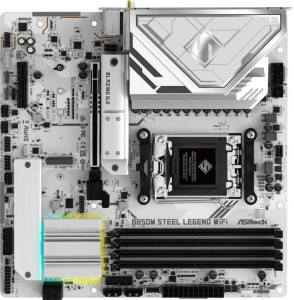
ASRock B850M Steel Legend WiFi
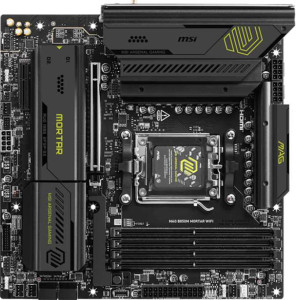
MSI MAG B850M Mortar WiFI

ASRock B850M Steel Legend WiFi MSI MAG B850M Mortar WiFI

Overview

Welcome to our in-depth specification comparison between the ASRock B850M Steel Legend WiFi and the MSI MAG B850M Mortar WiFi. Both are Micro-ATX motherboards built on the AM5 platform with the B850 chipset, sharing a strong foundation of DDR5 memory support, Wi-Fi 7, and PCIe 5.0. Yet beneath that common ground lie meaningful differences in USB connectivity, memory tuning headroom, and audio options that could make one a better fit for your specific build than the other.

Common Features

  • Both boards use the AM5 CPU socket.
  • Both boards feature the B850 chipset.
  • Both boards have a Micro-ATX form factor.
  • Wi-Fi is available on both boards, supporting Wi-Fi 4, Wi-Fi 5, Wi-Fi 6, Wi-Fi 6E, and Wi-Fi 7.
  • Bluetooth 5.4 is present on both boards.
  • Both boards include an HDMI 2.1 output.
  • Both boards support a maximum memory amount of 256GB.
  • Both boards have 4 memory slots.
  • Both boards use DDR5 memory.
  • Both boards support 2 memory channels.
  • ECC memory is not supported on either board.
  • Both boards include 1 USB 3.2 Gen 2 port (USB-C) on the rear panel.
  • Neither board has USB 3.2 Gen 1 ports (USB-C), USB 4 ports, or Thunderbolt ports.
  • Both boards include 1 RJ45 port.
  • Both boards provide 4 USB 2.0 ports through expansion.
  • Both boards have 4 SATA 3 connectors.
  • Both boards include 3 M.2 sockets.
  • A TPM connector is present on both boards.
  • Both boards have 1 PCIe 5.0 x16 slot and 1 PCIe x4 slot, with no PCIe 3.0, 2.0, x1, or PCI slots.
  • Both boards deliver a 120 dB signal-to-noise ratio on the DAC and support 7.1 audio channels.
  • RAID 0, RAID 1, and RAID 10 are supported on both boards, while RAID 0+1 is not supported on either.

Main Differences

  • Easy BIOS reset is available on the MSI MAG B850M Mortar WiFi but not on the ASRock B850M Steel Legend WiFi.
  • Maximum official RAM speed is 8000 MHz on the ASRock B850M Steel Legend WiFi and 5600 MHz on the MSI MAG B850M Mortar WiFi.
  • Maximum overclocked RAM speed is 8200 MHz on the MSI MAG B850M Mortar WiFi and 8000 MHz on the ASRock B850M Steel Legend WiFi.
  • USB 3.2 Gen 2 ports (USB-A) count is 1 on the ASRock B850M Steel Legend WiFi and 3 on the MSI MAG B850M Mortar WiFi.
  • USB 3.2 Gen 1 ports (USB-A) count is 2 on the ASRock B850M Steel Legend WiFi and 4 on the MSI MAG B850M Mortar WiFi.
  • USB 2.0 rear ports number 4 on the ASRock B850M Steel Legend WiFi, while the MSI MAG B850M Mortar WiFi has none.
  • A USB 3.2 Gen 2x2 port is present on the MSI MAG B850M Mortar WiFi but absent on the ASRock B850M Steel Legend WiFi.
  • A DisplayPort output is available on the ASRock B850M Steel Legend WiFi but not on the MSI MAG B850M Mortar WiFi.
  • USB 3.2 Gen 1 ports available through expansion number 4 on the ASRock B850M Steel Legend WiFi and 2 on the MSI MAG B850M Mortar WiFi.
  • Fan headers total 5 on the ASRock B850M Steel Legend WiFi and 6 on the MSI MAG B850M Mortar WiFi.
  • An S/PDIF Out port is present on the MSI MAG B850M Mortar WiFi but not on the ASRock B850M Steel Legend WiFi.
  • Audio connectors number 3 on the ASRock B850M Steel Legend WiFi and 2 on the MSI MAG B850M Mortar WiFi.
  • RAID 5 support is available on the MSI MAG B850M Mortar WiFi but not on the ASRock B850M Steel Legend WiFi.
Specs Comparison
ASRock B850M Steel Legend WiFi

ASRock B850M Steel Legend WiFi

MSI MAG B850M Mortar WiFI

MSI MAG B850M Mortar WiFI

General info:
CPU socket AM5 AM5
chipset B850 B850
form factor Micro-ATX Micro-ATX
release date January 2025 March 2025
supports Wi-Fi
Wi-Fi version Wi-Fi 4 (802.11n), Wi-Fi 5 (802.11ac), Wi-Fi 6 (802.11ax), Wi-Fi 6E (802.11ax), Wi-Fi 7 (802.11be) Wi-Fi 4 (802.11n), Wi-Fi 5 (802.11ac), Wi-Fi 6 (802.11ax), Wi-Fi 6E (802.11ax), Wi-Fi 7 (802.11be)
Has Bluetooth
Bluetooth version 5.4 5.4
HDMI version HDMI 2.1 HDMI 2.1
Easy to overclock
has RGB lighting
Easy to reset BIOS
Has dual BIOS
has aptX
CPU sockets 1 1
Has integrated graphics
warranty period 3 years 3 years
height 244 mm 244 mm
width 244 mm 244 mm
Has integrated CPU

At the general level, the ASRock B850M Steel Legend WiFi and the MSI MAG B850M Mortar WiFi are remarkably similar boards. Both share the same AM5 socket, B850 chipset, and Micro-ATX form factor with identical 244×244 mm dimensions, making them interchangeable from a case-compatibility standpoint. Connectivity parity extends to Wi-Fi 7 support, Bluetooth 5.4, and HDMI 2.1, while both also offer RGB lighting, dual BIOS, and a 3-year warranty.

The only meaningful differentiator in this spec group is Easy to reset BIOS: the MSI supports it, the ASRock does not. In practice, this feature — typically implemented via a dedicated reset button accessible without installing a CPU or RAM — is a real convenience advantage for builders who frequently test hardware or recover from bad overclocks. Both boards are rated as easy to overclock, but without a straightforward BIOS reset mechanism, the ASRock demands a more manual recovery process if something goes wrong.

Overall, these two boards are essentially tied on general specs, with the MSI MAG B850M Mortar WiFi holding a narrow but practical edge thanks to its easier BIOS reset capability — a small but genuinely useful advantage for enthusiast builders and system integrators.

Memory:
maximum memory amount 256GB 256GB
RAM speed (max) 8000 MHz 5600 MHz
overclocked RAM speed 8000 MHz 8200 MHz
memory slots 4 4
DDR memory version 5 5
memory channels 2 2
Supports ECC memory

Both boards support DDR5 memory across 4 slots in a dual-channel configuration, with a maximum capacity of 256GB — more than sufficient for even the most demanding workstation builds. These shared fundamentals mean neither board imposes a meaningful structural disadvantage for everyday memory configuration.

Where things get nuanced is in the rated versus overclocked speeds. The ASRock B850M Steel Legend WiFi lists its official RAM speed and overclocked ceiling at the same 8000 MHz, suggesting a straightforward, well-validated ceiling. The MSI MAG B850M Mortar WiFi, by contrast, shows a lower official rated speed of 5600 MHz but a higher overclocked ceiling of 8200 MHz — implying that pushing beyond JEDEC defaults is where it stretches its legs. For users running XMP/EXPO profiles, the MSI technically supports a slightly higher peak, though the 200 MHz difference over the ASRock's ceiling is marginal in real-world performance terms.

On balance, the MSI MAG B850M Mortar WiFi has a razor-thin edge in maximum overclocked memory speed, but the ASRock's unified rated/OC ceiling makes it a simpler, more predictable choice for builders who want high-speed DDR5 without manual tuning. Neither board offers a decisive memory advantage — the right pick here comes down to whether you prefer peak headroom or out-of-the-box simplicity.

Ports:
USB 3.2 Gen 2 ports (USB-A) 1 3
USB 3.2 Gen 1 ports (USB-A) 2 4
USB 3.2 Gen 2 ports (USB-C) 1 1
USB 3.2 Gen 1 ports (USB-C) 0 0
USB 2.0 ports 4 0
USB 3.2 Gen 2x2 ports 0 1
USB 4 40Gbps ports 0 0
USB 4 20Gbps ports 0 0
Thunderbolt 4 ports 0 0
Thunderbolt 3 ports 0 0
has an HDMI output
DisplayPort outputs 1 0
RJ45 ports 1 1
Has USB Type-C
eSATA ports 0 0
DVI outputs 0 0
has a VGA connector
PS/2 ports 0 0

The rear I/O panel is where these two boards diverge most sharply. The MSI MAG B850M Mortar WiFi offers a substantially richer USB layout: 3 USB 3.2 Gen 2 Type-A ports, 4 USB 3.2 Gen 1 Type-A ports, and critically, a USB 3.2 Gen 2x2 port delivering 20Gbps — useful for high-speed external SSDs or fast docking stations. The ASRock B850M Steel Legend WiFi counters with just 1 Gen 2 and 2 Gen 1 Type-A ports, supplemented by 4 USB 2.0 ports that, while functional for keyboards and mice, feel like a dated inclusion on a modern B850 board.

For video output, the trade-off flips. The ASRock includes both HDMI and a DisplayPort output, giving users with iGPU-equipped CPUs or those using the board's video-out for secondary displays more flexibility. The MSI provides only HDMI, which is limiting if your monitor or capture setup requires DisplayPort. Both share a single RJ45 ethernet port and one USB 3.2 Gen 2 Type-C, so those are a wash.

The MSI MAG B850M Mortar WiFi holds a clear overall advantage in this category. Its higher USB port count, faster aggregate bandwidth, and the inclusion of a Gen 2x2 port make it the stronger choice for connectivity-heavy desks. The ASRock's DisplayPort output is a notable practical win for specific display setups, but it cannot offset the MSI's significantly more capable USB ecosystem.

Connectors:
USB 3.2 Gen 1 ports (through expansion) 4 2
USB 2.0 ports (through expansion) 4 4
SATA 3 connectors 4 4
fan headers 5 6
USB 3.0 ports (through expansion) 4 2
M.2 sockets 3 3
Has TPM connector
U.2 sockets 0 0
Has mSATA connector
SATA 2 connectors 0 0

Internal connectivity is closely matched between these two boards, with both offering 3 M.2 sockets, 4 SATA 3 connectors, and a TPM header — a solid and identical foundation for storage builds. The M.2 parity is particularly relevant: three slots comfortably accommodates an OS drive plus two additional NVMe drives without touching SATA at all, which suits modern storage configurations well on both boards.

The more meaningful differences emerge in fan headers and internal USB expansion. The MSI MAG B850M Mortar WiFi provides 6 fan headers versus the ASRock's 5 — a tangible advantage for builds with elaborate cooling setups, such as multi-radiator AIOs or cases with dense fan arrays, where running out of headers forces the use of splitters and complicates individual fan control. Conversely, the ASRock B850M Steel Legend WiFi pulls ahead with 4 internal USB 3.2 Gen 1 expansion ports compared to the MSI's 2, meaning it can support more front-panel USB 3.0 connections simultaneously — relevant for cases with dual USB 3.0 headers or multi-device front I/O panels.

This group is essentially a split decision. The MSI is the better choice for cooling-focused builds needing granular fan control, while the ASRock serves builders who prioritize internal USB 3.0 expansion. Neither board holds a decisive overall edge here — the right pick depends squarely on which internal connectivity priority matters more for your specific build.

Expansion slots:
PCIe 4.0 x16 slots 0 0
PCIe 5.0 x16 slots 1 1
PCIe 3.0 x16 slots 0 0
PCIe x1 slots 0 0
PCI slots 0 0
PCIe 2.0 x16 slots 0 0
PCIe x4 slots 1 1
PCIe x8 slots 0 0

Expansion slot configurations are identical across both boards: one PCIe 5.0 x16 slot for the primary GPU and one PCIe x4 slot for auxiliary cards such as add-in NVMe controllers, capture cards, or 10GbE adapters. There is nothing to differentiate them here.

The PCIe 5.0 x16 slot is worth contextualizing — it delivers double the bandwidth of PCIe 4.0, future-proofing both boards for next-generation discrete GPUs. Current high-end GPUs do not yet saturate PCIe 4.0 bandwidth in most workloads, but having PCIe 5.0 available means neither board becomes a bottleneck as GPU generations advance. The secondary x4 slot, while limited in bandwidth compared to a full x16, is practical for the kinds of expansion cards most Micro-ATX builds actually use.

This category is a complete tie. Both the ASRock B850M Steel Legend WiFi and the MSI MAG B850M Mortar WiFi offer exactly the same expansion slot layout, and neither holds any advantage over the other for GPU or add-in card compatibility.

Audio:
Signal-to-Noise ratio (DAC) 120 dB 120 dB
audio channels 7.1 7.1
Has S/PDIF Out port
audio connectors 3 2

Audio quality fundamentals are identical: both boards deliver a 120 dB signal-to-noise ratio on the DAC and support 7.1 channel surround sound. A 120 dB SNR is a strong result for onboard audio, indicating clean output with very low background noise — well-suited for gaming headsets, stereo speakers, and even entry-level audiophile setups without requiring a dedicated sound card.

The differentiators are in output options. The ASRock B850M Steel Legend WiFi offers 3 analog audio connectors versus the MSI's 2, giving users more simultaneous analog connection flexibility — useful for setups that need separate front/rear/subwoofer outputs without remapping. The MSI MAG B850M Mortar WiFi counters with an S/PDIF optical output, which the ASRock lacks entirely. S/PDIF is a digital audio connection that allows lossless passthrough to AV receivers, soundbars, or DACs over optical cable — a meaningful feature for home theater integrations or users with digital audio equipment.

Neither board dominates outright, but the deciding factor is your audio setup. The MSI edges ahead for anyone with digital audio gear or a receiver, thanks to its S/PDIF output. The ASRock is the more practical choice for purely analog multi-speaker configurations. For the majority of users relying on standard headset or stereo speaker connections, both boards are effectively equivalent.

Storage:
Supports RAID 1
Supports RAID 10 (1+0)
Supports RAID 5
Supports RAID 0
Supports RAID 0+1

RAID support is nearly identical across both boards, with shared compatibility for RAID 0, RAID 1, and RAID 10 — covering the most common consumer use cases: pure performance striping, simple mirroring for redundancy, and the combined stripe-plus-mirror configuration that balances both. For the vast majority of desktop users, this shared baseline is all that is practically needed.

The single differentiator is RAID 5 support, which the MSI MAG B850M Mortar WiFi offers and the ASRock does not. RAID 5 distributes both data and parity across three or more drives, enabling fault tolerance against a single drive failure while preserving more usable capacity than RAID 1 — making it a popular choice in small NAS-style or workstation storage arrays. It is a more advanced configuration that requires at least three drives and carries a write performance overhead, but for users managing larger multi-drive setups, its absence on the ASRock is a real limitation.

The MSI MAG B850M Mortar WiFi takes a clear, if narrow, edge in this category. For typical desktop builders using one or two drives, the difference is irrelevant — but for anyone planning a three-drive redundant array, the MSI is the only option between these two boards that supports it.

Comparison Summary & Verdict

Both the ASRock B850M Steel Legend WiFi and the MSI MAG B850M Mortar WiFi are compelling Micro-ATX B850 boards, but they cater to slightly different builders. The ASRock B850M Steel Legend WiFi stands out with its DisplayPort output, a higher official RAM speed ceiling of 8000 MHz, and three audio connectors, making it a strong pick for users who need integrated display output flexibility and a richer analog audio setup. The MSI MAG B850M Mortar WiFi counters with a superior USB-A port count, a USB 3.2 Gen 2x2 port, an S/PDIF Out, RAID 5 support, six fan headers for better thermal management, and a convenient easy BIOS reset feature, making it the more versatile daily-driver board for connectivity-heavy and enthusiast workstation builds.

ASRock B850M Steel Legend WiFi
Buy ASRock B850M Steel Legend WiFi if...

Buy the ASRock B850M Steel Legend WiFi if you need a DisplayPort video output on your motherboard, prefer more analog audio connectors, or want the highest official (non-overclocked) RAM speed rating.

MSI MAG B850M Mortar WiFI
Buy MSI MAG B850M Mortar WiFI if...

Buy the MSI MAG B850M Mortar WiFi if you prioritize maximum USB-A connectivity, a USB 3.2 Gen 2x2 port, S/PDIF digital audio output, RAID 5 support, more fan headers, or the convenience of an easy BIOS reset button.