ASRock B850M-X
Asus Pro WS W880-Ace SE

ASRock B850M-X Asus Pro WS W880-Ace SE

Overview

Welcome to our in-depth comparison of the ASRock B850M-X and the Asus Pro WS W880-Ace SE — two motherboards that share a common DDR5 foundation yet take very different paths in form factor, connectivity, and expandability. While both boards support overclocking, dual-channel memory, and a broad set of RAID configurations, their differences in memory capacity, PCIe slot generations, and rear port selection make each one a distinct choice for different builder profiles. Read on to see which one fits your needs.

Common Features

  • Neither product supports Wi-Fi.
  • Neither product has Bluetooth connectivity.
  • Both products feature HDMI 2.1 output.
  • Both products are easy to overclock.
  • Neither product has RGB lighting.
  • Both products have a single CPU socket.
  • Neither product has integrated graphics.
  • Both products come with a 3-year warranty.
  • Both products use DDR5 memory.
  • Both products support dual-channel memory.
  • Neither product supports ECC memory.
  • Neither product has USB 3.2 Gen 2 ports (USB-C) on the rear.
  • Neither product has USB 4 20Gbps ports.
  • Neither product has Thunderbolt 3 ports.
  • Both products have an HDMI output.
  • Neither product has eSATA ports.
  • Neither product has DVI outputs.
  • Neither product has PS/2 ports.
  • Both products provide 2 USB 3.2 Gen 1 ports through expansion.
  • Both products provide 4 USB 2.0 ports through expansion.
  • Both products provide 2 USB 3.0 ports through expansion.
  • Both products have a TPM connector.
  • Neither product has U.2 sockets.
  • Neither product has an mSATA connector.
  • Neither product has SATA 2 connectors.
  • Neither product has PCIe 3.0 x16 slots.
  • Neither product has PCI slots.
  • Neither product has PCIe 2.0 x16 slots.
  • Neither product has PCIe x4 slots.
  • Neither product has PCIe x8 slots.
  • Both products support 7.1 audio channels.
  • Neither product has an S/PDIF Out port.
  • Both products support RAID 0, RAID 1, and RAID 10.

Main Differences

  • The form factor is Micro-ATX on ASRock B850M-X and ATX on Asus Pro WS W880-Ace SE.
  • Easy BIOS reset is not available on ASRock B850M-X but is available on Asus Pro WS W880-Ace SE.
  • Dual BIOS is present on ASRock B850M-X but not available on Asus Pro WS W880-Ace SE.
  • The board height is 226 mm on ASRock B850M-X and 244 mm on Asus Pro WS W880-Ace SE.
  • The board width is 244 mm on ASRock B850M-X and 305 mm on Asus Pro WS W880-Ace SE.
  • Maximum memory capacity is 128GB on ASRock B850M-X and 256GB on Asus Pro WS W880-Ace SE.
  • Maximum overclocked RAM speed is 8200 MHz on ASRock B850M-X and 9066 MHz on Asus Pro WS W880-Ace SE.
  • Memory slots total 2 on ASRock B850M-X and 4 on Asus Pro WS W880-Ace SE.
  • USB 3.2 Gen 2 ports (USB-A) number 0 on ASRock B850M-X and 6 on Asus Pro WS W880-Ace SE.
  • USB 3.2 Gen 1 ports (USB-A) number 3 on ASRock B850M-X and 0 on Asus Pro WS W880-Ace SE.
  • USB 3.2 Gen 1 ports (USB-C) number 1 on ASRock B850M-X and 0 on Asus Pro WS W880-Ace SE.
  • USB 2.0 ports number 2 on ASRock B850M-X and 0 on Asus Pro WS W880-Ace SE.
  • USB 3.2 Gen 2x2 ports number 0 on ASRock B850M-X and 1 on Asus Pro WS W880-Ace SE.
  • USB 4 40Gbps ports number 0 on ASRock B850M-X and 1 on Asus Pro WS W880-Ace SE.
  • Thunderbolt 4 ports number 0 on ASRock B850M-X and 1 on Asus Pro WS W880-Ace SE.
  • DisplayPort outputs number 1 on ASRock B850M-X and 0 on Asus Pro WS W880-Ace SE.
  • RJ45 ports number 1 on ASRock B850M-X and 2 on Asus Pro WS W880-Ace SE.
  • USB Type-C connectivity is present on ASRock B850M-X but not available on Asus Pro WS W880-Ace SE.
  • A VGA connector is not present on ASRock B850M-X but is available on Asus Pro WS W880-Ace SE.
  • SATA 3 connectors number 4 on ASRock B850M-X and 8 on Asus Pro WS W880-Ace SE.
  • Fan headers number 6 on ASRock B850M-X and 7 on Asus Pro WS W880-Ace SE.
  • M.2 sockets number 2 on ASRock B850M-X and 4 on Asus Pro WS W880-Ace SE.
  • PCIe 4.0 x16 slots number 2 on ASRock B850M-X and 1 on Asus Pro WS W880-Ace SE.
  • PCIe 5.0 x16 slots number 0 on ASRock B850M-X and 2 on Asus Pro WS W880-Ace SE.
  • PCIe x1 slots number 1 on ASRock B850M-X and 0 on Asus Pro WS W880-Ace SE.
  • Audio connectors number 3 on ASRock B850M-X and 2 on Asus Pro WS W880-Ace SE.
  • RAID 5 support is not available on ASRock B850M-X but is present on Asus Pro WS W880-Ace SE.
Specs Comparison
ASRock B850M-X

ASRock B850M-X

Asus Pro WS W880-Ace SE

Asus Pro WS W880-Ace SE

General info:
form factor Micro-ATX ATX
release date January 2025 June 2025
supports Wi-Fi
Has Bluetooth
HDMI version HDMI 2.1 HDMI 2.1
Easy to overclock
has RGB lighting
Easy to reset BIOS
Has dual BIOS
CPU sockets 1 1
Has integrated graphics
warranty period 3 years 3 years
height 226 mm 244 mm
width 244 mm 305 mm
Has integrated CPU

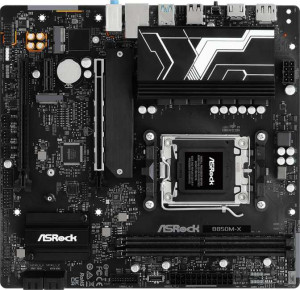
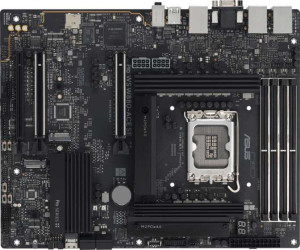
The most immediate distinction between these two boards lies in their form factor: the ASRock B850M-X is Micro-ATX (226 × 244 mm), while the Asus Pro WS W880-Ace SE is a full ATX board (244 × 305 mm). This is a foundational decision — the ASRock will fit in smaller, more compact cases and leaves a smaller physical footprint, making it the natural choice for space-constrained builds. The Asus, being full ATX, demands a mid-tower or larger case but in return typically offers more PCIe slots and physical expansion room, which matters for workstation-oriented configurations.

Where the two boards diverge most sharply on reliability and serviceability features is their opposing BIOS resilience strategies. The ASRock ships with dual BIOS, meaning a backup chip can restore a corrupted primary firmware automatically — a significant safety net for enthusiasts who overclock or flash experimental firmware. The Asus counters with an easy BIOS reset mechanism, which simplifies recovery when a bad overclock prevents POST, but offers no redundant chip if the firmware itself is corrupted. Both boards are rated as easy to overclock, so the choice between them here comes down to which failure mode you consider more likely to encounter.

Beyond those two dividing lines, the boards are closely matched on general fundamentals: both lack Wi-Fi and Bluetooth, output over HDMI 2.1, carry a single CPU socket, omit integrated graphics, and are covered by a 3-year warranty. Neither board edges the other on connectivity or wireless out of the box. Overall, the ASRock B850M-X holds an advantage for compact, space-efficient builds with its smaller footprint and dual-BIOS safety net, while the Asus Pro WS W880-Ace SE suits builders who need full ATX expandability and prefer a straightforward physical BIOS reset over firmware redundancy.
Memory:
maximum memory amount 128GB 256GB
overclocked RAM speed 8200 MHz 9066 MHz
memory slots 2 4
DDR memory version 5 5
memory channels 2 2
Supports ECC memory

Capacity and slot count tell the sharpest story here. The Asus Pro WS W880-Ace SE offers 4 memory slots and a ceiling of 256GB, exactly double the ASRock B850M-X's 2 slots and 128GB maximum. In practical terms, the ASRock forces a choice between cost efficiency now and upgradeability later — two slots means you either populate both immediately and have nowhere to expand, or you start with a single stick and sacrifice dual-channel bandwidth until you upgrade. The Asus avoids this trade-off entirely, letting you start small and scale up across four slots without ever pulling existing modules.

On overclocked RAM speed, the Asus again pulls ahead, supporting kits up to 9066 MHz versus the ASRock's 8200 MHz. For the vast majority of workloads — gaming, content creation, general productivity — the real-world gap between those frequencies is marginal. However, in memory-bandwidth-sensitive tasks like large dataset processing or high-resolution video rendering, the headroom to run faster kits does offer a measurable advantage, and it future-proofs the platform as high-speed DDR5 kits become more accessible. Both boards share DDR5 and a dual-channel architecture, so the memory generation and bandwidth efficiency foundation is identical.

Across every metric in this group, the Asus Pro WS W880-Ace SE holds a clear advantage — more slots, higher capacity ceiling, and greater overclocked frequency headroom. The ASRock B850M-X is a reasonable fit for users whose memory needs are modest and fixed, but anyone planning a high-capacity or future-scalable build will find the Asus's memory subsystem meaningfully more capable.

Ports:
USB 3.2 Gen 2 ports (USB-A) 0 6
USB 3.2 Gen 1 ports (USB-A) 3 0
USB 3.2 Gen 2 ports (USB-C) 0 0
USB 3.2 Gen 1 ports (USB-C) 1 0
USB 2.0 ports 2 0
USB 3.2 Gen 2x2 ports 0 1
USB 4 40Gbps ports 0 1
USB 4 20Gbps ports 0 0
Thunderbolt 4 ports 0 1
Thunderbolt 3 ports 0 0
has an HDMI output
DisplayPort outputs 1 0
RJ45 ports 1 2
Has USB Type-C
eSATA ports 0 0
DVI outputs 0 0
has a VGA connector
PS/2 ports 0 0

USB speed philosophy separates these two boards immediately. Every USB-A port on the Asus Pro WS W880-Ace SE runs at Gen 2 (10Gbps), with six of them on the rear panel alone, while the ASRock B850M-X relies entirely on slower Gen 1 (5Gbps) ports. For users who regularly transfer large files to external SSDs or high-speed storage, that 2× throughput difference is tangible. More striking is the Asus's inclusion of a Thunderbolt 4 port and a USB 4 40Gbps port — bandwidth tiers that the ASRock does not approach at all. These connections support daisy-chaining high-resolution displays, ultra-fast NVMe enclosures, and docking stations at speeds the ASRock simply cannot match.

The ASRock counters in a couple of specific areas. It includes a USB-C port and a DisplayPort output, both absent on the Asus. The USB-C is increasingly expected for modern peripherals and fast-charge compatibility, so its omission on the Asus is a genuine gap. The DisplayPort versus HDMI distinction matters mainly to users with monitors that lack HDMI inputs — each board covers a different half of the display connectivity landscape. The Asus also carries a VGA output, which reads as a legacy concession likely aimed at enterprise or industrial environments with older display hardware.

Networking deserves a mention: the Asus provides two RJ45 ports versus the ASRock's one, which is directly useful for workstation users running dual NICs for link aggregation or network segmentation. On balance, the Asus Pro WS W880-Ace SE holds a decisive edge in port quality and high-bandwidth connectivity, with Thunderbolt 4 and USB 4 setting it apart for demanding peripheral ecosystems. The ASRock is the more practical pick only if USB-C rear I/O or DisplayPort output is a firm requirement.

Connectors:
USB 3.2 Gen 1 ports (through expansion) 2 2
USB 2.0 ports (through expansion) 4 4
SATA 3 connectors 4 8
fan headers 6 7
USB 3.0 ports (through expansion) 2 2
M.2 sockets 2 4
Has TPM connector
U.2 sockets 0 0
Has mSATA connector
SATA 2 connectors 0 0

Storage expansion is where these two boards diverge most meaningfully. The Asus Pro WS W880-Ace SE doubles up on both fronts, offering 4 M.2 sockets and 8 SATA 3 connectors compared to the ASRock B850M-X's 2 M.2 sockets and 4 SATA 3 ports. For a build centered on a single NVMe boot drive and a couple of storage drives, the ASRock is perfectly adequate. But for content creators, small NAS-style workstations, or anyone assembling a multi-drive array — whether for capacity, redundancy, or tiered storage — the Asus provides room to grow without reaching for an expansion card.

Thermal management headroom also tips slightly toward the Asus, which carries 7 fan headers versus the ASRock's 6. One additional header may seem minor, but in a densely cooled workstation with multiple case fans, a radiator pump, and CPU cooler headers all competing for connections, that extra slot can eliminate the need for a fan splitter. Both boards match on internal USB expansion headers and share a TPM connector, keeping security module compatibility consistent across both platforms.

Across this connector group, the Asus Pro WS W880-Ace SE holds a clear and consistent advantage — more M.2 slots, more SATA ports, and one additional fan header. The ASRock B850M-X covers the fundamentals competently, but it leaves little margin for storage expansion. Users who anticipate growing their drive count over time will find the Asus's internal connectivity meaningfully more accommodating.

Expansion slots:
PCIe 4.0 x16 slots 2 1
PCIe 5.0 x16 slots 0 2
PCIe 3.0 x16 slots 0 0
PCIe x1 slots 1 0
PCI slots 0 0
PCIe 2.0 x16 slots 0 0
PCIe x4 slots 0 0
PCIe x8 slots 0 0

Generation gap is the defining story in this group. The Asus Pro WS W880-Ace SE fields two PCIe 5.0 x16 slots, while the ASRock B850M-X has none — its x16 slots are both PCIe 4.0. PCIe 5.0 doubles the available bandwidth of PCIe 4.0, which matters most for next-generation GPUs and enterprise-grade NVMe cards that can saturate a 4.0 link. For current mainstream GPUs, the practical performance difference is slim, but for workstation users pairing the board with cutting-edge accelerators or high-throughput add-in cards, PCIe 5.0 is a meaningful generational advantage that extends the platform's longevity.

Slot count is a secondary but relevant distinction. The ASRock has a total of three expansion slots — two x16 and one PCIe x1 — giving it a small edge in flexibility for adding compact add-in cards like capture cards or network adapters without sacrificing a full x16 slot. The Asus carries only its two x16 slots and no x1, which is a reasonable trade-off for a workstation-class board where high-bandwidth cards dominate, but it does eliminate low-profile expansion options entirely.

Taken together, the Asus Pro WS W880-Ace SE holds the stronger position for performance-forward and future-facing builds thanks to its PCIe 5.0 slots. The ASRock B850M-X is the more pragmatic choice for users whose current and near-future cards are well-served by PCIe 4.0 bandwidth, and who value the added flexibility of the x1 slot for auxiliary expansion.

Audio:
audio channels 7.1 7.1
Has S/PDIF Out port
audio connectors 3 2

Audio is one of the closest categories in this comparison, with both boards delivering 7.1-channel surround support and neither offering an S/PDIF digital output. The absence of S/PDIF means users who want to feed a home theater receiver or an external DAC via optical will need to look elsewhere — a USB audio interface or a dedicated sound card would be required on either platform.

The only differentiator here is connector count: the ASRock B850M-X provides 3 analog audio jacks versus 2 on the Asus Pro WS W880-Ace SE. In a 7.1 setup, more physical jacks on the rear I/O allow for more speaker groups to be connected simultaneously without an audio splitter or workaround. With just two jacks, the Asus limits direct analog hookups to stereo or basic configurations, making the full 7.1 capability harder to utilize through analog means alone. For the majority of users relying on a headset or a stereo speaker pair, two jacks is sufficient, but it is a tangible limitation compared to the ASRock for anyone building an analog surround setup.

On the whole, audio is a secondary consideration for both of these platforms, and neither board distinguishes itself strongly here. That said, the ASRock B850M-X holds a narrow edge by virtue of its additional analog connector, which offers marginally more flexibility for users who rely on onboard audio for multi-channel analog output.

Storage:
Supports RAID 1
Supports RAID 10 (1+0)
Supports RAID 5
Supports RAID 0
Supports RAID 0+1

RAID support is nearly identical across these two boards, with one meaningful exception. Both handle RAID 0, 1, and 10 — covering the most common use cases of pure performance striping, mirrored redundancy, and the combined stripe-plus-mirror configuration respectively. Where they part ways is RAID 5: the Asus Pro WS W880-Ace SE supports it, the ASRock B850M-X does not.

RAID 5 distributes parity data across all drives in an array, allowing any single drive to fail and be replaced without data loss while using only one drive's worth of capacity as overhead. Compared to RAID 1 — which mirrors data and costs 50% of total capacity regardless of drive count — RAID 5 becomes increasingly storage-efficient as you add more drives. For a workstation user managing a three- or four-drive array of large spinning disks or SSDs, the capacity savings of RAID 5 over RAID 1 are substantial. This makes the Asus meaningfully more flexible for data-intensive or storage-heavy configurations.

Given that RAID 5 is the only differentiator here, the Asus Pro WS W880-Ace SE holds a narrow but real advantage — one that is irrelevant to users content with RAID 0, 1, or 10, but genuinely significant for those running multi-drive arrays where storage efficiency and fault tolerance need to coexist. This also aligns well with the Asus's larger SATA port count noted in the connectors group, reinforcing its positioning as the stronger platform for storage-heavy workstation builds.

Comparison Summary & Verdict

After examining every specification, a clear picture emerges for each board. The ASRock B850M-X is the more compact Micro-ATX option, offering a dual BIOS safety net, a DisplayPort output, USB Type-C on the rear, and two PCIe 4.0 x16 slots — all at a smaller footprint of 226 x 244 mm. It suits builders who need a space-efficient board with solid everyday connectivity. The Asus Pro WS W880-Ace SE, by contrast, is built for demanding workstation use: it supports up to 256GB of DDR5 RAM at 9066 MHz, offers two PCIe 5.0 x16 slots, a Thunderbolt 4 port, a USB 4 40Gbps port, six USB 3.2 Gen 2 (USB-A) ports, dual RJ45 networking, and eight SATA 3 connectors alongside four M.2 sockets. Choose the ASRock for a compact, versatile build; choose the Asus for a high-capacity, expansion-focused workstation platform.

ASRock B850M-X
Buy ASRock B850M-X if...

Choose the ASRock B850M-X if you want a compact Micro-ATX board with a dual BIOS safety feature, rear USB Type-C, and a DisplayPort output for a space-efficient desktop build.

Asus Pro WS W880-Ace SE
Buy Asus Pro WS W880-Ace SE if...

Choose the Asus Pro WS W880-Ace SE if you need a full ATX workstation board with up to 256GB of DDR5 RAM, PCIe 5.0 x16 slots, Thunderbolt 4, USB 4 40Gbps, dual LAN ports, and maximum storage expandability.