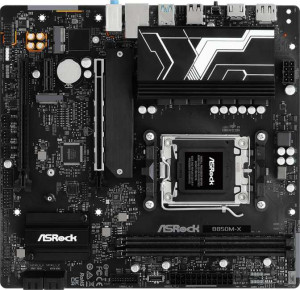
ASRock B850M-X
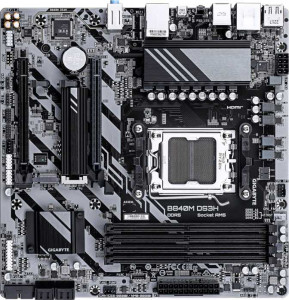
Gigabyte B840M DS3H

ASRock B850M-X Gigabyte B840M DS3H

Overview

Welcome to our in-depth specification comparison between the ASRock B850M-X and the Gigabyte B840M DS3H — two Micro-ATX motherboards built on the AM5 platform targeting budget-to-mid-range AMD builds. While they share a surprising amount of common ground, key battlegrounds emerge around memory capacity and slot count, expansion slot configurations, rear port selection, and storage features that could tip the scales depending on your build goals.

Common Features

  • Both boards use the AM5 CPU socket.
  • Both boards have a Micro-ATX form factor.
  • Neither board includes Wi-Fi support.
  • Neither board includes Bluetooth support.
  • Both boards feature HDMI 2.1.
  • Both boards support overclocking.
  • Neither board has RGB lighting.
  • Neither board offers an easy BIOS reset feature.
  • Both boards support overclocked RAM speeds up to 8200 MHz.
  • Both boards use DDR5 memory.
  • Both boards have 2 memory channels.
  • Neither board supports ECC memory.
  • Neither board has USB 3.2 Gen 2 Type-C, USB 3.2 Gen 2x2, USB 4 40Gbps, USB 4 20Gbps, Thunderbolt 4, or Thunderbolt 3 ports.
  • Both boards have an HDMI output.
  • Both boards have 1 RJ45 port.
  • Both boards provide 2 USB 3.2 Gen 1 ports and 4 USB 2.0 ports through expansion headers.
  • Both boards have 4 SATA 3 connectors.
  • Both boards include 2 M.2 sockets.
  • Both boards have a TPM connector.
  • Neither board has U.2 or mSATA connectors.
  • Neither board has PCIe 5.0 x16, PCIe 3.0 x16, PCIe 2.0 x16, PCIe x8, or PCI slots.
  • Both boards deliver 7.1 audio channels with 3 audio connectors.
  • Neither board has an S/PDIF Out port.
  • Both boards support RAID 0, RAID 1, and RAID 10, but neither supports RAID 0+1.

Main Differences

  • The chipset is B850 on the ASRock B850M-X and B840 on the Gigabyte B840M DS3H.
  • The board height is 226 mm on the ASRock B850M-X and 244 mm on the Gigabyte B840M DS3H.
  • The maximum memory capacity is 128 GB on the ASRock B850M-X and 256 GB on the Gigabyte B840M DS3H.
  • The number of memory slots is 2 on the ASRock B850M-X and 4 on the Gigabyte B840M DS3H.
  • USB 3.2 Gen 2 Type-A port count is 0 on the ASRock B850M-X and 1 on the Gigabyte B840M DS3H.
  • USB 3.2 Gen 1 Type-A port count is 3 on the ASRock B850M-X and 2 on the Gigabyte B840M DS3H.
  • USB 3.2 Gen 1 Type-C port count is 1 on the ASRock B850M-X and 0 on the Gigabyte B840M DS3H.
  • USB 2.0 port count is 2 on the ASRock B850M-X and 4 on the Gigabyte B840M DS3H.
  • DisplayPort output count is 1 on the ASRock B850M-X and 2 on the Gigabyte B840M DS3H.
  • PS/2 port count is 0 on the ASRock B850M-X and 1 on the Gigabyte B840M DS3H.
  • Fan header count is 6 on the ASRock B850M-X and 4 on the Gigabyte B840M DS3H.
  • PCIe 4.0 x16 slot count is 2 on the ASRock B850M-X and 1 on the Gigabyte B840M DS3H.
  • PCIe x1 slot count is 1 on the ASRock B850M-X and 0 on the Gigabyte B840M DS3H.
  • PCIe x4 slot count is 0 on the ASRock B850M-X and 1 on the Gigabyte B840M DS3H.
  • RAID 5 support is present on the Gigabyte B840M DS3H but not available on the ASRock B850M-X.
Specs Comparison
ASRock B850M-X

ASRock B850M-X

Gigabyte B840M DS3H

Gigabyte B840M DS3H

General info:
CPU socket AM5 AM5
chipset B850 B840
form factor Micro-ATX Micro-ATX
release date January 2025 January 2025
supports Wi-Fi
Has Bluetooth
HDMI version HDMI 2.1 HDMI 2.1
Easy to overclock
has RGB lighting
Easy to reset BIOS
Has dual BIOS
CPU sockets 1 1
Has integrated graphics
warranty period 3 years 3 years
height 226 mm 244 mm
width 244 mm 244 mm
Has integrated CPU

Both the ASRock B850M-X and the Gigabyte B840M DS3H share the same foundational profile: Micro-ATX form factor, a single AM5 socket, no Wi-Fi or Bluetooth, and a 3-year warranty. For users building a compact AMD Ryzen system, either board slots into the same case footprint — with one subtle exception. The ASRock measures 226 mm tall versus the Gigabyte's 244 mm, making it slightly more compact in the vertical dimension, which can matter in tighter Micro-ATX enclosures with limited clearance.

The more consequential difference lies in the chipset. The ASRock runs on the B850 chipset, while the Gigabyte uses the B840. In practical terms, B850 sits a tier above B840 in AMD's stack, offering broader support for PCIe 5.0 lanes and more robust memory overclocking capabilities — particularly relevant for users wanting to push EXPO or XMP profiles on fast DDR5 kits. Both boards are listed as easy to overclock, but the B850 platform gives that headroom more architectural backing.

Both boards share dual BIOS, HDMI 2.1 output, and identical warranty coverage, so neither pulls ahead on reliability features or display connectivity. Overall, the ASRock B850M-X holds a clear edge for users who want a more future-proof platform with stronger overclocking infrastructure, while the Gigabyte B840M DS3H positions itself as a more entry-level option — suitable for builds where platform headroom is less of a priority.

Memory:
maximum memory amount 128GB 256GB
overclocked RAM speed 8200 MHz 8200 MHz
memory slots 2 4
DDR memory version 5 5
memory channels 2 2
Supports ECC memory

On paper, the memory configurations of these two boards look similar — both run DDR5 in dual-channel mode with a peak overclocked speed of 8200 MHz. That shared ceiling means neither board gives you a raw frequency advantage for latency-sensitive workloads like gaming or fast content rendering. Where things diverge, however, is capacity and scalability.

The Gigabyte B840M DS3H offers 4 memory slots and supports up to 256 GB of RAM, while the ASRock B850M-X is limited to 2 slots and a 128 GB maximum. For most gaming or everyday desktop builds, 128 GB is far more than sufficient — but the slot count difference has a practical implication beyond raw capacity. With only 2 slots, the ASRock forces you to buy your full intended kit upfront; there is no room to start with one stick and expand later. The Gigabyte's 4-slot layout gives users the flexibility to begin with a modest 2-stick configuration and upgrade without replacing existing modules.

Neither board supports ECC memory, so workstation use cases requiring error-correcting RAM are off the table for both. Taken as a whole, the Gigabyte B840M DS3H holds a clear advantage in this category — not because of speed, which is identical, but because its higher slot count and doubled maximum capacity make it the more versatile and upgrade-friendly platform for memory-intensive workflows or long-term builds.

Ports:
USB 3.2 Gen 2 ports (USB-A) 0 1
USB 3.2 Gen 1 ports (USB-A) 3 2
USB 3.2 Gen 2 ports (USB-C) 0 0
USB 3.2 Gen 1 ports (USB-C) 1 0
USB 2.0 ports 2 4
USB 3.2 Gen 2x2 ports 0 0
USB 4 40Gbps ports 0 0
USB 4 20Gbps ports 0 0
Thunderbolt 4 ports 0 0
Thunderbolt 3 ports 0 0
has an HDMI output
DisplayPort outputs 1 2
RJ45 ports 1 1
Has USB Type-C
eSATA ports 0 0
DVI outputs 0 0
has a VGA connector
PS/2 ports 0 1

The rear I/O layouts of these two boards reflect different priorities. The ASRock B850M-X stands out by including a USB 3.2 Gen 1 Type-C port — something the Gigabyte B840M DS3H omits entirely from its rear panel. For users with modern peripherals, external SSDs, or accessories that rely on USB-C connectivity, this is a meaningful convenience that eliminates the need for adapters. The Gigabyte counters with a USB 3.2 Gen 2 Type-A port (10 Gbps), versus the ASRock's absence of any Gen 2 ports — so if raw transfer speed on Type-A connections is the priority, the Gigabyte has the faster individual port.

Display output is another point of divergence. The Gigabyte offers two DisplayPort outputs alongside HDMI, enabling a straightforward dual-monitor setup driven entirely from the board's integrated display outputs. The ASRock provides only one DisplayPort plus HDMI — still capable of driving two screens, but with less flexibility in monitor pairing. For users leaning on integrated graphics across multiple displays, the Gigabyte's extra DisplayPort is a tangible advantage. The Gigabyte also includes a PS/2 port, which is relevant only in niche legacy or KVM scenarios.

Neither board offers Thunderbolt, USB4, or eSATA, so neither pulls ahead on high-bandwidth or legacy storage connectivity. The verdict here is split by use case: the ASRock B850M-X is the better pick for anyone who values rear-panel USB-C availability, while the Gigabyte B840M DS3H edges ahead for multi-monitor users and those needing the faster Gen 2 Type-A throughput.

Connectors:
USB 3.2 Gen 1 ports (through expansion) 2 2
USB 2.0 ports (through expansion) 4 4
SATA 3 connectors 4 4
fan headers 6 4
USB 3.0 ports (through expansion) 2 2
M.2 sockets 2 2
Has TPM connector
U.2 sockets 0 0
Has mSATA connector
SATA 2 connectors 0 0

Internal connectivity is remarkably consistent across both boards. Each provides 2 M.2 sockets, 4 SATA 3 connectors, matching internal USB expansion headers, and a TPM connector — giving builders the same baseline storage and security options regardless of which board they choose. For a typical build with an NVMe boot drive and a secondary SSD or two mechanical drives, neither board creates a bottleneck or forces any compromises.

The single meaningful differentiator in this category is fan headers. The ASRock B850M-X includes 6 fan headers, compared to 4 on the Gigabyte B840M DS3H. In a Micro-ATX chassis with multiple case fans, a CPU cooler, and potentially a radiator pump header, that extra headroom matters. With only 4 headers, Gigabyte users building more actively cooled systems may need to resort to a fan hub, adding cost and cable clutter. The ASRock's additional headers allow for more direct, granular fan control without extra hardware.

Aside from that, this category is essentially a draw on storage and expansion. The ASRock B850M-X takes a clear edge specifically for cooling-heavy builds, where having two additional fan headers over the Gigabyte translates to a cleaner, more manageable thermal setup right out of the box.

Expansion slots:
PCIe 4.0 x16 slots 2 1
PCIe 5.0 x16 slots 0 0
PCIe 3.0 x16 slots 0 0
PCIe x1 slots 1 0
PCI slots 0 0
PCIe 2.0 x16 slots 0 0
PCIe x4 slots 0 1
PCIe x8 slots 0 0

Expansion slot layouts tell an interesting story here. The ASRock B850M-X provides two PCIe 4.0 x16 slots, while the Gigabyte B840M DS3H offers only one. For the overwhelming majority of users running a single GPU, this distinction is invisible in daily use — but it opens the ASRock to more flexible configurations, such as pairing a graphics card with a PCIe-based capture card, RAID controller, or network adapter in a full-bandwidth slot without compromising the primary GPU's lane allocation.

The secondary slot difference is also worth noting. The ASRock's second expansion option is a PCIe x1 slot, suited for low-bandwidth add-in cards like sound cards or simple NICs. The Gigabyte instead offers a PCIe x4 slot as its secondary, which carries more bandwidth and is better suited for mid-tier add-in cards — such as a 10GbE network card or a PCIe SSD adapter — that would saturate or be bottlenecked by x1. Neither configuration is universally superior; the right choice depends on what you plan to plug in.

Notably, neither board reaches for PCIe 5.0 x16, which keeps GPU bandwidth at Gen 4 levels — a non-issue for current graphics cards but worth flagging for long-term platform longevity. Weighing the full picture, the ASRock B850M-X has an edge for users wanting multi-card or multi-device flexibility, while the Gigabyte's x4 secondary slot is the smarter choice for anyone specifically needing higher-bandwidth auxiliary cards.

Audio:
audio channels 7.1 7.1
Has S/PDIF Out port
audio connectors 3 3

Audio is the rare category where there is simply nothing to separate these two boards. Both the ASRock B850M-X and the Gigabyte B840M DS3H deliver identical specs across the board: 7.1-channel audio support, 3 analog audio connectors, and no S/PDIF optical output. For typical desktop use — headsets, stereo speakers, or a 7.1 surround setup routed through analog jacks — either board covers the bases equally well.

The absence of S/PDIF Out on both means users who want to pass digital audio to an AV receiver or an external DAC via optical will need to look at a USB audio interface or a PCIe sound card regardless of which board they choose. This is a shared limitation rather than a differentiator, and one that is common at this price tier.

This category is a dead tie. Neither board offers any audio advantage over the other, and the decision between them should rest entirely on the differentiators found in other specification groups.

Storage:
Supports RAID 1
Supports RAID 10 (1+0)
Supports RAID 5
Supports RAID 0
Supports RAID 0+1

RAID support between these two boards is largely aligned, with one notable exception. Both the ASRock B850M-X and the Gigabyte B840M DS3H support RAID 0, 1, and 10 — covering the most common consumer configurations for either maximum performance (striping) or redundancy (mirroring and striped mirrors). For the vast majority of home and small office builds, this shared baseline is more than adequate.

Where the Gigabyte pulls ahead is its additional support for RAID 5. This mode distributes parity data across all drives in an array, allowing the system to survive a single drive failure while delivering better storage efficiency than pure mirroring — making it a preferred choice for NAS-adjacent builds or workstations where both data protection and usable capacity matter. The ASRock lacks this mode entirely, which limits its appeal for more advanced multi-drive storage setups.

For typical desktop users running a single boot NVMe and a data drive, neither board's RAID capabilities will ever come into play. But for those specifically building a system around a multi-drive storage array, the Gigabyte B840M DS3H holds a clear and practical advantage by virtue of its RAID 5 support.

Comparison Summary & Verdict

Both the ASRock B850M-X and the Gigabyte B840M DS3H are competent AM5 Micro-ATX boards that share DDR5 support, dual M.2 sockets, and 7.1 audio — but they cater to noticeably different builders. The Gigabyte B840M DS3H stands out for users who need serious memory headroom, offering 4 DIMM slots and up to 256 GB of RAM, an extra DisplayPort output, RAID 5 support, and a USB 3.2 Gen 2 Type-A port. The ASRock B850M-X, on the other hand, appeals to builders who value a richer expansion layout, delivering 2 PCIe 4.0 x16 slots, a USB 3.2 Gen 1 Type-C rear port, and 6 fan headers for more thorough system cooling and dual-GPU or multi-card setups. Choose the Gigabyte if future memory upgrades and extra display outputs are priorities; choose the ASRock if cooling control and PCIe flexibility matter most.

ASRock B850M-X
Buy ASRock B850M-X if...

Buy the ASRock B850M-X if you want more PCIe 4.0 x16 expansion slots, a rear USB Type-C port, and up to 6 fan headers for superior cooling control in your AM5 build.

Gigabyte B840M DS3H
Buy Gigabyte B840M DS3H if...

Buy the Gigabyte B840M DS3H if you need 4 memory slots with up to 256 GB of RAM capacity, RAID 5 support, and extra display and USB connectivity at the rear.