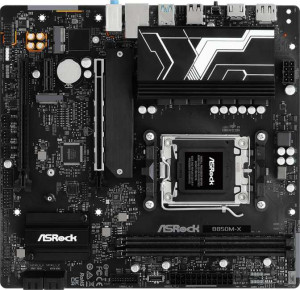
ASRock B850M-X
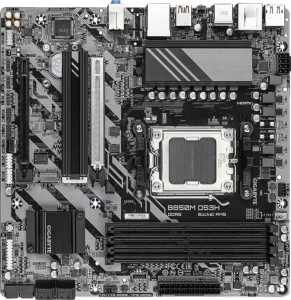
Gigabyte B850M DS3H

ASRock B850M-X Gigabyte B850M DS3H

Overview

Welcome to our detailed spec comparison between the ASRock B850M-X and the Gigabyte B850M DS3H, two Micro-ATX motherboards built on the AM5 platform with the B850 chipset. While they share a strong common foundation, key battlegrounds emerge around memory capacity and slot count, expansion slot generations, USB port configurations, and storage features. Read on to discover which board fits your build best.

Common Features

  • Both motherboards use the AM5 CPU socket.
  • Both motherboards feature the B850 chipset.
  • Both motherboards have a Micro-ATX form factor.
  • Wi-Fi is not supported on either motherboard.
  • Bluetooth is not available on either motherboard.
  • Both motherboards include an HDMI 2.1 output.
  • Both motherboards support overclocking.
  • RGB lighting is not present on either motherboard.
  • Both motherboards support DDR5 memory.
  • Both motherboards have 2 memory channels.
  • The maximum supported overclocked RAM speed is 8200 MHz on both motherboards.
  • ECC memory is not supported on either motherboard.
  • Neither motherboard has USB 3.2 Gen 2x2, USB 4 40Gbps, USB 4 20Gbps, Thunderbolt 4, or Thunderbolt 3 ports.
  • Both motherboards include an HDMI output.
  • Both motherboards have a USB Type-C port.
  • Both motherboards have 1 RJ45 port.
  • Both motherboards provide 2 USB 3.2 Gen 1 expansion ports and 4 USB 2.0 expansion ports.
  • Both motherboards have 4 SATA 3 connectors and 2 M.2 sockets.
  • Both motherboards include a TPM connector.
  • Neither motherboard has a mSATA connector or U.2 sockets.
  • Both motherboards support 7.1 audio channels with 3 audio connectors.
  • S/PDIF Out port is not available on either motherboard.
  • Both motherboards support RAID 0, RAID 1, and RAID 10.
  • RAID 0+1 is not supported on either motherboard.

Main Differences

  • The board height is 226 mm on the ASRock B850M-X and 244 mm on the Gigabyte B850M DS3H.
  • The maximum memory capacity is 128 GB on the ASRock B850M-X and 256 GB on the Gigabyte B850M DS3H.
  • The number of memory slots is 2 on the ASRock B850M-X and 4 on the Gigabyte B850M DS3H.
  • USB 3.2 Gen 2 ports (USB-A) count is 0 on the ASRock B850M-X and 1 on the Gigabyte B850M DS3H.
  • USB 3.2 Gen 1 ports (USB-A) count is 3 on the ASRock B850M-X and 2 on the Gigabyte B850M DS3H.
  • USB 3.2 Gen 2 ports (USB-C) count is 0 on the ASRock B850M-X and 1 on the Gigabyte B850M DS3H.
  • USB 3.2 Gen 1 ports (USB-C) count is 1 on the ASRock B850M-X and 0 on the Gigabyte B850M DS3H.
  • USB 2.0 ports count is 2 on the ASRock B850M-X and 0 on the Gigabyte B850M DS3H.
  • DisplayPort outputs count is 1 on the ASRock B850M-X and 2 on the Gigabyte B850M DS3H.
  • A PS/2 port is present on the Gigabyte B850M DS3H but not available on the ASRock B850M-X.
  • The number of fan headers is 6 on the ASRock B850M-X and 4 on the Gigabyte B850M DS3H.
  • PCIe 4.0 x16 slot count is 2 on the ASRock B850M-X and 0 on the Gigabyte B850M DS3H.
  • PCIe 5.0 x16 slot count is 0 on the ASRock B850M-X and 1 on the Gigabyte B850M DS3H.
  • PCIe x1 slot count is 1 on the ASRock B850M-X and 0 on the Gigabyte B850M DS3H.
  • PCIe x4 slot count is 0 on the ASRock B850M-X and 1 on the Gigabyte B850M DS3H.
  • RAID 5 support is present on the Gigabyte B850M DS3H but not available on the ASRock B850M-X.
Specs Comparison
ASRock B850M-X

ASRock B850M-X

Gigabyte B850M DS3H

Gigabyte B850M DS3H

General info:
CPU socket AM5 AM5
chipset B850 B850
form factor Micro-ATX Micro-ATX
release date January 2025 January 2025
supports Wi-Fi
Has Bluetooth
HDMI version HDMI 2.1 HDMI 2.1
Easy to overclock
has RGB lighting
Easy to reset BIOS
Has dual BIOS
CPU sockets 1 1
Has integrated graphics
warranty period 3 years 3 years
height 226 mm 244 mm
width 244 mm 244 mm
Has integrated CPU

At their core, the ASRock B850M-X and Gigabyte B850M DS3H are built on the same foundational platform: both use the AM5 socket with the B850 chipset, adopt a Micro-ATX form factor, and share an identical feature set across most general specs — including HDMI 2.1 output, dual BIOS, overclocking support, and a 3-year warranty. Neither board offers Wi-Fi, Bluetooth, RGB lighting, or an easy BIOS reset mechanism, so buyers needing wireless connectivity will need to budget for an add-in card regardless of which they choose.

The only measurable difference in this group is physical size. The ASRock B850M-X measures 226 × 244 mm, while the Gigabyte B850M DS3H is a slightly taller 244 × 244 mm — an 18 mm difference in height. In practice, both fit standard Micro-ATX cases without issue, but the ASRock's slightly smaller footprint could matter in very compact builds where clearance around the board is tight.

For this spec group, the two boards are effectively tied. The marginal size advantage of the ASRock B850M-X is only relevant in edge-case compact builds; for the vast majority of users, general characteristics alone give neither board a meaningful edge, and the decision will hinge on differences in other spec categories.

Memory:
maximum memory amount 128GB 256GB
overclocked RAM speed 8200 MHz 8200 MHz
memory slots 2 4
DDR memory version 5 5
memory channels 2 2
Supports ECC memory

The most significant divergence between these two boards lies in memory capacity and expandability. The Gigabyte B850M DS3H offers 4 DIMM slots with a maximum capacity of 256 GB, while the ASRock B850M-X is limited to 2 DIMM slots and a 128 GB ceiling. Both are Micro-ATX boards, so the Gigabyte's ability to fit four slots into the same form factor is a tangible engineering advantage for users who anticipate heavy memory demands.

In practical terms, the slot count difference matters in two ways: upgrade headroom and initial cost flexibility. With 4 slots, the DS3H allows users to start with two modules and add two more later — a common and budget-friendly upgrade path. The B850M-X, with only 2 slots, means any future capacity upgrade requires replacing existing modules entirely rather than supplementing them. The doubled maximum capacity on the Gigabyte also makes it a more viable platform for memory-intensive workloads like video editing, large virtual machines, or professional content creation. For mainstream gaming or everyday use, however, 128 GB is more than sufficient and the difference is unlikely to be felt.

Where the boards are equal — DDR5, dual-channel operation, 8200 MHz overclocked speed, and no ECC support — neither holds an advantage in raw performance or compatibility. But on memory configuration, the Gigabyte B850M DS3H holds a clear edge, making it the stronger choice for anyone planning long-term upgrades or running demanding multi-tasking workloads.

Ports:
USB 3.2 Gen 2 ports (USB-A) 0 1
USB 3.2 Gen 1 ports (USB-A) 3 2
USB 3.2 Gen 2 ports (USB-C) 0 1
USB 3.2 Gen 1 ports (USB-C) 1 0
USB 2.0 ports 2 0
USB 3.2 Gen 2x2 ports 0 0
USB 4 40Gbps ports 0 0
USB 4 20Gbps ports 0 0
Thunderbolt 4 ports 0 0
Thunderbolt 3 ports 0 0
has an HDMI output
DisplayPort outputs 1 2
RJ45 ports 1 1
Has USB Type-C
eSATA ports 0 0
DVI outputs 0 0
has a VGA connector
PS/2 ports 0 1

USB port quality is where these two boards diverge most meaningfully. The Gigabyte B850M DS3H includes a USB 3.2 Gen 2 USB-A and a USB 3.2 Gen 2 USB-C on the rear panel — both running at 10 Gbps — making it noticeably faster for external SSDs, high-speed hubs, and modern peripherals. The ASRock B850M-X, by contrast, tops out at USB 3.2 Gen 1 (5 Gbps) across all its ports, which is half the throughput. For anyone regularly transferring large files to external storage, that gap is real and felt in practice.

Display output tells a similar story in the Gigabyte's favor: it provides two DisplayPort outputs alongside HDMI, enabling a three-monitor setup using integrated graphics without any adapters. The ASRock offers only one DisplayPort plus HDMI, capping native multi-monitor use at two displays. The ASRock does counter with a higher raw USB port count — six total versus four on the Gigabyte — and retains two USB 2.0 ports for legacy peripherals like older input devices. The Gigabyte drops USB 2.0 entirely but adds a PS/2 port, which serves a narrow but specific audience using older keyboards or mice.

Taken together, the Gigabyte B850M DS3H holds a clear advantage in this category. Its faster USB speeds and superior display output options make it the stronger pick for productivity-focused or multi-monitor users, while the ASRock's edge in port quantity and USB 2.0 legacy support is a secondary consideration that matters only in specific, older-hardware scenarios.

Connectors:
USB 3.2 Gen 1 ports (through expansion) 2 2
USB 2.0 ports (through expansion) 4 4
SATA 3 connectors 4 4
fan headers 6 4
USB 3.0 ports (through expansion) 2 2
M.2 sockets 2 2
Has TPM connector
U.2 sockets 0 0
Has mSATA connector
SATA 2 connectors 0 0

Internal connectors are nearly identical across both boards, and that alignment is worth noting: both offer 2 M.2 sockets, 4 SATA 3 ports, matching internal USB expansion headers, and a TPM connector. For most builds — even those combining an NVMe boot drive with additional SATA storage — neither board creates any bottleneck or forces a compromise on storage configuration.

The single differentiator in this group is fan headers. The ASRock B850M-X provides 6 fan headers compared to 4 on the Gigabyte B850M DS3H. In a compact Micro-ATX build this may seem trivial, but it becomes meaningful in thermally demanding setups — particularly those using large air coolers with multiple fans, or cases with several intake and exhaust points. With only 4 headers, the Gigabyte may require a fan hub or splitter to manage more complex cooling configurations, adding a small cost and cable management burden.

Overall, this group is nearly a wash, but the ASRock B850M-X earns a narrow edge purely on the strength of its additional fan headers. For users building straightforward systems with modest cooling needs, the two boards are functionally equivalent here; for those prioritizing detailed thermal control without extra accessories, the ASRock has a quiet but practical advantage.

Expansion slots:
PCIe 4.0 x16 slots 2 0
PCIe 5.0 x16 slots 0 1
PCIe 3.0 x16 slots 0 0
PCIe x1 slots 1 0
PCI slots 0 0
PCIe 2.0 x16 slots 0 0
PCIe x4 slots 0 1
PCIe x8 slots 0 0

Expansion slot philosophy is where these two boards take genuinely different approaches. The Gigabyte B850M DS3H bets on the future with a single PCIe 5.0 x16 slot — the latest standard, doubling the bandwidth of PCIe 4.0 and positioned to take full advantage of next-generation GPUs and high-throughput add-in cards as they become available. The ASRock B850M-X, meanwhile, offers two PCIe 4.0 x16 slots, prioritizing flexibility over cutting-edge bandwidth. PCIe 4.0 is more than sufficient for every current consumer GPU, so the practical performance difference today is negligible for gaming or standard workstation use.

The secondary slot comparison is also telling. ASRock includes a PCIe x1 slot, useful for compact add-in cards like sound cards, USB controllers, or network adapters. The Gigabyte replaces this with a PCIe x4 slot, which accommodates a wider range of cards including some NVMe expansion and capture cards that require more bandwidth than x1 can provide. For users who know they need a specific add-in card, verifying its slot requirement against each board matters here.

The edge in this group goes to the Gigabyte B850M DS3H for users with a long upgrade horizon — its PCIe 5.0 primary slot ensures the board won't become a bottleneck when the next GPU generation lands. The ASRock's dual-slot layout is a reasonable trade-off for those wanting more simultaneous expansion options today, but the generational bandwidth advantage of PCIe 5.0 is a meaningful differentiator for forward-looking builds.

Audio:
audio channels 7.1 7.1
Has S/PDIF Out port
audio connectors 3 3

Audio is a clean sweep for parity: both the ASRock B850M-X and Gigabyte B850M DS3H offer identical onboard audio specs — 7.1-channel support, 3 audio connectors, and no S/PDIF optical output. There is nothing to separate them here.

The 7.1-channel configuration means both boards can drive a full surround sound speaker setup, which is the practical ceiling for onboard audio in this class. The absence of S/PDIF on both boards is a minor limitation for users who prefer to pass a digital audio signal to an external DAC or AV receiver via optical cable — those users will need a discrete sound card or a USB DAC regardless of which board they choose.

This group is a complete tie. Neither board offers any audio advantage over the other, and the decision between them should rest entirely on the differentiators found in other spec categories.

Storage:
Supports RAID 1
Supports RAID 10 (1+0)
Supports RAID 5
Supports RAID 0
Supports RAID 0+1

RAID support is largely consistent between these two boards, with both covering the most commonly used configurations: RAID 0 for performance striping, RAID 1 for mirroring, and RAID 10 for a combination of both. For the vast majority of home and enthusiast users, these three modes cover every practical use case — from boot drive acceleration to basic redundancy.

The single differentiator is RAID 5, which only the Gigabyte B850M DS3H supports. RAID 5 distributes parity data across three or more drives, offering a balance of storage efficiency, read performance, and fault tolerance that RAID 10 achieves only at greater cost in drive count. It is a configuration more commonly associated with small NAS or workstation environments than typical desktop builds, but for users managing larger multi-drive arrays where storage efficiency matters, its availability on the Gigabyte is a genuine plus.

The Gigabyte B850M DS3H takes a narrow edge here by virtue of its RAID 5 support. For mainstream users, this distinction is unlikely to factor into a purchase decision — but for anyone building a multi-drive storage array where parity-based redundancy is the goal, the Gigabyte is the only option of the two that can accommodate it natively.

Comparison Summary & Verdict

Both the ASRock B850M-X and the Gigabyte B850M DS3H are capable AM5 B850 Micro-ATX boards that share support for DDR5 memory, 8200 MHz overclocked RAM, 7.1 audio, and identical RAID 0, 1, and 10 configurations. However, their differences reveal distinct target audiences. The Gigabyte B850M DS3H stands out for users who need higher memory capacity up to 256 GB across 4 slots, a PCIe 5.0 x16 slot for next-gen GPUs, RAID 5 support, and more display outputs. The ASRock B850M-X, on the other hand, appeals to builders who prioritize more fan headers (6 vs 4), dual PCIe 4.0 x16 slots, a more compact height, and additional USB flexibility. Neither board includes Wi-Fi or Bluetooth, so both require external networking solutions.

ASRock B850M-X
Buy ASRock B850M-X if...

Buy the ASRock B850M-X if you need more fan headers for complex cooling setups, prefer dual PCIe 4.0 x16 slots, or are working within a tighter board height constraint.

Gigabyte B850M DS3H
Buy Gigabyte B850M DS3H if...

Buy the Gigabyte B850M DS3H if you need a higher maximum memory capacity of 256 GB across 4 slots, a PCIe 5.0 x16 slot for the latest GPUs, or RAID 5 storage support.