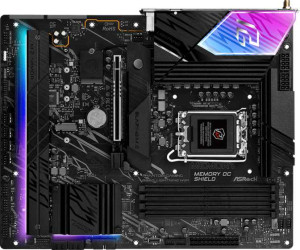
ASRock B860 Lightning WiFi
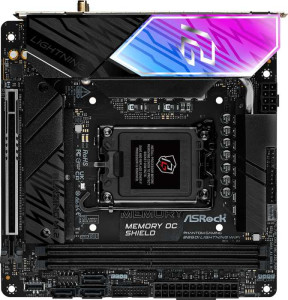
ASRock B860I Lightning WiFi

ASRock B860 Lightning WiFi ASRock B860I Lightning WiFi

Overview

Welcome to our in-depth specification comparison between the ASRock B860 Lightning WiFi and the ASRock B860I Lightning WiFi. Both motherboards share the same LGA 1851 socket and B860 chipset, but their approaches to form factor, memory capacity, and expansion set them apart in meaningful ways. Whether you are building a full-sized desktop workstation or a compact small-form-factor system, understanding these key differences will help you make the right choice for your build.

Common Features

  • Both products use the LGA 1851 CPU socket.
  • Both products feature the B860 chipset.
  • Wi-Fi is supported on both products.
  • Both products support Wi-Fi 4 (802.11n), Wi-Fi 5 (802.11ac), Wi-Fi 6 (802.11ax), and Wi-Fi 6E (802.11ax).
  • Bluetooth is available on both products.
  • Both products have Bluetooth version 5.3.
  • Both products include an HDMI 2.1 port.
  • Both products are easy to overclock.
  • Both products use DDR5 memory.
  • Both products have 2 memory channels.
  • ECC memory is not supported on either product.
  • Both products include 2 USB 3.2 Gen 2 ports (USB-A).
  • Both products include 4 USB 3.2 Gen 1 ports (USB-A).
  • Neither product has USB 3.2 Gen 2 ports (USB-C).
  • Neither product has USB 3.2 Gen 1 ports (USB-C).
  • Neither product has USB 3.2 Gen 2x2 ports.
  • Both products include 1 USB 4 40Gbps port.
  • Neither product has USB 4 20Gbps ports.
  • Both products include 1 Thunderbolt 4 port.
  • Neither product has U.2 sockets.
  • Neither product has an mSATA connector.
  • Neither product has SATA 2 connectors.
  • Both products have a signal-to-noise ratio (DAC) of 120 dB.
  • Both products support 7.1 audio channels.
  • Both products include an S/PDIF Out port.
  • Both products have 2 audio connectors.
  • Both products include 1 PCIe 5.0 x16 slot.
  • Neither product has PCIe 3.0 x16 slots, PCIe x1 slots, PCI slots, PCIe 2.0 x16 slots, PCIe x4 slots, or PCIe x8 slots.
  • RAID 0, RAID 1, and RAID 5 are supported on both products.
  • RAID 0+1 is not supported on either product.

Main Differences

  • The form factor is ATX on ASRock B860 Lightning WiFi and Mini-ITX on ASRock B860I Lightning WiFi.
  • The height is 244 mm on ASRock B860 Lightning WiFi and 170 mm on ASRock B860I Lightning WiFi.
  • The width is 305 mm on ASRock B860 Lightning WiFi and 170 mm on ASRock B860I Lightning WiFi.
  • The maximum memory amount is 256 GB on ASRock B860 Lightning WiFi and 128 GB on ASRock B860I Lightning WiFi.
  • The maximum RAM speed is 5600 MHz on ASRock B860 Lightning WiFi and 6400 MHz on ASRock B860I Lightning WiFi.
  • The overclocked RAM speed is 8933 MHz on ASRock B860 Lightning WiFi and 9333 MHz on ASRock B860I Lightning WiFi.
  • The number of memory slots is 4 on ASRock B860 Lightning WiFi and 2 on ASRock B860I Lightning WiFi.
  • USB 2.0 ports number 3 on ASRock B860 Lightning WiFi and 1 on ASRock B860I Lightning WiFi.
  • DisplayPort outputs number 1 on ASRock B860 Lightning WiFi and 0 on ASRock B860I Lightning WiFi.
  • USB 3.2 Gen 1 ports through expansion number 4 on ASRock B860 Lightning WiFi and 2 on ASRock B860I Lightning WiFi.
  • USB 2.0 ports through expansion number 4 on ASRock B860 Lightning WiFi and 2 on ASRock B860I Lightning WiFi.
  • USB 3.0 ports through expansion number 4 on ASRock B860 Lightning WiFi and 2 on ASRock B860I Lightning WiFi.
  • SATA 3 connectors number 4 on ASRock B860 Lightning WiFi and 3 on ASRock B860I Lightning WiFi.
  • Fan headers number 8 on ASRock B860 Lightning WiFi and 3 on ASRock B860I Lightning WiFi.
  • M.2 sockets number 4 on ASRock B860 Lightning WiFi and 2 on ASRock B860I Lightning WiFi.
  • A TPM connector is present on ASRock B860 Lightning WiFi but not available on ASRock B860I Lightning WiFi.
  • There is 1 PCIe 4.0 x16 slot on ASRock B860 Lightning WiFi and none on ASRock B860I Lightning WiFi.
  • RAID 10 (1+0) support is present on ASRock B860 Lightning WiFi but not available on ASRock B860I Lightning WiFi.
Specs Comparison
ASRock B860 Lightning WiFi

ASRock B860 Lightning WiFi

ASRock B860I Lightning WiFi

ASRock B860I Lightning WiFi

General info:
CPU socket LGA 1851 LGA 1851
chipset B860 B860
form factor ATX Mini-ITX
release date January 2025 January 2025
supports Wi-Fi
Wi-Fi version Wi-Fi 4 (802.11n), Wi-Fi 5 (802.11ac), Wi-Fi 6 (802.11ax), Wi-Fi 6E (802.11ax) Wi-Fi 4 (802.11n), Wi-Fi 5 (802.11ac), Wi-Fi 6 (802.11ax), Wi-Fi 6E (802.11ax)
Has Bluetooth
Bluetooth version 5.3 5.3
HDMI version HDMI 2.1 HDMI 2.1
Easy to overclock
has RGB lighting
Easy to reset BIOS
Has dual BIOS
has aptX
CPU sockets 1 1
Has integrated graphics
warranty period 3 years 3 years
height 244 mm 170 mm
width 305 mm 170 mm
Has integrated CPU

At their core, the ASRock B860 Lightning WiFi and B860I Lightning WiFi are near-identical boards: both use the LGA 1851 socket with the B860 chipset, support overclocking, include dual BIOS, RGB lighting, Wi-Fi 6E and Bluetooth 5.3, output via HDMI 2.1, and come with a 3-year warranty. For a buyer evaluating features on paper, these two boards are functionally equivalent in almost every meaningful category.

The single defining difference is form factor. The standard model is ATX (305 × 244 mm), while the ″I″ variant is Mini-ITX (170 × 170 mm) — less than one-third the surface area. In practice, this determines which cases are compatible, and more importantly, how many expansion slots, VRM phases, and M.2 connectors each board can physically accommodate. The Mini-ITX format is purpose-built for compact or small-form-factor builds, while ATX suits mid-tower and full-tower cases where expandability and airflow are priorities.

Neither board holds a feature advantage in this group — the edge belongs entirely to your use case. If you are building a compact or space-constrained system, the B860I Lightning WiFi is the clear choice. If you want maximum expandability and are not constrained by case size, the B860 Lightning WiFi (ATX) gives you the physical real estate to grow your build over time.

Memory:
maximum memory amount 256GB 128GB
RAM speed (max) 5600 MHz 6400 MHz
overclocked RAM speed 8933 MHz 9333 MHz
memory slots 4 2
DDR memory version 5 5
memory channels 2 2
Supports ECC memory

Both boards run DDR5 in dual-channel configuration, but the slot count tells the story of their different ambitions. The ATX B860 Lightning WiFi offers 4 memory slots and a maximum capacity of 256 GB, while the Mini-ITX B860I Lightning WiFi is limited to 2 slots and 128 GB. For most consumer workloads today, 128 GB is more than sufficient, but the ATX board's extra slots matter in two practical ways: they allow you to start with cheaper, lower-density sticks and upgrade later, and they make it easier to run a four-stick kit without hunting for high-capacity DIMMs.

Interestingly, the B860I flips the script on raw speed. Its rated maximum is 6400 MHz versus the B860′s 5600 MHz, and its overclocked ceiling reaches 9333 MHz compared to 8933 MHz. In real-world terms, this gap is unlikely to produce a noticeable difference in most tasks, but it does signal that the Mini-ITX board is tuned to squeeze more performance from fewer sticks — a sensible trade-off given its slot limitation.

The edge here depends on your priority. For maximum capacity and long-term upgrade flexibility, the B860 Lightning WiFi (ATX) wins outright. If you are building a tight, performance-focused system where raw speed matters more than headroom, the B860I′s higher frequency support gives it a modest but real advantage.

Ports:
USB 3.2 Gen 2 ports (USB-A) 2 2
USB 3.2 Gen 1 ports (USB-A) 4 4
USB 3.2 Gen 2 ports (USB-C) 0 0
USB 3.2 Gen 1 ports (USB-C) 0 0
USB 2.0 ports 3 1
USB 3.2 Gen 2x2 ports 0 0
USB 4 40Gbps ports 1 1
USB 4 20Gbps ports 0 0
Thunderbolt 4 ports 1 1
Thunderbolt 3 ports 0 0
has an HDMI output
DisplayPort outputs 1 0
RJ45 ports 1 1
Has USB Type-C
eSATA ports 0 0
DVI outputs 0 0
has a VGA connector
PS/2 ports 0 0

The rear I/O on these two boards is remarkably similar given their size difference. Both deliver the same high-speed USB lineup — 4× USB 3.2 Gen 1 and 2× USB 3.2 Gen 2 Type-A ports, a USB 4 40Gbps port, and a Thunderbolt 4 port — alongside a single RJ45 ethernet jack and HDMI output. For a Mini-ITX board to match an ATX in high-bandwidth connectivity is a genuine achievement, and users who rely on fast external storage or USB 4 peripherals will find neither board lacking.

The divergence comes in two areas. The ATX B860 Lightning WiFi adds a DisplayPort output, giving it two video-out options versus the B860I′s single HDMI — a meaningful advantage for users running multiple monitors directly off the board without a discrete GPU. On the lower end, the B860 also carries 3 USB 2.0 ports compared to just 1 on the B860I; while USB 2.0 is low-bandwidth, those extra ports are practical for keyboards, mice, and dongles without occupying faster ports unnecessarily.

The B860 Lightning WiFi holds a clear edge in this group. The additional DisplayPort output is a tangible real-world differentiator for multi-display setups, and the extra USB 2.0 ports add everyday convenience. The B860I′s port selection is respectable for its size, but the ATX board simply offers more flexibility at the rear panel.

Connectors:
USB 3.2 Gen 1 ports (through expansion) 4 2
USB 2.0 ports (through expansion) 4 2
SATA 3 connectors 4 3
fan headers 8 3
USB 3.0 ports (through expansion) 4 2
M.2 sockets 4 2
Has TPM connector
U.2 sockets 0 0
Has mSATA connector
SATA 2 connectors 0 0

Internal connectivity is where the ATX form factor's extra PCB real estate translates most directly into build capability. The B860 Lightning WiFi offers 4 M.2 sockets and 4 SATA 3 connectors, while the B860I Lightning WiFi provides just 2 M.2 sockets and 3 SATA 3 ports. In practical terms, the ATX board can accommodate a significantly more complex storage array — four NVMe drives simultaneously, or a mix of NVMe and SATA SSDs — making it far more capable as a workstation or home server platform.

The fan header disparity is equally striking: 8 headers on the B860 versus 3 on the B860I. For a compact Mini-ITX build this is typically fine, as small cases rarely house more than a couple of fans. But anyone planning a high-airflow or custom water-cooling setup with multiple pump and fan headers will find the B860′s headroom far more practical. The ATX board also includes a TPM connector, which the B860I lacks — a relevant consideration for enterprise environments or users with hardware security requirements.

This group is a decisive win for the B860 Lightning WiFi. Across storage expansion, thermal management, and security features, it outpaces the B860I at every turn. The Mini-ITX board's connector set is adequate for a lean, single-purpose system, but users who anticipate growing their build or need richer internal connectivity should weigh this gap seriously.

Expansion slots:
PCIe 4.0 x16 slots 1 0
PCIe 5.0 x16 slots 1 1
PCIe 3.0 x16 slots 0 0
PCIe x1 slots 0 0
PCI slots 0 0
PCIe 2.0 x16 slots 0 0
PCIe x4 slots 0 0
PCIe x8 slots 0 0

Expansion slot options are minimal on both boards, which is expected given the B860 chipset and the platform's focus on mainstream builds rather than multi-card configurations. The B860I Lightning WiFi offers a single PCIe 5.0 x16 slot — full stop. The B860 Lightning WiFi matches that with its own PCIe 5.0 x16 slot, but adds a second slot running at PCIe 4.0 x16, giving it one additional expansion option.

The PCIe 5.0 primary slot is consistent across both boards, meaning a current-generation discrete GPU will have the same bandwidth available regardless of which board you choose. The ATX board's extra PCIe 4.0 x16 slot is less about GPU headroom and more about accommodating additional cards — a capture card, a 10GbE NIC, a PCIe storage controller, or similar expansion. For a Mini-ITX case, that second slot would rarely fit physically anyway, so the B860I's single-slot design is a natural consequence of its form factor rather than a meaningful limitation for its target user.

The B860 Lightning WiFi has the technical edge here by virtue of its additional PCIe 4.0 slot, but the real-world significance is narrow. Users who genuinely need a second expansion card will appreciate the option; everyone else will find both boards equally capable for a single discrete GPU build.

Audio:
Signal-to-Noise ratio (DAC) 120 dB 120 dB
audio channels 7.1 7.1
Has S/PDIF Out port
audio connectors 2 2

Audio is the one specification group where these two boards are in complete lockstep. Both deliver a 120 dB signal-to-noise ratio from their DAC, support 7.1 channel audio output, include an S/PDIF optical output, and provide the same number of analog audio connectors. There is no distinction to draw here — the onboard audio implementation is effectively identical.

A 120 dB SNR is a genuinely strong figure for integrated audio, sitting at the upper end of what motherboard codecs typically offer. In practice, this means clean, low-noise output suitable for high-quality headphones and speakers without the need for a dedicated sound card in most scenarios. The S/PDIF output further extends flexibility for users with AV receivers or DACs that accept digital input.

This group is a straightforward tie. Audio quality and feature parity are complete — your choice between the B860 Lightning WiFi and B860I Lightning WiFi should rest entirely on the differentiators found in other specification groups.

Storage:
Supports RAID 1
Supports RAID 10 (1+0)
Supports RAID 5
Supports RAID 0
Supports RAID 0+1

RAID support between these two boards is nearly identical, with one meaningful exception. Both handle RAID 0, RAID 1, and RAID 5 — covering the most common use cases of pure performance striping, mirroring for redundancy, and parity-based protection respectively. Where they diverge is RAID 10: the ATX B860 Lightning WiFi supports it, while the B860I Lightning WiFi does not.

RAID 10 combines striping and mirroring across four or more drives, delivering both the speed benefits of RAID 0 and the fault tolerance of RAID 1. It is the preferred configuration for users who need high throughput without sacrificing data protection — common in small NAS-style builds, video editing workstations, or any setup where both performance and redundancy matter. Notably, RAID 10 requires a minimum of four drives, which aligns with the fact that the B860 carries four SATA connectors and four M.2 slots, while the B860I's more limited storage connectivity would make assembling a four-drive array more constrained in practice anyway.

The B860 Lightning WiFi takes this group. RAID 10 support is a genuine capability gap, and while most home users will never configure it, anyone building a performance-redundant storage array will find the ATX board the only viable option between the two.

Comparison Summary & Verdict

After examining every specification, these two motherboards serve distinctly different builder profiles. The ASRock B860 Lightning WiFi is the clear choice for users who demand maximum expandability, offering 4 memory slots up to 256 GB, 4 M.2 sockets, 8 fan headers, a PCIe 4.0 x16 slot, a TPM connector, and RAID 10 support — making it ideal for demanding desktop workstations or enthusiast builds. The ASRock B860I Lightning WiFi, in its compact Mini-ITX form factor, trades raw expansion for a smaller footprint while compensating with a higher maximum RAM speed of 6400 MHz and overclocked RAM support up to 9333 MHz, appealing to space-conscious builders who do not need multiple slots or connectors. Both boards share strong wireless, audio, and USB connectivity fundamentals, so the decision ultimately comes down to size versus scalability.

ASRock B860 Lightning WiFi
Buy ASRock B860 Lightning WiFi if...

Buy the ASRock B860 Lightning WiFi if you need maximum expandability, with 4 memory slots supporting up to 256 GB, 4 M.2 sockets, 8 fan headers, a TPM connector, and RAID 10 support for a full-featured ATX build.

ASRock B860I Lightning WiFi
Buy ASRock B860I Lightning WiFi if...

Buy the ASRock B860I Lightning WiFi if you are building a compact Mini-ITX system and want higher maximum RAM speeds of up to 6400 MHz and overclocked support up to 9333 MHz in a much smaller footprint.