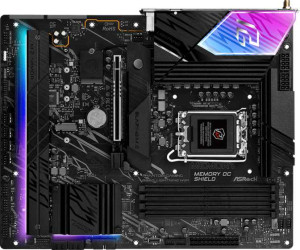
ASRock B860 Lightning WiFi
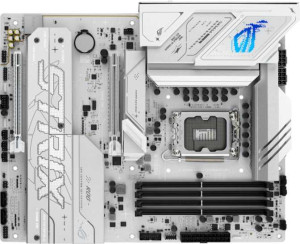
Asus ROG Strix B860-A Gaming WiFi

ASRock B860 Lightning WiFi Asus ROG Strix B860-A Gaming WiFi

Overview

Welcome to our in-depth comparison of the ASRock B860 Lightning WiFi and the Asus ROG Strix B860-A Gaming WiFi, two ATX motherboards sharing the B860 chipset and LGA 1851 socket. While they agree on many fundamentals, key battlegrounds emerge around wireless connectivity, high-speed USB options, expansion headers, and BIOS convenience features. Read on to find out which board best suits your next build.

Common Features

  • Both boards use the LGA 1851 CPU socket.
  • Both boards feature the B860 chipset.
  • Both boards have an ATX form factor.
  • Wi-Fi is supported on both boards.
  • Bluetooth is available on both boards.
  • Both boards support HDMI 2.1.
  • Memory overclocking is supported on both boards.
  • RGB lighting is present on both boards.
  • Both boards support a maximum of 256GB of RAM.
  • Both boards have 4 memory slots.
  • Both boards use DDR5 memory.
  • Both boards have 2 memory channels.
  • ECC memory is not supported on either board.
  • Both boards have 2 USB 3.2 Gen 2 Type-A ports.
  • No USB 3.2 Gen 1 Type-C ports are present on either board.
  • No USB 3.2 Gen 2x2 ports are available on either board.
  • An HDMI output is present on both boards.
  • Both boards include 1 DisplayPort output.
  • Both boards have 1 RJ45 port.
  • A USB Type-C port is available on both boards.
  • Both boards have 4 SATA 3 connectors.
  • Both boards include 4 M.2 sockets.
  • No U.2 sockets are present on either board.
  • An mSATA connector is not available on either board.
  • No SATA 2 connectors are present on either board.
  • Both boards have 1 PCIe 4.0 x16 slot.
  • Both boards have 1 PCIe 5.0 x16 slot.
  • No PCIe 3.0 x16 slots are present on either board.
  • Both boards have a 120 dB signal-to-noise ratio on the DAC.
  • Both boards support 7.1 audio channels.
  • An S/PDIF Out port is available on both boards.
  • Both boards have 2 audio connectors.
  • RAID 0, RAID 1, RAID 5, and RAID 10 are supported on both boards.
  • RAID 0+1 is not supported on either board.

Main Differences

  • Wi-Fi 7 (802.11be) is supported on the Asus ROG Strix B860-A Gaming WiFi but not on the ASRock B860 Lightning WiFi.
  • Bluetooth version is 5.3 on the ASRock B860 Lightning WiFi and 5.4 on the Asus ROG Strix B860-A Gaming WiFi.
  • Easy BIOS reset is available on the Asus ROG Strix B860-A Gaming WiFi but not on the ASRock B860 Lightning WiFi.
  • Maximum overclocked RAM speed is 8933 MHz on the ASRock B860 Lightning WiFi and 8600 MHz on the Asus ROG Strix B860-A Gaming WiFi.
  • USB 3.2 Gen 1 Type-A ports total 4 on the ASRock B860 Lightning WiFi and 2 on the Asus ROG Strix B860-A Gaming WiFi.
  • A USB 3.2 Gen 2 Type-C port is present on the Asus ROG Strix B860-A Gaming WiFi but not on the ASRock B860 Lightning WiFi.
  • USB 2.0 ports number 3 on the ASRock B860 Lightning WiFi and 4 on the Asus ROG Strix B860-A Gaming WiFi.
  • A USB 4 40Gbps port is present on the ASRock B860 Lightning WiFi but not on the Asus ROG Strix B860-A Gaming WiFi.
  • A USB 4 20Gbps port is present on the Asus ROG Strix B860-A Gaming WiFi but not on the ASRock B860 Lightning WiFi.
  • A Thunderbolt 4 port is present on the ASRock B860 Lightning WiFi but not on the Asus ROG Strix B860-A Gaming WiFi.
  • USB 3.2 Gen 1 expansion ports number 4 on the ASRock B860 Lightning WiFi and 2 on the Asus ROG Strix B860-A Gaming WiFi.
  • USB 2.0 expansion ports number 4 on the ASRock B860 Lightning WiFi and 2 on the Asus ROG Strix B860-A Gaming WiFi.
  • USB 3.0 expansion ports number 4 on the ASRock B860 Lightning WiFi and 2 on the Asus ROG Strix B860-A Gaming WiFi.
  • Fan headers total 8 on the ASRock B860 Lightning WiFi and 6 on the Asus ROG Strix B860-A Gaming WiFi.
  • A TPM connector is present on the ASRock B860 Lightning WiFi but not on the Asus ROG Strix B860-A Gaming WiFi.
Specs Comparison
ASRock B860 Lightning WiFi

ASRock B860 Lightning WiFi

Asus ROG Strix B860-A Gaming WiFi

Asus ROG Strix B860-A Gaming WiFi

General info:
CPU socket LGA 1851 LGA 1851
chipset B860 B860
form factor ATX ATX
release date January 2025 January 2025
supports Wi-Fi
Wi-Fi version Wi-Fi 4 (802.11n), Wi-Fi 5 (802.11ac), Wi-Fi 6 (802.11ax), Wi-Fi 6E (802.11ax) Wi-Fi 4 (802.11n), Wi-Fi 5 (802.11ac), Wi-Fi 6 (802.11ax), Wi-Fi 6E (802.11ax), Wi-Fi 7 (802.11be)
Has Bluetooth
Bluetooth version 5.3 5.4
HDMI version HDMI 2.1 HDMI 2.1
Easy to overclock
has RGB lighting
Easy to reset BIOS
Has dual BIOS
has aptX
CPU sockets 1 1
Has integrated graphics
warranty period 3 years 3 years
height 244 mm 244 mm
width 305 mm 305 mm
Has integrated CPU

Both the ASRock B860 Lightning WiFi and the Asus ROG Strix B860-A Gaming WiFi share the same foundational platform: the LGA 1851 socket with a B860 chipset, standard ATX form factor (244 × 305 mm), HDMI 2.1 output, dual BIOS, RGB lighting, and a 3-year warranty. For most buyers, this means either board will slot into the same cases and support the same CPU generation without compromise.

The meaningful differences emerge in wireless connectivity and BIOS usability. The ROG Strix steps ahead with Wi-Fi 7 (802.11be) support alongside the full Wi-Fi 4/5/6/6E stack, whereas the ASRock tops out at Wi-Fi 6E. In practice, Wi-Fi 7 delivers significantly higher theoretical throughput and lower latency — relevant if you have or plan to upgrade to a Wi-Fi 7 router. The ROG Strix also carries Bluetooth 5.4 versus the ASRock′s Bluetooth 5.3, a minor but forward-looking improvement in connection reliability and efficiency. On the BIOS side, the ROG Strix is marked as easy to reset, while the ASRock is not — a small but real convenience advantage for builders who tinker frequently.

Overall, the Asus ROG Strix B860-A Gaming WiFi holds a clear edge in this category. Its Wi-Fi 7 support is the standout differentiator — future-proofing wireless performance for years ahead — and its easier BIOS reset adds practical value for enthusiasts. The ASRock is not deficient by any means, but if wireless longevity and ease of maintenance matter to you, the ROG Strix is the stronger pick based strictly on these specs.

Memory:
maximum memory amount 256GB 256GB
overclocked RAM speed 8933 MHz 8600 MHz
memory slots 4 4
DDR memory version 5 5
memory channels 2 2
Supports ECC memory

Both the ASRock B860 Lightning WiFi and the Asus ROG Strix B860-A Gaming WiFi support a maximum memory amount of 256GB and come with 4 memory slots. They also both support DDR5 memory and feature dual memory channels, ensuring similar capabilities in terms of memory configuration and overall compatibility.

However, there is a slight difference in their overclocked RAM speeds. The ASRock model supports up to 8933 MHz, while the Asus model supports up to 8600 MHz, offering a marginally higher overclocked speed on the ASRock board.

Neither product supports ECC memory, so both are suitable for gaming or general use where error-correcting code memory is not a requirement.

Ports:
USB 3.2 Gen 2 ports (USB-A) 2 2
USB 3.2 Gen 1 ports (USB-A) 4 2
USB 3.2 Gen 2 ports (USB-C) 0 1
USB 3.2 Gen 1 ports (USB-C) 0 0
USB 2.0 ports 3 4
USB 3.2 Gen 2x2 ports 0 0
USB 4 40Gbps ports 1 0
USB 4 20Gbps ports 0 1
Thunderbolt 4 ports 1 0
Thunderbolt 3 ports 0 0
has an HDMI output
DisplayPort outputs 1 1
RJ45 ports 1 1
Has USB Type-C
eSATA ports 0 0
DVI outputs 0 0
has a VGA connector
PS/2 ports 0 0

The ASRock B860 Lightning WiFi and Asus ROG Strix B860-A Gaming WiFi offer a wide range of ports, but there are some differences in their configurations. Both motherboards feature 2 USB 3.2 Gen 2 (USB-A) ports, but the ASRock model includes 4 USB 3.2 Gen 1 (USB-A) ports, while the Asus model has only 2. The Asus board, however, provides 1 USB 3.2 Gen 2 (USB-C) port, while the ASRock board does not include any USB-C Gen 2 ports, though it does have 3 USB 2.0 ports, which is one more than the Asus model, which has 4.

Both boards include 1 USB 4 40Gbps port, but the Asus model has a USB 4 20Gbps port, while the ASRock model does not. Neither board offers USB 3.2 Gen 2x2 ports or Thunderbolt 4 ports, though the ASRock board includes 1 Thunderbolt 4 port, while the Asus model lacks Thunderbolt 4 entirely. Both motherboards feature HDMI outputs, DisplayPort outputs, and a single RJ45 Ethernet port, so these features are matched.

Neither product includes eSATA, DVI, VGA, or PS/2 ports, and both motherboards have USB Type-C support. Overall, the main differences lie in the specific USB port offerings and the inclusion of Thunderbolt 4 on the ASRock board versus the USB 4 20Gbps port on the Asus board.

Connectors:
USB 3.2 Gen 1 ports (through expansion) 4 2
USB 2.0 ports (through expansion) 4 2
SATA 3 connectors 4 4
fan headers 8 6
USB 3.0 ports (through expansion) 4 2
M.2 sockets 4 4
Has TPM connector
U.2 sockets 0 0
Has mSATA connector
SATA 2 connectors 0 0

The ASRock B860 Lightning WiFi and Asus ROG Strix B860-A Gaming WiFi offer different configurations for their connectors. Both motherboards feature 4 SATA 3 connectors and 4 M.2 sockets, ensuring similar storage expansion capabilities. However, the ASRock model provides more connectivity options for USB ports through expansion, with 4 USB 3.2 Gen 1 ports, 4 USB 2.0 ports, and 4 USB 3.0 ports, while the Asus model has fewer expansion USB ports, offering 2 USB 3.2 Gen 1 ports, 2 USB 2.0 ports, and 2 USB 3.0 ports.

For fan headers, the ASRock board has 8, giving it more flexibility for cooling systems compared to the Asus board, which has 6 fan headers. The ASRock model also includes a TPM connector, which is not available on the Asus motherboard. Both models feature no U.2 or mSATA connectors, and neither includes SATA 2 connectors.

Overall, the ASRock B860 Lightning WiFi offers more USB ports for expansion and additional fan headers, while the Asus ROG Strix B860-A Gaming WiFi lacks the TPM connector found on the ASRock board.

Expansion slots:
PCIe 4.0 x16 slots 1 1
PCIe 5.0 x16 slots 1 1
PCIe 3.0 x16 slots 0 0
PCIe x1 slots 0 0
PCI slots 0 0
PCIe 2.0 x16 slots 0 0
PCIe x4 slots 0 0
PCIe x8 slots 0 0

The ASRock B860 Lightning WiFi and Asus ROG Strix B860-A Gaming WiFi both offer similar expansion slot configurations. Each motherboard features 1 PCIe 4.0 x16 slot and 1 PCIe 5.0 x16 slot, providing support for high-speed graphics and expansion cards. Neither motherboard includes PCIe 3.0 x16, PCIe x1, PCI, PCIe 2.0 x16, PCIe x4, or PCIe x8 slots.

As a result, both motherboards offer the same set of PCIe expansion options with no differences in their slot configurations. These boards are ideal for users who need PCIe 4.0 and PCIe 5.0 slots for modern GPUs and other high-bandwidth devices but do not need older PCIe versions or additional specialized slots.

Audio:
Signal-to-Noise ratio (DAC) 120 dB 120 dB
audio channels 7.1 7.1
Has S/PDIF Out port
audio connectors 2 2

Both the ASRock B860 Lightning WiFi and Asus ROG Strix B860-A Gaming WiFi feature identical audio specifications. Each motherboard offers a 120 dB signal-to-noise ratio (DAC), ensuring high-quality audio output. They both support 7.1 audio channels, which is ideal for immersive surround sound experiences.

Additionally, both motherboards are equipped with an S/PDIF Out port for digital audio output and feature 2 audio connectors, providing the necessary ports for connecting external audio devices.

As a result, in terms of audio performance and connectivity, the two motherboards are identical with no differences in their specifications.

Storage:
Supports RAID 1
Supports RAID 10 (1+0)
Supports RAID 5
Supports RAID 0
Supports RAID 0+1

Both the ASRock B860 Lightning WiFi and Asus ROG Strix B860-A Gaming WiFi support the same RAID configurations. Each motherboard supports RAID 1, RAID 10 (1+0), RAID 5, and RAID 0, which enables a variety of options for data redundancy and performance optimization. Neither motherboard supports RAID 0+1, a configuration that combines RAID 0 and RAID 1.

Thus, in terms of RAID support, both boards are identical, offering the same set of features and capabilities for users who require advanced storage configurations.

Comparison Summary & Verdict

Both boards deliver a strong B860-chipset foundation with DDR5 support, four M.2 sockets, PCIe 5.0, and solid audio, making either a capable choice for an Intel Arrow Lake platform. The ASRock B860 Lightning WiFi stands out with its Thunderbolt 4 port, USB 4 40Gbps connectivity, more fan headers, a TPM connector, and higher peak overclocked RAM speeds of 8933 MHz, making it ideal for power users who need maximum expansion and connectivity flexibility. The Asus ROG Strix B860-A Gaming WiFi counters with Wi-Fi 7, Bluetooth 5.4, an easy BIOS reset feature, and a USB 3.2 Gen 2 Type-C rear port, making it the smarter pick for users who prioritize cutting-edge wireless performance and everyday usability.

ASRock B860 Lightning WiFi
Buy ASRock B860 Lightning WiFi if...

Buy the ASRock B860 Lightning WiFi if you need a Thunderbolt 4 port, USB 4 40Gbps support, more fan headers, or a TPM connector, and want the highest possible overclocked RAM speeds.

Asus ROG Strix B860-A Gaming WiFi
Buy Asus ROG Strix B860-A Gaming WiFi if...

Buy the Asus ROG Strix B860-A Gaming WiFi if cutting-edge Wi-Fi 7, Bluetooth 5.4, and a convenient easy BIOS reset are priorities for your build.