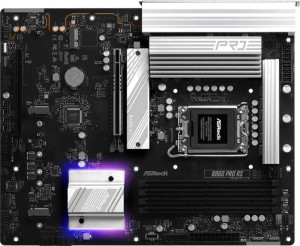
ASRock B860 Pro RS
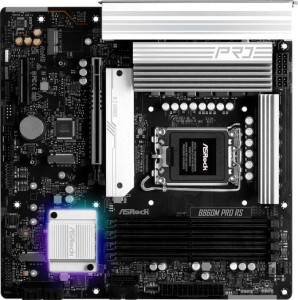
ASRock B860M Pro RS

ASRock B860 Pro RS ASRock B860M Pro RS

Overview

Choosing between the ASRock B860 Pro RS and the ASRock B860M Pro RS is not simply a matter of size — it is a decision that touches on PCIe slot configuration, rear USB connectivity, and even ECC memory support. Both motherboards are built on the B860 chipset with an LGA 1851 socket, DDR5 memory support up to 256GB, and a solid storage foundation, yet they diverge in several areas that can meaningfully affect which types of builds and users they best serve. Dive into the full comparison below to find out which board is right for you.

Common Features

  • Both boards use the LGA 1851 CPU socket.
  • Both boards feature the B860 chipset.
  • Neither board supports Wi-Fi.
  • Neither board has Bluetooth.
  • Both boards have HDMI 2.1 output.
  • Both boards support memory overclocking.
  • Both boards have RGB lighting.
  • Neither board has an easy BIOS reset feature.
  • Both boards support a maximum of 256GB of RAM.
  • Both boards have a maximum RAM speed of 5600 MHz, with overclocking support up to 8666 MHz.
  • Both boards have 4 memory slots and 2 memory channels with DDR5 support.
  • Neither board has USB 3.2 Gen 2 Type-A, Type-C, or USB 3.2 Gen 1 Type-C rear ports.
  • Both boards have 2 USB 2.0 rear ports and 1 USB 3.2 Gen 2x2 port.
  • Neither board has USB 4 or Thunderbolt 4 ports.
  • Both boards have 4 USB 2.0 headers, 4 SATA 3 connectors, and 3 M.2 sockets.
  • Both boards include a TPM connector, and neither has an mSATA connector or U.2 sockets.
  • Both boards have 1 PCIe 5.0 x16 slot and no PCIe 3.0 x16, PCIe 2.0 x16, PCIe x8, or PCIe x1 slots.
  • Both boards offer 7.1 audio channels with 3 audio connectors, and neither has an S/PDIF Out port.
  • Both boards support RAID 0, RAID 1, RAID 5, and RAID 10, but neither supports RAID 0+1.

Main Differences

  • The ASRock B860 Pro RS has an ATX form factor, while the ASRock B860M Pro RS has a Micro-ATX form factor.
  • The ASRock B860 Pro RS is 305 mm wide, while the ASRock B860M Pro RS is 244 mm wide.
  • The ASRock B860 Pro RS is 254 mm tall, while the ASRock B860M Pro RS is 244 mm tall.
  • ECC memory support is available on the ASRock B860M Pro RS but not on the ASRock B860 Pro RS.
  • The ASRock B860 Pro RS has 6 USB 3.2 Gen 1 Type-A rear ports, while the ASRock B860M Pro RS has 3.
  • The ASRock B860 Pro RS has 2 USB 3.2 Gen 1 expansion headers, while the ASRock B860M Pro RS has 4.
  • The ASRock B860 Pro RS has 7 fan headers, while the ASRock B860M Pro RS has 6.
  • The ASRock B860 Pro RS has 1 PCIe 4.0 x16 slot, while the ASRock B860M Pro RS has none.
  • The ASRock B860M Pro RS has 1 PCIe x4 slot, while the ASRock B860 Pro RS has none.
Specs Comparison
ASRock B860 Pro RS

ASRock B860 Pro RS

ASRock B860M Pro RS

ASRock B860M Pro RS

General info:
CPU socket LGA 1851 LGA 1851
chipset B860 B860
form factor ATX Micro-ATX
release date January 2025 January 2025
supports Wi-Fi
Has Bluetooth
HDMI version HDMI 2.1 HDMI 2.1
Easy to overclock
has RGB lighting
Easy to reset BIOS
Has dual BIOS
CPU sockets 1 1
Has integrated graphics
warranty period 3 years 3 years
height 254 mm 244 mm
width 305 mm 244 mm
Has integrated CPU

Both the ASRock B860 Pro RS and the B860M Pro RS are built on the same LGA 1851 socket and B860 chipset foundation, meaning they target the same generation of Intel processors and share an identical feature baseline in most respects: HDMI 2.1 output, dual BIOS support, RGB lighting, and a solid 3-year warranty. Neither board offers Wi-Fi or Bluetooth, so users requiring wireless connectivity will need to factor in the cost of an add-in card or adapter regardless of which model they choose.

The defining differentiator between these two boards is form factor. The Pro RS is a full-size ATX board measuring 305 × 254 mm, while the B860M Pro RS is a Micro-ATX board at a more compact 244 × 244 mm. In practical terms, this means the ATX model offers more physical space for additional PCIe slots, M.2 connectors, and power delivery components — all of which tend to scale with board size. The Micro-ATX variant, on the other hand, fits mid-tower and smaller cases, making it the right pick for space-constrained or compact desktop builds.

For users who prioritize expandability, multi-GPU potential, or simply want more headroom for future upgrades, the B860 Pro RS has a structural edge by virtue of its larger ATX footprint. However, if the build targets a smaller chassis or desk footprint matters, the B860M Pro RS delivers the same core platform capabilities in a tighter package with no functional penalty based on the specs provided. The choice here is almost entirely dictated by case compatibility and expansion needs rather than any meaningful performance difference.
Memory:
maximum memory amount 256GB 256GB
RAM speed (max) 5600 MHz 5600 MHz
overclocked RAM speed 8666 MHz 8666 MHz
memory slots 4 4
DDR memory version 5 5
memory channels 2 2
Supports ECC memory

On paper, the memory specifications of these two boards look virtually identical: both support DDR5 RAM across 4 slots in a dual-channel configuration, cap out at 256 GB of maximum capacity, and share the same native speed ceiling of 5600 MHz with overclocking headroom pushing all the way to 8666 MHz. For mainstream desktop workloads — gaming, content creation, general productivity — either board will behave exactly the same way when paired with the same memory kit.

The single but noteworthy divergence is ECC memory support, which is present on the B860M Pro RS and absent on the B860 Pro RS. ECC (Error-Correcting Code) memory detects and corrects single-bit memory errors on the fly, making it a critical feature for workloads where data integrity is non-negotiable — think scientific computing, financial modeling, or server-adjacent tasks running on a desktop platform. It is rarely relevant for gaming or typical consumer use, but for the right user it is an important reliability safeguard.

For the vast majority of buyers, memory performance will be a dead heat between these two boards. However, the B860M Pro RS holds a clear and targeted advantage for anyone whose workload demands or benefits from error-correcting memory — a capability the B860 Pro RS simply cannot offer regardless of which RAM kit is installed.

Ports:
USB 3.2 Gen 2 ports (USB-A) 0 0
USB 3.2 Gen 1 ports (USB-A) 6 3
USB 3.2 Gen 2 ports (USB-C) 0 0
USB 3.2 Gen 1 ports (USB-C) 0 0
USB 2.0 ports 2 2
USB 3.2 Gen 2x2 ports 1 1
USB 4 40Gbps ports 0 0
USB 4 20Gbps ports 0 0
Thunderbolt 4 ports 0 0
Thunderbolt 3 ports 0 0
has an HDMI output
DisplayPort outputs 1 1
RJ45 ports 1 1
Has USB Type-C
eSATA ports 0 0
DVI outputs 0 0
has a VGA connector
PS/2 ports 0 0

Strip away the zeros and the two boards share a solid common foundation: one HDMI output, one DisplayPort, a single RJ45 Ethernet jack, one USB 3.2 Gen 2x2 Type-C port delivering up to 20 Gbps, and a pair of USB 2.0 ports. Neither board offers Thunderbolt or USB4, so users with high-bandwidth external storage arrays or docking stations requiring those protocols will need to look elsewhere regardless of which model they pick.

The practical gap between these two boards comes down to rear-panel USB 3.2 Gen 1 Type-A port count. The B860 Pro RS provides 6 of these 5 Gbps ports, while the B860M Pro RS offers just 3. That difference matters more than it might initially seem — in a typical desktop setup, those ports fill up quickly between keyboards, mice, headsets, webcams, and USB hubs. Having six available without reaching for a hub keeps the desk cleaner and latency lower for peripherals that benefit from a direct connection.

The B860 Pro RS holds a clear advantage in this category purely on port density. Users who routinely connect multiple USB peripherals simultaneously will find the extra three Type-A ports genuinely useful day-to-day, whereas B860M Pro RS owners with busy desks may find themselves relying on a powered USB hub sooner rather than later.

Connectors:
USB 3.2 Gen 1 ports (through expansion) 2 4
USB 2.0 ports (through expansion) 4 4
SATA 3 connectors 4 4
fan headers 7 6
USB 3.0 ports (through expansion) 2 4
M.2 sockets 3 3
Has TPM connector
U.2 sockets 0 0
Has mSATA connector
SATA 2 connectors 0 0

Internal connectivity tells an interesting story here, because the two boards diverge in opposite directions depending on which resource you prioritize. Storage is a non-issue for either: both offer 3 M.2 sockets and 4 SATA 3 ports, giving builders ample room for fast NVMe drives alongside traditional SSDs or HDDs without compromise.

Where things split is fan headers versus internal USB. The B860 Pro RS edges ahead with 7 fan headers to the B860M Pro RS's 6 — a meaningful difference for enthusiast cooling setups with multiple case fans, radiator pumps, and AIO headers all needing addressable control points. Meanwhile, the B860M Pro RS flips the script on internal USB expansion, offering 4 USB 3.2 Gen 1 headers compared to just 2 on the Pro RS. That translates directly to more front-panel USB ports or internal USB hubs without sacrificing bandwidth.

Neither board dominates outright in this category — the advantage depends entirely on the builder's priorities. Those running high fan counts or complex liquid cooling loops will appreciate the B860 Pro RS's extra header. Builders focused on maximizing accessible USB ports throughout the chassis — particularly in larger cases with front-panel USB arrays — will find the B860M Pro RS better equipped, which is somewhat counterintuitive given its smaller form factor.

Expansion slots:
PCIe 4.0 x16 slots 1 0
PCIe 5.0 x16 slots 1 1
PCIe 3.0 x16 slots 0 0
PCIe x1 slots 0 0
PCI slots 0 0
PCIe 2.0 x16 slots 0 0
PCIe x4 slots 0 1
PCIe x8 slots 0 0

Both boards lead with a single PCIe 5.0 x16 slot, which is the right call for a primary GPU in 2024 and beyond — current and near-future graphics cards can fully utilize that bandwidth ceiling, and it ensures the platform remains relevant as discrete GPU generations advance. That common ground means neither board will bottleneck a high-end graphics card.

The secondary slot is where they part ways. The B860 Pro RS adds a PCIe 4.0 x16 slot, which — while likely wired at fewer physical lanes in practice — still offers significantly more bandwidth than the PCIe x4 slot found on the B860M Pro RS. A PCIe 4.0 x16-sized slot is better suited to expansion cards that demand real throughput: capture cards, high-end networking adapters, or certain NVMe expansion cards. The x4 slot on the Micro-ATX board will handle lighter add-in cards just fine, but it is a more limited resource.

The B860 Pro RS has a clear edge here for users who plan to populate that secondary slot with a bandwidth-hungry expansion card. For builders who only ever intend to install a single GPU and nothing else, both boards are effectively equivalent — but the Pro RS offers more headroom if plans change down the line.

Audio:
audio channels 7.1 7.1
Has S/PDIF Out port
audio connectors 3 3

Audio is a clean draw between these two boards — both deliver 7.1-channel surround sound support through 3 analog audio connectors, and neither includes an S/PDIF optical output. The 7.1 configuration is a practical ceiling for onboard audio, covering everything from stereo headsets to full surround speaker setups without requiring a discrete sound card for the majority of users.

The absence of S/PDIF on both boards is worth noting for anyone who relies on optical out to connect to an AV receiver or external DAC via digital passthrough — that use case will require an add-in audio card on either platform. For everyone else, the analog output trio handles the standard line-out, line-in, and microphone duties that most desktop users actually need.

There is no basis for recommending one board over the other on audio grounds — the specifications are identical across every provided data point. Users with demanding audio requirements, such as audiophiles or home theater enthusiasts needing optical connectivity, should plan for a dedicated sound card regardless of which board they choose.

Storage:
Supports RAID 1
Supports RAID 10 (1+0)
Supports RAID 5
Supports RAID 0
Supports RAID 0+1

RAID support is identical across both boards, and the lineup is a practical one: RAID 0, RAID 1, RAID 5, and RAID 10 are all supported, while RAID 0+1 is absent on both. This covers the configurations that matter most — striping for performance, mirroring for redundancy, parity-based protection for multi-drive arrays, and the combined stripe-plus-mirror of RAID 10 for users who want both speed and fault tolerance.

The absence of RAID 0+1 is largely inconsequential in practice, as RAID 10 achieves a functionally superior result for the same use case and is the more widely recommended configuration. Any user considering a redundant or performance-oriented multi-drive setup will find everything they need within the supported modes on either board.

This category is a complete tie. Storage configuration flexibility is equal on the ASRock B860 Pro RS and the B860M Pro RS, and neither board offers anything the other does not when it comes to RAID. The decision between them should rest entirely on the differentiators identified in other specification groups.

Comparison Summary & Verdict

The ASRock B860 Pro RS and ASRock B860M Pro RS share a strong common foundation — identical chipset, memory capacity, storage options, audio, and RAID support — but their differences point each board toward a distinct audience. The full-size ATX form factor of the B860 Pro RS, combined with its extra PCIe 4.0 x16 slot, six rear USB 3.2 Gen 1 Type-A ports, and seven fan headers, makes it the stronger pick for enthusiasts building larger, more expansion-hungry systems. The B860M Pro RS, on the other hand, stands out with its Micro-ATX footprint, ECC memory support, and four internal USB 3.2 Gen 1 expansion headers, making it better suited for compact workstation builds or users who value error-correcting memory for reliability-sensitive workloads. Neither board is universally superior — your choice should be driven by case size, expansion needs, and whether ECC memory is a priority.

ASRock B860 Pro RS
Buy ASRock B860 Pro RS if...

Buy the ASRock B860 Pro RS if you want an ATX board with more rear USB 3.2 Gen 1 ports, a secondary PCIe 4.0 x16 slot, and more fan headers for larger, more demanding builds.

ASRock B860M Pro RS
Buy ASRock B860M Pro RS if...

Buy the ASRock B860M Pro RS if you need a compact Micro-ATX board with ECC memory support and more internal USB 3.2 Gen 1 expansion headers for a smaller or reliability-focused workstation build.