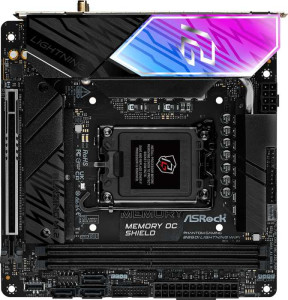
ASRock B860I Lightning WiFi
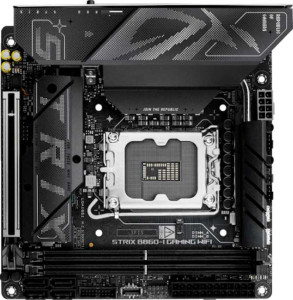
Asus ROG Strix B860-I Gaming WiFi

ASRock B860I Lightning WiFi Asus ROG Strix B860-I Gaming WiFi

Overview

When choosing between two Mini-ITX B860 motherboards, every specification counts. The ASRock B860I Lightning WiFi and the Asus ROG Strix B860-I Gaming WiFi share the same LGA 1851 socket, chipset, and compact form factor, yet diverge in meaningful ways across wireless connectivity, port selection, storage options, and advanced platform features. This comparison examines exactly where each board holds its ground.

Common Features

  • Both boards use the LGA 1851 CPU socket.
  • Both boards are based on the B860 chipset.
  • Both boards use the Mini-ITX form factor.
  • Wi-Fi connectivity is available on both boards.
  • Bluetooth is available on both boards.
  • Both boards support HDMI 2.1.
  • Both boards support memory overclocking.
  • RGB lighting is present on both boards.
  • Both boards support a maximum of 128 GB of RAM.
  • Both boards have 2 memory slots.
  • Both boards use DDR5 memory.
  • Both boards support dual-channel memory.
  • ECC memory is not supported on either board.
  • Neither board has USB 3.2 Gen 2 ports in USB-C format on the rear panel.
  • Neither board has USB 3.2 Gen 1 ports in USB-C format on the rear panel.
  • Both boards have 1 USB 4 40Gbps port.
  • Neither board has USB 4 20Gbps ports.
  • Both boards have 1 Thunderbolt 4 port.
  • Neither board has Thunderbolt 3 ports.
  • Both boards have an HDMI output.
  • Both boards have 1 RJ45 port.
  • Both boards provide 2 USB 3.2 Gen 1 ports through expansion headers.
  • Both boards provide 1 USB-C 3.2 Gen 2 port through expansion headers.
  • Both boards provide 2 USB 2.0 ports through expansion headers.
  • Both boards provide 2 USB 3.0 ports through expansion headers.
  • Both boards have 2 M.2 sockets.
  • Neither board has a U.2 socket.
  • Neither board has an mSATA connector.
  • Neither board has SATA 2 connectors.
  • Both boards have 1 PCIe 5.0 x16 slot.
  • Neither board has PCIe 4.0 x16, PCIe 3.0 x16, PCIe 2.0 x16, PCIe x1, PCIe x4, PCIe x8, or PCI slots.
  • Both boards have a DAC signal-to-noise ratio of 120 dB.
  • Both boards support 7.1 audio channels.
  • Both boards have an S/PDIF Out port.
  • Both boards have 2 audio connectors.
  • RAID 0 support is available on both boards.
  • RAID 1 support is available on both boards.
  • RAID 5 support is available on both boards.
  • RAID 0+1 support is not available on either board.

Main Differences

  • Wi-Fi 7 (802.11be) support is present on Asus ROG Strix B860-I Gaming WiFi but not available on ASRock B860I Lightning WiFi.
  • Bluetooth version is 5.3 on ASRock B860I Lightning WiFi and 5.4 on Asus ROG Strix B860-I Gaming WiFi.
  • Easy BIOS reset is available on Asus ROG Strix B860-I Gaming WiFi but not on ASRock B860I Lightning WiFi.
  • Maximum overclocked RAM speed is 9333 MHz on ASRock B860I Lightning WiFi and 9066 MHz on Asus ROG Strix B860-I Gaming WiFi.
  • USB 3.2 Gen 2 ports (USB-A) count is 2 on ASRock B860I Lightning WiFi and 1 on Asus ROG Strix B860-I Gaming WiFi.
  • USB 3.2 Gen 1 ports (USB-A) count is 4 on ASRock B860I Lightning WiFi and 3 on Asus ROG Strix B860-I Gaming WiFi.
  • USB 2.0 port count is 1 on ASRock B860I Lightning WiFi and 2 on Asus ROG Strix B860-I Gaming WiFi.
  • A USB 3.2 Gen 2x2 port is present on Asus ROG Strix B860-I Gaming WiFi but not on ASRock B860I Lightning WiFi.
  • A DisplayPort output is present on Asus ROG Strix B860-I Gaming WiFi but not on ASRock B860I Lightning WiFi.
  • SATA 3 connector count is 3 on ASRock B860I Lightning WiFi and 4 on Asus ROG Strix B860-I Gaming WiFi.
  • Fan header count is 3 on ASRock B860I Lightning WiFi and 2 on Asus ROG Strix B860-I Gaming WiFi.
  • A TPM connector is present on Asus ROG Strix B860-I Gaming WiFi but not on ASRock B860I Lightning WiFi.
  • RAID 10 (1+0) support is available on Asus ROG Strix B860-I Gaming WiFi but not on ASRock B860I Lightning WiFi.
Specs Comparison
ASRock B860I Lightning WiFi

ASRock B860I Lightning WiFi

Asus ROG Strix B860-I Gaming WiFi

Asus ROG Strix B860-I Gaming WiFi

General info:
CPU socket LGA 1851 LGA 1851
chipset B860 B860
form factor Mini-ITX Mini-ITX
release date January 2025 January 2025
supports Wi-Fi
Wi-Fi version Wi-Fi 4 (802.11n), Wi-Fi 5 (802.11ac), Wi-Fi 6 (802.11ax), Wi-Fi 6E (802.11ax) Wi-Fi 4 (802.11n), Wi-Fi 5 (802.11ac), Wi-Fi 6 (802.11ax), Wi-Fi 6E (802.11ax), Wi-Fi 7 (802.11be)
Has Bluetooth
Bluetooth version 5.3 5.4
HDMI version HDMI 2.1 HDMI 2.1
Easy to overclock
has RGB lighting
Easy to reset BIOS
Has dual BIOS
has aptX
CPU sockets 1 1
Has integrated graphics
warranty period 3 years 3 years
height 170 mm 170 mm
width 170 mm 170 mm
Has integrated CPU

Both the ASRock B860I Lightning WiFi and the Asus ROG Strix B860-I Gaming WiFi share the same fundamental platform: the LGA 1851 socket, B860 chipset, and Mini-ITX form factor (170 × 170 mm). This means identical CPU compatibility, the same chipset-level feature ceiling, and equivalent physical footprint for small-form-factor builds. Both also offer HDMI 2.1, dual BIOS, RGB lighting, and a 3-year warranty — so on the surface-level checklist, they look nearly identical.

The meaningful differences emerge in wireless connectivity and usability. The ROG Strix adds Wi-Fi 7 (802.11be) support, which the ASRock lacks entirely. Wi-Fi 7 delivers substantially higher theoretical throughput and lower latency versus Wi-Fi 6E, and is the forward-looking standard for next-gen routers — relevant if you plan to upgrade your network infrastructure. The ROG Strix also carries Bluetooth 5.4 versus the ASRock's 5.3, a minor but measurable improvement in connection stability and power efficiency for peripherals. On the usability side, the ROG Strix supports easy BIOS reset while the ASRock does not — a small but real convenience advantage when troubleshooting a compact build where physical access is already constrained.

For this spec group, the Asus ROG Strix B860-I Gaming WiFi holds a clear edge. Wi-Fi 7 alone is a tangible generational advantage for anyone investing in a long-term build, and the easier BIOS reset adds practical convenience that matters more in a cramped Mini-ITX chassis. The ASRock is not meaningfully behind on anything else in this group, but the ROG Strix is the more future-ready option at the platform level.
Memory:
maximum memory amount 128GB 128GB
overclocked RAM speed 9333 MHz 9066 MHz
memory slots 2 2
DDR memory version 5 5
memory channels 2 2
Supports ECC memory

The memory configurations of these two boards are nearly identical in every structural sense: both support DDR5, offer 2 memory slots in a dual-channel arrangement, cap out at 128GB, and exclude ECC memory — all expected for B860-class Mini-ITX boards targeting enthusiast consumers rather than workstation users.

The one concrete differentiator is overclocked RAM speed. The ASRock B860I Lightning WiFi tops out at 9333 MHz, while the ROG Strix B860-I Gaming WiFi reaches 9066 MHz. In practice, the 267 MHz gap is narrow and will produce no perceptible difference in everyday workloads. However, for users who push XMP/EXPO profiles to the limit or enjoy memory overclocking as part of a tuned build, the ASRock's slightly higher certified ceiling is a genuine, if modest, advantage.

On memory, the ASRock B860I Lightning WiFi takes a narrow edge purely on peak overclocked speed. That said, this is one of the closest calls in this comparison — the structural parity between the two boards means neither is a meaningfully better choice for the vast majority of users based on memory specs alone.

Ports:
USB 3.2 Gen 2 ports (USB-A) 2 1
USB 3.2 Gen 1 ports (USB-A) 4 3
USB 3.2 Gen 2 ports (USB-C) 0 0
USB 3.2 Gen 1 ports (USB-C) 0 0
USB 2.0 ports 1 2
USB 3.2 Gen 2x2 ports 0 1
USB 4 40Gbps ports 1 1
USB 4 20Gbps ports 0 0
Thunderbolt 4 ports 1 1
Thunderbolt 3 ports 0 0
has an HDMI output
DisplayPort outputs 0 1
RJ45 ports 1 1
Has USB Type-C
eSATA ports 0 0
DVI outputs 0 0
has a VGA connector
PS/2 ports 0 0

Where these two boards diverge most visibly is in how they allocate their rear I/O real estate. The ASRock B860I Lightning WiFi prioritizes raw USB-A port count, offering 6 USB-A ports in total (2× Gen 2 + 4× Gen 1), versus the ROG Strix B860-I Gaming WiFi's 4 USB-A ports (1× Gen 2 + 3× Gen 1). For users with multiple peripherals — keyboards, mice, headsets, dongles — that additional headroom on the ASRock is genuinely useful in a Mini-ITX system where adding a hub can feel like a workaround.

The ROG Strix compensates with two notable additions. First, it includes a USB 3.2 Gen 2x2 port, delivering up to 20Gbps — ideal for next-generation external SSDs that saturate the more common 10Gbps Gen 2 interface. Second, it adds a DisplayPort output alongside the shared HDMI 2.1, giving it two independent video outputs versus the ASRock's single HDMI. That matters for anyone using integrated or discrete graphics with a multi-monitor setup, or who simply needs display output flexibility. Both boards share a USB 4 40Gbps port and Thunderbolt 4 — high-bandwidth options that cover docking stations and fast storage alike.

The verdict here depends entirely on use case. The ASRock B860I Lightning WiFi wins for peripheral-heavy setups needing more plug-and-play USB-A availability, while the ROG Strix B860-I Gaming WiFi is the stronger choice for users who need faster external storage throughput or a second display output. On balance, the ROG Strix's additions are more strategically differentiated, giving it a slight overall edge in port versatility.

Connectors:
USB 3.2 Gen 1 ports (through expansion) 2 2
USB-C 3.2 Gen 2 ports (through expansion) 1 1
USB 2.0 ports (through expansion) 2 2
SATA 3 connectors 3 4
fan headers 3 2
USB 3.0 ports (through expansion) 2 2
M.2 sockets 2 2
Has TPM connector
U.2 sockets 0 0
Has mSATA connector
SATA 2 connectors 0 0

Internal connectors tell a lot about how a board is designed to grow. Both boards match evenly on expansion USB — identical headers for USB 3.2 Gen 1, USB-C 3.2 Gen 2, and USB 2.0 — and both provide 2 M.2 sockets, which is the practical ceiling for most Mini-ITX designs and sufficient for a fast boot drive paired with a secondary NVMe storage drive.

The splits come in storage and thermal management. The ROG Strix B860-I Gaming WiFi offers 4 SATA 3 connectors versus the ASRock's 3, a meaningful difference for anyone building a compact NAS-style system or simply wanting to connect multiple 2.5″/3.5″ drives alongside their M.2 slots. The ASRock counters with 3 fan headers compared to the ROG Strix's 2 — in a thermally constrained Mini-ITX chassis where airflow management is critical, that extra header provides more granular control over cooling without relying on fan splitters. The ROG Strix also includes a TPM connector, which the ASRock omits; while TPM 2.0 is increasingly relevant for enterprise security compliance and Windows 11 requirements, many users will find this a non-issue if their CPU already provides firmware TPM.

This group is a genuine trade-off rather than a clean win for either side. The ROG Strix B860-I Gaming WiFi is the better fit for storage-heavy builds needing more SATA ports and for users who require a discrete TPM header, while the ASRock B860I Lightning WiFi is more appealing to builders prioritizing careful thermal control in a tight case. Neither holds a decisive overall advantage here.

Expansion slots:
PCIe 4.0 x16 slots 0 0
PCIe 5.0 x16 slots 1 1
PCIe 3.0 x16 slots 0 0
PCIe x1 slots 0 0
PCI slots 0 0
PCIe 2.0 x16 slots 0 0
PCIe x4 slots 0 0
PCIe x8 slots 0 0

Expansion slot configuration is one area where Mini-ITX form factor imposes its own verdict before the spec sheet even matters. Both the ASRock B860I Lightning WiFi and the Asus ROG Strix B860-I Gaming WiFi offer exactly one expansion slot each — a single PCIe 5.0 x16 — and the configurations are perfectly identical. There is nothing to differentiate here.

That said, the shared presence of PCIe 5.0 x16 is worth contextualizing. This is the current-generation standard for discrete GPU connectivity, ensuring full bandwidth compatibility with the latest graphics cards and keeping both boards relevant for high-end gaming or compute workloads well into the future. Neither board wastes board space on legacy PCIe slots, which is the rational design choice at this size.

This group is a complete tie. Both boards deliver the same expansion capability, and neither holds any advantage over the other. The choice between them on this dimension is purely academic.

Audio:
Signal-to-Noise ratio (DAC) 120 dB 120 dB
audio channels 7.1 7.1
Has S/PDIF Out port
audio connectors 2 2

Audio is another category where these two boards converge entirely. Both deliver a 120 dB signal-to-noise ratio from their DAC, support 7.1 channel surround output, include an S/PDIF optical out port, and provide the same number of analog audio connectors. There is not a single data point in this group that separates them.

The shared 120 dB SNR is worth noting as a quality indicator — this figure sits comfortably in the range associated with clean, low-noise audio reproduction, suitable for both gaming headsets and quality stereo setups. S/PDIF output adds flexibility for users routing audio to an external DAC or AV receiver, a common choice among enthusiasts who prefer to bypass onboard analog circuitry entirely.

This group is a complete tie. Neither board offers any audio advantage over the other, and the decision between them should rest entirely on the differentiators identified in other specification groups.

Storage:
Supports RAID 1
Supports RAID 10 (1+0)
Supports RAID 5
Supports RAID 0
Supports RAID 0+1

RAID support is largely identical across these two boards, with both handling RAID 0, 1, and 5 — covering the most common use cases of performance striping, mirroring for redundancy, and parity-based fault tolerance respectively. The single point of divergence is RAID 10, which the ROG Strix B860-I Gaming WiFi supports and the ASRock B860I Lightning WiFi does not.

RAID 10 combines striping and mirroring across four or more drives, offering both the read/write performance benefits of RAID 0 and the redundancy of RAID 1. It is the preferred configuration for workloads that demand both speed and data protection simultaneously — think small business file servers, media production storage, or any environment where drive failure cannot mean data loss and performance cannot be sacrificed. For a standard gaming or prosumer desktop, RAID 10 is rarely a priority, but it is a meaningful capability gap for anyone building a more serious multi-drive system.

The Asus ROG Strix B860-I Gaming WiFi takes a narrow win here. The addition of RAID 10 support expands its appeal to more demanding storage configurations, and when combined with its extra SATA port noted in the Connectors group, the ROG Strix is the more capable platform overall for users with serious multi-drive storage ambitions.

Comparison Summary & Verdict

Both boards are solid Mini-ITX B860 platforms with DDR5 support, a PCIe 5.0 x16 slot, and 7.1 audio, but their differences clearly define their target audiences. The ASRock B860I Lightning WiFi appeals to builders who value a higher RAM overclocking ceiling of 9333 MHz, more USB-A rear ports, and three fan headers for greater cooling flexibility. The Asus ROG Strix B860-I Gaming WiFi, on the other hand, is the more feature-complete choice, offering Wi-Fi 7, a DisplayPort output, USB 3.2 Gen 2x2, a TPM connector, RAID 10 support, and a dedicated easy BIOS reset button, making it the better fit for enthusiasts who prioritize future-ready connectivity and a richer feature set over maximum RAM clock speed.

ASRock B860I Lightning WiFi
Buy ASRock B860I Lightning WiFi if...

Buy the ASRock B860I Lightning WiFi if you want a higher RAM overclocking ceiling of 9333 MHz, more USB-A ports on the rear panel, and three fan headers for greater cooling control.

Asus ROG Strix B860-I Gaming WiFi
Buy Asus ROG Strix B860-I Gaming WiFi if...

Choose the Asus ROG Strix B860-I Gaming WiFi if you need Wi-Fi 7, a DisplayPort output, a TPM connector, RAID 10 support, and the added convenience of an easy BIOS reset button.