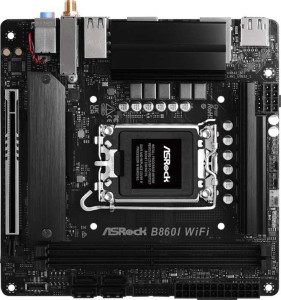
ASRock B860I WiFi
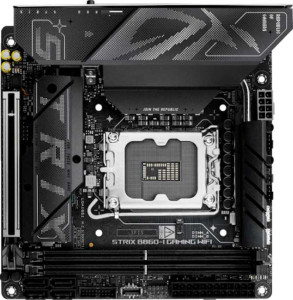
Asus ROG Strix B860-I Gaming WiFi

ASRock B860I WiFi Asus ROG Strix B860-I Gaming WiFi

Overview

Welcome to our in-depth spec comparison between the ASRock B860I WiFi and the Asus ROG Strix B860-I Gaming WiFi — two compact Mini-ITX motherboards sharing the B860 chipset and LGA 1851 socket. While they agree on many fundamentals, key battlegrounds emerge around wireless connectivity, rear port selection, and premium extras like Thunderbolt 4 and RGB lighting. Read on to find out which board best fits your next small-form-factor build.

Common Features

  • Both boards use the LGA 1851 CPU socket.
  • Both boards are based on the B860 chipset.
  • Both boards use the Mini-ITX form factor.
  • Wi-Fi connectivity is available on both boards.
  • Bluetooth is available on both boards.
  • Both boards feature HDMI 2.1 output.
  • Memory overclocking is supported on both boards.
  • Both boards have a dual BIOS feature.
  • Both boards support a maximum of 128GB of RAM.
  • Both boards have 2 memory slots.
  • Both boards use DDR5 memory.
  • Both boards support 2 memory channels.
  • ECC memory is not supported on either board.
  • Both boards have 1 USB 3.2 Gen 2 Type-A port.
  • Neither board has a USB 3.2 Gen 2 Type-C rear port.
  • Both boards have 1 USB 3.2 Gen 2x2 port.
  • Neither board has Thunderbolt 3 ports.
  • Both boards include a DisplayPort output.
  • Both boards have 2 M.2 sockets and 4 SATA 3 connectors.
  • Both boards feature a PCIe 5.0 x16 slot and no PCIe 4.0 or 3.0 x16 slots.
  • Both boards support 7.1 audio channels.
  • RAID 0, 1, 5, and 10 are supported on both boards, while RAID 0+1 is not supported on either.

Main Differences

  • Wi-Fi 7 (802.11be) is supported on Asus ROG Strix B860-I Gaming WiFi but not on ASRock B860I WiFi.
  • Bluetooth version is 5.4 on Asus ROG Strix B860-I Gaming WiFi and 5.3 on ASRock B860I WiFi.
  • RGB lighting is present on Asus ROG Strix B860-I Gaming WiFi but not available on ASRock B860I WiFi.
  • An easy BIOS reset feature is available on Asus ROG Strix B860-I Gaming WiFi but not on ASRock B860I WiFi.
  • Maximum overclocked RAM speed is 9066 MHz on Asus ROG Strix B860-I Gaming WiFi and 8933 MHz on ASRock B860I WiFi.
  • USB 3.2 Gen 1 Type-A ports number 3 on Asus ROG Strix B860-I Gaming WiFi and 2 on ASRock B860I WiFi.
  • USB 2.0 ports number 4 on ASRock B860I WiFi and 2 on Asus ROG Strix B860-I Gaming WiFi.
  • A USB 4 40Gbps port is present on Asus ROG Strix B860-I Gaming WiFi but not on ASRock B860I WiFi.
  • A Thunderbolt 4 port is present on Asus ROG Strix B860-I Gaming WiFi but not on ASRock B860I WiFi.
  • RJ45 ports number 2 on ASRock B860I WiFi and 1 on Asus ROG Strix B860-I Gaming WiFi.
  • Fan headers number 3 on ASRock B860I WiFi and 2 on Asus ROG Strix B860-I Gaming WiFi.
  • A TPM connector is present on Asus ROG Strix B860-I Gaming WiFi but not on ASRock B860I WiFi.
  • An S/PDIF Out port is present on Asus ROG Strix B860-I Gaming WiFi but not on ASRock B860I WiFi.
  • Audio connectors number 3 on ASRock B860I WiFi and 2 on Asus ROG Strix B860-I Gaming WiFi.
Specs Comparison
ASRock B860I WiFi

ASRock B860I WiFi

Asus ROG Strix B860-I Gaming WiFi

Asus ROG Strix B860-I Gaming WiFi

General info:
CPU socket LGA 1851 LGA 1851
chipset B860 B860
form factor Mini-ITX Mini-ITX
release date January 2025 January 2025
supports Wi-Fi
Wi-Fi version Wi-Fi 4 (802.11n), Wi-Fi 5 (802.11ac), Wi-Fi 6 (802.11ax), Wi-Fi 6E (802.11ax) Wi-Fi 4 (802.11n), Wi-Fi 5 (802.11ac), Wi-Fi 6 (802.11ax), Wi-Fi 6E (802.11ax), Wi-Fi 7 (802.11be)
Has Bluetooth
Bluetooth version 5.3 5.4
HDMI version HDMI 2.1 HDMI 2.1
Easy to overclock
has RGB lighting
Easy to reset BIOS
Has dual BIOS
has aptX
CPU sockets 1 1
Has integrated graphics
warranty period 3 years 3 years
height 170 mm 170 mm
width 170 mm 170 mm
Has integrated CPU

Both the ASRock B860I WiFi and the Asus ROG Strix B860-I Gaming WiFi share a strong common foundation: the same LGA 1851 socket, B860 chipset, and Mini-ITX form factor at identical 170×170 mm dimensions. They both support overclocking, carry a 3-year warranty, include dual BIOS, and output video over HDMI 2.1. For anyone building a compact system, either board slots into the same physical and platform constraints.

The meaningful differences emerge in connectivity and usability. The ROG Strix steps ahead with Wi-Fi 7 (802.11be) support, which the ASRock lacks — this matters for users on a Wi-Fi 7 router, as it enables significantly higher throughput and lower latency over wireless. The ROG Strix also carries the slightly newer Bluetooth 5.4 versus the ASRock's Bluetooth 5.3, a marginal but real improvement in connection stability. On the practical side, the ROG Strix offers an easy BIOS reset mechanism and RGB lighting, while the ASRock provides neither — the former is a genuine convenience advantage for troubleshooting, the latter purely aesthetic.

Overall, the Asus ROG Strix B860-I Gaming WiFi holds a clear edge in this category. Wi-Fi 7 readiness is a future-proofing advantage that directly impacts wireless performance in compatible environments, and the easier BIOS reset adds real-world usability. The ASRock is a capable board that matches the ROG Strix on core platform specs, but it falls behind on wireless generation and convenience features.

Memory:
maximum memory amount 128GB 128GB
overclocked RAM speed 8933 MHz 9066 MHz
memory slots 2 2
DDR memory version 5 5
memory channels 2 2
Supports ECC memory

On paper, both boards are essentially identical in their memory architecture: DDR5, two slots, dual-channel configuration, and a 128GB maximum capacity. For the vast majority of users, this means the same real-world experience — dual-channel bandwidth, ample headroom for even the most memory-hungry workloads, and full DDR5 efficiency.

The only separating factor is the maximum overclocked RAM speed. The ROG Strix B860-I supports memory overclocking up to 9066 MHz, compared to 8933 MHz on the ASRock B860I WiFi — a difference of 133 MHz. In practice, this gap is extremely narrow; at these frequencies, the real-world performance delta in gaming or productivity workloads would be virtually unmeasurable, and reaching either ceiling requires carefully selected, high-binned DDR5 kits that most users will never purchase.

This category is effectively a tie. The shared DDR5 platform, slot count, channel count, and maximum capacity are what genuinely define daily memory performance, and both boards are identical across all of those dimensions. The ROG Strix technically edges out the ASRock on peak overclock headroom, but the margin is too slim to influence a purchasing decision on its own.

Ports:
USB 3.2 Gen 2 ports (USB-A) 1 1
USB 3.2 Gen 1 ports (USB-A) 2 3
USB 3.2 Gen 2 ports (USB-C) 0 0
USB 3.2 Gen 1 ports (USB-C) 0 0
USB 2.0 ports 4 2
USB 3.2 Gen 2x2 ports 1 1
USB 4 40Gbps ports 0 1
USB 4 20Gbps ports 0 0
Thunderbolt 4 ports 0 1
Thunderbolt 3 ports 0 0
has an HDMI output
DisplayPort outputs 1 1
RJ45 ports 2 1
Has USB Type-C
eSATA ports 0 0
DVI outputs 0 0
has a VGA connector
PS/2 ports 0 0

The headline difference here is the ROG Strix B860-I's inclusion of a Thunderbolt 4 port and a USB4 40Gbps port — neither of which appears on the ASRock B860I WiFi. These are not minor upgrades: Thunderbolt 4 opens the door to external GPU enclosures, high-bandwidth docks, and daisy-chaining up to six devices, while USB4 40Gbps delivers the same raw throughput as Thunderbolt 3 for compatible accessories. For a Mini-ITX build where internal expansion is inherently limited, this kind of rear-panel flexibility is genuinely valuable.

The trade-offs elsewhere are worth noting. The ASRock counters with two RJ45 ports versus the ROG Strix's single port — a meaningful advantage for users who want network redundancy, a direct device-to-device link, or a dedicated management connection. The ASRock also offers more USB 2.0 ports (4 vs 2), though at this point USB 2.0 is largely relevant only for low-bandwidth peripherals like keyboards and mice. The ROG Strix compensates with an extra USB 3.2 Gen 1 Type-A port, keeping its total high-speed USB count ahead.

The Asus ROG Strix B860-I Gaming WiFi wins this category for most users. Thunderbolt 4 and USB4 40Gbps are premium capabilities that expand a compact system's versatility significantly, and no amount of legacy USB 2.0 ports makes up for their absence. The ASRock's dual RJ45 is a genuine niche advantage for networking use cases, but as a general-purpose port selection, the ROG Strix is the stronger offering.

Connectors:
USB 3.2 Gen 1 ports (through expansion) 2 2
USB-C 3.2 Gen 2 ports (through expansion) 1 1
USB 2.0 ports (through expansion) 2 2
SATA 3 connectors 4 4
fan headers 3 2
USB 3.0 ports (through expansion) 2 2
M.2 sockets 2 2
Has TPM connector
U.2 sockets 0 0
Has mSATA connector
SATA 2 connectors 0 0

Internal connector layouts are remarkably similar between these two boards. Both offer identical storage expansion — 2 M.2 sockets and 4 SATA 3 connectors — which is a generous allocation for a Mini-ITX platform and gives builders plenty of flexibility for NVMe SSDs alongside traditional drives. Internal USB headers, including expansion ports for front-panel connectivity, are also matched across the board.

Two specific differences stand out. The ASRock B860I WiFi provides 3 fan headers versus the ROG Strix's 2 — a small but practical edge for thermal management in compact cases where airflow routing can be challenging and every controllable fan connection counts. Going the other direction, the ROG Strix B860-I includes a TPM connector while the ASRock does not. A dedicated TPM header matters for enterprise environments or security-conscious users who want to attach a discrete TPM module for hardware-level encryption and platform integrity verification.

This category is close to a wash, with each board holding one meaningful advantage over the other. The ASRock's extra fan header appeals to builders focused on cooling control in tight chassis, while the ROG Strix's TPM connector serves a more specialized but legitimate security use case. Neither difference is significant enough to declare a clear overall winner here — the right call depends entirely on which of those two features aligns with the intended build.

Expansion slots:
PCIe 4.0 x16 slots 0 0
PCIe 5.0 x16 slots 1 1
PCIe 3.0 x16 slots 0 0
PCIe x1 slots 0 0
PCI slots 0 0
PCIe 2.0 x16 slots 0 0
PCIe x4 slots 0 0
PCIe x8 slots 0 0

Expansion slot configurations are identical on both boards: a single PCIe 5.0 x16 slot and nothing else. For a Mini-ITX form factor, this is entirely expected — the standard only accommodates one full-length slot, and dedicating it to PCIe 5.0 x16 is the right call. That slot delivers the bandwidth headroom needed for current and next-generation discrete GPUs without any bottlenecking.

The absence of additional x1 or x4 slots is a non-issue in practice. Mini-ITX builds are inherently single-GPU configurations, and any supplementary functionality — additional networking, capture cards, and so on — is typically handled through M.2 or USB-based solutions in this form factor anyway. The PCIe 5.0 interface also ensures forward compatibility with future graphics cards that may demand greater bandwidth than PCIe 4.0 can provide.

This category is an unambiguous tie. Both boards offer the same slot type, the same generation, and the same count. There is no differentiator here whatsoever, and expansion slot selection should carry zero weight in the decision between these two boards.

Audio:
audio channels 7.1 7.1
Has S/PDIF Out port
audio connectors 3 2

Both boards deliver 7.1-channel audio, meaning neither imposes a ceiling on surround sound capability for users relying on onboard audio. The more telling difference lies in how that audio reaches external devices. The ROG Strix B860-I includes an S/PDIF optical output, which the ASRock B860I WiFi omits entirely. S/PDIF matters for users connecting to AV receivers, soundbars, or DACs via optical cable — it passes a clean digital signal that bypasses the motherboard's analog circuitry altogether, which is particularly useful in electrically noisy environments like a compact PC chassis.

The analog connector count flips the advantage briefly back toward the ASRock, which offers 3 audio jacks versus the ROG Strix's 2. In a 7.1 setup driven purely by analog connections, more jacks allow more speaker groups to be wired directly without adapters. That said, most users running a true 7.1 analog configuration would typically route audio through a dedicated sound card or external DAC anyway, limiting the practical weight of this difference.

Narrowly, the Asus ROG Strix B860-I Gaming WiFi has the audio edge. The S/PDIF output is a qualitatively meaningful addition for home theater integration or audiophile-adjacent setups, and it represents a connectivity option the ASRock simply cannot provide. The ASRock's extra analog jack is a minor convenience at best for the average user in this form factor.

Storage:
Supports RAID 1
Supports RAID 10 (1+0)
Supports RAID 5
Supports RAID 0
Supports RAID 0+1

RAID support is identical across both boards. Each supports RAID 0, 1, 5, and 10, covering the full practical spectrum from pure performance striping to mirrored redundancy and the combined protection of RAID 10. Neither board supports RAID 0+1, but this is a distinction without a real difference — RAID 10 achieves the same goals more efficiently and is the preferred standard in virtually all modern implementations.

This is a straightforward tie. There is no differentiator between the ASRock B860I WiFi and the ROG Strix B860-I Gaming WiFi in this category, and storage redundancy configuration should play no role in choosing between them.

Comparison Summary & Verdict

Both boards are capable Mini-ITX platforms with strong shared foundations: DDR5 support, PCIe 5.0 x16, dual BIOS, and RAID compatibility. However, their priorities diverge meaningfully. The Asus ROG Strix B860-I Gaming WiFi pulls ahead for enthusiasts who want the very latest connectivity, offering Wi-Fi 7, a Thunderbolt 4 port, USB 4 40Gbps, a TPM connector, S/PDIF Out, and higher overclocked RAM speeds up to 9066 MHz — all wrapped in an RGB-lit package with an easy BIOS reset button. The ASRock B860I WiFi, on the other hand, appeals to users who value dual 2.5GbE networking, more fan headers for cooling control, more audio connectors, and more USB 2.0 ports for legacy peripherals, typically at a friendlier price point. Choose Asus for cutting-edge feature density; choose ASRock for practical, network-focused versatility.

ASRock B860I WiFi
Buy ASRock B860I WiFi if...

Choose the ASRock B860I WiFi if you need dual 2.5GbE network ports, more fan headers for custom cooling setups, or more USB 2.0 connectivity for legacy peripherals.

Asus ROG Strix B860-I Gaming WiFi
Buy Asus ROG Strix B860-I Gaming WiFi if...

Choose the Asus ROG Strix B860-I Gaming WiFi if you want Wi-Fi 7, a Thunderbolt 4 port, USB 4 40Gbps, higher RAM overclocking headroom, and a richer feature set including RGB lighting and an easy BIOS reset.