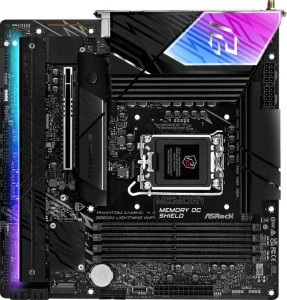
ASRock B860M Lightning WiFi
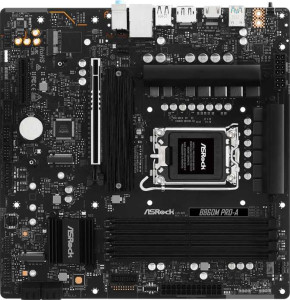
ASRock B860M Pro-A

ASRock B860M Lightning WiFi ASRock B860M Pro-A

Overview

Welcome to our in-depth specification comparison between the ASRock B860M Lightning WiFi and the ASRock B860M Pro-A, two Micro-ATX motherboards built on the B860 chipset with LGA 1851 socket support. While they share a strong common foundation in memory capacity, storage options, and RAID support, their differences tell two distinct stories — particularly around wireless connectivity, USB port variety, and expansion flexibility. Read on to discover which board better suits your specific build requirements.

Common Features

  • Both motherboards use the LGA 1851 CPU socket.
  • Both motherboards are based on the B860 chipset.
  • Both motherboards use the Micro-ATX form factor.
  • Both motherboards feature HDMI 2.1 output.
  • Both motherboards support easy overclocking.
  • Neither motherboard supports easy BIOS reset.
  • Both motherboards have dual BIOS.
  • Both motherboards have 1 CPU socket.
  • Both motherboards support a maximum memory amount of 256GB.
  • Both motherboards support a maximum RAM speed of 5600 MHz.
  • Both motherboards support overclocked RAM speeds up to 8666 MHz.
  • Both motherboards have 4 memory slots.
  • Both motherboards use DDR5 memory.
  • Both motherboards support 2 memory channels.
  • Neither motherboard supports ECC memory.
  • Both motherboards have 0 USB-C 3.2 Gen 2 ports.
  • Both motherboards have 0 USB-C 3.2 Gen 1 ports.
  • Both motherboards have 2 USB 2.0 ports.
  • Both motherboards have an HDMI output.
  • Both motherboards have 1 DisplayPort output.
  • Both motherboards have 1 RJ45 port.
  • Both motherboards provide 2 USB 3.2 Gen 1 ports through expansion.
  • Both motherboards provide 4 USB 2.0 ports through expansion.
  • Both motherboards have 4 SATA 3 connectors.
  • Both motherboards have a TPM connector.
  • Neither motherboard has an mSATA connector.
  • Both motherboards have 0 SATA 2 connectors.
  • Both motherboards have 1 PCIe 5.0 x16 slot.
  • Both motherboards support 7.1 audio channels.
  • Both motherboards support RAID 0, RAID 1, RAID 5, and RAID 10.
  • Neither motherboard supports RAID 0+1.

Main Differences

  • Wi-Fi support is present on ASRock B860M Lightning WiFi but not available on ASRock B860M Pro-A.
  • Bluetooth support is present on ASRock B860M Lightning WiFi but not available on ASRock B860M Pro-A.
  • RGB lighting is present on ASRock B860M Lightning WiFi but not available on ASRock B860M Pro-A.
  • USB 3.2 Gen 2 ports (USB-A) count is 2 on ASRock B860M Lightning WiFi and 0 on ASRock B860M Pro-A.
  • USB 3.2 Gen 1 ports (USB-A) count is 4 on ASRock B860M Lightning WiFi and 3 on ASRock B860M Pro-A.
  • USB 3.2 Gen 2x2 ports count is 0 on ASRock B860M Lightning WiFi and 1 on ASRock B860M Pro-A.
  • USB 4 40Gbps ports count is 1 on ASRock B860M Lightning WiFi and 0 on ASRock B860M Pro-A.
  • Thunderbolt 4 ports count is 1 on ASRock B860M Lightning WiFi and 0 on ASRock B860M Pro-A.
  • Fan headers count is 7 on ASRock B860M Lightning WiFi and 6 on ASRock B860M Pro-A.
  • M.2 sockets count is 4 on ASRock B860M Lightning WiFi and 3 on ASRock B860M Pro-A.
  • PCIe x4 slots count is 0 on ASRock B860M Lightning WiFi and 1 on ASRock B860M Pro-A.
  • S/PDIF Out port is present on ASRock B860M Lightning WiFi but not available on ASRock B860M Pro-A.
  • Audio connectors count is 2 on ASRock B860M Lightning WiFi and 3 on ASRock B860M Pro-A.
Specs Comparison
ASRock B860M Lightning WiFi

ASRock B860M Lightning WiFi

ASRock B860M Pro-A

ASRock B860M Pro-A

General info:
CPU socket LGA 1851 LGA 1851
chipset B860 B860
form factor Micro-ATX Micro-ATX
release date January 2025 January 2025
supports Wi-Fi
Has Bluetooth
HDMI version HDMI 2.1 HDMI 2.1
Easy to overclock
has RGB lighting
Easy to reset BIOS
Has dual BIOS
CPU sockets 1 1
Has integrated graphics
warranty period 3 years 3 years
height 244 mm 244 mm
width 244 mm 244 mm
Has integrated CPU

Both the ASRock B860M Lightning WiFi and the ASRock B860M Pro-A share a common foundation: the LGA 1851 socket with a B860 chipset, a Micro-ATX form factor at identical 244 × 244 mm dimensions, and the same 3-year warranty. Both boards also support overclocking and feature dual BIOS, which provides a valuable safety net for failed BIOS updates. Neither board integrates a CPU or graphics solution, and both offer HDMI 2.1 output for connecting a display directly — useful when pairing with a processor that has integrated graphics.

The decisive differentiator in this group is connectivity. The Lightning WiFi includes built-in Wi-Fi and Bluetooth, while the Pro-A offers neither. In practice, this means the Pro-A requires a separate PCIe or USB wireless adapter to achieve wireless networking, adding cost and consuming an expansion slot or USB port. For a compact Micro-ATX build where slot real estate is limited, having wireless built in is a genuine convenience advantage. The Lightning WiFi also adds RGB lighting, which the Pro-A omits — a cosmetic difference, but relevant for users building inside a windowed case.

The Lightning WiFi holds a clear edge in this group. The integrated Wi-Fi and Bluetooth alone justify the distinction for anyone targeting a cable-free setup, and the dual BIOS safety feature is equally present on both boards. The Pro-A is not deficient in its core platform specs, but it offers strictly less out of the box when it comes to general feature set.

Memory:
maximum memory amount 256GB 256GB
RAM speed (max) 5600 MHz 5600 MHz
overclocked RAM speed 8666 MHz 8666 MHz
memory slots 4 4
DDR memory version 5 5
memory channels 2 2
Supports ECC memory

Both the ASRock B860M Lightning WiFi and ASRock B860M Pro-A share identical memory specifications. Each motherboard supports a maximum memory amount of 256GB, with a maximum RAM speed of 5600 MHz. Additionally, both models can handle overclocked RAM speeds of up to 8666 MHz. They are equipped with 4 memory slots, which allows for a significant amount of RAM expansion. Both motherboards also support DDR5 memory and operate with a dual memory channel configuration. Furthermore, neither motherboard supports ECC (Error-Correcting Code) memory.

Given that all these key memory specs match across both products, users can expect the same memory performance and expansion options from either motherboard.

In summary, there is no difference between the ASRock B860M Lightning WiFi and ASRock B860M Pro-A when it comes to memory support and features. Both offer identical capabilities in this category.

Ports:
USB 3.2 Gen 2 ports (USB-A) 2 0
USB 3.2 Gen 1 ports (USB-A) 4 3
USB 3.2 Gen 2 ports (USB-C) 0 0
USB 3.2 Gen 1 ports (USB-C) 0 0
USB 2.0 ports 2 2
USB 3.2 Gen 2x2 ports 0 1
USB 4 40Gbps ports 1 0
USB 4 20Gbps ports 0 0
Thunderbolt 4 ports 1 0
Thunderbolt 3 ports 0 0
has an HDMI output
DisplayPort outputs 1 1
RJ45 ports 1 1
Has USB Type-C
eSATA ports 0 0
DVI outputs 0 0
has a VGA connector
PS/2 ports 0 0

The ASRock B860M Lightning WiFi and ASRock B860M Pro-A differ in their port offerings. The Lightning WiFi model provides more USB ports, including 2 USB 3.2 Gen 2 (USB-A) ports and 4 USB 3.2 Gen 1 (USB-A) ports, compared to the Pro-A’s 3 USB 3.2 Gen 1 (USB-A) ports. The Lightning WiFi also includes a USB 4 40Gbps port, a feature not present on the Pro-A. Additionally, the Lightning WiFi model supports Thunderbolt 4, while the Pro-A lacks any Thunderbolt ports.

Both motherboards include the same number of USB 2.0 ports (2), DisplayPort outputs (1), HDMI outputs, and RJ45 ports (1), making them comparable in these aspects. The Pro-A, however, features a USB 3.2 Gen 2x2 port, which the Lightning WiFi does not have.

In summary, while both motherboards offer a solid selection of ports, the ASRock B860M Lightning WiFi has a more comprehensive set, including USB 4, Thunderbolt 4, and additional USB 3.2 Gen 2 ports, whereas the Pro-A has a USB 3.2 Gen 2x2 port that the Lightning WiFi lacks.

Connectors:
USB 3.2 Gen 1 ports (through expansion) 2 2
USB 2.0 ports (through expansion) 4 4
SATA 3 connectors 4 4
fan headers 7 6
USB 3.0 ports (through expansion) 2 2
M.2 sockets 4 3
Has TPM connector
U.2 sockets 0 0
Has mSATA connector
SATA 2 connectors 0 0

The ASRock B860M Lightning WiFi and ASRock B860M Pro-A are similar in several connector-related features but differ in a few key areas. Both models have 2 USB 3.2 Gen 1 ports and 4 USB 2.0 ports through expansion. They also both offer 4 SATA 3 connectors, 2 USB 3.0 ports through expansion, and no SATA 2 connectors. Each motherboard includes a TPM connector and lacks an mSATA connector or U.2 sockets.

One difference between the two is in the number of fan headers: the Lightning WiFi model has 7 fan headers, while the Pro-A has 6. Additionally, the Lightning WiFi model has 4 M.2 sockets, one more than the Pro-A's 3.

In summary, while both motherboards provide a solid selection of connectors, the ASRock B860M Lightning WiFi offers more fan headers and M.2 sockets, whereas the ASRock B860M Pro-A offers fewer fan headers and M.2 sockets.

Expansion slots:
PCIe 4.0 x16 slots 0 0
PCIe 5.0 x16 slots 1 1
PCIe 3.0 x16 slots 0 0
PCIe x1 slots 0 0
PCI slots 0 0
PCIe 2.0 x16 slots 0 0
PCIe x4 slots 0 1
PCIe x8 slots 0 0

The ASRock B860M Lightning WiFi and ASRock B860M Pro-A both feature a PCIe 5.0 x16 slot, but the configurations of their expansion slots differ. The Lightning WiFi has no PCIe 4.0 x16 slots, PCIe 3.0 x16 slots, PCIe x1 slots, or PCI slots, and it lacks both PCIe x4 and PCIe x8 slots. In contrast, the Pro-A includes a PCIe x4 slot, but like the Lightning WiFi, it also lacks PCIe 4.0 x16, PCIe 3.0 x16, PCIe x1, and PCI slots.

In terms of other expansion slots, both models feature only a PCIe 5.0 x16 slot, with the Pro-A being the only one to include a PCIe x4 slot.

Overall, both motherboards are similar in having a PCIe 5.0 x16 slot, but the ASRock B860M Pro-A offers an additional PCIe x4 slot, which the ASRock B860M Lightning WiFi does not have.

Audio:
audio channels 7.1 7.1
Has S/PDIF Out port
audio connectors 2 3

Both the ASRock B860M Lightning WiFi and ASRock B860M Pro-A feature 7.1 audio channels, ensuring high-quality sound output. However, they differ in the availability of additional audio features. The Lightning WiFi model includes an S/PDIF Out port, while the Pro-A does not. In terms of audio connectors, the Lightning WiFi has 2 connectors, while the Pro-A has 3, offering slightly more flexibility in connecting audio devices.

In summary, both motherboards support 7.1 audio channels, but the ASRock B860M Lightning WiFi has an S/PDIF Out port, while the ASRock B860M Pro-A has one more audio connector.

Storage:
Supports RAID 1
Supports RAID 10 (1+0)
Supports RAID 5
Supports RAID 0
Supports RAID 0+1

Both the ASRock B860M Lightning WiFi and ASRock B860M Pro-A support the same RAID configurations. These include RAID 1, RAID 10 (1+0), RAID 5, and RAID 0. Neither motherboard supports RAID 0+1, which is not available on either model.

Overall, the storage capabilities in terms of RAID support are identical for both motherboards, with no difference between the ASRock B860M Lightning WiFi and the ASRock B860M Pro-A in this regard.

Comparison Summary & Verdict

Both the ASRock B860M Lightning WiFi and the ASRock B860M Pro-A deliver a solid Micro-ATX platform with identical DDR5 memory support up to 256GB at 5600 MHz, four SATA 3 connectors, a PCIe 5.0 x16 slot, and full RAID capability. However, their differences make each board suited to a different type of builder. The ASRock B860M Lightning WiFi stands out with built-in Wi-Fi and Bluetooth, RGB lighting, a Thunderbolt 4 port, a USB 4 40Gbps port, four M.2 sockets, and seven fan headers — making it the stronger choice for feature-rich, wireless-enabled builds. The ASRock B860M Pro-A, on the other hand, offers a PCIe x4 expansion slot, an extra audio connector, and a USB 3.2 Gen 2x2 port, appealing to builders who prioritize wired setups and targeted hardware expandability over premium connectivity features.

ASRock B860M Lightning WiFi
Buy ASRock B860M Lightning WiFi if...

Buy the ASRock B860M Lightning WiFi if you want built-in Wi-Fi, Bluetooth, Thunderbolt 4, a USB 4 40Gbps port, and more M.2 slots for a fully connected, feature-packed build with RGB lighting.

ASRock B860M Pro-A
Buy ASRock B860M Pro-A if...

Buy the ASRock B860M Pro-A if you prefer a wired setup and need a PCIe x4 expansion slot, an extra audio connector, or a USB 3.2 Gen 2x2 port without paying for wireless features you will not use.