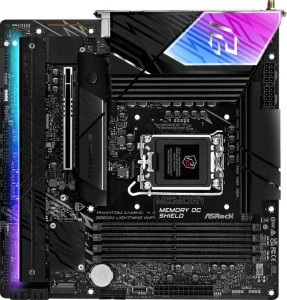
ASRock B860M Lightning WiFi
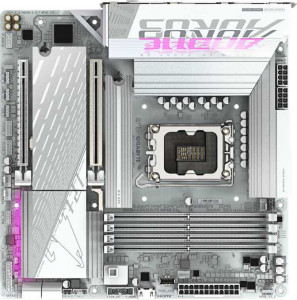
Gigabyte B860M Aorus Elite WiFi6E Ice

ASRock B860M Lightning WiFi Gigabyte B860M Aorus Elite WiFi6E Ice

Overview

Choosing between the ASRock B860M Lightning WiFi and the Gigabyte B860M Aorus Elite WiFi6E Ice is no simple task. Both are Micro-ATX motherboards sharing the B860 chipset, LGA 1851 socket, Wi-Fi 6E, DDR5 support, Thunderbolt 4, and USB 4 — a remarkably strong common foundation. Yet they diverge in notable ways across memory speeds, storage connectivity, and expansion options. This head-to-head comparison walks through every key specification to help you decide which board is the right fit for your build.

Common Features

  • Both boards use the LGA 1851 CPU socket.
  • Both boards feature the B860 chipset.
  • Both boards have a Micro-ATX form factor.
  • Wi-Fi is supported on both boards, covering Wi-Fi 4 (802.11n), Wi-Fi 5 (802.11ac), Wi-Fi 6 (802.11ax), and Wi-Fi 6E (802.11ax).
  • Bluetooth 5.3 is available on both boards.
  • Both boards include an HDMI 2.1 port.
  • Both boards support a maximum of 256GB of RAM.
  • Both boards have 4 memory slots.
  • Both boards use DDR5 memory.
  • Both boards operate with 2 memory channels.
  • ECC memory is not supported on either board.
  • Both boards have 2 USB 3.2 Gen 2 Type-A ports.
  • Both boards have 4 USB 3.2 Gen 1 Type-A ports.
  • Neither board has any USB 3.2 Gen 2 Type-C ports.
  • Neither board has any USB 3.2 Gen 1 Type-C ports.
  • Neither board has any USB 3.2 Gen 2x2 ports.
  • Both boards have 1 USB 4 40Gbps port.
  • Both boards have 1 Thunderbolt 4 port.
  • Both boards provide 2 USB 3.2 Gen 1 ports through expansion.
  • Both boards provide 1 USB-C 3.2 Gen 2 port through expansion.
  • Both boards provide 4 USB 2.0 ports through expansion.
  • Both boards have 4 SATA 3 connectors.
  • Both boards provide 2 USB 3.0 ports through expansion.
  • Both boards include a TPM connector.
  • Neither board has a U.2 socket.
  • Neither board has an mSATA connector.
  • Neither board has any PCIe 4.0 x16 slots.
  • Both boards have 1 PCIe 5.0 x16 slot.
  • Neither board has any PCIe 3.0 x16, PCIe x1, PCI, PCIe 2.0 x16, or PCIe x8 slots.
  • Both boards support 7.1 audio channels.
  • Both boards include an S/PDIF Out port.
  • Both boards have 2 audio connectors.
  • Both boards support RAID 0, RAID 1, RAID 5, and RAID 10 (1+0).
  • RAID 0+1 is not supported on either board.

Main Differences

  • Maximum native RAM speed is 5600 MHz on ASRock B860M Lightning WiFi and 6400 MHz on Gigabyte B860M Aorus Elite WiFi6E Ice.
  • Maximum overclocked RAM speed is 8666 MHz on ASRock B860M Lightning WiFi and 9200 MHz on Gigabyte B860M Aorus Elite WiFi6E Ice.
  • USB 2.0 rear ports total 2 on ASRock B860M Lightning WiFi and 4 on Gigabyte B860M Aorus Elite WiFi6E Ice.
  • Fan headers number 7 on ASRock B860M Lightning WiFi and 6 on Gigabyte B860M Aorus Elite WiFi6E Ice.
  • M.2 sockets total 4 on ASRock B860M Lightning WiFi and 3 on Gigabyte B860M Aorus Elite WiFi6E Ice.
  • A PCIe x4 slot is present on Gigabyte B860M Aorus Elite WiFi6E Ice but not available on ASRock B860M Lightning WiFi.
Specs Comparison
ASRock B860M Lightning WiFi

ASRock B860M Lightning WiFi

Gigabyte B860M Aorus Elite WiFi6E Ice

Gigabyte B860M Aorus Elite WiFi6E Ice

General info:
CPU socket LGA 1851 LGA 1851
chipset B860 B860
form factor Micro-ATX Micro-ATX
release date January 2025 January 2025
supports Wi-Fi
Wi-Fi version Wi-Fi 4 (802.11n), Wi-Fi 5 (802.11ac), Wi-Fi 6 (802.11ax), Wi-Fi 6E (802.11ax) Wi-Fi 4 (802.11n), Wi-Fi 5 (802.11ac), Wi-Fi 6 (802.11ax), Wi-Fi 6E (802.11ax)
Has Bluetooth
Bluetooth version 5.3 5.3
HDMI version HDMI 2.1 HDMI 2.1
Easy to overclock
has RGB lighting
Easy to reset BIOS
Has dual BIOS
has aptX
CPU sockets 1 1
Has integrated graphics
warranty period 3 years 3 years
height 244 mm 244 mm
width 244 mm 244 mm
Has integrated CPU

In terms of general specifications, the ASRock B860M Lightning WiFi and the Gigabyte B860M Aorus Elite WiFi6E Ice are remarkably identical across every measured data point in this group. Both boards share the LGA 1851 socket, the B860 chipset, and a Micro-ATX form factor at exactly 244 × 244 mm — meaning they will fit the same cases and support the same Intel CPU lineup without distinction.

Connectivity features are also a perfect match: both offer Wi-Fi 6E (802.11ax) and Bluetooth 5.3, which in practical terms means fast, low-latency wireless connectivity on the 6 GHz band and stable peripheral pairing. Both include HDMI 2.1 for display output, support overclocking within B860 platform limits, feature RGB lighting, carry a dual BIOS for firmware recovery, and come with a 3-year warranty. Neither board offers easy BIOS reset, integrated graphics, an integrated CPU, or aptX audio — these are consistent omissions across both products.

Given that every single spec in this group is numerically and functionally identical, there is no advantage for either board based solely on this data. A buyer cannot differentiate these two products on general specifications alone and should look to other spec groups — such as memory support, expansion slots, or power delivery — to find meaningful distinctions.

Memory:
maximum memory amount 256GB 256GB
RAM speed (max) 5600 MHz 6400 MHz
overclocked RAM speed 8666 MHz 9200 MHz
memory slots 4 4
DDR memory version 5 5
memory channels 2 2
Supports ECC memory

Both boards share a solid DDR5 foundation: 4 memory slots, dual-channel architecture, a 256GB maximum capacity, and no ECC support — making them functionally equivalent for mainstream and enthusiast workloads. Where they diverge is in raw memory speed headroom.

The Gigabyte B860M Aorus Elite WiFi6E Ice pulls ahead on both native and overclocked memory frequencies. Its native ceiling of 6400 MHz versus 5600 MHz on the ASRock means the Gigabyte can run faster DDR5 kits at spec without relying on XMP/EXPO profiles. More notably, the overclocked ceiling reaches 9200 MHz compared to 8666 MHz on the ASRock — a gap of over 500 MHz that matters to memory enthusiasts and competitive overclockers pushing high-frequency kits.

For typical users running standard DDR5 kits in the 4800–6000 MHz range, this difference will be invisible in day-to-day use. However, for those pairing these boards with premium high-speed DDR5 modules, the Gigabyte holds a clear edge, offering more headroom both out-of-the-box and under extreme tuning conditions.

Ports:
USB 3.2 Gen 2 ports (USB-A) 2 2
USB 3.2 Gen 1 ports (USB-A) 4 4
USB 3.2 Gen 2 ports (USB-C) 0 0
USB 3.2 Gen 1 ports (USB-C) 0 0
USB 2.0 ports 2 4
USB 3.2 Gen 2x2 ports 0 0
USB 4 40Gbps ports 1 1
USB 4 20Gbps ports 0 0
Thunderbolt 4 ports 1 1
Thunderbolt 3 ports 0 0
has an HDMI output
DisplayPort outputs 1 1
RJ45 ports 1 1
Has USB Type-C
eSATA ports 0 0
DVI outputs 0 0
has a VGA connector
PS/2 ports 0 0

The rear I/O layout on these two boards is nearly a carbon copy of each other. Both offer the same high-speed USB lineup — 2× USB 3.2 Gen 2 (USB-A), 4× USB 3.2 Gen 1 (USB-A), a USB4 40Gbps port, and a Thunderbolt 4 port — alongside identical display outputs (HDMI and DisplayPort) and a single RJ45 ethernet jack. The presence of Thunderbolt 4 on both is particularly noteworthy for a budget-oriented chipset, enabling 40Gbps data transfers and daisy-chaining of compatible peripherals and displays.

The sole differentiator is the USB 2.0 count: the Gigabyte B860M Aorus Elite WiFi6E Ice provides 4 USB 2.0 ports versus just 2 on the ASRock. While USB 2.0 is a legacy standard unsuitable for fast storage, it remains relevant for low-bandwidth devices like keyboards, mice, and dongles — and having more of them means fewer hub dependencies in a fully populated setup.

Overall, the port selection is a near-tie, but the Gigabyte earns a marginal edge for users with many legacy USB peripherals. For everyone else, the practical rear I/O experience will be essentially identical.

Connectors:
USB 3.2 Gen 1 ports (through expansion) 2 2
USB-C 3.2 Gen 2 ports (through expansion) 1 1
USB 2.0 ports (through expansion) 4 4
SATA 3 connectors 4 4
fan headers 7 6
USB 3.0 ports (through expansion) 2 2
M.2 sockets 4 3
Has TPM connector
U.2 sockets 0 0
Has mSATA connector
SATA 2 connectors 0 0

Internal connectivity is where the ASRock B860M Lightning WiFi quietly pulls ahead. The shared baseline is strong for both boards — identical internal USB expansion headers, 4× SATA 3 connectors, and a TPM connector — but two specs break the tie in ASRock's favor: M.2 socket count and fan headers.

The ASRock offers 4 M.2 sockets versus 3 on the Gigabyte. On a Micro-ATX platform, that extra slot is genuinely meaningful — it allows a user to run, for example, a dedicated OS drive, a fast scratch or cache drive, and additional NVMe storage simultaneously, all without consuming any SATA ports. The Gigabyte's 3-slot configuration is still competitive, but users planning NVMe-heavy builds will hit its ceiling sooner. Similarly, the ASRock's 7 fan headers compared to 6 on the Gigabyte provides one additional point of thermal control — useful in compact cases where airflow management is more demanding.

These are not dramatic differences, but they are consistent and point in the same direction. For storage-intensive or thermally complex builds, the ASRock B860M Lightning WiFi holds a clear edge in internal expandability within this spec group.

Expansion slots:
PCIe 4.0 x16 slots 0 0
PCIe 5.0 x16 slots 1 1
PCIe 3.0 x16 slots 0 0
PCIe x1 slots 0 0
PCI slots 0 0
PCIe 2.0 x16 slots 0 0
PCIe x4 slots 0 1
PCIe x8 slots 0 0

Both boards lead with a single PCIe 5.0 x16 slot for the primary GPU — the current top-tier standard, delivering up to 128GB/s of bandwidth and full compatibility with the latest graphics cards and NVMe add-in cards. For the overwhelming majority of users building a single-GPU system, this shared slot is all that matters, and neither board compromises here.

The distinction lies in what sits alongside it. The Gigabyte B860M Aorus Elite WiFi6E Ice includes an additional PCIe x4 slot, which the ASRock entirely lacks. While an x4 slot won't host a second GPU meaningfully, it opens the door for practical expansion: capture cards, 10GbE network adapters, PCIe SSD expansion cards, or other add-in peripherals that would otherwise compete for the primary x16 slot.

For a single-purpose gaming or workstation build, this difference is negligible. But for users who anticipate adding specialized PCIe cards down the line, the Gigabyte holds a clear and practical advantage — that extra slot adds genuine flexibility without any trade-off visible in this spec group.

Audio:
audio channels 7.1 7.1
Has S/PDIF Out port
audio connectors 2 2

Audio specifications are an exact match across both boards. Each supports 7.1-channel surround sound, includes an S/PDIF optical output for connecting to external receivers or DACs, and provides 2 analog audio connectors on the rear I/O. This is a competent but restrained onboard audio implementation typical of motherboards at this tier.

The 7.1 channel support means both boards can drive a full surround sound speaker setup or pass through multichannel audio to an AV receiver via S/PDIF — relevant for home theater PC builds. The 2-connector rear audio layout is on the minimal side, meaning users with complex analog setups (simultaneous headphone and speaker switching, for instance) may find it limiting compared to boards with more jacks.

Since every data point in this group is identical, audio quality is a complete tie by the available specs. Neither board offers a measurable advantage here, and buyers with serious audio requirements should look beyond onboard specs — such as the audio codec used — to differentiate the two.

Storage:
Supports RAID 1
Supports RAID 10 (1+0)
Supports RAID 5
Supports RAID 0
Supports RAID 0+1

RAID support is identical on both boards. Each covers the four most practical configurations: RAID 0 for striped performance, RAID 1 for mirrored redundancy, RAID 5 for the balanced parity-based approach favored in small NAS-style setups, and RAID 10 for the combined speed and redundancy of a striped mirror. Neither board supports RAID 0+1, though this omission is inconsequential in practice — RAID 10 achieves the same outcome more efficiently and is the preferred standard.

The presence of RAID 5 is worth highlighting specifically: it requires a minimum of three drives and offers a good middle ground between storage efficiency and fault tolerance, making it useful for users who want data protection without sacrificing as much usable capacity as RAID 1 demands. Both boards supporting it equally means neither restricts more advanced storage configurations.

With no differences anywhere in this spec group, storage redundancy capability is a complete tie. Users with identical RAID needs will find no reason to favor one board over the other on this basis alone.

Comparison Summary & Verdict

Both boards are well-equipped B860 Micro-ATX options that share an impressive feature set, but their differences point each one toward a distinct type of builder. The ASRock B860M Lightning WiFi earns its place for storage-focused enthusiasts, offering four M.2 sockets and seven fan headers — giving a clear edge in drive capacity and cooling flexibility. The Gigabyte B860M Aorus Elite WiFi6E Ice, meanwhile, is the stronger choice for performance-oriented users, with a higher native RAM speed of 6400 MHz, overclocked memory support reaching 9200 MHz, an extra PCIe x4 slot, and four rear USB 2.0 ports. If raw memory throughput and expansion headroom are your priorities, the Gigabyte wins out. If you need more M.2 slots and tighter thermal control over your system, the ASRock is the smarter pick. Neither board is a clear overall winner — it all comes down to what your build demands most.

ASRock B860M Lightning WiFi
Buy ASRock B860M Lightning WiFi if...

Buy the ASRock B860M Lightning WiFi if you need maximum storage capacity, as it offers four M.2 sockets and seven fan headers for superior drive expansion and cooling control.

Gigabyte B860M Aorus Elite WiFi6E Ice
Buy Gigabyte B860M Aorus Elite WiFi6E Ice if...

Buy the Gigabyte B860M Aorus Elite WiFi6E Ice if memory performance is your top priority — it supports faster native and overclocked RAM speeds, adds a PCIe x4 slot, and provides more rear USB 2.0 ports.