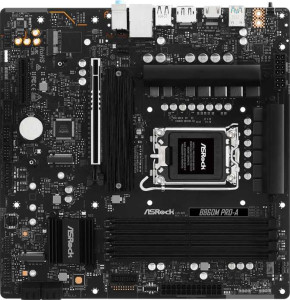
ASRock B860M Pro-A
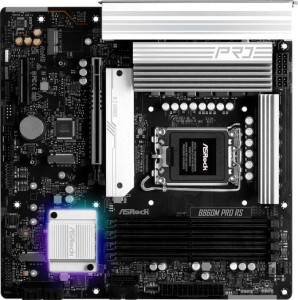
ASRock B860M Pro RS

ASRock B860M Pro-A ASRock B860M Pro RS

Overview

Welcome to our in-depth specification comparison between the ASRock B860M Pro-A and the ASRock B860M Pro RS. Both are Micro-ATX motherboards built on the B860 chipset with the LGA 1851 socket, sharing a remarkably similar foundation in terms of memory, storage, and expansion capabilities. Yet beneath that common ground lie meaningful distinctions around RGB aesthetics, ECC memory support, and internal USB expansion headers that could make one a better fit for your specific build than the other.

Common Features

  • Both motherboards use the LGA 1851 CPU socket.
  • Both motherboards feature the B860 chipset.
  • Both motherboards have a Micro-ATX form factor.
  • Wi-Fi support is not available on either motherboard.
  • Bluetooth is not available on either motherboard.
  • Both motherboards include HDMI 2.1.
  • Overclocking is easy on both motherboards.
  • Easy BIOS reset is not available on either motherboard.
  • Both motherboards support a maximum memory amount of 256GB.
  • Both motherboards support a maximum RAM speed of 5600 MHz.
  • Both motherboards support an overclocked RAM speed of 8666 MHz.
  • Both motherboards have 4 memory slots.
  • Both motherboards use DDR5 memory.
  • Both motherboards support 2 memory channels.
  • Both motherboards have 3 USB 3.2 Gen 1 ports (USB-A) and 2 USB 2.0 ports on the rear.
  • Both motherboards have 1 USB 3.2 Gen 2x2 port and no USB 3.2 Gen 2 (USB-A or USB-C) ports.
  • Both motherboards offer 4 USB 2.0 ports through expansion, 4 SATA 3 connectors, 6 fan headers, and 3 M.2 sockets.
  • A TPM connector is present on both motherboards.
  • Both motherboards have 1 PCIe 5.0 x16 slot and 1 PCIe x4 slot, with no PCIe 3.0/4.0/2.0 x16 or x1 slots.
  • Both motherboards support 7.1 audio channels with 3 audio connectors, and neither has an S/PDIF Out port.
  • Both motherboards support RAID 0, RAID 1, RAID 5, and RAID 10, but neither supports RAID 0+1.

Main Differences

  • RGB lighting is present on the ASRock B860M Pro RS but not available on the ASRock B860M Pro-A.
  • ECC memory support is present on the ASRock B860M Pro RS but not available on the ASRock B860M Pro-A.
  • USB 3.2 Gen 1 ports through expansion total 2 on the ASRock B860M Pro-A and 4 on the ASRock B860M Pro RS.
  • USB 3.0 ports through expansion total 2 on the ASRock B860M Pro-A and 4 on the ASRock B860M Pro RS.
Specs Comparison
ASRock B860M Pro-A

ASRock B860M Pro-A

ASRock B860M Pro RS

ASRock B860M Pro RS

General info:
CPU socket LGA 1851 LGA 1851
chipset B860 B860
form factor Micro-ATX Micro-ATX
release date January 2025 January 2025
supports Wi-Fi
Has Bluetooth
HDMI version HDMI 2.1 HDMI 2.1
Easy to overclock
has RGB lighting
Easy to reset BIOS
Has dual BIOS
CPU sockets 1 1
Has integrated graphics
warranty period 3 years 3 years
height 244 mm 244 mm
width 244 mm 244 mm
Has integrated CPU

The ASRock B860M Pro-A and ASRock B860M Pro RS share an almost identical general profile: both use the LGA 1851 socket with the B860 chipset, adopt the compact Micro-ATX form factor at 244 × 244 mm, and carry the same 3-year warranty. Neither board includes integrated Wi-Fi, Bluetooth, or an integrated CPU, and both support HDMI 2.1 for display output. Critically for budget builders, both retain dual BIOS and are rated as easy to overclock — meaningful value-adds on a mid-range chipset.

The sole differentiator in this group is RGB lighting: the Pro RS includes it, while the Pro-A does not. In practical terms, this is purely cosmetic — RGB has zero impact on performance or thermals. However, for builders assembling a visually themed system with other RGB components, the Pro RS offers native lighting integration without requiring an add-in controller.

For this spec group, the two boards are functionally tied in every meaningful technical category. The Pro RS holds a minor aesthetic edge thanks to RGB support, but buyers who prioritize substance over style will find no reason to favour one over the other based on general specs alone.

Memory:
maximum memory amount 256GB 256GB
RAM speed (max) 5600 MHz 5600 MHz
overclocked RAM speed 8666 MHz 8666 MHz
memory slots 4 4
DDR memory version 5 5
memory channels 2 2
Supports ECC memory

The ASRock B860M Pro-A and ASRock B860M Pro RS have identical memory specifications in many areas. Both motherboards support a maximum memory amount of 256GB and can handle RAM speeds up to 5600 MHz. When overclocked, both boards can achieve an overclocked RAM speed of 8666 MHz. Additionally, both models feature 4 memory slots and support DDR5 memory with dual-channel configuration.

However, there is a difference when it comes to ECC memory support. The ASRock B860M Pro-A does not support ECC memory, while the ASRock B860M Pro RS does provide support for ECC memory, which may be important for users seeking added error correction and stability for critical workloads.

In summary, aside from the inclusion of ECC memory support on the Pro RS model, the memory specifications of the two motherboards are virtually identical, offering similar maximum capacity, speeds, and configuration options.

Ports:
USB 3.2 Gen 2 ports (USB-A) 0 0
USB 3.2 Gen 1 ports (USB-A) 3 3
USB 3.2 Gen 2 ports (USB-C) 0 0
USB 3.2 Gen 1 ports (USB-C) 0 0
USB 2.0 ports 2 2
USB 3.2 Gen 2x2 ports 1 1
USB 4 40Gbps ports 0 0
USB 4 20Gbps ports 0 0
Thunderbolt 4 ports 0 0
Thunderbolt 3 ports 0 0
has an HDMI output
DisplayPort outputs 1 1
RJ45 ports 1 1
Has USB Type-C
eSATA ports 0 0
DVI outputs 0 0
has a VGA connector
PS/2 ports 0 0

The ASRock B860M Pro-A and ASRock B860M Pro RS have identical port configurations. Both motherboards feature 3 USB 3.2 Gen 1 ports (USB-A), 2 USB 2.0 ports, and 1 USB 3.2 Gen 2x2 port. They also both have 1 HDMI output, 1 DisplayPort output, and 1 RJ45 port for network connectivity. Additionally, both boards support USB Type-C, but neither includes any USB 3.2 Gen 2 or USB 4 ports, nor Thunderbolt 3 or 4 ports.

Neither motherboard offers eSATA, DVI, or PS/2 ports, and both lack a VGA connector. In summary, the port layouts of the ASRock B860M Pro-A and ASRock B860M Pro RS are identical, with no differences in available USB, video, or networking ports.

Connectors:
USB 3.2 Gen 1 ports (through expansion) 2 4
USB 2.0 ports (through expansion) 4 4
SATA 3 connectors 4 4
fan headers 6 6
USB 3.0 ports (through expansion) 2 4
M.2 sockets 3 3
Has TPM connector
U.2 sockets 0 0
Has mSATA connector
SATA 2 connectors 0 0

The ASRock B860M Pro-A and ASRock B860M Pro RS have similar connector options, with both offering 4 SATA 3 connectors and 6 fan headers. They also feature 3 M.2 sockets, a TPM connector, and 0 U.2 sockets. Both models lack a mSATA connector and do not provide any SATA 2 connectors.

The primary difference lies in the number of USB ports available through expansion. The Pro-A model offers 2 USB 3.2 Gen 1 ports and 2 USB 3.0 ports, while the Pro RS model provides 4 USB 3.2 Gen 1 ports and 4 USB 3.0 ports. The Pro RS thus offers more expansion options for USB devices.

In conclusion, while the two motherboards are largely identical in terms of core connectors, the ASRock B860M Pro RS has more USB expansion ports compared to the ASRock B860M Pro-A.

Expansion slots:
PCIe 4.0 x16 slots 0 0
PCIe 5.0 x16 slots 1 1
PCIe 3.0 x16 slots 0 0
PCIe x1 slots 0 0
PCI slots 0 0
PCIe 2.0 x16 slots 0 0
PCIe x4 slots 1 1
PCIe x8 slots 0 0

The ASRock B860M Pro-A and ASRock B860M Pro RS have identical expansion slot configurations. Both motherboards feature a single PCIe 5.0 x16 slot and a PCIe x4 slot, with no PCIe 4.0 x16, PCIe 3.0 x16, or PCIe 2.0 x16 slots. Neither model includes any PCIe x1 or PCI slots, nor do they offer any PCIe x8 slots.

In summary, the expansion slots for both the Pro-A and Pro RS are the same, providing the same number and types of PCIe slots for expansion.

Audio:
audio channels 7.1 7.1
Has S/PDIF Out port
audio connectors 3 3

Both the ASRock B860M Pro-A and ASRock B860M Pro RS offer identical audio specifications. They both support 7.1 audio channels, providing a high-quality audio experience. Neither model includes an S/PDIF Out port. Additionally, both motherboards are equipped with 3 audio connectors, offering standard connectivity options for audio devices.

In conclusion, the audio features of the ASRock B860M Pro-A and ASRock B860M Pro RS are the same, with no differences in the number of channels, connectors, or additional ports.

Storage:
Supports RAID 1
Supports RAID 10 (1+0)
Supports RAID 5
Supports RAID 0
Supports RAID 0+1

Both the ASRock B860M Pro-A and ASRock B860M Pro RS support the same RAID configurations. They both support RAID 1, RAID 10 (1+0), RAID 5, and RAID 0, but neither model supports RAID 0+1. This provides users with a variety of options for configuring storage redundancy and performance.

In summary, the storage capabilities and RAID support are identical between the ASRock B860M Pro-A and ASRock B860M Pro RS, with no differences in the RAID options available on either motherboard.

Comparison Summary & Verdict

After a thorough review of their specifications, the ASRock B860M Pro-A and ASRock B860M Pro RS stand as near-identical platforms in the areas that matter most to the majority of builders: DDR5 support up to 256GB across four slots, a PCIe 5.0 x16 slot, three M.2 sockets, and comprehensive RAID support. The differences, while few, are targeted and meaningful. The Pro RS pulls ahead with RGB lighting, ECC memory support, and a doubled set of internal USB 3.2 Gen 1 expansion headers, making it the stronger choice for workstation-oriented builds or those wanting more internal USB connectivity. The Pro-A, meanwhile, delivers the same core performance platform in a no-frills package that suits budget-conscious builders who have no need for those extras.

ASRock B860M Pro-A
Buy ASRock B860M Pro-A if...

Buy the ASRock B860M Pro-A if you want a capable B860 Micro-ATX motherboard without paying for RGB lighting or ECC memory support you do not need.

ASRock B860M Pro RS
Buy ASRock B860M Pro RS if...

Buy the ASRock B860M Pro RS if you need ECC memory support for a workstation build, want RGB lighting, or require more internal USB 3.2 Gen 1 expansion headers for a heavily connected case.