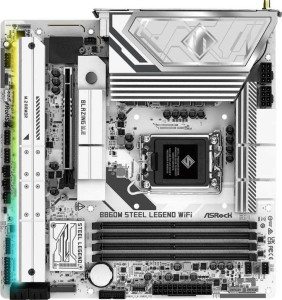
ASRock B860M Steel Legend WiFi
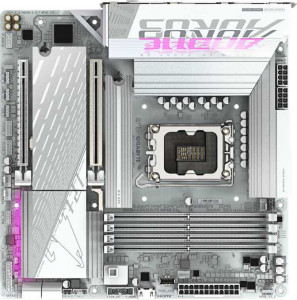
Gigabyte B860M Aorus Elite WiFi6E Ice

ASRock B860M Steel Legend WiFi Gigabyte B860M Aorus Elite WiFi6E Ice

Overview

Welcome to our detailed specification comparison between the ASRock B860M Steel Legend WiFi and the Gigabyte B860M Aorus Elite WiFi6E Ice. Both boards share the same Micro-ATX form factor, LGA 1851 socket, and B860 chipset, making this a close contest. The key battlegrounds lie in memory performance, storage expansion via M.2 slots, and a handful of connectivity differences that could tip the scales depending on your build priorities.

Common Features

  • Both boards use the LGA 1851 CPU socket.
  • Both boards are built on the B860 chipset.
  • Both boards come in the Micro-ATX form factor.
  • Wi-Fi is available on both boards, supporting Wi-Fi 4 (802.11n), Wi-Fi 5 (802.11ac), Wi-Fi 6 (802.11ax), and Wi-Fi 6E (802.11ax).
  • Bluetooth 5.3 is available on both boards.
  • Both boards include an HDMI 2.1 port.
  • Both boards support up to 256GB of maximum memory.
  • Both boards have 4 memory slots.
  • Both boards use DDR5 memory.
  • Both boards support 2 memory channels.
  • ECC memory is not supported on either board.
  • Both boards provide 2 USB 3.2 Gen 2 ports (USB-A).
  • Both boards provide 4 USB 3.2 Gen 1 ports (USB-A).
  • Neither board has USB 3.2 Gen 2 ports (USB-C) or USB 3.2 Gen 1 ports (USB-C).
  • Both boards include 1 USB 4 40Gbps port and 1 Thunderbolt 4 port.
  • Both boards have 4 SATA 3 connectors.
  • A TPM connector is present on both boards.
  • Both boards feature a PCIe 5.0 x16 slot and no PCIe 4.0 x16 or PCIe 3.0 x16 slots.
  • Both boards support 7.1 audio channels with an S/PDIF Out port and 2 audio connectors.
  • Both boards support RAID 0, RAID 1, RAID 5, and RAID 10 (1+0), but neither supports RAID 0+1.

Main Differences

  • Maximum native RAM speed is 5600 MHz on ASRock B860M Steel Legend WiFi and 6400 MHz on Gigabyte B860M Aorus Elite WiFi6E Ice.
  • Maximum overclocked RAM speed is 8666 MHz on ASRock B860M Steel Legend WiFi and 9200 MHz on Gigabyte B860M Aorus Elite WiFi6E Ice.
  • USB 2.0 rear ports total 2 on ASRock B860M Steel Legend WiFi and 4 on Gigabyte B860M Aorus Elite WiFi6E Ice.
  • Fan headers total 7 on ASRock B860M Steel Legend WiFi and 6 on Gigabyte B860M Aorus Elite WiFi6E Ice.
  • M.2 sockets total 4 on ASRock B860M Steel Legend WiFi and 3 on Gigabyte B860M Aorus Elite WiFi6E Ice.
  • A PCIe x4 expansion slot is present on Gigabyte B860M Aorus Elite WiFi6E Ice but not available on ASRock B860M Steel Legend WiFi.
Specs Comparison
ASRock B860M Steel Legend WiFi

ASRock B860M Steel Legend WiFi

Gigabyte B860M Aorus Elite WiFi6E Ice

Gigabyte B860M Aorus Elite WiFi6E Ice

General info:
CPU socket LGA 1851 LGA 1851
chipset B860 B860
form factor Micro-ATX Micro-ATX
release date January 2025 January 2025
supports Wi-Fi
Wi-Fi version Wi-Fi 4 (802.11n), Wi-Fi 5 (802.11ac), Wi-Fi 6 (802.11ax), Wi-Fi 6E (802.11ax) Wi-Fi 4 (802.11n), Wi-Fi 5 (802.11ac), Wi-Fi 6 (802.11ax), Wi-Fi 6E (802.11ax)
Has Bluetooth
Bluetooth version 5.3 5.3
HDMI version HDMI 2.1 HDMI 2.1
Easy to overclock
has RGB lighting
Easy to reset BIOS
Has dual BIOS
has aptX
CPU sockets 1 1
Has integrated graphics
warranty period 3 years 3 years
height 244 mm 244 mm
width 244 mm 244 mm
Has integrated CPU

In terms of general specifications, the ASRock B860M Steel Legend WiFi and the Gigabyte B860M Aorus Elite WiFi6E Ice are remarkably alike. Both boards share the same LGA 1851 socket and B860 chipset, target the same Micro-ATX form factor at identical 244 × 244 mm dimensions, and carry identical wireless credentials — Wi-Fi 6E (covering 802.11n/ac/ax) paired with Bluetooth 5.3. Users building a compact system with modern wireless connectivity will find no practical difference between them on this front.

Other shared traits reinforce how closely matched these two are: both support easy overclocking, feature RGB lighting, include dual BIOS for firmware recovery, output video via HDMI 2.1, and come backed by a 3-year warranty. Neither board has integrated graphics or an integrated CPU, and neither supports aptX audio or offers an easy BIOS reset mechanism — the absence of that last feature is a minor usability note worth keeping in mind for less experienced builders.

Based strictly on the general info specs provided, these two motherboards are in a complete tie. Every single specification in this category is identical. The decision between them will need to rest entirely on other spec groups — such as memory support, connectivity, power delivery, or pricing — rather than anything in their general profiles.

Memory:
maximum memory amount 256GB 256GB
RAM speed (max) 5600 MHz 6400 MHz
overclocked RAM speed 8666 MHz 9200 MHz
memory slots 4 4
DDR memory version 5 5
memory channels 2 2
Supports ECC memory

The memory story between these two boards is largely one of shared foundations with a meaningful speed gap at the top. Both the ASRock B860M Steel Legend WiFi and the Gigabyte B860M Aorus Elite WiFi6E Ice offer 4 DDR5 slots, a 256GB capacity ceiling, and dual-channel operation — all the hallmarks of a well-specified modern platform. For the vast majority of users, these shared traits matter far more than any difference between them.

Where they diverge is in memory speed headroom. The Gigabyte board supports a native maximum of 6400 MHz versus the ASRock's 5600 MHz, and that gap widens further when pushing overclocked profiles: 9200 MHz on the Gigabyte compared to 8666 MHz on the ASRock. In practice, faster memory speeds reduce latency and improve bandwidth-sensitive workloads — think large data sets, video editing timelines, or memory-hungry creative applications. For gaming, the real-world delta between these speeds is typically modest, but for productivity-heavy or enthusiast use cases, the Gigabyte's higher ceiling is a tangible advantage.

The Gigabyte B860M Aorus Elite WiFi6E Ice holds a clear edge in this category strictly on the basis of its higher native and overclocked memory speeds. Neither board supports ECC memory, so workstation-oriented users have no differentiation there. If raw memory performance or future-proofing with fast DDR5 kits matters to you, the Gigabyte is the stronger choice here.

Ports:
USB 3.2 Gen 2 ports (USB-A) 2 2
USB 3.2 Gen 1 ports (USB-A) 4 4
USB 3.2 Gen 2 ports (USB-C) 0 0
USB 3.2 Gen 1 ports (USB-C) 0 0
USB 2.0 ports 2 4
USB 3.2 Gen 2x2 ports 0 0
USB 4 40Gbps ports 1 1
USB 4 20Gbps ports 0 0
Thunderbolt 4 ports 1 1
Thunderbolt 3 ports 0 0
has an HDMI output
DisplayPort outputs 1 1
RJ45 ports 1 1
Has USB Type-C
eSATA ports 0 0
DVI outputs 0 0
has a VGA connector
PS/2 ports 0 0

Port selection on both boards is strikingly similar, and the high-end connectivity on offer is genuinely impressive for Micro-ATX builds. Each board provides a USB 4 40Gbps port and a Thunderbolt 4 port — a combination that enables blazing-fast external storage, daisy-chaining high-resolution displays, and connecting eGPUs without compromise. Add to that a matching set of 2 USB 3.2 Gen 2 and 4 USB 3.2 Gen 1 Type-A ports, and day-to-day peripheral connectivity is well covered on both.

The one place these boards diverge is in legacy USB 2.0 availability. The Gigabyte B860M Aorus Elite WiFi6E Ice offers 4 USB 2.0 ports at the rear, while the ASRock B860M Steel Legend WiFi provides only 2. This matters more than it might first appear — USB 2.0 ports are ideal for low-bandwidth, always-on devices like keyboards, mice, wireless receivers, or smart home dongles, since they free up faster ports for storage and high-speed peripherals. Having more of them reduces the need for hubs in a fully populated desk setup.

Video output parity is complete — both boards include HDMI and a DisplayPort output, useful for systems pairing integrated or discrete graphics with a multi-monitor setup. Overall, the Gigabyte holds a narrow but practical edge in this category solely due to its doubled USB 2.0 port count, which gives users greater flexibility when connecting multiple low-speed peripherals simultaneously.

Connectors:
USB 3.2 Gen 1 ports (through expansion) 2 2
USB-C 3.2 Gen 2 ports (through expansion) 1 1
USB 2.0 ports (through expansion) 4 4
SATA 3 connectors 4 4
fan headers 7 6
USB 3.0 ports (through expansion) 2 2
M.2 sockets 4 3
Has TPM connector
U.2 sockets 0 0
Has mSATA connector
SATA 2 connectors 0 0

Internal connectivity is nearly identical across these two boards, with shared specs covering 4 SATA 3 connectors, matching internal USB expansion headers, and a TPM connector on both — a feature increasingly relevant for Windows 11 compliance and security-conscious builds. The internal USB header lineup is also a dead heat, offering the same front-panel USB 2.0, USB 3.0, and USB-C 3.2 Gen 2 expansion options.

Two differences stand out, however. The ASRock B860M Steel Legend WiFi includes 4 M.2 sockets versus 3 on the Gigabyte — a meaningful distinction for storage-hungry builders. That extra M.2 slot means one additional NVMe SSD without occupying any SATA ports, which is particularly valuable in a Micro-ATX chassis where physical space for 2.5″ or 3.5″ drives is already constrained. Similarly, the ASRock provides 7 fan headers compared to the Gigabyte's 6. In a thermally demanding build with multiple case fans, a CPU cooler, and an AIO pump, that extra header can eliminate the need for a fan splitter or hub entirely.

The ASRock B860M Steel Legend WiFi takes a clear win in this category. The additional M.2 slot and extra fan header are both practically useful advantages — especially for builders aiming to maximize storage capacity or maintain clean, hub-free cooling setups within the tighter confines of a Micro-ATX case.

Expansion slots:
PCIe 4.0 x16 slots 0 0
PCIe 5.0 x16 slots 1 1
PCIe 3.0 x16 slots 0 0
PCIe x1 slots 0 0
PCI slots 0 0
PCIe 2.0 x16 slots 0 0
PCIe x4 slots 0 1
PCIe x8 slots 0 0

Expansion slot options are minimal on both boards — as is typical for Micro-ATX designs — but both deliver where it counts most: a single PCIe 5.0 x16 slot for the primary GPU. PCIe 5.0 doubles the bandwidth of PCIe 4.0, and while current graphics cards don't yet saturate even PCIe 4.0 lanes, this slot ensures the board is well-positioned for next-generation GPU releases without becoming a bottleneck.

The one differentiator here is the Gigabyte B860M Aorus Elite WiFi6E Ice's additional PCIe x4 slot, which the ASRock lacks entirely. That slot opens up meaningful expansion possibilities — a dedicated PCIe NVMe controller card, a high-speed capture card, a 10GbE networking adapter, or other peripherals that benefit from direct PCIe bandwidth rather than USB. For a builder who has already filled their M.2 sockets or needs a specific add-in card, this slot can be the difference between a capable and a limiting build.

The Gigabyte holds the edge in this category. While neither board offers extensive slot real estate — a known trade-off of the Micro-ATX form factor — the extra PCIe x4 slot gives Gigabyte users a meaningful secondary expansion option that the ASRock simply cannot match.

Audio:
audio channels 7.1 7.1
Has S/PDIF Out port
audio connectors 2 2

Audio capabilities on both boards are identical across every provided data point. Each supports 7.1-channel surround sound output — the standard for immersive gaming and home-theater PC setups — alongside an S/PDIF optical output for connecting to external DACs, AV receivers, or soundbars via a digital lossless signal. Both also offer the same count of 2 analog audio connectors at the rear panel.

The S/PDIF output is worth noting for audiophiles or home-theater builders: it bypasses the motherboard's onboard audio circuitry entirely, passing a clean digital signal to a dedicated external device. This makes the quality of the onboard codec less of a concern for those users. For everyone else, the 7.1-channel analog output covers the needs of most headset and speaker configurations without any add-in card required.

This category is a complete tie. With every audio specification matching exactly, neither board offers any advantage over the other here. Buyers who prioritize audio quality beyond what the provided specs describe — such as the specific audio codec used — will need to look beyond this data set to differentiate the two.

Storage:
Supports RAID 1
Supports RAID 10 (1+0)
Supports RAID 5
Supports RAID 0
Supports RAID 0+1

RAID support is perfectly matched across both boards. Each offers RAID 0 (striping for maximum performance), RAID 1 (mirroring for redundancy), RAID 5 (distributed parity balancing speed and fault tolerance), and RAID 10 (a combined stripe-and-mirror configuration favored in performance-critical setups). Neither board supports RAID 0+1, though this omission is inconsequential in practice since RAID 10 delivers comparable benefits with generally superior fault tolerance.

For most consumer and prosumer builders, RAID 0 and RAID 1 cover the primary use cases — pure speed or data protection respectively. RAID 5 and RAID 10 cater to more advanced multi-drive configurations, such as small creative workstations or local NAS-style setups where both throughput and resilience matter. Having all four modes available on a Micro-ATX board is a solid offering either way.

With every supported RAID level identical on both boards, this category is a complete tie. Storage configuration flexibility will not be a differentiating factor in the decision between the ASRock B860M Steel Legend WiFi and the Gigabyte B860M Aorus Elite WiFi6E Ice.

Comparison Summary & Verdict

After examining all specifications, both boards are closely matched in their foundations, sharing PCIe 5.0 x16 support, DDR5 memory, Wi-Fi 6E, and Bluetooth 5.3. However, meaningful differences emerge in the details. The ASRock B860M Steel Legend WiFi stands out with 4 M.2 sockets and 7 fan headers, making it the stronger pick for storage-heavy or thermally demanding builds. The Gigabyte B860M Aorus Elite WiFi6E Ice counters with a higher native RAM speed of 6400 MHz, an overclocked ceiling of 9200 MHz, more USB 2.0 rear ports, and an extra PCIe x4 slot, suiting builders who prioritize memory performance and expansion flexibility. Neither board is a clear-cut winner — your choice should align with whether raw memory headroom or maximum storage and cooling control matters most to you.

ASRock B860M Steel Legend WiFi
Buy ASRock B860M Steel Legend WiFi if...

Choose the ASRock B860M Steel Legend WiFi if you need maximum storage expansion with 4 M.2 sockets and more granular cooling control thanks to its 7 fan headers.

Gigabyte B860M Aorus Elite WiFi6E Ice
Buy Gigabyte B860M Aorus Elite WiFi6E Ice if...

Choose the Gigabyte B860M Aorus Elite WiFi6E Ice if you want higher native and overclocked RAM speeds, more USB 2.0 rear ports, and an additional PCIe x4 slot for greater expansion flexibility.