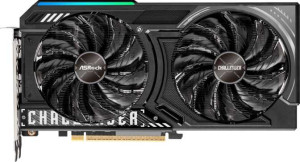
ASRock Radeon RX 9060 XT Challenger OC 8GB
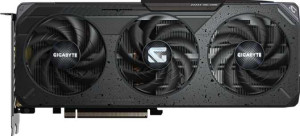
Gigabyte Radeon RX 9060 XT Gaming OC 16GB

ASRock Radeon RX 9060 XT Challenger OC 8GB Gigabyte Radeon RX 9060 XT Gaming OC 16GB

Common Features

  • Both products have a GPU memory speed of 2518 MHz.
  • Both products have 2048 shading units.
  • Both products have 128 texture mapping units (TMUs).
  • Both products have 64 render output units (ROPs).
  • Both products support double precision floating point (DPFP).
  • Both products have an effective memory speed of 20000 MHz.
  • Both products have a maximum memory bandwidth of 322.3 GB/s.
  • Both products use GDDR6 memory.
  • Both products have a 128-bit memory bus width.
  • Both products support ECC memory.
  • Both products support DirectX 12 Ultimate.
  • Both products support OpenGL version 4.6.
  • Both products support OpenCL version 2.2.
  • Both products support multi-display technology.
  • Both products support ray tracing.
  • Both products support 3D.
  • Both products have one HDMI output with HDMI 2.1b.
  • Both products have two DisplayPort outputs.
  • Both products use RDNA 4.0 GPU architecture.
  • Both products have a thermal design power (TDP) of 160W.

Main Differences

  • GPU clock speed is 1700 MHz on ASRock Radeon RX 9060 XT Challenger OC 8GB and 1900 MHz on Gigabyte Radeon RX 9060 XT Gaming OC 16GB.
  • GPU turbo is 3290 MHz on ASRock Radeon RX 9060 XT Challenger OC 8GB and 3320 MHz on Gigabyte Radeon RX 9060 XT Gaming OC 16GB.
  • Pixel rate is 210.6 GPixel/s on ASRock Radeon RX 9060 XT Challenger OC 8GB and 212.5 GPixel/s on Gigabyte Radeon RX 9060 XT Gaming OC 16GB.
  • Floating-point performance is 26.95 TFLOPS on ASRock Radeon RX 9060 XT Challenger OC 8GB and 27.2 TFLOPS on Gigabyte Radeon RX 9060 XT Gaming OC 16GB.
  • Texture rate is 421.1 GTexels/s on ASRock Radeon RX 9060 XT Challenger OC 8GB and 425 GTexels/s on Gigabyte Radeon RX 9060 XT Gaming OC 16GB.
  • VRAM is 8GB on ASRock Radeon RX 9060 XT Challenger OC 8GB and 16GB on Gigabyte Radeon RX 9060 XT Gaming OC 16GB.
  • The width is 249 mm on ASRock Radeon RX 9060 XT Challenger OC 8GB and 281 mm on Gigabyte Radeon RX 9060 XT Gaming OC 16GB.
  • The height is 132 mm on ASRock Radeon RX 9060 XT Challenger OC 8GB and 118 mm on Gigabyte Radeon RX 9060 XT Gaming OC 16GB.
Specs Comparison
ASRock Radeon RX 9060 XT Challenger OC 8GB

ASRock Radeon RX 9060 XT Challenger OC 8GB

Gigabyte Radeon RX 9060 XT Gaming OC 16GB

Gigabyte Radeon RX 9060 XT Gaming OC 16GB

Performance:
GPU clock speed 1700 MHz 1900 MHz
GPU turbo 3290 MHz 3320 MHz
pixel rate 210.6 GPixel/s 212.5 GPixel/s
floating-point performance 26.95 TFLOPS 27.2 TFLOPS
texture rate 421.1 GTexels/s 425 GTexels/s
GPU memory speed 2518 MHz 2518 MHz
shading units 2048 2048
texture mapping units (TMUs) 128 128
render output units (ROPs) 64 64
Has Double Precision Floating Point (DPFP)

The ASRock Radeon RX 9060 XT Challenger OC 8GB and the Gigabyte Radeon RX 9060 XT Gaming OC 16GB both offer similar core specifications, but with a few key differences. The GPU clock speeds are slightly higher on the Gigabyte model, with a base clock of 1900 MHz compared to ASRock's 1700 MHz. The GPU turbo speeds are also slightly faster on the Gigabyte card, at 3320 MHz versus 3290 MHz for the ASRock card.

Both cards deliver impressive pixel and texture rates. The ASRock card has a pixel rate of 210.6 GPixel/s, while the Gigabyte card is marginally ahead with a pixel rate of 212.5 GPixel/s. The texture rates are also similar, with ASRock at 421.1 GTexels/s and Gigabyte at 425 GTexels/s.

When it comes to floating-point performance, the ASRock card offers 26.95 TFLOPS, while the Gigabyte card delivers 27.2 TFLOPS, again showing a small edge. Both products feature the same GPU memory speed of 2518 MHz, the same number of shading units (2048), texture mapping units (128), and render output units (64). Additionally, both cards support Double Precision Floating Point (DPFP), though only the ASRock card specifically notes this feature.

Memory:
effective memory speed 20000 MHz 20000 MHz
maximum memory bandwidth 322.3 GB/s 322.3 GB/s
VRAM 8GB 16GB
GDDR version GDDR6 GDDR6
memory bus width 128-bit 128-bit
Supports ECC memory

The ASRock Radeon RX 9060 XT Challenger OC 8GB and the Gigabyte Radeon RX 9060 XT Gaming OC 16GB both share several key memory specifications, but there are differences in their VRAM capacity. Both cards feature an effective memory speed of 20000 MHz, a maximum memory bandwidth of 322.3 GB/s, and use GDDR6 memory with a 128-bit memory bus width.

One notable difference is the VRAM. The ASRock card is equipped with 8GB of VRAM, while the Gigabyte card offers double that amount, with 16GB of VRAM. This gives the Gigabyte card a significant advantage in terms of memory capacity, which may be useful for tasks requiring larger memory resources.

Both products also support ECC memory, ensuring error-correction capabilities for more reliable performance in memory-intensive tasks. Aside from the VRAM difference, the two cards are identical in all other memory-related specs.

Features:
DirectX version DirectX 12 Ultimate DirectX 12 Ultimate
OpenGL version 4.6 4.6
OpenCL version 2.2 2.2
Supports multi-display technology
supports ray tracing
Supports 3D
supports DLSS
has FSR4
has XeSS (XMX)
AMD SAM / Intel Resizable BAR AMD SAM AMD SAM
has LHR
has RGB lighting
supported displays 3 3

The ASRock Radeon RX 9060 XT Challenger OC 8GB and the Gigabyte Radeon RX 9060 XT Gaming OC 16GB share nearly identical features. Both cards support DirectX 12 Ultimate, OpenGL 4.6, and OpenCL 2.2, providing excellent compatibility with modern applications and games. They also both support multi-display technology, ray tracing, and 3D features.

When it comes to additional technologies, neither card supports DLSS, but both support FSR4. Neither card supports XeSS (XMX), and both cards feature RGB lighting. Both also support AMD SAM (Smart Access Memory) and Intel Resizable BAR for enhanced performance with compatible systems. Both models are equipped with 3 supported displays and do not have LHR (Lite Hash Rate) functionality.

As a result, the two cards are very similar in terms of their feature set, with no significant differences between them in this category. The only difference between the two is the size of the VRAM, which was addressed in the previous comparison, but in terms of features, both cards are essentially the same.

Ports:
has an HDMI output
HDMI ports 1 1
HDMI version HDMI 2.1b HDMI 2.1b
DisplayPort outputs 2 2
USB-C ports 0 0
DVI outputs 0 0
mini DisplayPort outputs 0 0

The ASRock Radeon RX 9060 XT Challenger OC 8GB and the Gigabyte Radeon RX 9060 XT Gaming OC 16GB are identical in terms of port configuration. Both cards feature 1 HDMI output, with HDMI version 2.1b support. They also each include 2 DisplayPort outputs, and neither card has USB-C, DVI, or mini DisplayPort outputs.

With the same HDMI version and number of DisplayPort outputs, the two cards offer the same video output options, and users will experience no differences in terms of connectivity between the two products.

In conclusion, the port setups on both cards are exactly the same, with no distinctions in functionality or the number of outputs available for display connections.

General info:
GPU architecture RDNA 4.0 RDNA 4.0
release date June 2025 June 2025
Thermal Design Power (TDP) 160W 160W
PCI Express (PCIe) version 5 5
semiconductor size 4 nm 4 nm
number of transistors 29700 million 29700 million
Has air-water cooling
width 249 mm 281 mm
height 132 mm 118 mm

The ASRock Radeon RX 9060 XT Challenger OC 8GB and the Gigabyte Radeon RX 9060 XT Gaming OC 16GB are nearly identical in terms of general specifications. Both cards use the RDNA 4.0 GPU architecture, feature a Thermal Design Power (TDP) of 160W, and support PCI Express version 5. The semiconductor size and the number of transistors are also the same, with both cards featuring a 4 nm process and 29,700 million transistors.

In terms of size, there is a noticeable difference. The ASRock card has a width of 249 mm and a height of 132 mm, while the Gigabyte card is slightly larger, measuring 281 mm in width and 118 mm in height. Despite these size differences, neither card includes air-water cooling.

Overall, the two cards are very similar in specifications, with the primary distinction being their physical dimensions.

Comparison Summary

This is a specification comparison between ASRock Radeon RX 9060 XT Challenger OC 8GB and Gigabyte Radeon RX 9060 XT Gaming OC 16GB. Both products share features such as a GPU memory speed of 2518 MHz, 2048 shading units, and support for DirectX 12 Ultimate. However, there are notable differences: the ASRock version has a GPU clock speed of 1700 MHz, while the Gigabyte version is slightly higher at 1900 MHz. The ASRock model comes with 8GB of VRAM, whereas the Gigabyte model has 16GB of VRAM. Additionally, the ASRock card is 249 mm wide, while the Gigabyte card is larger at 281 mm in width.