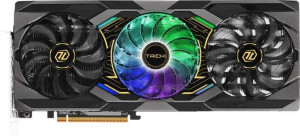
ASRock Radeon RX 9070 XT Taichi OC
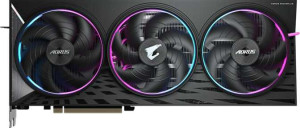
Gigabyte Aorus Radeon RX 9070 XT Elite

ASRock Radeon RX 9070 XT Taichi OC Gigabyte Aorus Radeon RX 9070 XT Elite

Overview

Welcome to our detailed spec comparison between the ASRock Radeon RX 9070 XT Taichi OC and the Gigabyte Aorus Radeon RX 9070 XT Elite. Both cards are built on the same RDNA 4.0 foundation and share identical core performance figures, yet they differ in ways that could matter depending on your setup. In this comparison, we examine their display output configurations and physical dimensions to help you decide which card fits your needs best.

Common Features

  • Both cards share a base GPU clock speed of 1870 MHz.
  • Both cards share a GPU turbo clock speed of 3100 MHz.
  • Both cards deliver a pixel rate of 396.8 GPixel/s.
  • Both cards deliver a floating-point performance of 50.79 TFLOPS.
  • Both cards deliver a texture rate of 793.6 GTexels/s.
  • Both cards have a GPU memory speed of 2518 MHz.
  • Both cards have 4096 shading units.
  • Both cards have 256 texture mapping units (TMUs).
  • Both cards have an effective memory speed of 20000 MHz.
  • Both cards have a maximum memory bandwidth of 644.6 GB/s.
  • Both cards come with 16GB of VRAM.
  • Both cards use GDDR6 memory on a 256-bit memory bus.
  • ECC memory is supported on both cards.
  • Both cards support DirectX 12 Ultimate.
  • Both cards support OpenGL 4.6.
  • Both cards support OpenCL 2.2.
  • Multi-display technology is supported on both cards.
  • Ray tracing is supported on both cards.
  • 3D support is available on both cards.
  • DLSS is not supported on either card.
  • FSR4 is supported on both cards.
  • Both cards include an HDMI output running at HDMI 2.1b.
  • Neither card includes USB-C ports, DVI outputs, or mini DisplayPort outputs.
  • Both cards are built on the RDNA 4.0 GPU architecture.
  • Both cards have a Thermal Design Power (TDP) of 304W.
  • Both cards use PCIe 5 and are manufactured on a 4 nm process node.
  • Both cards contain 53900 million transistors.
  • Air-water cooling is not available on either card.

Main Differences

  • HDMI port count is 1 on ASRock Radeon RX 9070 XT Taichi OC and 2 on Gigabyte Aorus Radeon RX 9070 XT Elite.
  • DisplayPort output count is 3 on ASRock Radeon RX 9070 XT Taichi OC and 2 on Gigabyte Aorus Radeon RX 9070 XT Elite.
  • Card width is 330 mm on ASRock Radeon RX 9070 XT Taichi OC and 339 mm on Gigabyte Aorus Radeon RX 9070 XT Elite.
  • Card height is 140 mm on ASRock Radeon RX 9070 XT Taichi OC and 136 mm on Gigabyte Aorus Radeon RX 9070 XT Elite.
Specs Comparison
ASRock Radeon RX 9070 XT Taichi OC

ASRock Radeon RX 9070 XT Taichi OC

Gigabyte Aorus Radeon RX 9070 XT Elite

Gigabyte Aorus Radeon RX 9070 XT Elite

Performance:
GPU clock speed 1870 MHz 1870 MHz
GPU turbo 3100 MHz 3100 MHz
pixel rate 396.8 GPixel/s 396.8 GPixel/s
floating-point performance 50.79 TFLOPS 50.79 TFLOPS
texture rate 793.6 GTexels/s 793.6 GTexels/s
GPU memory speed 2518 MHz 2518 MHz
shading units 4096 4096
texture mapping units (TMUs) 256 256
render output units (ROPs) 128 128
Has Double Precision Floating Point (DPFP)

When comparing the Performance specs of the ASRock Radeon RX 9070 XT Taichi OC and the Gigabyte Aorus Radeon RX 9070 XT Elite, the data tells a remarkably straightforward story: these two cards are built on an identical GPU configuration. Both share a base clock of 1870 MHz and a peak turbo of 3100 MHz, which is the frequency that matters most under sustained gaming loads. That 3100 MHz boost clock places both cards at the upper tier of the RX 9070 XT stack, meaning neither manufacturer has pulled ahead with a factory overclock advantage.

The deeper compute figures reinforce this parity. Both cards deliver 50.79 TFLOPS of floating-point performance and a texture rate of 793.6 GTexels/s, backed by the same 4096 shading units, 256 TMUs, and 128 ROPs. These are not rounding differences — they are identical silicon running at identical clocks. In practice, this means both cards will produce the same frame rates in rasterized games, the same throughput in GPU compute workloads, and the same rendering quality in content creation applications. The memory subsystem is equally matched at 2518 MHz, so memory bandwidth — a critical bottleneck in high-resolution and texture-heavy scenarios — is a non-factor in differentiating them.

The verdict for this group is an exact tie. No edge exists on either side based purely on performance specifications. Both cards support Double Precision Floating Point, which benefits scientific and professional compute tasks, but again this is shared equally. Buyers choosing between the Taichi OC and the Aorus Elite should look beyond raw performance — factors such as cooling design, acoustic profile, build quality, and price will be the true differentiators.
Memory:
effective memory speed 20000 MHz 20000 MHz
maximum memory bandwidth 644.6 GB/s 644.6 GB/s
VRAM 16GB 16GB
GDDR version GDDR6 GDDR6
memory bus width 256-bit 256-bit
Supports ECC memory

The memory configurations of the Taichi OC and the Aorus Elite are, once again, a perfect mirror of each other. Both cards carry 16GB of GDDR6 across a 256-bit bus, yielding a maximum bandwidth of 644.6 GB/s at an effective speed of 20000 MHz. That 16GB figure is particularly relevant today — it comfortably handles 4K texture packs, large AI model inference workloads, and demanding titles that have begun pushing beyond the 12GB threshold that constrained previous mid-to-high-end cards.

The 256-bit bus width is a meaningful architectural detail worth understanding. It strikes a balance between the narrower 192-bit buses found on more budget-oriented cards and the wider 384-bit configurations reserved for flagship products. Combined with GDDR6 at this speed, the resulting 644.6 GB/s of bandwidth is sufficient to keep the GPU's 4096 shading units well-fed in virtually all consumer gaming scenarios, including high-refresh 1440p and quality-mode 4K. ECC memory support is also present on both, which reduces the risk of data corruption in professional and compute-adjacent use cases — a minor but noteworthy inclusion at this price tier.

As with the performance group, this is an exact tie. Every memory specification — capacity, type, bus width, speed, and bandwidth — is shared between the two cards without deviation. Memory characteristics will play no role in differentiating real-world outcomes between the Taichi OC and the Aorus Elite.

Features:
DirectX version DirectX 12 Ultimate DirectX 12 Ultimate
OpenGL version 4.6 4.6
OpenCL version 2.2 2.2
Supports multi-display technology
supports ray tracing
Supports 3D
supports DLSS
has FSR4
has XeSS (XMX)
AMD SAM / Intel Resizable BAR AMD SAM AMD SAM
has LHR
has RGB lighting
supported displays 4 4

Feature parity continues to define this comparison. Both the Taichi OC and the Aorus Elite support DirectX 12 Ultimate, which is the relevant ceiling for modern PC gaming — it unlocks hardware-accelerated ray tracing, mesh shaders, and variable rate shading across supported titles. Speaking of ray tracing, both cards include it, and while AMD's ray tracing implementation has historically trailed Nvidia's in raw performance, its presence here means neither card is at a disadvantage relative to the other.

The upscaling picture is worth unpacking. Neither card supports DLSS, which is expected given these are AMD products, but both carry FSR4 — AMD's latest upscaling generation — and neither supports Intel's XeSS with XMX acceleration. FSR4 represents a meaningful leap in reconstruction quality over its predecessors and works across a broad range of games, so its inclusion is a genuine asset for both cards at high resolutions. AMD SAM (Smart Access Memory) is also supported on both, allowing compatible AMD CPU platforms to access the full VRAM pool, which can yield measurable performance gains in SAM-optimized titles. The support for up to 4 simultaneous displays rounds out a feature set well-suited for multi-monitor productivity and gaming setups alike.

Across every feature that materially affects gaming capability, compatibility, or platform integration, these two cards are identical. There is no differentiator in this group — the decision between the Taichi OC and the Aorus Elite remains entirely outside the scope of features and software capabilities.

Ports:
has an HDMI output
HDMI ports 1 2
HDMI version HDMI 2.1b HDMI 2.1b
DisplayPort outputs 3 2
USB-C ports 0 0
DVI outputs 0 0
mini DisplayPort outputs 0 0

Ports are where this comparison finally surfaces a concrete, practical difference. Both cards offer four total display outputs and share the same HDMI 2.1b standard — which supports 4K at 144Hz, 8K, and high frame rate output with full VRR capability. However, the split between port types diverges: the Taichi OC provides 1 HDMI and 3 DisplayPort outputs, while the Aorus Elite flips the balance to 2 HDMI and 2 DisplayPort.

In real-world terms, this distinction matters depending on your display ecosystem. DisplayPort is generally preferred for high-refresh gaming monitors, as it has historically offered broader adoption of features like G-Sync Compatible and high frame rate chaining. HDMI 2.1b, on the other hand, is the connector of choice for modern TVs, consoles, and an increasing number of living-room-oriented displays. Users running a mixed setup — say, a primary gaming monitor alongside a television or a secondary HDMI-native screen — will find the Aorus Elite's dual HDMI configuration more accommodating without needing adapters.

For most single or dual-monitor gaming setups, the difference is negligible. But for multi-display users whose monitors lean HDMI-heavy, the Aorus Elite holds a marginal edge in connectivity flexibility. Conversely, the Taichi OC's three DisplayPort outputs make it the stronger choice for users running multiple high-refresh DisplayPort monitors simultaneously. Neither layout is objectively superior — it comes down to the specific displays in your setup.

General info:
GPU architecture RDNA 4.0 RDNA 4.0
release date March 2025 March 2025
Thermal Design Power (TDP) 304W 304W
PCI Express (PCIe) version 5 5
semiconductor size 4 nm 4 nm
number of transistors 53900 million 53900 million
Has air-water cooling
width 330 mm 339 mm
height 140 mm 136 mm

At the architectural level, these two cards share the same foundation in every meaningful respect. Both are built on AMD's RDNA 4.0 architecture using a 4nm process node, pack an identical 53.9 billion transistors, and carry a 304W TDP. That power envelope is notable — 304W is substantial and will require a quality PSU with adequate headroom, but it is consistent with what competing high-performance cards at this tier demand. PCIe 5.0 support is present on both, ensuring neither card is a bottleneck on current-generation platforms, though PCIe 4.0 systems will also run these cards without meaningful performance loss.

The only divergence in this group is physical dimensions. The Taichi OC measures 330 × 140 mm, while the Aorus Elite is slightly longer and shorter at 339 × 136 mm. The 9mm length difference is minor but worth checking against your case's GPU clearance spec — both are firmly in triple-slot, large-cooler territory. The 4mm height difference is negligible in practice. Neither card uses liquid cooling, so installation complexity is the same for both.

This group is effectively a tie. The dimensional gap is too small to meaningfully favor one card over the other for the vast majority of mid-tower and full-tower cases. Buyers with exceptionally tight builds should measure carefully regardless of which card they choose, but the Taichi OC's marginally shorter length gives it the slightest advantage in constrained enclosures.

Comparison Summary & Verdict

After a thorough look at the specs, both the ASRock Radeon RX 9070 XT Taichi OC and the Gigabyte Aorus Radeon RX 9070 XT Elite deliver identical 50.79 TFLOPS of floating-point performance, the same 16GB GDDR6 memory on a 256-bit bus, and a shared 304W TDP, making raw performance a tie between them. The differences come down to connectivity and form factor. The Gigabyte Aorus RX 9070 XT Elite stands out with two HDMI 2.1b ports, making it the stronger choice for users who run dual HDMI displays or need flexible multi-monitor setups. The ASRock Radeon RX 9070 XT Taichi OC, on the other hand, offers three DisplayPort outputs and a slightly more compact width of 330 mm, which may suit users with DisplayPort-heavy rigs or tighter cases. Neither card is a clear overall winner; your ideal pick simply depends on how you plan to connect your displays.

ASRock Radeon RX 9070 XT Taichi OC
Buy ASRock Radeon RX 9070 XT Taichi OC if...

Buy the ASRock Radeon RX 9070 XT Taichi OC if you rely primarily on DisplayPort monitors, as it provides three DisplayPort outputs and has a slightly narrower build at 330 mm.

Gigabyte Aorus Radeon RX 9070 XT Elite
Buy Gigabyte Aorus Radeon RX 9070 XT Elite if...

Buy the Gigabyte Aorus Radeon RX 9070 XT Elite if you need two HDMI ports for a dual-HDMI display setup, giving you greater flexibility without adapters.