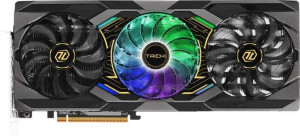
ASRock Radeon RX 9070 XT Taichi OC
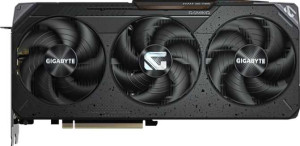
Gigabyte Radeon RX 9070 XT Gaming OC

ASRock Radeon RX 9070 XT Taichi OC Gigabyte Radeon RX 9070 XT Gaming OC

Overview

Welcome to our in-depth specification comparison between the ASRock Radeon RX 9070 XT Taichi OC and the Gigabyte Radeon RX 9070 XT Gaming OC, two custom cards built on AMD’s RDNA 4.0 architecture. While they share the same core silicon, memory configuration, and feature set, key battlegrounds emerge around clock speeds and raw performance figures, as well as port layouts and physical dimensions. Read on to find out which card is the better fit for your setup.

Common Features

  • Both cards have a GPU memory speed of 2518 MHz.
  • Both cards feature 4096 shading units.
  • Both cards include 256 texture mapping units (TMUs).
  • Both cards have 128 render output units (ROPs).
  • Double Precision Floating Point (DPFP) is supported on both cards.
  • Both cards have an effective memory speed of 20000 MHz.
  • Both cards offer a maximum memory bandwidth of 644.6 GB/s.
  • Both cards come with 16GB of VRAM.
  • Both cards use GDDR6 memory.
  • Both cards have a 256-bit memory bus width.
  • ECC memory is supported on both cards.
  • Both cards support DirectX 12 Ultimate.
  • Both cards support OpenGL version 4.6.
  • Both cards support OpenCL version 2.2.
  • Multi-display technology is supported on both cards.
  • Ray tracing is supported on both cards.
  • 3D support is available on both cards.
  • DLSS is not supported on either card.
  • FSR4 is available on both cards.
  • Both cards have an HDMI 2.1b output.
  • Neither card has USB-C ports, DVI outputs, or mini DisplayPort outputs.
  • Both cards are built on the RDNA 4.0 GPU architecture.
  • Both cards have a Thermal Design Power (TDP) of 304W.
  • Both cards use PCIe version 5.
  • Both cards are manufactured on a 4 nm semiconductor process.
  • Both cards feature 53900 million transistors.
  • Neither card has air-water cooling.

Main Differences

  • GPU base clock speed is 1870 MHz on ASRock Radeon RX 9070 XT Taichi OC and 1660 MHz on Gigabyte Radeon RX 9070 XT Gaming OC.
  • GPU turbo clock speed is 3100 MHz on ASRock Radeon RX 9070 XT Taichi OC and 3060 MHz on Gigabyte Radeon RX 9070 XT Gaming OC.
  • Pixel rate is 396.8 GPixel/s on ASRock Radeon RX 9070 XT Taichi OC and 391.7 GPixel/s on Gigabyte Radeon RX 9070 XT Gaming OC.
  • Floating-point performance is 50.79 TFLOPS on ASRock Radeon RX 9070 XT Taichi OC and 50.14 TFLOPS on Gigabyte Radeon RX 9070 XT Gaming OC.
  • Texture rate is 793.6 GTexels/s on ASRock Radeon RX 9070 XT Taichi OC and 783.4 GTexels/s on Gigabyte Radeon RX 9070 XT Gaming OC.
  • HDMI port count is 1 on ASRock Radeon RX 9070 XT Taichi OC and 2 on Gigabyte Radeon RX 9070 XT Gaming OC.
  • DisplayPort output count is 3 on ASRock Radeon RX 9070 XT Taichi OC and 2 on Gigabyte Radeon RX 9070 XT Gaming OC.
  • Card width is 330 mm on ASRock Radeon RX 9070 XT Taichi OC and 288 mm on Gigabyte Radeon RX 9070 XT Gaming OC.
  • Card height is 140 mm on ASRock Radeon RX 9070 XT Taichi OC and 132 mm on Gigabyte Radeon RX 9070 XT Gaming OC.
Specs Comparison
ASRock Radeon RX 9070 XT Taichi OC

ASRock Radeon RX 9070 XT Taichi OC

Gigabyte Radeon RX 9070 XT Gaming OC

Gigabyte Radeon RX 9070 XT Gaming OC

Performance:
GPU clock speed 1870 MHz 1660 MHz
GPU turbo 3100 MHz 3060 MHz
pixel rate 396.8 GPixel/s 391.7 GPixel/s
floating-point performance 50.79 TFLOPS 50.14 TFLOPS
texture rate 793.6 GTexels/s 783.4 GTexels/s
GPU memory speed 2518 MHz 2518 MHz
shading units 4096 4096
texture mapping units (TMUs) 256 256
render output units (ROPs) 128 128
Has Double Precision Floating Point (DPFP)

Both cards share an identical hardware foundation — 4096 shading units, 256 TMUs, and 128 ROPs — meaning any performance difference between the ASRock Taichi OC and the Gigabyte Gaming OC comes purely from factory clock tuning. The ASRock card runs a notably higher base clock of 1870 MHz versus the Gigabyte's 1660 MHz, a 210 MHz gap that reflects a more aggressive out-of-the-box overclock. The boost clocks are closer — 3100 MHz versus 3060 MHz — but the ASRock still leads by 40 MHz at the top end.

These clock advantages translate directly into slightly better computed throughput metrics: the ASRock delivers 50.79 TFLOPS of floating-point performance and a texture rate of 793.6 GTexels/s, compared to the Gigabyte's 50.14 TFLOPS and 783.4 GTexels/s. In practice, these are roughly 1–1.3% differences, which will not be perceptible in most gaming scenarios but could marginally favor the ASRock in sustained compute-heavy workloads. Memory bandwidth is a non-factor here, as both cards use the exact same 2518 MHz memory speed.

The ASRock Radeon RX 9070 XT Taichi OC holds a clear, if modest, performance edge in this group. Its higher factory overclock produces consistently better throughput numbers across every computed metric. For users who plan to run cards at stock settings, the Taichi OC delivers slightly more headroom without any manual tuning. The Gigabyte Gaming OC is essentially equivalent in architecture and very close in real-world output, but it does not lead in a single performance spec here.

Memory:
effective memory speed 20000 MHz 20000 MHz
maximum memory bandwidth 644.6 GB/s 644.6 GB/s
VRAM 16GB 16GB
GDDR version GDDR6 GDDR6
memory bus width 256-bit 256-bit
Supports ECC memory

The memory subsystems of the Taichi OC and the Gaming OC are, by every measurable spec, completely identical. Both cards feature 16GB of GDDR6 running at an effective 20000 MHz across a 256-bit bus, yielding a maximum bandwidth of 644.6 GB/s. There is no differentiation to be found here — not in capacity, not in speed, not in bus width.

The practical significance of these shared specs is worth noting. 16GB of VRAM is a generous allocation that comfortably handles 4K gaming, high-resolution texture packs, and memory-intensive workloads. The 256-bit bus paired with GDDR6 at this speed produces bandwidth that should remain sufficient even in demanding scenarios where frame buffers grow large. ECC memory support on both cards is a useful bonus for users doing compute or professional workloads alongside gaming, as it enables error correction that improves data integrity under sustained load.

This group is a definitive tie. Neither the ASRock nor the Gigabyte holds any memory advantage whatsoever — buyers choosing between these two cards should look entirely to other specification groups to make their decision here.

Features:
DirectX version DirectX 12 Ultimate DirectX 12 Ultimate
OpenGL version 4.6 4.6
OpenCL version 2.2 2.2
Supports multi-display technology
supports ray tracing
Supports 3D
supports DLSS
has FSR4
has XeSS (XMX)
AMD SAM / Intel Resizable BAR AMD SAM AMD SAM
has LHR
has RGB lighting
supported displays 4 4

Feature parity between the Taichi OC and the Gaming OC is total. Both cards support DirectX 12 Ultimate and ray tracing, placing them fully in line with modern rendering requirements. DirectX 12 Ultimate is particularly meaningful as it unlocks the full suite of next-generation graphics features — variable rate shading, mesh shaders, and hardware-accelerated ray tracing — ensuring neither card is left behind as game engines continue to adopt these capabilities.

On the upscaling front, both cards carry FSR4 support and, as AMD products, neither supports DLSS — which is expected and not a disadvantage relative to each other. FSR4 represents AMD's latest upscaling generation, offering improved image quality over its predecessors and making high-resolution gaming more accessible without a raw performance cost. The shared absence of XeSS (XMX) is equally unremarkable since that technology targets Intel's hardware acceleration path. Both cards also support AMD SAM (Smart Access Memory), which can improve performance when paired with a compatible AMD CPU and motherboard by allowing the processor full access to the GPU's VRAM.

Much like the memory group, this is an unambiguous tie. Every software capability, API version, display output count, and feature flag is mirrored exactly between the two cards. A buyer prioritizing feature set has no reason to choose one over the other — the decision must rest on performance clocks, design, cooling, or price.
Ports:
has an HDMI output
HDMI ports 1 2
HDMI version HDMI 2.1b HDMI 2.1b
DisplayPort outputs 3 2
USB-C ports 0 0
DVI outputs 0 0
mini DisplayPort outputs 0 0

With a total of four display outputs each, the Taichi OC and the Gaming OC match in overall connectivity count — but they divide that budget differently. The ASRock opts for 1 HDMI + 3 DisplayPort, while the Gigabyte flips the balance to 2 HDMI + 2 DisplayPort. Both use HDMI 2.1b, the latest revision, which supports up to 4K at high refresh rates and 8K output, so the quality of each HDMI port is equal.

The split matters in practice depending on a user's monitor setup. The Gigabyte Gaming OC is the more practical choice for anyone running two HDMI-native devices simultaneously — such as a TV and a monitor, or a capture device alongside a display — without needing adapters. The ASRock Taichi OC, by contrast, is better suited to multi-monitor desktop users who have invested in DisplayPort panels, offering one additional DP output that enables a three-display configuration using only native connections.

Neither layout is objectively superior, but each card has a situational edge. The Gigabyte Gaming OC wins for HDMI-heavy setups, while the ASRock Taichi OC is the stronger pick for DisplayPort-centric configurations. Buyers should simply match the port layout to their existing or planned display hardware.

General info:
GPU architecture RDNA 4.0 RDNA 4.0
release date March 2025 March 2025
Thermal Design Power (TDP) 304W 304W
PCI Express (PCIe) version 5 5
semiconductor size 4 nm 4 nm
number of transistors 53900 million 53900 million
Has air-water cooling
width 330 mm 288 mm
height 140 mm 132 mm

At their core, these two cards are built from the same silicon. Identical RDNA 4.0 architecture, the same 4nm manufacturing process, the same transistor count of 53,900 million, and a matching 304W TDP — the shared foundation means thermal management demands and PCIe 5.0 slot requirements are equal for both. A 304W TDP is substantial and will require adequate case airflow and a quality power supply, but this constraint applies to both cards without distinction.

Where the two diverge is physical size. The ASRock Taichi OC measures 330 × 140 mm, while the Gigabyte Gaming OC is noticeably more compact at 288 × 132 mm — a difference of 42mm in length and 8mm in height. That length gap is meaningful in smaller mid-tower or ITX-adjacent cases where GPU clearance is tight. The Gigabyte's shorter footprint makes it the more chassis-friendly option, while the ASRock's larger body may accommodate a more expansive cooling array, though the data here does not confirm that directly.

For most users in full-tower builds, size is a non-issue and this group is essentially a tie on the specs that matter most — power draw and architecture. However, for anyone working with a compact case, the Gigabyte Gaming OC holds a clear practical advantage thanks to its significantly shorter length.

Comparison Summary & Verdict

Both the ASRock Radeon RX 9070 XT Taichi OC and the Gigabyte Radeon RX 9070 XT Gaming OC deliver identical memory configurations with 16GB of GDDR6 at 20000 MHz effective speed, share the same 304W TDP, and support the same feature set including ray tracing and FSR4. The key distinction lies in their tuning and physical design. The ASRock Taichi OC holds a meaningful edge in GPU clock speeds — reaching 3100 MHz boost versus 3060 MHz — translating into marginally higher pixel rate, texture rate, and floating-point performance. It also offers three DisplayPort outputs for users running multi-monitor setups. The Gigabyte Gaming OC, meanwhile, is the more compact card at 288x132mm and offers two HDMI 2.1b ports, making it a better fit for living-room or media-centric builds requiring dual HDMI connections. Choose based on your connectivity needs and available case clearance.

ASRock Radeon RX 9070 XT Taichi OC
Buy ASRock Radeon RX 9070 XT Taichi OC if...

Buy the ASRock Radeon RX 9070 XT Taichi OC if you want the highest clock speeds and floating-point performance of the two, and need three DisplayPort outputs for a multi-monitor workstation setup.

Gigabyte Radeon RX 9070 XT Gaming OC
Buy Gigabyte Radeon RX 9070 XT Gaming OC if...

Buy the Gigabyte Radeon RX 9070 XT Gaming OC if you need a more compact card that fits smaller cases, or if your display setup requires two HDMI 2.1b connections simultaneously.