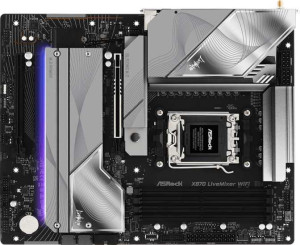
ASRock X870 LiveMixer Wi-Fi
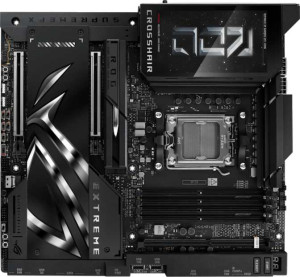
Asus ROG Crosshair X870E Extreme

ASRock X870 LiveMixer Wi-Fi Asus ROG Crosshair X870E Extreme

Common Features

  • Both products have an AM5 CPU socket.
  • Both products have an X870 chipset.
  • Both products support Wi-Fi 4, Wi-Fi 5, Wi-Fi 6, Wi-Fi 6E, and Wi-Fi 7.
  • Both products have Bluetooth 5.4 support.
  • Both products have HDMI 2.1 support.
  • Both products are easy to overclock.
  • Both products have 256GB maximum memory capacity.
  • Both products have 4 memory slots.
  • Both products support DDR5 memory.
  • Both products support dual-channel memory.
  • Both products do not support ECC memory.
  • Both products have no USB 3.2 Gen 2x2 ports.
  • Both products have two USB 4 40Gbps ports.
  • Both products have two Thunderbolt 4 ports.
  • Both products have HDMI output.
  • Both products have USB Type-C ports.
  • Both products have USB 3.2 Gen 1 ports through expansion.
  • Both products have SATA 3 connectors.
  • Both products support RAID 1, RAID 10, and RAID 0.
  • Both products have 7.1 audio channels.

Main Differences

  • The ASRock X870 LiveMixer Wi-Fi has an ATX form factor, while the Asus ROG Crosshair X870E Extreme has an E-ATX form factor.
  • The ASRock X870 LiveMixer Wi-Fi does not have an easy BIOS reset feature, whereas the Asus ROG Crosshair X870E Extreme does.
  • The ASRock X870 LiveMixer Wi-Fi is 244 mm in height, while the Asus ROG Crosshair X870E Extreme is 277 mm in height.
  • The ASRock X870 LiveMixer Wi-Fi supports RAM overclocking up to 8000 MHz, while the Asus ROG Crosshair X870E Extreme supports RAM overclocking up to 9000 MHz.
  • The ASRock X870 LiveMixer Wi-Fi has 2 SATA 3 connectors, while the Asus ROG Crosshair X870E Extreme has 4 SATA 3 connectors.
  • The ASRock X870 LiveMixer Wi-Fi has 6 fan headers, while the Asus ROG Crosshair X870E Extreme has 7 fan headers.
  • The ASRock X870 LiveMixer Wi-Fi has 4 M.2 sockets, while the Asus ROG Crosshair X870E Extreme has 5 M.2 sockets.
  • The ASRock X870 LiveMixer Wi-Fi has a TPM connector, while the Asus ROG Crosshair X870E Extreme does not.
  • The ASRock X870 LiveMixer Wi-Fi has 2 PCIe 5.0 x16 slots, while the Asus ROG Crosshair X870E Extreme has 1 PCIe 5.0 x16 slot.
  • The ASRock X870 LiveMixer Wi-Fi has 2 PCIe 3.0 x16 slots, while the Asus ROG Crosshair X870E Extreme does not have any PCIe 3.0 x16 slots.
  • The ASRock X870 LiveMixer Wi-Fi has a signal-to-noise ratio of 130 dB for its DAC, while the Asus ROG Crosshair X870E Extreme has a signal-to-noise ratio of 120 dB.
  • The ASRock X870 LiveMixer Wi-Fi does not support RAID 5, while the Asus ROG Crosshair X870E Extreme supports RAID 5.
Specs Comparison
ASRock X870 LiveMixer Wi-Fi

ASRock X870 LiveMixer Wi-Fi

Asus ROG Crosshair X870E Extreme

Asus ROG Crosshair X870E Extreme

General info:
CPU socket AM5 AM5
chipset X870 X870
form factor ATX E-ATX
release date July 2025 April 2025
supports Wi-Fi
Wi-Fi version Wi-Fi 4 (802.11n), Wi-Fi 5 (802.11ac), Wi-Fi 6 (802.11ax), Wi-Fi 6E (802.11ax), Wi-Fi 7 (802.11be) Wi-Fi 4 (802.11n), Wi-Fi 5 (802.11ac), Wi-Fi 6 (802.11ax), Wi-Fi 6E (802.11ax), Wi-Fi 7 (802.11be)
Has Bluetooth
Bluetooth version 5.4 5.4
HDMI version HDMI 2.1 HDMI 2.1
Easy to overclock
has RGB lighting
Easy to reset BIOS
Has dual BIOS
has aptX
CPU sockets 1 1
Has integrated graphics
warranty period 3 years 3 years
height 244 mm 277 mm
width 305 mm 305 mm
Has integrated CPU

The ASRock X870 LiveMixer Wi-Fi and Asus ROG Crosshair X870E Extreme share several key features, such as the same CPU socket (AM5), chipset (X870), and support for Wi-Fi with versions ranging from Wi-Fi 4 (802.11n) to Wi-Fi 7 (802.11be). Both motherboards also support Bluetooth 5.4 and HDMI 2.1, and both are designed with RGB lighting and ease of overclocking in mind. They each offer a 3-year warranty and a single CPU socket. The form factors differ, with the ASRock model using an ATX size (244 mm height, 305 mm width), while the Asus model adopts a larger E-ATX form factor (277 mm height, 305 mm width).

Both boards have dual BIOS, but the Asus model has the added advantage of an easier BIOS reset, which is not available on the ASRock board. Neither product has integrated graphics or an integrated CPU, and neither includes aptX support. The ASRock X870 LiveMixer Wi-Fi does not have an easy way to reset the BIOS, but it does have an additional feature of not offering an integrated CPU.

Overall, the differences between these two motherboards mainly lie in their form factors and BIOS reset functionality, but they share a lot of similarities, including Wi-Fi support, Bluetooth, and the chipset.

Memory:
maximum memory amount 256GB 256GB
overclocked RAM speed 8000 MHz 9000 MHz
memory slots 4 4
DDR memory version 5 5
memory channels 2 2
Supports ECC memory

The ASRock X870 LiveMixer Wi-Fi and Asus ROG Crosshair X870E Extreme both support a maximum memory amount of 256GB and are equipped with 4 memory slots. Both motherboards also use DDR5 memory and have 2 memory channels, which is standard for modern boards. However, they differ when it comes to overclocked RAM speeds. The ASRock model supports an overclocked RAM speed of up to 8000 MHz, while the Asus model can handle a faster overclocked RAM speed of up to 9000 MHz.

Neither product supports ECC memory, which means they are not designed for error-correcting memory configurations.

In summary, the key difference between these two motherboards in terms of memory is the overclocked RAM speed, with the Asus model offering a higher speed capability at 9000 MHz compared to the 8000 MHz supported by the ASRock board.

Ports:
USB 3.2 Gen 2 ports (USB-A) 0 8
USB 3.2 Gen 1 ports (USB-A) 7 0
USB 3.2 Gen 2 ports (USB-C) 0 2
USB 3.2 Gen 1 ports (USB-C) 1 0
USB 2.0 ports 6 0
USB 3.2 Gen 2x2 ports 0 0
USB 4 40Gbps ports 2 2
USB 4 20Gbps ports 0 0
Thunderbolt 4 ports 2 2
Thunderbolt 3 ports 0 0
has an HDMI output
DisplayPort outputs 0 0
RJ45 ports 1 2
Has USB Type-C
eSATA ports 0 0
DVI outputs 0 0
has a VGA connector
PS/2 ports 0 0

The ASRock X870 LiveMixer Wi-Fi and Asus ROG Crosshair X870E Extreme differ in their port configurations. The ASRock board offers 7 USB 3.2 Gen 1 USB-A ports, 1 USB 3.2 Gen 1 USB-C port, 6 USB 2.0 ports, and 2 USB 4 40Gbps ports. Additionally, it has 2 Thunderbolt 4 ports, 1 RJ45 port, and an HDMI output. The board does not include any USB 3.2 Gen 2 USB-A ports or USB 3.2 Gen 2x2 ports, and lacks DisplayPort, eSATA, DVI, or VGA outputs.

On the other hand, the Asus model includes 8 USB 3.2 Gen 2 USB-A ports, 2 USB 3.2 Gen 2 USB-C ports, and no USB 2.0 ports. It also has 2 USB 4 40Gbps ports and 2 Thunderbolt 4 ports, with 2 RJ45 ports and an HDMI output. The Asus board does not have USB 3.2 Gen 1 USB-A ports, USB 3.2 Gen 1 USB-C ports, or USB 3.2 Gen 2x2 ports, and similarly lacks DisplayPort, eSATA, DVI, and VGA connectors.

Both motherboards have an HDMI output and Thunderbolt 4 support, but the Asus model provides more USB 3.2 Gen 2 ports (USB-A and USB-C) and includes an extra RJ45 port for networking. Neither board has eSATA, DVI, or VGA connectors, and both offer similar USB 4 40Gbps capabilities and Thunderbolt 4 support.

Connectors:
USB 3.2 Gen 1 ports (through expansion) 4 4
USB 3.2 Gen 2x2 ports (through expansion) 1 1
USB 2.0 ports (through expansion) 4 4
SATA 3 connectors 2 4
fan headers 6 7
USB 3.0 ports (through expansion) 4 4
M.2 sockets 4 5
Has TPM connector
U.2 sockets 0 0
Has mSATA connector
SATA 2 connectors 0 0

The ASRock X870 LiveMixer Wi-Fi and Asus ROG Crosshair X870E Extreme share several similar connector features, but there are a few key differences. Both motherboards offer 4 USB 3.2 Gen 1 ports (through expansion), 1 USB 3.2 Gen 2x2 port (through expansion), and 4 USB 2.0 ports (through expansion). They also each support 4 USB 3.0 ports (through expansion) and include no mSATA connectors or U.2 sockets.

One difference is in the number of SATA 3 connectors. The ASRock board has 2, while the Asus model provides 4. Additionally, the ASRock X870 LiveMixer Wi-Fi includes 6 fan headers, while the Asus board offers 7. The ASRock motherboard has a TPM connector, but the Asus model does not.

Both motherboards have 4 M.2 sockets, but the Asus model offers an additional M.2 socket, bringing its total to 5. Neither motherboard supports SATA 2 connectors, and both lack mSATA and U.2 sockets.

Expansion slots:
PCIe 4.0 x16 slots 0 0
PCIe 5.0 x16 slots 1 2
PCIe 3.0 x16 slots 2 0
PCIe x1 slots 0 0
PCI slots 0 0
PCIe 2.0 x16 slots 0 0
PCIe x4 slots 0 0
PCIe x8 slots 0 0

The ASRock X870 LiveMixer Wi-Fi and Asus ROG Crosshair X870E Extreme both feature PCIe slots, but their configurations differ. The ASRock model has 1 PCIe 5.0 x16 slot and 2 PCIe 3.0 x16 slots, while the Asus model offers 2 PCIe 5.0 x16 slots and no PCIe 3.0 x16 slots. Neither board includes PCIe x1, PCI, PCIe 2.0 x16, PCIe x4, or PCIe x8 slots.

In summary, the main difference between these two boards is that the ASRock board includes PCIe 3.0 x16 slots alongside its PCIe 5.0 x16 slot, while the Asus board exclusively offers PCIe 5.0 x16 slots and does not feature any PCIe 3.0 x16 slots.

Audio:
Signal-to-Noise ratio (DAC) 130 dB 120 dB
audio channels 7.1 7.1
Has S/PDIF Out port
audio connectors 2 2

The ASRock X870 LiveMixer Wi-Fi and Asus ROG Crosshair X870E Extreme both offer 7.1 audio channels and support an S/PDIF Out port. In terms of audio quality, the ASRock board has a slightly higher signal-to-noise ratio (DAC) at 130 dB, compared to the 120 dB on the Asus model.

Both motherboards provide 2 audio connectors, which is identical across the two products.

In summary, while both boards offer similar audio features, the ASRock model has a marginally higher DAC signal-to-noise ratio, but both are equipped with the same number of audio channels and connectors.

Storage:
Supports RAID 1
Supports RAID 10 (1+0)
Supports RAID 5
Supports RAID 0
Supports RAID 0+1

Both the ASRock X870 LiveMixer Wi-Fi and Asus ROG Crosshair X870E Extreme support RAID 1 and RAID 10 (1+0), making them suitable for mirroring and striped array configurations. However, there is a key difference in their RAID support: the ASRock model does not support RAID 5, while the Asus model does. Neither motherboard supports RAID 0+1.

In summary, while both motherboards offer similar RAID options for RAID 1 and RAID 10 (1+0), the Asus board provides additional flexibility with RAID 5 support, which the ASRock board lacks.

Comparison Summary

This is a specification comparison between ASRock X870 LiveMixer Wi-Fi and Asus ROG Crosshair X870E Extreme. Both products share an AM5 CPU socket, support for Wi-Fi versions up to Wi-Fi 7, and feature 256GB maximum memory capacity. However, the ASRock model has an ATX form factor and lacks an easy BIOS reset feature, while the Asus model uses an E-ATX form factor and supports easier BIOS resetting. The ASRock board supports RAM speeds up to 8000 MHz, while the Asus board supports 9000 MHz. Additionally, the ASRock model has fewer SATA 3 connectors and M.2 sockets than the Asus model.