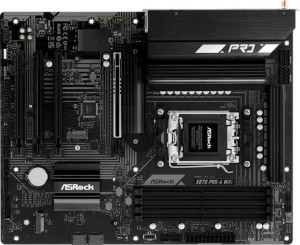
ASRock X870 Pro-A Wi-Fi
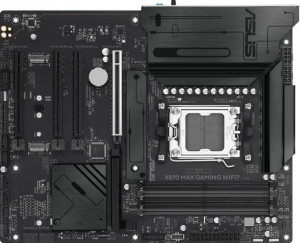
Asus X870 Max Gaming Wi-Fi7

ASRock X870 Pro-A Wi-Fi Asus X870 Max Gaming Wi-Fi7

Common Features

  • Both products have an AM5 CPU socket.
  • Both products use an X870 chipset.
  • Both products have an ATX form factor.
  • Both products support Wi-Fi.
  • Both products support Wi-Fi 4, Wi-Fi 5, Wi-Fi 6, Wi-Fi 6E, and Wi-Fi 7.
  • Both products have Bluetooth version 5.4.
  • Both products have HDMI 2.1.
  • Both products have 4 memory slots.
  • Both products support a maximum memory amount of 256GB.
  • Both products support DDR5 memory.
  • Both products have 2 memory channels.
  • Both products have 6 fan headers.
  • Both products have 3 M.2 sockets.
  • Both products support RAID 1.
  • Both products support RAID 10 (1+0).
  • Both products support RAID 0.
  • Both products do not support RAID 0+1.
  • Both products have audio channels of 7.1.
  • Both products have 3 audio connectors.

Main Differences

  • ASRock X870 Pro-A Wi-Fi has dual BIOS support while Asus X870 Max Gaming Wi-Fi7 does not.
  • ASRock X870 Pro-A Wi-Fi has 2 USB 3.2 Gen 2 ports (USB-A) and Asus X870 Max Gaming Wi-Fi7 has 1.
  • ASRock X870 Pro-A Wi-Fi has 1 USB 3.2 Gen 1 port (USB-A) and Asus X870 Max Gaming Wi-Fi7 has 3.
  • ASRock X870 Pro-A Wi-Fi has 4 USB 3.2 Gen 1 ports (through expansion) and Asus X870 Max Gaming Wi-Fi7 has 2.
  • ASRock X870 Pro-A Wi-Fi has 4 USB 3.0 ports (through expansion) and Asus X870 Max Gaming Wi-Fi7 has 2.
  • ASRock X870 Pro-A Wi-Fi has 3 PCIe 4.0 x16 slots and Asus X870 Max Gaming Wi-Fi7 has 2.
  • ASRock X870 Pro-A Wi-Fi has no PCIe 3.0 x16 slots while Asus X870 Max Gaming Wi-Fi7 has 1.
  • Asus X870 Max Gaming Wi-Fi7 supports RAID 5, while ASRock X870 Pro-A Wi-Fi does not.
Specs Comparison
ASRock X870 Pro-A Wi-Fi

ASRock X870 Pro-A Wi-Fi

Asus X870 Max Gaming Wi-Fi7

Asus X870 Max Gaming Wi-Fi7

General info:
CPU socket AM5 AM5
chipset X870 X870
form factor ATX ATX
release date June 2025 April 2025
supports Wi-Fi
Wi-Fi version Wi-Fi 4 (802.11n), Wi-Fi 5 (802.11ac), Wi-Fi 6 (802.11ax), Wi-Fi 6E (802.11ax), Wi-Fi 7 (802.11be) Wi-Fi 4 (802.11n), Wi-Fi 5 (802.11ac), Wi-Fi 6 (802.11ax), Wi-Fi 6E (802.11ax), Wi-Fi 7 (802.11be)
Has Bluetooth
Bluetooth version 5.4 5.4
HDMI version HDMI 2.1 HDMI 2.1
Easy to overclock
has RGB lighting
Easy to reset BIOS
Has dual BIOS
has aptX
CPU sockets 1 1
Has integrated graphics
warranty period 3 years 3 years
height 244 mm 244 mm
width 305 mm 305 mm
Has integrated CPU

Both the ASRock X870 Pro-A Wi-Fi and the Asus X870 Max Gaming Wi-Fi7 share several key features in their general specifications. Both motherboards use the AM5 CPU socket and the X870 chipset, and both have the same ATX form factor. They also support Wi-Fi with the same versions: Wi-Fi 4 (802.11n), Wi-Fi 5 (802.11ac), Wi-Fi 6 (802.11ax), Wi-Fi 6E (802.11ax), and Wi-Fi 7 (802.11be), ensuring robust wireless connectivity on both. Additionally, both products come with Bluetooth 5.4 support and HDMI 2.1 for video output, making them comparable in terms of connectivity and wireless technology.

However, there are a few differences between the two. The ASRock X870 Pro-A Wi-Fi features dual BIOS, while the Asus X870 Max Gaming Wi-Fi7 lacks this feature. Both motherboards are easy to overclock and include RGB lighting, but neither offers easy BIOS resetting. The warranty period is the same for both products, set at 3 years. Both motherboards also have the same dimensions, with a height of 244 mm and a width of 305 mm.

Neither motherboard offers integrated graphics or an integrated CPU, and neither includes aptX support. The ASRock X870 Pro-A Wi-Fi has dual BIOS for additional protection against BIOS corruption, a feature absent in the Asus X870 Max Gaming Wi-Fi7. Overall, the general specs of both products are very similar, with the primary distinction being the inclusion of dual BIOS in the ASRock model.

Memory:
maximum memory amount 256GB 256GB
overclocked RAM speed 8000 MHz 8000 MHz
memory slots 4 4
DDR memory version 5 5
memory channels 2 2
Supports ECC memory

The ASRock X870 Pro-A Wi-Fi and Asus X870 Max Gaming Wi-Fi7 are identical in terms of memory specifications. Both motherboards support a maximum memory amount of 256GB, offering substantial capacity for high-performance tasks. They also feature 4 memory slots and support DDR5 memory, ensuring compatibility with the latest memory technology. Additionally, both products support dual memory channels, optimizing memory performance.

For overclocking, both motherboards can handle RAM speeds up to 8000 MHz, allowing users to push memory performance to higher levels. Neither motherboard supports ECC memory, so they are not designed for error-correcting memory setups.

In summary, the memory specifications for both the ASRock X870 Pro-A Wi-Fi and the Asus X870 Max Gaming Wi-Fi7 are identical, providing equal memory capacity, slot count, overclocking potential, and memory version support.

Ports:
USB 3.2 Gen 2 ports (USB-A) 2 1
USB 3.2 Gen 1 ports (USB-A) 1 3
USB 3.2 Gen 2 ports (USB-C) 0 0
USB 3.2 Gen 1 ports (USB-C) 0 0
USB 2.0 ports 4 4
USB 3.2 Gen 2x2 ports 0 0
USB 4 40Gbps ports 2 2
USB 4 20Gbps ports 0 0
Thunderbolt 4 ports 2 2
Thunderbolt 3 ports 0 0
has an HDMI output
DisplayPort outputs 0 0
RJ45 ports 1 1
Has USB Type-C
eSATA ports 0 0
DVI outputs 0 0
has a VGA connector
PS/2 ports 0 0

The ASRock X870 Pro-A Wi-Fi and Asus X870 Max Gaming Wi-Fi7 offer a similar selection of ports, though there are a few differences. Both motherboards provide USB 2.0 ports, with 4 on each. However, the ASRock X870 Pro-A Wi-Fi has 2 USB 3.2 Gen 2 ports (USB-A) and 1 USB 3.2 Gen 1 port (USB-A), while the Asus X870 Max Gaming Wi-Fi7 has 1 USB 3.2 Gen 2 port (USB-A) and 3 USB 3.2 Gen 1 ports (USB-A). Neither board includes USB 3.2 Gen 2 or USB 3.2 Gen 1 ports for USB-C, and both lack USB 3.2 Gen 2x2 and USB 4 20Gbps ports.

Both motherboards support USB 4 40Gbps ports with 2 ports available on each, and both feature Thunderbolt 4 ports (also with 2 ports each). Additionally, both boards have an HDMI output, but neither offers DisplayPort outputs, DVI outputs, or VGA connectors. Both also include 1 RJ45 port for Ethernet connectivity and USB Type-C support.

In terms of other ports, both motherboards have no eSATA ports, PS/2 ports, or Thunderbolt 3 ports. The primary difference in the ports section lies in the distribution of USB 3.2 Gen 1 and Gen 2 ports: the ASRock model has more Gen 2 (USB-A) ports, while the Asus model has more Gen 1 (USB-A) ports.

Connectors:
USB 3.2 Gen 1 ports (through expansion) 4 2
USB 2.0 ports (through expansion) 4 4
SATA 3 connectors 4 4
fan headers 6 6
USB 3.0 ports (through expansion) 4 2
M.2 sockets 3 3
Has TPM connector
U.2 sockets 0 0
Has mSATA connector
SATA 2 connectors 0 0

The ASRock X870 Pro-A Wi-Fi and Asus X870 Max Gaming Wi-Fi7 have a similar set of connectors, with a few key differences. Both motherboards offer 4 SATA 3 connectors, 6 fan headers, and 3 M.2 sockets. Additionally, both support a TPM connector for security, and neither includes U.2 sockets or mSATA connectors. Both also have 4 USB 2.0 ports through expansion, but there is a difference in the number of USB 3.2 Gen 1 and USB 3.0 ports. The ASRock model offers 4 USB 3.2 Gen 1 ports through expansion and 4 USB 3.0 ports, while the Asus model provides only 2 USB 3.2 Gen 1 ports and 2 USB 3.0 ports through expansion.

In summary, the ASRock X870 Pro-A Wi-Fi offers a higher number of USB 3.2 Gen 1 and USB 3.0 ports through expansion compared to the Asus X870 Max Gaming Wi-Fi7. However, both motherboards are equipped with the same number of SATA 3 connectors, M.2 sockets, fan headers, and share common features such as the TPM connector.

There are no significant differences in the overall functionality of the connectors, except for the USB port configuration, where the ASRock model provides more options for expansion.

Expansion slots:
PCIe 4.0 x16 slots 3 2
PCIe 5.0 x16 slots 1 1
PCIe 3.0 x16 slots 0 1
PCIe x1 slots 0 0
PCI slots 0 0
PCIe 2.0 x16 slots 0 0
PCIe x8 slots 0 0

The ASRock X870 Pro-A Wi-Fi and Asus X870 Max Gaming Wi-Fi7 differ slightly in their expansion slot configurations. The ASRock model offers 3 PCIe 4.0 x16 slots, while the Asus model has 2 PCIe 4.0 x16 slots. Both motherboards include 1 PCIe 5.0 x16 slot, ensuring support for the latest generation of GPUs and expansion cards. However, the ASRock X870 Pro-A Wi-Fi does not include any PCIe 3.0 x16 slots, while the Asus X870 Max Gaming Wi-Fi7 provides 1 PCIe 3.0 x16 slot, adding a bit more flexibility in terms of backward compatibility.

Neither motherboard has any PCIe x1, PCI, or PCIe 2.0 x16 slots, and both models also lack PCIe x8 slots. This means that both motherboards are designed with a focus on higher-bandwidth expansion options, primarily in the form of PCIe x16 slots for graphics cards or other high-speed add-ons.

In summary, the main difference in expansion slots between the two models is the additional PCIe 3.0 x16 slot in the Asus X870 Max Gaming Wi-Fi7, whereas the ASRock X870 Pro-A Wi-Fi provides one extra PCIe 4.0 x16 slot. Both motherboards are similar in offering PCIe 5.0 x16 slots and lack support for older slot types like PCIe x1 or PCI slots.

Audio:
audio channels 7.1 7.1
Has S/PDIF Out port
audio connectors 3 3

The ASRock X870 Pro-A Wi-Fi and Asus X870 Max Gaming Wi-Fi7 share identical audio specifications. Both motherboards support 7.1 audio channels, offering a rich surround sound experience. Additionally, neither motherboard includes an S/PDIF Out port, which is typically used for digital audio output. Both models are equipped with 3 audio connectors, which are standard for providing various audio input and output options.

Overall, the audio features are the same for both the ASRock X870 Pro-A Wi-Fi and the Asus X870 Max Gaming Wi-Fi7, with no differences in terms of audio channels, S/PDIF Out port, or the number of audio connectors.

Storage:
Supports RAID 1
Supports RAID 10 (1+0)
Supports RAID 5
Supports RAID 0
Supports RAID 0+1

The ASRock X870 Pro-A Wi-Fi and Asus X870 Max Gaming Wi-Fi7 both support RAID 1 and RAID 10 (1+0), providing users with options for data redundancy and performance. However, there is a difference in the RAID configurations they support. The ASRock X870 Pro-A Wi-Fi does not support RAID 5 but does support RAID 0, while the Asus X870 Max Gaming Wi-Fi7 supports both RAID 0 and RAID 5. Neither motherboard supports RAID 0+1, which is another type of mirroring and striping combination.

In summary, the primary difference between the two motherboards in terms of storage support is that the Asus X870 Max Gaming Wi-Fi7 offers RAID 5 support, whereas the ASRock X870 Pro-A Wi-Fi does not. Both models share support for RAID 1, RAID 10, and RAID 0, but the Asus model provides an additional RAID option for those requiring more complex storage setups.

Comparison Summary

This is a specification comparison between ASRock X870 Pro-A Wi-Fi and Asus X870 Max Gaming Wi-Fi7. Both motherboards feature an AM5 CPU socket, support 256GB of maximum memory, and offer Wi-Fi 4 through Wi-Fi 7 compatibility. The ASRock X870 Pro-A Wi-Fi has dual BIOS support, unlike the Asus X870 Max Gaming Wi-Fi7. Additionally, the ASRock X870 Pro-A Wi-Fi offers more USB 3.2 Gen 2 ports (USB-A) and PCIe 4.0 x16 slots compared to the Asus model. The Asus X870 Max Gaming Wi-Fi7 supports RAID 5, while the ASRock model does not. Finally, the ASRock board has more expansion options with USB 3.0 ports through expansion than the Asus board.