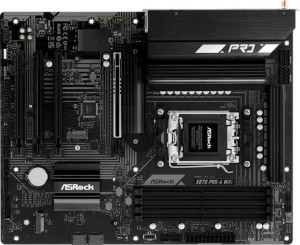
ASRock X870 Pro-A Wi-Fi
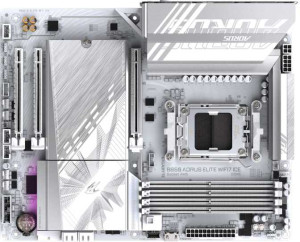
Gigabyte B850 Aorus Elite WiFi7 Ice

ASRock X870 Pro-A Wi-Fi Gigabyte B850 Aorus Elite WiFi7 Ice

Overview

Choosing between the ASRock X870 Pro-A Wi-Fi and the Gigabyte B850 Aorus Elite WiFi7 Ice means weighing two capable AM5 motherboards that share a strong foundation yet diverge in meaningful ways. Both offer Wi-Fi 7, DDR5 support, and PCIe 5.0, but key battlegrounds emerge around connectivity options, expansion slot configurations, and storage flexibility — making this a genuinely interesting matchup for builders with specific priorities.

Common Features

  • Both boards use the AM5 CPU socket.
  • Both boards have an ATX form factor.
  • Wi-Fi is supported on both boards.
  • Both boards support the same Wi-Fi versions: Wi-Fi 4 (802.11n), Wi-Fi 5 (802.11ac), Wi-Fi 6 (802.11ax), Wi-Fi 6E (802.11ax), and Wi-Fi 7 (802.11be).
  • Bluetooth is available on both boards.
  • Both boards have Bluetooth version 5.4.
  • Overclocking is supported on both boards.
  • RGB lighting is present on both boards.
  • Both boards support a maximum memory amount of 256GB.
  • Both boards have 4 memory slots.
  • Both boards use DDR5 memory.
  • Both boards have 2 memory channels.
  • ECC memory is not supported on either board.
  • Both boards have 2 USB 3.2 Gen 2 Type-A ports.
  • Neither board has USB 3.2 Gen 1 Type-C ports.
  • Both boards have 4 USB 2.0 ports.
  • Neither board has USB 3.2 Gen 2x2 ports.
  • Neither board has USB 4 20Gbps ports.
  • Neither board has Thunderbolt 3 ports.
  • Both boards have 1 RJ45 port.
  • A USB Type-C port is present on both boards.
  • Both boards provide 4 USB 2.0 ports through expansion.
  • Both boards have 4 SATA 3 connectors.
  • Both boards have 6 fan headers.
  • Both boards have 3 M.2 sockets.
  • A TPM connector is present on both boards.
  • Neither board has U.2 sockets.
  • An mSATA connector is not available on either board.
  • Neither board has SATA 2 connectors.
  • Both boards have 1 PCIe 5.0 x16 slot.
  • Neither board has PCIe 3.0 x16 slots.
  • Neither board has PCI slots.
  • Neither board has PCIe 2.0 x16 slots.
  • Neither board has PCIe x4 slots.
  • Neither board has PCIe x8 slots.
  • Both boards support 7.1 audio channels.
  • RAID 0, RAID 1, and RAID 10 (1+0) are supported on both boards.
  • RAID 0+1 is not supported on either board.

Main Differences

  • The chipset is X870 on the ASRock X870 Pro-A Wi-Fi and B850 on the Gigabyte B850 Aorus Elite WiFi7 Ice.
  • The maximum overclocked RAM speed is 8000 MHz on the ASRock X870 Pro-A Wi-Fi and 8200 MHz on the Gigabyte B850 Aorus Elite WiFi7 Ice.
  • USB 3.2 Gen 1 Type-A ports number 1 on the ASRock X870 Pro-A Wi-Fi and 5 on the Gigabyte B850 Aorus Elite WiFi7 Ice.
  • A USB 3.2 Gen 2 Type-C port is present on the Gigabyte B850 Aorus Elite WiFi7 Ice but not available on the ASRock X870 Pro-A Wi-Fi.
  • USB 4 40Gbps ports number 2 on the ASRock X870 Pro-A Wi-Fi, while the Gigabyte B850 Aorus Elite WiFi7 Ice has none.
  • Thunderbolt 4 ports number 2 on the ASRock X870 Pro-A Wi-Fi, while the Gigabyte B850 Aorus Elite WiFi7 Ice has none.
  • An HDMI output is present on the ASRock X870 Pro-A Wi-Fi but not available on the Gigabyte B850 Aorus Elite WiFi7 Ice.
  • DisplayPort outputs number 0 on the ASRock X870 Pro-A Wi-Fi and 1 on the Gigabyte B850 Aorus Elite WiFi7 Ice.
  • USB 3.2 Gen 1 ports available through expansion number 4 on the ASRock X870 Pro-A Wi-Fi and 2 on the Gigabyte B850 Aorus Elite WiFi7 Ice.
  • USB 3.0 ports available through expansion number 4 on the ASRock X870 Pro-A Wi-Fi and 2 on the Gigabyte B850 Aorus Elite WiFi7 Ice.
  • PCIe 4.0 x16 slots number 3 on the ASRock X870 Pro-A Wi-Fi, while the Gigabyte B850 Aorus Elite WiFi7 Ice has none.
  • PCIe x1 slots number 0 on the ASRock X870 Pro-A Wi-Fi and 2 on the Gigabyte B850 Aorus Elite WiFi7 Ice.
  • An S/PDIF Out port is present on the Gigabyte B850 Aorus Elite WiFi7 Ice but not available on the ASRock X870 Pro-A Wi-Fi.
  • Audio connectors number 3 on the ASRock X870 Pro-A Wi-Fi and 2 on the Gigabyte B850 Aorus Elite WiFi7 Ice.
  • RAID 5 support is present on the Gigabyte B850 Aorus Elite WiFi7 Ice but not available on the ASRock X870 Pro-A Wi-Fi.
Specs Comparison
ASRock X870 Pro-A Wi-Fi

ASRock X870 Pro-A Wi-Fi

Gigabyte B850 Aorus Elite WiFi7 Ice

Gigabyte B850 Aorus Elite WiFi7 Ice

General info:
CPU socket AM5 AM5
chipset X870 B850
form factor ATX ATX
release date June 2025 January 2025
supports Wi-Fi
Wi-Fi version Wi-Fi 4 (802.11n), Wi-Fi 5 (802.11ac), Wi-Fi 6 (802.11ax), Wi-Fi 6E (802.11ax), Wi-Fi 7 (802.11be) Wi-Fi 4 (802.11n), Wi-Fi 5 (802.11ac), Wi-Fi 6 (802.11ax), Wi-Fi 6E (802.11ax), Wi-Fi 7 (802.11be)
Has Bluetooth
Bluetooth version 5.4 5.4
Easy to overclock
has RGB lighting
Easy to reset BIOS
Has dual BIOS
has aptX
CPU sockets 1 1
Has integrated graphics
warranty period 3 years 3 years
height 244 mm 244 mm
width 305 mm 305 mm
Has integrated CPU

At a foundational level, these two boards share a striking amount of DNA. Both use the AM5 socket, ship in the standard ATX form factor at identical dimensions (244 × 305 mm), and come with the same three-year warranty. Features like Wi-Fi 7, Bluetooth 5.4, dual BIOS, RGB lighting, and overclocking support are present on both — so neither board holds a lifestyle or usability edge on paper.

The sole but meaningful differentiator in this group is the chipset: the ASRock carries AMD's X870, while the Gigabyte runs on the B850. In AMD's hierarchy, X870 sits above B850, which in practice typically translates to more PCIe lanes, greater I/O flexibility, and a higher ceiling for multi-device builds. For a user planning to run multiple NVMe drives, high-bandwidth expansion cards, or future-proofing for more complex configurations, that chipset tier difference matters. For mainstream builds focused on a single GPU and one or two storage drives, the B850's capabilities are largely sufficient.

Overall, the ASRock X870 Pro-A Wi-Fi holds a clear, if narrow, edge in this group purely due to its higher-tier chipset. The Gigabyte B850 Aorus Elite is not at a disadvantage in everyday scenarios, but buyers who want the added headroom that a premium chipset provides will find the ASRock the stronger platform from the outset.

Memory:
maximum memory amount 256GB 256GB
overclocked RAM speed 8000 MHz 8200 MHz
memory slots 4 4
DDR memory version 5 5
memory channels 2 2
Supports ECC memory

Memory compatibility is nearly identical across both boards. Each supports DDR5 with four slots, a 256GB maximum capacity, and dual-channel operation — meaning real-world bandwidth and multitasking headroom are equivalent out of the box. Neither supports ECC memory, so workstation or server use cases requiring error correction are off the table for both.

The one point of separation is the maximum supported overclocked RAM speed: the Gigabyte B850 Aorus Elite tops out at 8200 MHz, compared to 8000 MHz on the ASRock X870. In isolation, a 200 MHz gap at these frequencies has negligible real-world impact on most workloads — even memory-sensitive tasks like video editing or game streaming are unlikely to register a meaningful difference. It matters most to extreme overclockers or benchmark enthusiasts who want to push the absolute ceiling of their DDR5 kit.

For this group, the two boards are essentially tied. The Gigabyte's marginally higher overclocking ceiling is a technical win on paper, but not a practical reason to choose one board over the other for the vast majority of users.

Ports:
USB 3.2 Gen 2 ports (USB-A) 2 2
USB 3.2 Gen 1 ports (USB-A) 1 5
USB 3.2 Gen 2 ports (USB-C) 0 1
USB 3.2 Gen 1 ports (USB-C) 0 0
USB 2.0 ports 4 4
USB 3.2 Gen 2x2 ports 0 0
USB 4 40Gbps ports 2 0
USB 4 20Gbps ports 0 0
Thunderbolt 4 ports 2 0
Thunderbolt 3 ports 0 0
has an HDMI output
DisplayPort outputs 0 1
RJ45 ports 1 1
Has USB Type-C
eSATA ports 0 0
DVI outputs 0 0
has a VGA connector
PS/2 ports 0 0

This is where the two boards diverge most sharply. The ASRock X870 makes a strong play for power users with 2× USB4 40Gbps ports and 2× Thunderbolt 4 — a combination that enables blazing-fast external NVMe enclosures, daisy-chained peripherals, and high-bandwidth docking stations. The Gigabyte B850 Aorus Elite offers none of these, which is a notable omission for anyone invested in the Thunderbolt or USB4 ecosystem.

Flip the perspective, however, and the Gigabyte punches back on raw port count. It offers 5 USB 3.2 Gen 1 Type-A ports versus the ASRock's single one, plus an additional USB 3.2 Gen 2 Type-C on the rear panel — making it the more practical choice for desks crowded with mice, keyboards, headsets, and other standard peripherals that don't demand cutting-edge transfer speeds. The display output story also splits differently: the ASRock provides HDMI for iGPU or integrated-graphics use cases, while the Gigabyte opts for DisplayPort — neither is objectively superior, but the choice matters depending on which cable your monitor uses.

On balance, the ASRock X870 Pro-A Wi-Fi holds the edge in this group for enthusiast and professional workflows that leverage USB4 or Thunderbolt 4 bandwidth. The Gigabyte B850 Aorus Elite is the better fit for users who prioritize a generous spread of everyday USB-A ports without needing high-speed external connectivity.

Connectors:
USB 3.2 Gen 1 ports (through expansion) 4 2
USB 2.0 ports (through expansion) 4 4
SATA 3 connectors 4 4
fan headers 6 6
USB 3.0 ports (through expansion) 4 2
M.2 sockets 3 3
Has TPM connector
U.2 sockets 0 0
Has mSATA connector
SATA 2 connectors 0 0

Internal connectivity is largely consistent between these two boards. Both offer 3× M.2 sockets, 4× SATA 3 connectors, 6 fan headers, and a TPM connector — a well-rounded foundation for a modern build with multiple NVMe drives, traditional storage, and thorough cooling control. Neither board includes U.2 or mSATA, which is expected at this tier.

The one practical difference lies in internal USB expansion headers. The ASRock X870 provides 4× USB 3.0 expansion ports (USB 3.2 Gen 1), while the Gigabyte B850 Aorus Elite offers only . For builders who plan to populate front-panel USB headers on larger cases, or add internal USB hubs and accessories, the ASRock's extra headers reduce the risk of running out of connections. Internal USB 2.0 expansion is identical at 4 ports on both boards.

The ASRock X870 Pro-A Wi-Fi takes a modest but genuine edge here, specifically for builders who anticipate making full use of their case's front-panel USB connectivity or internal USB-driven devices. For simpler builds, the Gigabyte's connector set is entirely adequate and the gap becomes inconsequential.

Expansion slots:
PCIe 4.0 x16 slots 3 0
PCIe 5.0 x16 slots 1 1
PCIe 3.0 x16 slots 0 0
PCIe x1 slots 0 2
PCI slots 0 0
PCIe 2.0 x16 slots 0 0
PCIe x4 slots 0 0
PCIe x8 slots 0 0

Both boards share the same primary GPU slot — a single PCIe 5.0 x16 — so neither has an advantage for the main graphics card. The divergence comes in secondary expansion. The ASRock X870 adds 3× PCIe 4.0 x16 slots, giving builders meaningful room for additional GPUs, capture cards, PCIe storage controllers, or high-bandwidth networking cards. The Gigabyte B850 Aorus Elite instead offers 2× PCIe x1 slots and no additional x16 slots, which suits smaller add-in cards like sound cards or basic NICs but cannot accommodate full-length, bandwidth-hungry expansion cards.

The practical implication depends heavily on intended use. For a clean single-GPU gaming or workstation build, both boards are equivalent — the primary PCIe 5.0 slot is all that gets used. Where the ASRock pulls ahead is in multi-card or high-expansion scenarios: the additional x16 slots provide both physical space and electrical bandwidth that the Gigabyte's x1 slots simply cannot match.

The ASRock X870 Pro-A Wi-Fi holds a clear advantage in this group for users who anticipate populating more than one full-sized expansion card. For mainstream single-GPU builds, the difference is moot, but the ASRock's layout offers considerably more long-term flexibility.

Audio:
audio channels 7.1 7.1
Has S/PDIF Out port
audio connectors 3 2

Both boards deliver 7.1 surround sound through their onboard audio, which is the standard ceiling for integrated motherboard audio and fully capable of driving a multi-speaker surround setup or a quality headset. The more telling difference is in how each board routes that audio out.

The ASRock X870 offers 3 analog audio connectors versus the Gigabyte's 2, giving it a slight edge for users running a dedicated speaker system alongside a headset — fewer adapter workarounds needed. The Gigabyte B850 Aorus Elite counters with an S/PDIF optical output, which the ASRock lacks entirely. S/PDIF matters specifically to users connecting to AV receivers, soundbars, or DAC units that accept a digital optical signal — it passes audio digitally, bypassing the motherboard's analog circuitry and any associated interference.

Neither board dominates outright. The ASRock X870 Pro-A Wi-Fi suits users who rely on analog connections and want more jack flexibility, while the Gigabyte B850 Aorus Elite is the better fit for anyone routing audio through a digital optical chain. The right choice here comes down entirely to which output type matches the user's existing audio setup.

Storage:
Supports RAID 1
Supports RAID 10 (1+0)
Supports RAID 5
Supports RAID 0
Supports RAID 0+1

RAID support is nearly identical between these two boards, with both covering the everyday essentials: RAID 0 for performance striping, RAID 1 for mirroring, and RAID 10 for a combined performance-and-redundancy array. For the vast majority of home and enthusiast builds, this shared foundation is all that's ever needed.

The single differentiator is RAID 5 support, which the Gigabyte B850 Aorus Elite includes and the ASRock X870 does not. RAID 5 distributes parity data across three or more drives, offering a balance of storage efficiency, read performance, and fault tolerance that makes it popular in small NAS and light server environments. It's a meaningful addition for users managing larger multi-drive arrays who want redundancy without sacrificing as much usable capacity as RAID 1 demands.

For mainstream desktop use, this distinction is largely academic — RAID 5 is rarely deployed on a consumer desktop. But for the builder who wants a capable multi-drive storage array without a dedicated NAS, the Gigabyte B850 Aorus Elite earns a narrow edge in this group by virtue of that additional RAID 5 option.

Comparison Summary & Verdict

Both boards are well-rounded AM5 platforms sharing DDR5 support, Wi-Fi 7, and a solid feature baseline. However, their differences make each a better fit for distinct builder profiles. The ASRock X870 Pro-A Wi-Fi stands out with its Thunderbolt 4 and USB 4 40Gbps ports, three PCIe 4.0 x16 slots, HDMI output, and more internal USB expansion — making it the stronger choice for users needing high-speed peripherals and multi-card flexibility. The Gigabyte B850 Aorus Elite WiFi7 Ice counters with a higher 8200 MHz RAM overclock ceiling, more rear USB Type-A ports, a USB 3.2 Gen 2 Type-C rear port, S/PDIF audio output, RAID 5 support, and a DisplayPort output, appealing to users who prioritize rear connectivity variety and memory tuning headroom.

ASRock X870 Pro-A Wi-Fi
Buy ASRock X870 Pro-A Wi-Fi if...

Buy the ASRock X870 Pro-A Wi-Fi if you need Thunderbolt 4 and USB 4 40Gbps connectivity, multiple PCIe 4.0 x16 slots for expansion cards, or a built-in HDMI output for display flexibility.

Gigabyte B850 Aorus Elite WiFi7 Ice
Buy Gigabyte B850 Aorus Elite WiFi7 Ice if...

Buy the Gigabyte B850 Aorus Elite WiFi7 Ice if you want a higher RAM overclock ceiling of 8200 MHz, more rear USB Type-A ports, S/PDIF audio output, RAID 5 support, or a rear DisplayPort output.