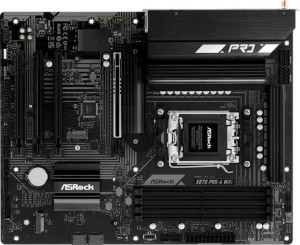
ASRock X870 Pro-A Wi-Fi
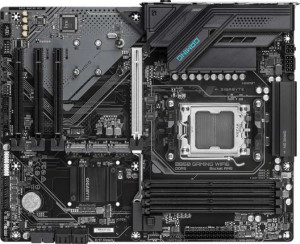
Gigabyte B850 Gaming WiFi6

ASRock X870 Pro-A Wi-Fi Gigabyte B850 Gaming WiFi6

Overview

Choosing between the ASRock X870 Pro-A Wi-Fi and the Gigabyte B850 Gaming WiFi6 means weighing two capable AM5 ATX motherboards that share a strong foundation but diverge in some meaningful ways. From connectivity standards like Wi-Fi and Thunderbolt 4 to expansion slot configurations and storage features, each board takes a distinctly different approach to serving its target audience. Read on to see how they stack up across every key specification.

Common Features

  • Both motherboards use the AM5 CPU socket.
  • Both boards have an ATX form factor.
  • Wi-Fi connectivity is available on both products.
  • Bluetooth is available on both products.
  • Both boards support HDMI 2.1.
  • Overclocking is supported on both products.
  • BIOS reset via dedicated button is not available on either product.
  • Dual BIOS is present on both products.
  • Both boards support up to 256GB of maximum memory.
  • Both boards have 4 memory slots.
  • Both boards use DDR5 memory.
  • Both boards have 2 memory channels.
  • ECC memory is not supported on either product.
  • Both boards have 2 USB 3.2 Gen 2 Type-A ports.
  • Neither board has a USB 3.2 Gen 2 Type-C port.
  • Both boards have 4 USB 2.0 ports.
  • Neither board has a USB 3.2 Gen 2x2 port.
  • Neither board has a Thunderbolt 3 port.
  • An HDMI output is present on both products.
  • Both boards have 1 RJ45 port.
  • Both boards provide 4 USB 2.0 ports through expansion.
  • Both boards have 4 SATA 3 connectors.
  • Both boards have 6 fan headers.
  • Both boards have 3 M.2 sockets.
  • A TPM connector is present on both products.
  • Neither board has a U.2 socket.
  • An mSATA connector is not available on either product.
  • Neither board has any SATA 2 connectors.
  • Both boards have 1 PCIe 5.0 x16 slot.
  • Neither board has any PCIe 3.0 x16, PCIe 2.0 x16, PCIe x4, or PCIe x8 slots.
  • Both boards support 7.1 audio channels.
  • An S/PDIF Out port is not available on either product.
  • Both boards have 3 audio connectors.
  • Both boards support RAID 0, RAID 1, and RAID 10.
  • RAID 0+1 is not supported on either product.

Main Differences

  • The chipset is X870 on ASRock X870 Pro-A Wi-Fi and B850 on Gigabyte B850 Gaming WiFi6.
  • Wi-Fi 6E and Wi-Fi 7 support is present on ASRock X870 Pro-A Wi-Fi but not available on Gigabyte B850 Gaming WiFi6.
  • Bluetooth version is 5.4 on ASRock X870 Pro-A Wi-Fi and 5.3 on Gigabyte B850 Gaming WiFi6.
  • RGB lighting is present on ASRock X870 Pro-A Wi-Fi but not available on Gigabyte B850 Gaming WiFi6.
  • The maximum overclocked RAM speed is 8000 MHz on ASRock X870 Pro-A Wi-Fi and 8200 MHz on Gigabyte B850 Gaming WiFi6.
  • USB 3.2 Gen 1 Type-A ports number 1 on ASRock X870 Pro-A Wi-Fi and 2 on Gigabyte B850 Gaming WiFi6.
  • A USB 3.2 Gen 1 Type-C port is not present on ASRock X870 Pro-A Wi-Fi but is available on Gigabyte B850 Gaming WiFi6.
  • USB 4 40Gbps ports number 2 on ASRock X870 Pro-A Wi-Fi and 0 on Gigabyte B850 Gaming WiFi6.
  • Thunderbolt 4 ports number 2 on ASRock X870 Pro-A Wi-Fi and 0 on Gigabyte B850 Gaming WiFi6.
  • A DisplayPort output is not present on ASRock X870 Pro-A Wi-Fi but is available on Gigabyte B850 Gaming WiFi6.
  • A PS/2 port is not present on ASRock X870 Pro-A Wi-Fi but is available on Gigabyte B850 Gaming WiFi6.
  • USB 3.2 Gen 1 ports through expansion number 4 on ASRock X870 Pro-A Wi-Fi and 2 on Gigabyte B850 Gaming WiFi6.
  • USB 3.0 ports through expansion number 4 on ASRock X870 Pro-A Wi-Fi and 2 on Gigabyte B850 Gaming WiFi6.
  • PCIe 4.0 x16 slots number 3 on ASRock X870 Pro-A Wi-Fi and 0 on Gigabyte B850 Gaming WiFi6.
  • PCIe x1 slots number 0 on ASRock X870 Pro-A Wi-Fi and 3 on Gigabyte B850 Gaming WiFi6.
  • RAID 5 support is present on Gigabyte B850 Gaming WiFi6 but not available on ASRock X870 Pro-A Wi-Fi.
Specs Comparison
ASRock X870 Pro-A Wi-Fi

ASRock X870 Pro-A Wi-Fi

Gigabyte B850 Gaming WiFi6

Gigabyte B850 Gaming WiFi6

General info:
CPU socket AM5 AM5
chipset X870 B850
form factor ATX ATX
release date June 2025 January 2025
supports Wi-Fi
Wi-Fi version Wi-Fi 4 (802.11n), Wi-Fi 5 (802.11ac), Wi-Fi 6 (802.11ax), Wi-Fi 6E (802.11ax), Wi-Fi 7 (802.11be) Wi-Fi 4 (802.11n), Wi-Fi 5 (802.11ac), Wi-Fi 6 (802.11ax)
Has Bluetooth
Bluetooth version 5.4 5.3
HDMI version HDMI 2.1 HDMI 2.1
Easy to overclock
has RGB lighting
Easy to reset BIOS
Has dual BIOS
has aptX
CPU sockets 1 1
Has integrated graphics
warranty period 3 years 3 years
height 244 mm 244 mm
width 305 mm 305 mm
Has integrated CPU

Both boards share a strong common foundation: the AM5 socket, ATX form factor, identical dimensions (244 × 305 mm), a 3-year warranty, dual BIOS, and HDMI 2.1 output. Both also support overclocking and include Wi-Fi and Bluetooth — so at a surface level, they are closely matched for everyday platform compatibility.

The most meaningful differentiators lie in the chipset and wireless stack. The ASRock runs on the X870 chipset, which sits above B850 in AMD's hierarchy and typically unlocks more PCIe lanes, broader overclocking headroom, and greater connectivity bandwidth — though those specifics belong to other spec groups. On wireless, the gap is notable: the ASRock supports up to Wi-Fi 7 (802.11be) and Bluetooth 5.4, while the Gigabyte tops out at Wi-Fi 6 (802.11ax) and Bluetooth 5.3. Wi-Fi 7 delivers significantly higher throughput and lower latency on compatible routers, and Bluetooth 5.4 brings improved connection stability and energy efficiency over 5.3. The ASRock also includes RGB lighting, which is absent on the Gigabyte — a minor but relevant point for aesthetics-focused builds.

Based strictly on this group's data, the ASRock X870 Pro-A Wi-Fi holds a clear edge. Its higher-tier chipset, next-generation Wi-Fi 7 support, and newer Bluetooth version give it a more future-proof general profile, while the two boards are otherwise evenly matched on form factor, warranty, and core platform features.
Memory:
maximum memory amount 256GB 256GB
overclocked RAM speed 8000 MHz 8200 MHz
memory slots 4 4
DDR memory version 5 5
memory channels 2 2
Supports ECC memory

On paper, these two boards are nearly identical in their memory configuration: both offer 4 slots, dual-channel DDR5, a 256GB maximum capacity, and no ECC support. For the vast majority of users — gamers, content creators, and workstation builders alike — this means the memory experience will feel essentially the same day-to-day.

The only differentiator in this group is the maximum overclocked RAM speed. The Gigabyte edges ahead with support up to 8200 MHz, compared to 8000 MHz on the ASRock. In practical terms, the gap between these two figures is extremely narrow — the real-world performance difference in gaming or productivity workloads at these frequencies is negligible, measurable only in synthetic benchmarks. It is worth noting that reaching either ceiling requires high-quality memory kits and careful BIOS tuning, so most users will never saturate either board's limit.

This group is effectively a near-tie, with the Gigabyte holding a marginal technical advantage in peak overclocked frequency. Unless extreme memory overclocking is a primary goal, this distinction should carry very little weight in a purchase decision.

Ports:
USB 3.2 Gen 2 ports (USB-A) 2 2
USB 3.2 Gen 1 ports (USB-A) 1 2
USB 3.2 Gen 2 ports (USB-C) 0 0
USB 3.2 Gen 1 ports (USB-C) 0 1
USB 2.0 ports 4 4
USB 3.2 Gen 2x2 ports 0 0
USB 4 40Gbps ports 2 0
USB 4 20Gbps ports 0 0
Thunderbolt 4 ports 2 0
Thunderbolt 3 ports 0 0
has an HDMI output
DisplayPort outputs 0 1
RJ45 ports 1 1
Has USB Type-C
eSATA ports 0 0
DVI outputs 0 0
has a VGA connector
PS/2 ports 0 1

The shared baseline here is respectable — both boards offer dual USB 3.2 Gen 2 (10Gbps) Type-A ports, four USB 2.0 ports, a single RJ45 LAN jack, and HDMI output. For a typical desktop build, that covers most peripherals without issue. The divergence, however, is significant once you look at the high-speed and display connectivity.

The ASRock X870 Pro-A Wi-Fi pulls decisively ahead with 2× USB4 40Gbps ports that also carry Thunderbolt 4 certification. This combination is a substantial real-world advantage: Thunderbolt 4 enables daisy-chaining of high-speed storage, external GPU enclosures, and 40Gbps data transfer — capabilities the Gigabyte B850 Gaming WiFi6 simply cannot match, as it offers no USB4 or Thunderbolt ports at all. For power users, video editors, or anyone working with fast external NVMe drives or pro docking stations, this gap is meaningful. The Gigabyte counters modestly with a DisplayPort output alongside HDMI, giving it a slight edge for multi-monitor setups driven directly from the board's video outputs — useful if the system uses integrated graphics. It also includes a legacy PS/2 port, which is niche but occasionally valued for specialized input devices.

This group has a clear winner: the ASRock X870 Pro-A Wi-Fi. Its Thunderbolt 4 / USB4 40Gbps ports represent a generational leap in rear-panel connectivity that the Gigabyte cannot replicate, making it the stronger choice for users who demand high-bandwidth peripheral and device support.

Connectors:
USB 3.2 Gen 1 ports (through expansion) 4 2
USB 2.0 ports (through expansion) 4 4
SATA 3 connectors 4 4
fan headers 6 6
USB 3.0 ports (through expansion) 4 2
M.2 sockets 3 3
Has TPM connector
U.2 sockets 0 0
Has mSATA connector
SATA 2 connectors 0 0

Internal connectors tell the story of how much a board can grow with your build over time. Here, the two boards share a solid common core: 3× M.2 sockets, 4× SATA 3 ports, 6 fan headers, and a TPM connector — meaning NVMe storage capacity, cooling control, and security module support are on equal footing for both.

The one meaningful difference is in internal USB expansion headers. The ASRock X870 Pro-A Wi-Fi provides 4× USB 3.2 Gen 1 internal ports for front-panel and case expansion, while the Gigabyte B850 Gaming WiFi6 offers only . In practical terms, this matters when pairing with cases that have multiple front-panel USB 3.0 ports, or when adding internal USB hubs and accessories — the ASRock gives builders more flexibility without needing additional PCIe expansion cards. Both boards match on USB 2.0 internal headers, so legacy front-panel connectors are equally covered.

A mild but real edge goes to the ASRock X870 Pro-A Wi-Fi in this group. The doubled internal USB 3.2 Gen 1 capacity is the only differentiator, but it is a practical one for builders who want to maximize internal connectivity without workarounds. Everything else is evenly matched.

Expansion slots:
PCIe 4.0 x16 slots 3 0
PCIe 5.0 x16 slots 1 1
PCIe 3.0 x16 slots 0 0
PCIe x1 slots 0 3
PCI slots 0 0
PCIe 2.0 x16 slots 0 0
PCIe x4 slots 0 0
PCIe x8 slots 0 0

At first glance, both boards look comparable — each offers a single PCIe 5.0 x16 primary slot, which is where a modern GPU will sit in either build. That slot delivers the full bandwidth needed for today's top graphics cards, and neither board compromises on that front.

Beyond the primary slot, however, the two boards take sharply different approaches. The ASRock X870 Pro-A Wi-Fi adds 3× PCIe 4.0 x16 additional slots, while the Gigabyte B850 Gaming WiFi6 fills its remaining expansion with 3× PCIe x1 slots. This is a significant functional gap. PCIe 4.0 x16 slots can accommodate high-bandwidth expansion cards — additional GPUs for compute workloads, capture cards, high-speed networking adapters, or NVMe expansion cards — whereas PCIe x1 slots are limited to low-bandwidth peripherals like basic sound cards or simple NICs. For builders who plan to go beyond a single-GPU setup or add demanding expansion hardware, the ASRock's slot configuration offers far greater versatility.

The ASRock X870 Pro-A Wi-Fi wins this category decisively. While both boards serve a standard single-GPU gaming build equally well, the ASRock's additional full-sized PCIe 4.0 x16 slots open up expansion possibilities that the Gigabyte's x1-only secondary slots simply cannot match.

Audio:
audio channels 7.1 7.1
Has S/PDIF Out port
audio connectors 3 3

Audio is the one spec group in this comparison where there is genuinely nothing to separate the two boards. Both the ASRock X870 Pro-A Wi-Fi and the Gigabyte B850 Gaming WiFi6 offer 7.1-channel audio with 3 analog connectors, and neither includes an S/PDIF optical output — meaning users who require a digital audio passthrough to an AV receiver or DAC will need to source that via a discrete sound card or USB audio device regardless of which board they choose.

The 7.1-channel configuration is a practical ceiling for onboard audio, supporting full surround sound setups for gaming or home theater use without any additional hardware. Three analog jacks is a standard implementation for this channel count, typically covering line-in, line-out, and microphone at minimum.

This group is a complete tie. Every data point is identical, and the audio experience out of the box will be indistinguishable between these two boards based on the provided specs alone.

Storage:
Supports RAID 1
Supports RAID 10 (1+0)
Supports RAID 5
Supports RAID 0
Supports RAID 0+1

RAID support is rarely a deciding factor for mainstream desktop builds, but it matters considerably for small workstations, home servers, or prosumer setups that rely on multi-drive arrays. Both boards cover the essentials — RAID 0 for performance striping, RAID 1 for mirroring, and RAID 10 for a combination of both — giving most users everything they need for either speed-focused or redundancy-focused configurations.

The single differentiator is RAID 5 support, which the Gigabyte B850 Gaming WiFi6 provides and the ASRock X870 Pro-A Wi-Fi does not. RAID 5 distributes parity data across three or more drives, offering a balance of usable storage capacity, read performance, and fault tolerance that RAID 1 and RAID 10 cannot replicate as efficiently at scale. For a build with multiple SATA or NVMe drives intended for workstation-style data storage, this is a meaningful capability gap.

A narrow edge goes to the Gigabyte B850 Gaming WiFi6 in this group. For the majority of users who will never configure a RAID array, the difference is moot — but for anyone planning a multi-drive redundant storage setup, the Gigabyte's RAID 5 support adds a genuinely useful option the ASRock cannot offer.

Comparison Summary & Verdict

Both boards offer a solid DDR5 platform with AM5 support, dual BIOS, Wi-Fi, Bluetooth, and 7.1 audio, making either a competent choice for a modern AMD build. However, their strengths diverge clearly. The ASRock X870 Pro-A Wi-Fi stands out with its Wi-Fi 7 and Wi-Fi 6E support, Thunderbolt 4 and USB 4 40Gbps ports, three PCIe 4.0 x16 slots, and more USB expansion headers, making it the stronger pick for power users who need cutting-edge connectivity and multi-card flexibility. The Gigabyte B850 Gaming WiFi6 counters with a higher overclocked RAM ceiling of 8200 MHz, a DisplayPort output, RAID 5 support, and a more conventional slot layout with three PCIe x1 slots, appealing to builders who prioritize memory performance and a leaner, no-RGB aesthetic.

ASRock X870 Pro-A Wi-Fi
Buy ASRock X870 Pro-A Wi-Fi if...

Buy the ASRock X870 Pro-A Wi-Fi if you need the latest wireless standards including Wi-Fi 7, plus Thunderbolt 4 and USB 4 40Gbps ports for maximum high-speed connectivity and multi-device versatility.

Gigabyte B850 Gaming WiFi6
Buy Gigabyte B850 Gaming WiFi6 if...

Buy the Gigabyte B850 Gaming WiFi6 if you want the highest overclocked RAM speeds at 8200 MHz, a DisplayPort output, RAID 5 support, and a clean build without RGB lighting.