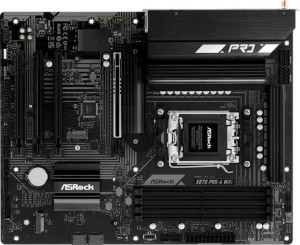
ASRock X870 Pro-A Wi-Fi
MSI MAG B850 Tomahawk Max WiFi

ASRock X870 Pro-A Wi-Fi MSI MAG B850 Tomahawk Max WiFi

Overview

When choosing between the ASRock X870 Pro-A Wi-Fi and the MSI MAG B850 Tomahawk Max WiFi, AMD AM5 platform builders face a genuinely competitive decision. Both boards share a strong foundation of modern connectivity and memory support, yet they diverge sharply in areas like USB port configuration, expansion slot layout, and storage options — making the right choice highly dependent on your specific build requirements.

Common Features

  • Both motherboards use the AM5 CPU socket.
  • Both boards use the ATX form factor.
  • Wi-Fi is supported on both boards, covering Wi-Fi 4, Wi-Fi 5, Wi-Fi 6, Wi-Fi 6E, and Wi-Fi 7.
  • Bluetooth 5.4 is available on both products.
  • Both boards feature an HDMI 2.1 output.
  • Overclocking support is available on both products.
  • Both boards support a maximum of 256GB of memory.
  • Both products have 4 memory slots.
  • Both boards use DDR5 memory.
  • Both boards offer 2 memory channels.
  • ECC memory is not supported on either product.
  • Both products include 2 USB 3.2 Gen 2 Type-A ports.
  • Both products include 1 USB 3.2 Gen 1 Type-A port.
  • USB 3.2 Gen 1 Type-C ports are absent on both products.
  • Both boards provide 4 USB 2.0 ports.
  • USB 3.2 Gen 2x2 ports are not present on either product.
  • USB 4 20Gbps ports are absent on both products.
  • Thunderbolt 3 ports are not available on either product.
  • Both boards include 4 USB 3.2 Gen 1 ports through expansion, 4 USB 2.0 ports through expansion, and 4 USB 3.0 ports through expansion.
  • Both boards have 4 SATA 3 connectors and no SATA 2 connectors.
  • A TPM connector is present on both products.
  • An mSATA connector is not available on either product.
  • Both boards feature 1 PCIe 5.0 x16 slot.
  • PCIe 3.0 x16, PCIe 2.0 x16, PCIe x4, and PCIe x8 slots are absent on both products.
  • Both boards support 7.1 audio channels.
  • RAID 0, RAID 1, and RAID 10 are supported on both products, while RAID 5 and RAID 0+1 are not supported on either.

Main Differences

  • The chipset is X870 on the ASRock X870 Pro-A Wi-Fi and B850 on the MSI MAG B850 Tomahawk Max WiFi.
  • Easy BIOS reset is available on the MSI MAG B850 Tomahawk Max WiFi but not on the ASRock X870 Pro-A Wi-Fi.
  • The board height is 244 mm on the ASRock X870 Pro-A Wi-Fi and 243.8 mm on the MSI MAG B850 Tomahawk Max WiFi.
  • The board width is 305 mm on the ASRock X870 Pro-A Wi-Fi and 304.8 mm on the MSI MAG B850 Tomahawk Max WiFi.
  • The maximum overclocked RAM speed is 8000 MHz on the ASRock X870 Pro-A Wi-Fi and 8400 MHz on the MSI MAG B850 Tomahawk Max WiFi.
  • USB 3.2 Gen 2 Type-C ports number 0 on the ASRock X870 Pro-A Wi-Fi and 3 on the MSI MAG B850 Tomahawk Max WiFi.
  • USB 4 40Gbps ports number 2 on the ASRock X870 Pro-A Wi-Fi and 0 on the MSI MAG B850 Tomahawk Max WiFi.
  • Thunderbolt 4 ports number 2 on the ASRock X870 Pro-A Wi-Fi and 0 on the MSI MAG B850 Tomahawk Max WiFi.
  • Fan headers number 6 on the ASRock X870 Pro-A Wi-Fi and 8 on the MSI MAG B850 Tomahawk Max WiFi.
  • M.2 sockets number 3 on the ASRock X870 Pro-A Wi-Fi and 4 on the MSI MAG B850 Tomahawk Max WiFi.
  • PCIe 4.0 x16 slots number 3 on the ASRock X870 Pro-A Wi-Fi and 1 on the MSI MAG B850 Tomahawk Max WiFi.
  • PCIe x1 slots number 0 on the ASRock X870 Pro-A Wi-Fi and 1 on the MSI MAG B850 Tomahawk Max WiFi.
  • An S/PDIF Out port is present on the MSI MAG B850 Tomahawk Max WiFi but not available on the ASRock X870 Pro-A Wi-Fi.
  • Audio connectors number 3 on the ASRock X870 Pro-A Wi-Fi and 2 on the MSI MAG B850 Tomahawk Max WiFi.
Specs Comparison
ASRock X870 Pro-A Wi-Fi

ASRock X870 Pro-A Wi-Fi

MSI MAG B850 Tomahawk Max WiFi

MSI MAG B850 Tomahawk Max WiFi

General info:
CPU socket AM5 AM5
chipset X870 B850
form factor ATX ATX
release date June 2025 January 2025
supports Wi-Fi
Wi-Fi version Wi-Fi 4 (802.11n), Wi-Fi 5 (802.11ac), Wi-Fi 6 (802.11ax), Wi-Fi 6E (802.11ax), Wi-Fi 7 (802.11be) Wi-Fi 4 (802.11n), Wi-Fi 5 (802.11ac), Wi-Fi 6 (802.11ax), Wi-Fi 6E (802.11ax), Wi-Fi 7 (802.11be)
Has Bluetooth
Bluetooth version 5.4 5.4
HDMI version HDMI 2.1 HDMI 2.1
Easy to overclock
has RGB lighting
Easy to reset BIOS
Has dual BIOS
has aptX
CPU sockets 1 1
Has integrated graphics
warranty period 3 years 3 years
height 244 mm 243.8 mm
width 305 mm 304.8 mm
Has integrated CPU

Both the ASRock X870 Pro-A Wi-Fi and the MSI MAG B850 Tomahawk Max WiFi share the same fundamental platform: the AM5 socket, standard ATX form factor, and identical wireless credentials including Wi-Fi 7 and Bluetooth 5.4. In practice, this means both boards are future-ready for the latest AMD processors and offer the same class of low-latency, high-throughput wireless connectivity. Their dimensions are virtually identical, so either will fit the same cases without issue.

The most meaningful distinction in this group is the chipset. The ASRock uses the X870 chipset, which sits above B850 in AMD's hierarchy and is typically associated with more PCIe lanes, greater bandwidth headroom, and a broader overclocking feature set — though both boards are rated as easy to overclock. The MSI rides the B850 chipset, a mid-range platform that still supports overclocking on AM5 but generally offers less I/O flexibility at the silicon level. For users who plan to push the platform hard with multiple high-bandwidth devices, the X870 has a structural advantage here.

On usability, the MSI holds a meaningful edge: it supports easy BIOS reset, while the ASRock does not — a small but real convenience advantage when troubleshooting unstable overclocks or failed POST situations. Both boards offer dual BIOS, RGB lighting, and a matching 3-year warranty, so outside of the chipset tier and BIOS reset convenience, they are closely matched. The ASRock X870 Pro-A Wi-Fi is the stronger choice for power users who want maximum platform headroom, while the MSI MAG B850 Tomahawk Max WiFi trades some of that ceiling for slightly better everyday serviceability.
Memory:
maximum memory amount 256GB 256GB
overclocked RAM speed 8000 MHz 8400 MHz
memory slots 4 4
DDR memory version 5 5
memory channels 2 2
Supports ECC memory

On paper, both boards share the same memory framework: DDR5, four slots, dual-channel configuration, and a 256GB maximum capacity. For most users, this means identical practical memory ceilings — you can load either board with large workloads, virtual machines, or content creation tasks without hitting a wall on either platform.

The single differentiator here is the peak overclocked RAM speed. The ASRock X870 Pro-A Wi-Fi tops out at 8000 MHz, while the MSI MAG B850 Tomahawk Max WiFi pushes to 8400 MHz. That 400 MHz gap matters primarily to enthusiasts running XMP/EXPO profiles at the extreme end — in bandwidth-sensitive tasks like video editing, large dataset processing, or competitive gaming with frame-rate-hungry titles, higher memory clocks can translate to measurable throughput gains, though the real-world delta at these frequencies is typically modest rather than transformative.

The MSI takes a narrow but genuine edge in this category purely on peak memory frequency. That said, for users not actively tuning RAM to its limits, the two boards are functionally equivalent here. The MSI's higher ceiling is a meaningful tiebreaker only for those who prioritize squeezing every last megahertz out of their DDR5 kit.

Ports:
USB 3.2 Gen 2 ports (USB-A) 2 2
USB 3.2 Gen 1 ports (USB-A) 1 1
USB 3.2 Gen 2 ports (USB-C) 0 3
USB 3.2 Gen 1 ports (USB-C) 0 0
USB 2.0 ports 4 4
USB 3.2 Gen 2x2 ports 0 0
USB 4 40Gbps ports 2 0
USB 4 20Gbps ports 0 0
Thunderbolt 4 ports 2 0
Thunderbolt 3 ports 0 0
has an HDMI output
DisplayPort outputs 0 0
RJ45 ports 1 1
Has USB Type-C
eSATA ports 0 0
DVI outputs 0 0
has a VGA connector
PS/2 ports 0 0

The rear I/O baseline is largely identical between these two boards — matching counts of USB-A ports across Gen 1 and Gen 2, four USB 2.0 ports for legacy peripherals, a single RJ45 jack, and HDMI output. Where they diverge sharply is in how they handle USB-C and high-speed connectivity, and this distinction is significant enough to be a deciding factor for certain users.

The ASRock X870 Pro-A Wi-Fi takes a premium approach: it offers 2x USB4 40Gbps ports paired with 2x Thunderbolt 4 ports. In practice, Thunderbolt 4 enables daisy-chaining of monitors and high-speed peripherals, connecting external GPU enclosures, and achieving up to 40Gbps transfer speeds — capabilities that are especially valuable for creative professionals and power users with demanding external device ecosystems. The MSI MAG B850 Tomahawk Max WiFi goes a different route, offering 3x USB 3.2 Gen 2 Type-C ports (10Gbps each) with no USB4 or Thunderbolt presence at all. This gives more USB-C port count but at a fraction of the bandwidth ceiling.

The ASRock holds a clear advantage here for users who need Thunderbolt 4 compatibility or the full 40Gbps throughput of USB4 — these are features the MSI simply cannot match. However, if your workflow revolves around modern USB-C peripherals without Thunderbolt requirements, the MSI's three Gen 2 Type-C ports offer broader plug-in flexibility. As a straight capability comparison though, the ASRock's port specification is meaningfully more advanced in this group.

Connectors:
USB 3.2 Gen 1 ports (through expansion) 4 4
USB 2.0 ports (through expansion) 4 4
SATA 3 connectors 4 4
fan headers 6 8
USB 3.0 ports (through expansion) 4 4
M.2 sockets 3 4
Has TPM connector
U.2 sockets 0 0
Has mSATA connector
SATA 2 connectors 0 0

Internal connectivity is where the MSI MAG B850 Tomahawk Max WiFi quietly pulls ahead. The two boards match on SATA 3 connectors, internal USB expansion headers, and TPM support — a solid shared baseline for typical builds. But the differences in M.2 sockets and fan headers tell a more nuanced story.

The MSI offers 4 M.2 sockets versus the ASRock's 3. That extra slot is genuinely useful: M.2 NVMe drives are now the default choice for OS installs, game libraries, and scratch storage, and power users can fill these slots quickly. Having a fourth socket means the MSI can accommodate a more expansive all-NVMe storage setup without requiring any SATA drives. Similarly, the MSI's 8 fan headers compared to the ASRock's 6 make a real difference in larger or thermally demanding builds — more headers means more granular control over case fans, radiator pumps, and CPU coolers without needing a separate fan controller hub.

The MSI holds a clear edge in this group. Neither difference is dramatic in a minimalist build, but for users planning multi-drive NVMe arrays or high-airflow chassis setups with numerous cooling components, the extra M.2 slot and two additional fan headers on the MSI represent tangible, build-day advantages.

Expansion slots:
PCIe 4.0 x16 slots 3 1
PCIe 5.0 x16 slots 1 1
PCIe 3.0 x16 slots 0 0
PCIe x1 slots 0 1
PCI slots 0 0
PCIe 2.0 x16 slots 0 0
PCIe x4 slots 0 0
PCIe x8 slots 0 0

Both boards offer a single PCIe 5.0 x16 slot — the primary GPU lane — putting them on equal footing for current-generation graphics cards. The meaningful divergence comes in how each board fills out the remaining expansion real estate.

The ASRock X870 Pro-A Wi-Fi adds three PCIe 4.0 x16 slots beyond that primary lane, which is a notably generous configuration. Even if those slots operate at reduced electrical bandwidth (x4 or x2) in multi-card scenarios, the physical x16 form factor accommodates full-length expansion cards — useful for multi-GPU compute setups, high-end capture cards, or 10GbE networking cards that occupy larger PCIe footprints. The MSI MAG B850 Tomahawk Max WiFi counters with just one PCIe 4.0 x16 slot and a single PCIe x1 slot. The x1 slot covers compact add-in cards like sound cards or basic network adapters, but the overall expansion capacity is considerably narrower.

For users running a single GPU and a handful of standard peripherals, the MSI's layout is perfectly adequate. But for anyone building a multi-card workstation, a capture or streaming rig with several full-length cards, or simply wanting headroom for future expansion, the ASRock's three additional PCIe 4.0 x16 slots represent a substantial and practical advantage in this category.

Audio:
audio channels 7.1 7.1
Has S/PDIF Out port
audio connectors 3 2

Audio is a relatively tight category between these two boards, with both delivering 7.1-channel surround sound support — sufficient for a full home theater or high-end gaming headset setup. The differences come down to two specific points: analog connector count and digital output availability.

The ASRock X870 Pro-A Wi-Fi provides 3 analog audio connectors versus the MSI's 2, giving it a minor edge for users running multiple analog audio devices simultaneously — for instance, combining front-panel headphone/mic use with rear speaker outputs without swapping plugs. The MSI MAG B850 Tomahawk Max WiFi compensates with an S/PDIF optical output, which the ASRock lacks entirely. S/PDIF is the preferred connection for passing digital audio to an external DAC, AV receiver, or soundbar, keeping the signal in the digital domain and bypassing the motherboard's analog circuitry — a meaningful advantage for home theater setups or audiophile configurations.

Which board has the edge depends entirely on use case. The ASRock suits users who rely on analog multi-device setups, while the MSI is the better choice for anyone routing audio through an external receiver or DAC via optical. Neither holds a universal advantage — this is a genuine split decision driven by how you output your audio.

Storage:
Supports RAID 1
Supports RAID 10 (1+0)
Supports RAID 5
Supports RAID 0
Supports RAID 0+1

Storage configuration is a dead heat between these two boards. Both support RAID 0 (striping for performance), RAID 1 (mirroring for redundancy), and RAID 10 (a combined stripe-and-mirror array balancing speed with fault tolerance) — and both equally omit RAID 5 and RAID 0+1.

The practical coverage here is solid for the vast majority of users. RAID 0 suits those chasing maximum sequential throughput across multiple drives; RAID 1 is the go-to for simple data protection; and RAID 10 serves power users who want both performance and resilience across four or more drives. The absence of RAID 5 is worth noting for users with larger multi-drive NAS-style setups, but this is a consistent limitation across both boards rather than a differentiator.

This group is a straight tie — there is no basis in the provided specs to favor one board over the other. Whichever board a user chooses, they arrive at identical RAID capabilities and the same storage configuration options.

Comparison Summary & Verdict

After a thorough side-by-side review, both boards prove to be capable AM5 platforms with Wi-Fi 7, DDR5, and solid RAID support. The ASRock X870 Pro-A Wi-Fi stands out for users who demand Thunderbolt 4 and USB 4 40Gbps connectivity, more PCIe 4.0 x16 slots, and a wider audio connector selection — making it a strong pick for content creators and power users with high-bandwidth peripheral needs. The MSI MAG B850 Tomahawk Max WiFi, on the other hand, wins on storage expandability with 4 M.2 sockets, offers a higher overclocked RAM ceiling of 8400 MHz, adds 3 USB 3.2 Gen 2 Type-C rear ports, includes more fan headers for complex cooling setups, and benefits from an easy BIOS reset feature for less experienced builders. Choose the ASRock for raw connectivity muscle; choose the MSI for a more flexible, builder-friendly experience.

ASRock X870 Pro-A Wi-Fi
Buy ASRock X870 Pro-A Wi-Fi if...

Buy the ASRock X870 Pro-A Wi-Fi if you need Thunderbolt 4 and USB 4 40Gbps ports for high-bandwidth peripherals, or require more PCIe 4.0 x16 expansion slots for a multi-card build.

MSI MAG B850 Tomahawk Max WiFi
Buy MSI MAG B850 Tomahawk Max WiFi if...

Buy the MSI MAG B850 Tomahawk Max WiFi if you want more M.2 storage slots, a higher overclocked RAM speed of 8400 MHz, additional USB Type-C rear ports, or an easy BIOS reset feature for a more flexible building experience.