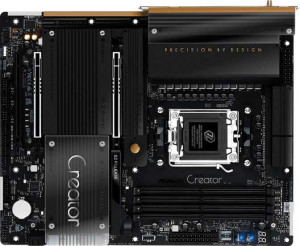
ASRock X870 Taichi Creator
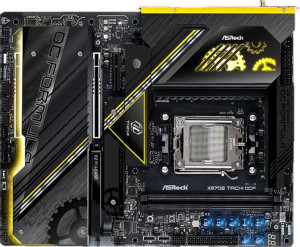
ASRock X870E Taichi OCF

ASRock X870 Taichi Creator ASRock X870E Taichi OCF

Overview

Welcome to our in-depth specification comparison between the ASRock X870 Taichi Creator and the ASRock X870E Taichi OCF. Both motherboards share the same AM5 socket, X870 chipset, and ATX form factor, yet they diverge sharply when it comes to memory capacity and slot count, rear USB port configuration, and expansion options. Whether you are building a content creation powerhouse or an overclocking-focused workstation, understanding these key differences will help you make the right choice.

Common Features

  • Both products use the AM5 CPU socket.
  • Both products feature the X870 chipset.
  • Both products have an ATX form factor.
  • Wi-Fi is supported on both products, covering Wi-Fi 4, Wi-Fi 5, Wi-Fi 6, Wi-Fi 6E, and Wi-Fi 7.
  • Bluetooth 5.4 is present on both products.
  • Both products have an HDMI 2.1 output.
  • Both products use DDR5 memory with a dual-channel configuration.
  • ECC memory is not supported on either product.
  • Both products have 2 USB 2.0 ports.
  • Neither product includes USB 3.2 Gen 1 USB-C ports or USB 3.2 Gen 2x2 ports on the rear.
  • Both products include 2 USB 4 40Gbps ports and 2 Thunderbolt 4 ports.
  • Neither product has Thunderbolt 3 ports or USB 4 20Gbps ports.
  • Both products offer 6 USB 2.0 ports through expansion.
  • Neither product has a TPM connector, U.2 socket, or mSATA connector.
  • Both products have 2 PCIe 5.0 x16 slots and no PCIe 4.0 x16 slots.
  • Neither product includes PCIe x1, PCI, PCIe 2.0 x16, or PCIe x8 slots.
  • Both products have a signal-to-noise ratio of 130 dB on the DAC.
  • An S/PDIF Out port is present on both products.
  • Both products have 2 audio connectors.
  • Both products support RAID 0, RAID 1, and RAID 10, while RAID 5 and RAID 0+1 are not supported on either product.

Main Differences

  • Maximum memory capacity is 256GB on ASRock X870 Taichi Creator and 128GB on ASRock X870E Taichi OCF.
  • Overclocked RAM speed reaches 8000 MHz on ASRock X870 Taichi Creator and 9000 MHz on ASRock X870E Taichi OCF.
  • Memory slots total 4 on ASRock X870 Taichi Creator and 2 on ASRock X870E Taichi OCF.
  • USB 3.2 Gen 2 USB-A ports number 2 on ASRock X870 Taichi Creator and 7 on ASRock X870E Taichi OCF.
  • USB 3.2 Gen 1 USB-A ports number 6 on ASRock X870 Taichi Creator, while ASRock X870E Taichi OCF has none.
  • A USB 3.2 Gen 2 USB-C port is absent on ASRock X870 Taichi Creator but present on ASRock X870E Taichi OCF.
  • RJ45 ports number 2 on ASRock X870 Taichi Creator and 1 on ASRock X870E Taichi OCF.
  • A PS/2 port is not present on ASRock X870 Taichi Creator but is available on ASRock X870E Taichi OCF.
  • USB 3.2 Gen 1 ports through expansion number 4 on ASRock X870 Taichi Creator and 2 on ASRock X870E Taichi OCF.
  • USB 3.2 Gen 2x2 ports through expansion number 1 on ASRock X870 Taichi Creator and 2 on ASRock X870E Taichi OCF.
  • SATA 3 connectors number 4 on ASRock X870 Taichi Creator and 2 on ASRock X870E Taichi OCF.
  • USB 3.0 ports through expansion number 4 on ASRock X870 Taichi Creator and 2 on ASRock X870E Taichi OCF.
  • M.2 sockets number 4 on ASRock X870 Taichi Creator and 6 on ASRock X870E Taichi OCF.
  • ASRock X870 Taichi Creator includes 1 PCIe 3.0 x16 slot, while ASRock X870E Taichi OCF has none.
  • ASRock X870E Taichi OCF includes 1 PCIe x4 slot, while ASRock X870 Taichi Creator has none.
  • Audio channels support 7.1 on ASRock X870 Taichi Creator and 5.1 on ASRock X870E Taichi OCF.
Specs Comparison
ASRock X870 Taichi Creator

ASRock X870 Taichi Creator

ASRock X870E Taichi OCF

ASRock X870E Taichi OCF

General info:
CPU socket AM5 AM5
chipset X870 X870
form factor ATX ATX
release date July 2025 July 2025
supports Wi-Fi
Wi-Fi version Wi-Fi 4 (802.11n), Wi-Fi 5 (802.11ac), Wi-Fi 6 (802.11ax), Wi-Fi 6E (802.11ax), Wi-Fi 7 (802.11be) Wi-Fi 4 (802.11n), Wi-Fi 5 (802.11ac), Wi-Fi 6 (802.11ax), Wi-Fi 6E (802.11ax), Wi-Fi 7 (802.11be)
Has Bluetooth
Bluetooth version 5.4 5.4
HDMI version HDMI 2.1 HDMI 2.1
Easy to overclock
has RGB lighting
Easy to reset BIOS
Has dual BIOS
has aptX
CPU sockets 1 1
Has integrated graphics
warranty period 3 years 3 years
Has integrated CPU

In terms of general specifications, the ASRock X870 Taichi Creator and the ASRock X870E Taichi OCF are virtually identical across every measured attribute in this group. Both boards are built around the AM5 socket with an X870 chipset, adopt the standard ATX form factor, and ship with a 3-year warranty. Feature parity extends to wireless connectivity — each supports the full Wi-Fi stack up to Wi-Fi 7 (802.11be) and Bluetooth 5.4, meaning users on either board get the latest wireless standards with improved speed, lower latency, and better range compared to older generations.

On the platform and usability front, both boards share dual BIOS, easy BIOS reset, RGB lighting, and are flagged as easy to overclock — all meaningful quality-of-life features for enthusiasts. Neither board carries integrated graphics or an integrated CPU, which is expected for this class of AM5 platform board. The single HDMI 2.1 output present on both is relevant only when pairing with a CPU that has an integrated GPU, which these boards do not support natively — so in practice it serves little functional purpose for most users.

Based strictly on the general info specs provided, these two boards are in a complete tie. There is no differentiating factor within this group — every specification is identical. Buyers will need to look to other spec groups such as storage, memory, or connectivity to find meaningful distinctions between the Creator and the OCF.
Memory:
maximum memory amount 256GB 128GB
overclocked RAM speed 8000 MHz 9000 MHz
memory slots 4 2
DDR memory version 5 5
memory channels 2 2
Supports ECC memory

The memory configuration is where these two boards begin to diverge in meaningful ways, and the trade-offs are worth understanding carefully. The Taichi Creator offers 4 memory slots with a maximum capacity of 256GB, while the Taichi OCF is limited to 2 slots and a ceiling of 128GB. For most gaming builds the difference is academic, but for content creators, video editors, or anyone running memory-hungry workloads like large virtual machines or 3D rendering, the Creator's doubled capacity headroom is a tangible advantage — both now and for future upgrades.

The OCF punches back on the speed front, supporting overclocked RAM up to 9000 MHz compared to the Creator's 8000 MHz. That 1000 MHz gap at the extreme end is primarily relevant to overclockers and enthusiasts chasing benchmark records or squeezing out peak performance from AMD's Infinity Fabric — for everyday workloads, the real-world difference between these speeds is marginal. Both boards share DDR5 and a dual-channel configuration, so the memory architecture and bandwidth efficiency are equivalent in typical use.

Overall, the Taichi Creator holds the edge in this group for the majority of users, thanks to its greater slot count and higher maximum capacity — attributes that translate directly into upgrade flexibility and workstation-class utility. The OCF's higher peak overclocking speed is a narrower advantage that only matters to a specific subset of enthusiasts. Neither board supports ECC memory, so mission-critical or server use cases are off the table for both.

Ports:
USB 3.2 Gen 2 ports (USB-A) 2 7
USB 3.2 Gen 1 ports (USB-A) 6 0
USB 3.2 Gen 2 ports (USB-C) 0 1
USB 3.2 Gen 1 ports (USB-C) 0 0
USB 2.0 ports 2 2
USB 3.2 Gen 2x2 ports 0 0
USB 4 40Gbps ports 2 2
USB 4 20Gbps ports 0 0
Thunderbolt 4 ports 2 2
Thunderbolt 3 ports 0 0
has an HDMI output
DisplayPort outputs 0 0
RJ45 ports 2 1
Has USB Type-C
eSATA ports 0 0
DVI outputs 0 0
has a VGA connector
PS/2 ports 0 1

Looking at rear I/O, the two boards take noticeably different approaches to USB connectivity. The Taichi Creator offers a mix of 6 USB 3.2 Gen 1 and 2 USB 3.2 Gen 2 Type-A ports, while the Taichi OCF consolidates its Type-A lineup into 7 USB 3.2 Gen 2 ports plus one USB 3.2 Gen 2 Type-C. In practical terms, the OCF delivers a uniformly faster 10Gbps experience across all its standard USB ports — relevant when transferring large files to fast external SSDs or high-resolution cameras — whereas the Creator's six Gen 1 ports are capped at 5Gbps. Both boards match on the premium end with 2 USB 4 40Gbps ports and 2 Thunderbolt 4 ports, covering the fastest peripherals and eGPU use cases equally well.

Where the Creator clearly pulls ahead is networking: it provides 2 RJ45 ports versus the OCF's single port. Dual Ethernet is a meaningful advantage for users who need simultaneous connections — think link aggregation for faster NAS throughput, or separating a gaming network from a workstation network without adding a PCIe card. The OCF includes a PS/2 port, which is a niche legacy feature with essentially no relevance to modern builds.

On balance, this group is closely contested but splits along use-case lines. The Taichi OCF wins on USB quality with its all-Gen-2 lineup, while the Taichi Creator wins on networking flexibility with dual RJ45. Users prioritizing high-speed USB peripheral throughput lean toward the OCF; those who need multi-network capability or link aggregation will find the Creator's dual Ethernet more compelling.

Connectors:
USB 3.2 Gen 1 ports (through expansion) 4 2
USB 3.2 Gen 2x2 ports (through expansion) 1 2
USB 2.0 ports (through expansion) 6 6
SATA 3 connectors 4 2
USB 3.0 ports (through expansion) 4 2
M.2 sockets 4 6
Has TPM connector
U.2 sockets 0 0
Has mSATA connector
SATA 2 connectors 0 0

Storage expansion is the headline story in this group, and the two boards make a clear philosophical split. The Taichi OCF leads with 6 M.2 sockets, making it a standout choice for NVMe-heavy builds — think high-speed RAID arrays, large content libraries, or professional workstations running multiple fast drives simultaneously. The Taichi Creator counters with 4 M.2 sockets, which is still generous by any standard, but trails the OCF by two slots. Conversely, the Creator offers 4 SATA 3 connectors versus the OCF's 2, giving it the edge for users who still rely on traditional SSDs or HDDs for bulk storage — a common scenario in media production or archiving workflows.

On the internal USB expansion front, the OCF provides 2 USB 3.2 Gen 2x2 headers compared to the Creator's single header. Gen 2x2 delivers up to 20Gbps, so the OCF is better positioned for high-speed front-panel USB-C accessories or internal hubs that demand that bandwidth. The Creator's slightly higher USB 3.2 Gen 1 header count is a lesser advantage given the slower 5Gbps ceiling of those ports.

The Taichi OCF takes the edge in this group for users building NVMe-centric systems, offering two additional M.2 slots and faster internal USB expansion. The Taichi Creator is the stronger pick for builds that blend NVMe and traditional SATA storage. Neither board includes a TPM connector, U.2, or mSATA, so those are non-factors for both.

Expansion slots:
PCIe 4.0 x16 slots 0 0
PCIe 5.0 x16 slots 2 2
PCIe 3.0 x16 slots 1 0
PCIe x1 slots 0 0
PCI slots 0 0
PCIe 2.0 x16 slots 0 0
PCIe x4 slots 0 1
PCIe x8 slots 0 0

Both boards share the same high-end foundation here: 2 PCIe 5.0 x16 slots, which represent the current peak of consumer expansion bandwidth. This makes either board equally capable of running the latest GPUs at full speed, and both can support dual-GPU or GPU-plus-high-speed-NVMe configurations without compromise. For the vast majority of enthusiast builders, those two slots alone cover every primary use case.

The distinction lies in the secondary slot. The Taichi Creator includes a PCIe 3.0 x16 slot — electrically a full-width slot running an older generation, useful for legacy capture cards, older NVMe adapters, or any PCIe card that doesn't demand the latest bandwidth. The Taichi OCF instead offers a PCIe x4 slot, which is narrower but can still serve capture cards, 10GbE NICs, or USB expansion cards without occupying a primary slot. Neither option is strictly superior — they simply cater to different secondary expansion needs.

This group is effectively a tie at the top, with both boards delivering identical PCIe 5.0 x16 coverage. The secondary slot difference is a minor consideration: the Creator's PCIe 3.0 x16 physical slot offers broader mechanical compatibility for legacy full-size cards, while the OCF's x4 slot is leaner but adequate for most add-in cards. Users with specific legacy hardware may lean toward the Creator, while those who need only a compact secondary slot will find the OCF sufficient.

Audio:
Signal-to-Noise ratio (DAC) 130 dB 130 dB
audio channels 7.1 5.1
Has S/PDIF Out port
audio connectors 2 2

Audio quality at the codec level is identical between these two boards — both deliver a 130 dB signal-to-noise ratio (SNR) from their DACs, which sits at the high end of onboard audio performance. A 130 dB SNR means the audio signal is exceptionally clean relative to background noise, making both boards capable of satisfying all but the most demanding audiophiles without a dedicated sound card.

The one meaningful difference is channel support. The Taichi Creator outputs 7.1 surround sound, while the Taichi OCF tops out at 5.1. For users with a full surround speaker setup, that distinction matters — 7.1 adds a dedicated pair of rear side channels that deepen spatial positioning in both games and home theater setups. Both boards share the same analog connector count and include an S/PDIF output for digital passthrough to an external receiver or DAC.

The Taichi Creator holds a clear edge here for anyone invested in multi-speaker surround audio. For users running stereo headphones or a 5.1 system — which covers the majority of PC audio setups — the OCF's audio capability is fully adequate and the gap is irrelevant in practice. The shared 130 dB SNR ensures neither board is a bottleneck for audio fidelity regardless of channel configuration.

Storage:
Supports RAID 1
Supports RAID 10 (1+0)
Supports RAID 5
Supports RAID 0
Supports RAID 0+1

RAID support is a complete wash between these two boards — every configuration listed is identical. Both the Taichi Creator and the Taichi OCF support RAID 0 (striping for maximum speed), RAID 1 (mirroring for redundancy), and RAID 10 (a combination of both, balancing performance and data protection). Neither board supports RAID 5 or RAID 0+1.

The practical implication is that both boards cover the RAID modes most relevant to consumer and prosumer workloads. RAID 0 suits users chasing peak sequential throughput; RAID 1 addresses data redundancy for critical files; and RAID 10 is the go-to for anyone wanting both speed and fault tolerance across four or more drives. The absence of RAID 5 is worth noting for users expecting parity-based redundancy across three or more drives — neither board accommodates that use case — but RAID 5 is uncommon on consumer desktop platforms regardless.

This group results in a complete tie. There is no storage RAID differentiator to weigh between these two boards; the decision here will not influence which one a buyer should choose.

Comparison Summary & Verdict

After a thorough comparison, both boards deliver a strong shared foundation: Wi-Fi 7, Bluetooth 5.4, dual Thunderbolt 4 ports, and PCIe 5.0 support. However, their strengths diverge clearly. The ASRock X870 Taichi Creator stands out with its 4 memory slots and 256GB maximum RAM capacity, 4 SATA 3 connectors, dual RJ45 ports, and 7.1 audio channels, making it the better fit for content creators and professionals who need maximum memory headroom and versatile connectivity. The ASRock X870E Taichi OCF, on the other hand, excels with a higher overclocked RAM speed of 9000 MHz, 6 M.2 sockets, and 7 USB 3.2 Gen 2 Type-A ports, positioning it as the ideal platform for overclockers and storage-hungry power users who prioritize raw speed and NVMe expansion above all else.

ASRock X870 Taichi Creator
Buy ASRock X870 Taichi Creator if...

Buy the ASRock X870 Taichi Creator if you need maximum memory capacity with 4 slots and up to 256GB of RAM, more SATA connectors, dual LAN ports, and 7.1 surround audio for a content creation or professional workstation build.

ASRock X870E Taichi OCF
Buy ASRock X870E Taichi OCF if...

Buy the ASRock X870E Taichi OCF if you prioritize higher overclocked RAM speeds of up to 9000 MHz, 6 M.2 sockets for extensive NVMe storage, and a greater number of USB 3.2 Gen 2 Type-A ports for a performance-tuned or storage-intensive system.