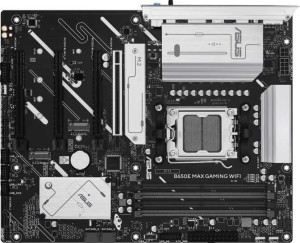
Asus B650E Max Gaming Wi-Fi
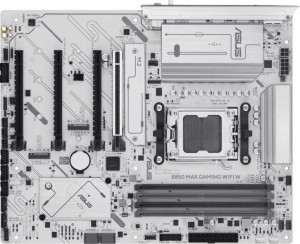
Asus B850 Max Gaming Wi-Fi W

Asus B650E Max Gaming Wi-Fi Asus B850 Max Gaming Wi-Fi W

Overview

Welcome to our in-depth spec comparison between the Asus B650E Max Gaming Wi-Fi and the Asus B850 Max Gaming Wi-Fi W — two ATX motherboards built on the AM5 platform with DDR5 support and robust connectivity. While both boards share a great deal of common ground, including identical port layouts, memory support, and expansion slots, the key battlegrounds lie in their chipset generation and a handful of quality-of-life features that could make a real difference for enthusiast builders.

Common Features

  • Both boards use the AM5 CPU socket.
  • Both boards have an ATX form factor.
  • Wi-Fi is supported on both boards.
  • Both boards support Wi-Fi 4 (802.11n), Wi-Fi 5 (802.11ac), Wi-Fi 6 (802.11ax), and Wi-Fi 6E (802.11ax).
  • Bluetooth is available on both boards at version 5.3.
  • Both boards include an HDMI 2.1 port.
  • Overclocking is supported on both boards.
  • Both boards support a maximum of 256GB of RAM.
  • Both boards support overclocked RAM speeds up to 8000 MHz.
  • Both boards have 4 memory slots.
  • Both boards use DDR5 memory.
  • Both boards operate in dual-channel memory mode.
  • ECC memory is not supported on either board.
  • Both boards provide 3 USB 3.2 Gen 2 Type-A ports.
  • Both boards provide 2 USB 3.2 Gen 1 Type-A ports.
  • Both boards provide 1 USB 3.2 Gen 2 Type-C port.
  • Both boards provide 2 USB 2.0 ports on the rear panel.
  • Both boards have 2 USB 3.2 Gen 1 ports through expansion.
  • Both boards have 6 USB 2.0 ports through expansion.
  • Both boards have 4 SATA 3 connectors.
  • Both boards have 3 M.2 sockets.
  • A TPM connector is present on both boards.
  • An mSATA connector is not available on either board.
  • Both boards have 1 PCIe 5.0 x16 slot.
  • Both boards have 1 PCIe 4.0 x16 slot.
  • Both boards have 2 PCIe 3.0 x16 slots.
  • Both boards support 7.1 audio channels.
  • Both boards have 3 audio connectors.
  • An S/PDIF Out port is not available on either board.
  • Both boards support RAID 0, RAID 1, RAID 5, and RAID 10 (1+0).
  • RAID 0+1 is not supported on either board.

Main Differences

  • The chipset is B650 on Asus B650E Max Gaming Wi-Fi and B850 on Asus B850 Max Gaming Wi-Fi W.
  • Easy BIOS reset is available on Asus B850 Max Gaming Wi-Fi W but not on Asus B650E Max Gaming Wi-Fi.
  • Dual BIOS is present on Asus B850 Max Gaming Wi-Fi W but not available on Asus B650E Max Gaming Wi-Fi.
  • Fan headers total 4 on Asus B650E Max Gaming Wi-Fi and 6 on Asus B850 Max Gaming Wi-Fi W.
Specs Comparison
Asus B650E Max Gaming Wi-Fi

Asus B650E Max Gaming Wi-Fi

Asus B850 Max Gaming Wi-Fi W

Asus B850 Max Gaming Wi-Fi W

General info:
CPU socket AM5 AM5
chipset B650 B850
form factor ATX ATX
release date March 2025 April 2025
supports Wi-Fi
Wi-Fi version Wi-Fi 4 (802.11n), Wi-Fi 5 (802.11ac), Wi-Fi 6 (802.11ax), Wi-Fi 6E (802.11ax) Wi-Fi 4 (802.11n), Wi-Fi 5 (802.11ac), Wi-Fi 6 (802.11ax), Wi-Fi 6E (802.11ax)
Has Bluetooth
Bluetooth version 5.3 5.3
HDMI version HDMI 2.1 HDMI 2.1
Easy to overclock
has RGB lighting
Easy to reset BIOS
Has dual BIOS
has aptX
CPU sockets 1 1
Has integrated graphics
warranty period 3 years 3 years
height 244 mm 244 mm
width 305 mm 305 mm
Has integrated CPU

Both the Asus B650E Max Gaming Wi-Fi and the Asus B850 Max Gaming Wi-Fi W share a strong common foundation: the same AM5 socket, ATX form factor, identical physical dimensions, Wi-Fi 6E and Bluetooth 5.3 connectivity, HDMI 2.1 output, RGB lighting, and overclocking support — all backed by a 3-year warranty. For most day-to-day platform considerations, these two boards are effectively twins.

The meaningful separation lies in the chipset generation and BIOS resilience features. The B850 moves to a newer chipset tier, which in practice typically brings improved USB bandwidth, PCIe lane allocation, and better support headroom for future AM5 processors. More concretely for builders, the B850 Max adds easy BIOS reset and a dual BIOS chip — features absent on the B650E Max. Dual BIOS is a genuine safety net: if a failed firmware flash bricks the primary chip, the board can automatically recover from a backup, a scenario that otherwise requires RMA. Easy BIOS reset further reduces the friction of recovering from a bad overclock or a misconfigured memory profile.

The B850 Max Gaming Wi-Fi W holds a clear edge in this group. The newer chipset offers a more future-proof platform, and the addition of dual BIOS and easy BIOS reset meaningfully lowers the risk and hassle of firmware-level mishaps — advantages that matter most to overclockers and enthusiasts who push their hardware. The B650E Max is not deficient in connectivity or build quality, but for users who value platform longevity and recovery safety, the B850 variant is the stronger choice.
Memory:
maximum memory amount 256GB 256GB
overclocked RAM speed 8000 MHz 8000 MHz
memory slots 4 4
DDR memory version 5 5
memory channels 2 2
Supports ECC memory

On memory, these two boards are identical in every measurable way. Both support DDR5 across 4 slots in a dual-channel configuration, cap out at 256GB of maximum capacity, and top their overclocked RAM speeds at 8000 MHz. Neither supports ECC memory, which is expected at this tier — ECC is typically reserved for workstation and server platforms.

The shared 8000 MHz overclocked ceiling is worth noting: that figure represents the upper bound of what the board will officially validate, and reaching it requires carefully selected high-speed DDR5 kits. In practice, most users will run their memory well below that ceiling, but it signals headroom for enthusiasts chasing maximum memory bandwidth in latency-sensitive workloads like gaming or content creation. The 256GB cap, achievable with four 64GB DIMMs, is more than sufficient for any consumer or prosumer use case today.

This group is a complete tie. There is no differentiator here — both boards offer an identical memory platform, and the choice between them should rest entirely on other specification groups.

Ports:
USB 3.2 Gen 2 ports (USB-A) 3 3
USB 3.2 Gen 1 ports (USB-A) 2 2
USB 3.2 Gen 2 ports (USB-C) 1 1
USB 3.2 Gen 1 ports (USB-C) 0 0
USB 2.0 ports 2 2
USB 3.2 Gen 2x2 ports 0 0
USB 4 40Gbps ports 0 0
USB 4 20Gbps ports 0 0
Thunderbolt 4 ports 0 0
Thunderbolt 3 ports 0 0
has an HDMI output
DisplayPort outputs 1 1
RJ45 ports 1 1
Has USB Type-C
eSATA ports 0 0
DVI outputs 0 0
has a VGA connector
PS/2 ports 0 0

The rear I/O port selection on both boards is a perfect mirror image. Each offers 3× USB 3.2 Gen 2 Type-A (10Gbps), 2× USB 3.2 Gen 1 Type-A (5Gbps), 1× USB 3.2 Gen 2 Type-C, and 2× USB 2.0 ports — a well-rounded spread that covers fast peripheral connectivity without leaving legacy devices stranded. Neither board steps up to USB 3.2 Gen 2x2 (20Gbps) or USB 4, which would have been a noteworthy differentiator.

For display output, both provide HDMI and 1 DisplayPort, useful when pairing with an AM5 CPU that has integrated graphics — though as noted in the general specs, neither board has onboard graphics itself. A single RJ45 Ethernet port rounds out the connectivity picture on both. The absence of Thunderbolt on either board is consistent with mainstream gaming motherboard positioning, where Thunderbolt remains relatively rare.

Once again, this group is a complete tie. The port layout is identical down to every count and generation, so peripheral and display connectivity offers no basis for choosing one board over the other.

Connectors:
USB 3.2 Gen 1 ports (through expansion) 2 2
USB 2.0 ports (through expansion) 6 6
SATA 3 connectors 4 4
fan headers 4 6
USB 3.0 ports (through expansion) 2 2
M.2 sockets 3 3
Has TPM connector
U.2 sockets 0 0
Has mSATA connector
SATA 2 connectors 0 0

Internal connector layouts are nearly identical across both boards: 3× M.2 sockets, 4× SATA 3 ports, expansion headers for USB 3.2 Gen 1 and USB 2.0, and a TPM connector. The 3 M.2 sockets are the headline here — they enable a fully NVMe-based storage configuration without touching any SATA ports, which is the practical preference for most modern gaming builds chasing fast load times.

The one concrete difference is fan headers: the B850 Max provides 6 fan headers versus 4 on the B650E Max. This gap matters more than it might first appear. In a high-airflow gaming build with multiple case fans, a CPU cooler, and potentially a radiator pump header, four headers can become a bottleneck — forcing users to rely on fan splitters or hubs to manage their cooling setup. Six dedicated headers offer greater per-channel control through the firmware, which translates to more precise and independent fan curve tuning without additional accessories.

The B850 Max Gaming Wi-Fi W holds a narrow but genuine edge here, solely on the strength of its 2 additional fan headers. For builders planning a thermally complex system — large cases, multi-fan radiators, or extensive airflow setups — that extra headroom is a practical advantage. For simpler builds, the difference is unlikely to matter.

Expansion slots:
PCIe 4.0 x16 slots 1 1
PCIe 5.0 x16 slots 1 1
PCIe 3.0 x16 slots 2 2
PCIe x1 slots 0 0
PCI slots 0 0
PCIe 2.0 x16 slots 0 0
PCIe x4 slots 0 0
PCIe x8 slots 0 0

Expansion slot configurations are identical on both boards: one PCIe 5.0 x16 slot, one PCIe 4.0 x16 slot, and two PCIe 3.0 x16 slots. The PCIe 5.0 x16 primary slot is the headline feature — it delivers up to 128GB/s of bandwidth, ensuring the board is ready for current and next-generation discrete GPUs without any bottlenecking at the slot level. For the vast majority of users running a single high-end graphics card, this is the only slot that will ever matter.

The secondary PCIe 4.0 x16 slot is well-suited for add-in cards such as capture cards, 10GbE NICs, or a secondary GPU in compute scenarios. The two PCIe 3.0 x16 slots round out the layout for lower-bandwidth expansion needs, though their practical use in gaming-focused builds is limited. The complete absence of PCIe x1 slots is notable — it trades away legacy low-profile card compatibility in favor of a cleaner, more modern slot arrangement.

This group is a complete tie. Every slot type, generation, and count is shared between the two boards, meaning expansion flexibility plays no role in differentiating them.

Audio:
audio channels 7.1 7.1
Has S/PDIF Out port
audio connectors 3 3

Audio hardware is another area where these two boards converge entirely. Both deliver 7.1-channel surround sound support through 3 analog audio connectors, and neither includes an S/PDIF optical output. The 7.1 channel capability covers the full range of surround sound configurations relevant to gaming and home theater setups, making the onboard audio more than adequate for users without a dedicated sound card.

The absence of S/PDIF Out on both boards is worth flagging for users who rely on optical connections to external DACs, AV receivers, or certain headphone amplifiers. Those users will need to route audio digitally through HDMI or invest in a discrete audio card. For the majority of gamers using analog headsets or USB audio, however, this omission is unlikely to matter in practice.

Audio is a complete tie — the specs are identical, and neither board offers any advantage over the other in this category.

Storage:
Supports RAID 1
Supports RAID 10 (1+0)
Supports RAID 5
Supports RAID 0
Supports RAID 0+1

RAID support is identical across both boards. Each covers the four most practically relevant configurations: RAID 0 for striped performance, RAID 1 for mirroring and redundancy, RAID 5 for a balance of performance and fault tolerance across three or more drives, and RAID 10 for combining striping and mirroring in larger arrays. Neither supports RAID 0+1, though its omission is inconsequential given that RAID 10 achieves a functionally similar outcome with better fault tolerance in most implementations.

For the overwhelming majority of gaming builds, RAID support is a moot point — most users run a single NVMe drive and never touch these settings. Where it becomes relevant is in content creation or prosumer workstation scenarios, where RAID 1 or RAID 5 arrays across SATA drives offer data protection without relying entirely on external backups. Both boards accommodate those use cases equally well.

Storage configuration is another complete tie. The RAID feature sets are a perfect match, and this group contributes nothing to differentiate the two boards.

Comparison Summary & Verdict

Both the Asus B650E Max Gaming Wi-Fi and the Asus B850 Max Gaming Wi-Fi W are highly capable AM5 motherboards that share the same DDR5 memory support, identical port configurations, and equivalent expansion slot layouts. However, the Asus B850 Max Gaming Wi-Fi W pulls ahead in practical usability with its newer B850 chipset, dual BIOS functionality, an easy BIOS reset mechanism, and two additional fan headers — features that benefit overclockers and system builders who want more control and resilience. The Asus B650E Max Gaming Wi-Fi remains a solid and well-rounded choice for builders who do not require those extras and may prefer a slightly more streamlined board. In short, the B850 variant is the better-equipped option for power users, while the B650E serves budget-conscious builders who still want a feature-rich AM5 foundation.

Asus B650E Max Gaming Wi-Fi
Buy Asus B650E Max Gaming Wi-Fi if...

Buy the Asus B650E Max Gaming Wi-Fi if you want a capable AM5 DDR5 motherboard and do not need dual BIOS, easy BIOS reset, or extra fan headers.

Asus B850 Max Gaming Wi-Fi W
Buy Asus B850 Max Gaming Wi-Fi W if...

Buy the Asus B850 Max Gaming Wi-Fi W if you want the newer B850 chipset, the added safety of dual BIOS, a convenient BIOS reset button, and two extra fan headers for better thermal management.